
havit M9030 Ultra
Havit M9030 Ultra Smart Watch User Manual
Model: M9030 Ultra
1. Introduction
This manual provides detailed instructions for the setup, operation, and maintenance of your Havit M9030 Ultra Smart Watch. Please read this manual thoroughly to ensure proper use and to maximize the functionality of your device.

Image 1.1: Front view of the Havit M9030 Ultra Smart Watch, showcasing its 1.43" AMOLED HD touch screen and metallic design.
2. Package Contents
Verify that all items are present in the package:
- Havit M9030 Ultra Smart Watch
- Wireless Charging Cable
- User Manual (this document)
3. Setup
3.1 Charging the Smart Watch
Before first use, fully charge the smart watch. The device features wireless charging. Place the watch on the provided wireless charging cable, ensuring the charging contacts align. The screen will indicate charging status. A full charge typically takes approximately 2-3 hours.
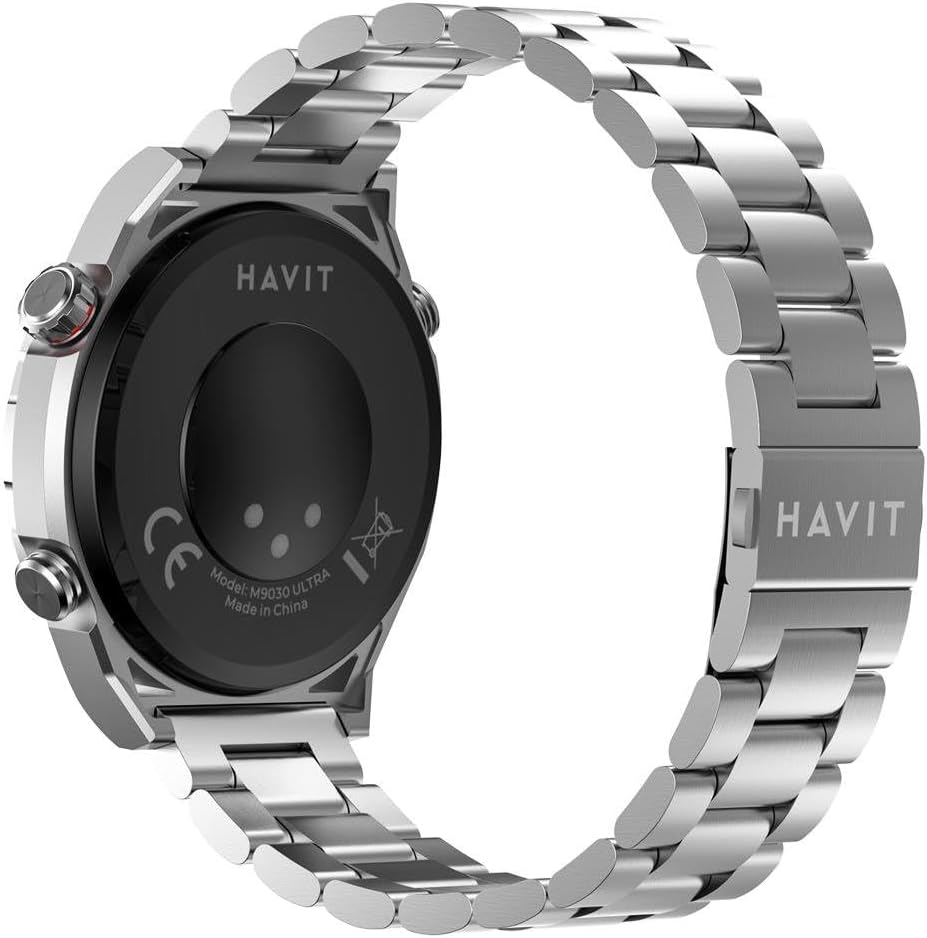
Image 3.1: Rear view of the smart watch, highlighting the wireless charging area and model information.
3.2 Powering On/Off
- Power On: Press and hold the side power button until the screen illuminates.
- Power Off: Press and hold the side power button, then select 'Power Off' on the screen.
3.3 Pairing with Your Smartphone
- Download the companion application (refer to the watch screen or packaging for app name) from your smartphone's app store.
- Ensure Bluetooth is enabled on your smartphone.
- Open the companion app and follow the on-screen instructions to search for and connect to your Havit M9030 Ultra Smart Watch.
- Confirm the pairing request on both your smartphone and the smart watch.
4. Operating Instructions
4.1 Touch Screen Navigation
- Swipe Up/Down: Scroll through menus or notifications.
- Swipe Left/Right: Access different widgets or quick settings.
- Tap: Select an item or open an application.
- Press and Hold: Customize watch faces or access specific functions.
4.2 Wireless Calling
Once paired with your smartphone, the watch supports Bluetooth calling. You can answer incoming calls directly from your wrist or dial numbers using the watch's interface. Ensure the watch is within Bluetooth range of your phone for this feature to function.
4.3 Health Monitoring
The Havit M9030 Ultra monitors various health metrics:
- Heart Rate: Real-time heart rate tracking.
- Blood Oxygen (SpO2): Measures blood oxygen saturation levels.
- Blood Pressure: Provides estimated blood pressure readings.
- Step Count: Tracks daily steps and distance.
- Sleep Patterns: Monitors sleep duration and quality.
Note: Health monitoring data is for reference only and should not be used for medical diagnosis or treatment. Consult a medical professional for health concerns.
4.4 Sports Modes
The watch offers over 100 sports modes to track your physical activities. Navigate to the 'Sports' menu on the watch, select your desired activity (e.g., running, cycling, yoga), and start tracking. The watch will record relevant data such such as duration, calories burned, and heart rate.
4.5 Additional Features
- Built-in Music Player: Play music directly from the watch. Transfer music files via the companion app.
- Bluetooth Camera Shutter: Control your smartphone's camera remotely. Open the camera function in the app, then use the watch to trigger the shutter.
- Multiple Alarm Clocks: Set up to 5 alarms through the watch or companion app.
- Weather & Temperature Display: View real-time weather updates after syncing with your phone's location data.
- Customizable Watch Faces: Personalize your watch face from a selection of pre-installed options or upload custom images via the app.
5. Maintenance
5.1 Water Resistance (IP68)
The Havit M9030 Ultra Smart Watch is IP68 rated, meaning it is dustproof and can withstand immersion in water up to 1 meter for 30 minutes. It is suitable for swimming and showering. However, avoid prolonged exposure to hot water, steam, or high-pressure water jets, as this may compromise the water resistance.
5.2 Cleaning and Care
- Wipe the watch and strap regularly with a soft, dry cloth.
- For stubborn dirt, use a slightly damp cloth and mild soap, then dry thoroughly.
- Avoid using harsh chemicals, abrasive cleaners, or solvents.
- Keep the charging contacts clean and dry.
5.3 Storage
Store the watch in a cool, dry place away from direct sunlight and extreme temperatures when not in use for extended periods. Ensure the battery has some charge to prevent deep discharge.
6. Troubleshooting
If you encounter issues with your Havit M9030 Ultra Smart Watch, refer to the following common solutions:
- Watch not powering on: Ensure the watch is fully charged. Connect it to the wireless charger for at least 30 minutes.
- Cannot pair with smartphone:
- Ensure Bluetooth is enabled on your phone and the watch.
- Restart both your phone and the watch.
- Make sure the watch is within Bluetooth range of your phone.
- Try unpairing and re-pairing the device through the companion app.
- Inaccurate health data: Ensure the watch is worn snugly on your wrist, not too tight or too loose. Clean the sensor on the back of the watch.
- Screen unresponsive: Try restarting the watch. If the issue persists, ensure the screen is clean and dry.
- Short battery life: Reduce screen brightness, disable unnecessary notifications, and limit continuous health monitoring if not required.
For further assistance, consult the manufacturer's support resources.
7. Specifications
| Feature | Detail |
|---|---|
| Model | M9030 Ultra |
| Display | 1.43" AMOLED HD Touch Screen, 466 x 466 resolution |
| Material | Zinc alloy, ABS, IML |
| Battery Capacity | 300mAh |
| Charging Method | Wireless Charging |
| Water Resistance | IP68 (up to 1 meter for 30 minutes) |
| Connectivity | Bluetooth, Wi-Fi |
| Memory Storage Capacity | 64 MB |
| Operating System | Android Wear 1.0 |
| Special Features | Phone Call, Health Monitoring, Sports Modes, Music Player, Camera Shutter, Alarms, Weather Display |
| Item Weight | 350 Grams |
8. Warranty and Support
The Havit M9030 Ultra Smart Watch comes with a standard manufacturer's warranty. Please refer to the product packaging or the official Havit website for specific warranty terms and conditions. For technical support, troubleshooting assistance, or warranty claims, please contact Havit customer service through their official channels.
Online Support: Visit the official Havit website for FAQs, software updates, and contact information.
Related documentsM9030 Ultra


Ask a question about this manual
Ask about setup, troubleshooting, compatibility, parts, safety, or missing instructions. Manuals+ will review the question and use this page’s manual context to help answer it.