
1. Product Overview
The TEENO 20V Cordless Combo Kit is a versatile 8-in-1 multi-tool system designed for a wide range of DIY and professional tasks. This kit provides the convenience of cordless operation with interchangeable tool heads, allowing you to switch between various functions quickly and efficiently. It is powered by a high-capacity 3.0Ah Lithium-ion battery, ensuring long-lasting performance.
This 6-tool combo kit includes the following primary attachments:
- Variable Speed Drill/Driver
- Impact Wrench
- Reciprocating Saw
- Chain Saw
- Oscillating Tool
- Sander

Figure 1.1: Overview of the TEENO 20V Cordless Multi-Tool Kit and its components.
2. Important Safety Instructions
Always read and understand all safety warnings, instructions, illustrations, and specifications provided with this power tool. Failure to follow all instructions listed below may result in electric shock, fire, and/or serious injury. Save all warnings and instructions for future reference.
- Work Area Safety: Keep your work area clean and well-lit. Cluttered or dark areas invite accidents. Do not operate power tools in explosive atmospheres, such as in the presence of flammable liquids, gases, or dust.
- Electrical Safety: Power tool plugs must match the outlet. Never modify the plug in any way. Avoid body contact with earthed or grounded surfaces, such as pipes, radiators, ranges, and refrigerators.
- Personal Safety: Always wear appropriate personal protective equipment (PPE), including safety glasses, hearing protection, and gloves. Dress properly; avoid loose clothing or jewelry that can get caught in moving parts.
- Tool Use and Care: Do not force the power tool. Use the correct power tool for your application. Disconnect the battery pack from the power tool before making any adjustments, changing accessories, or storing power tools.
- Battery Pack Use and Care: Recharge only with the charger specified by the manufacturer. Use power tools only with specifically designated battery packs.
3. Setup and Assembly
3.1 Battery Charging and Installation
The TEENO 20V Cordless Combo Kit is powered by a 3.0Ah Lithium-ion battery. Ensure the battery is fully charged before first use.
- Connect the charger to a standard power outlet.
- Slide the battery pack onto the charger until it clicks into place. The charging indicator light on the charger will illuminate.
- Once fully charged, remove the battery from the charger.
- To install the battery into the tool's main unit, align the battery with the battery slot and slide it in until it locks securely. To remove, press the battery release button and slide the battery out.
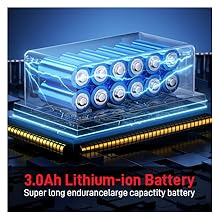
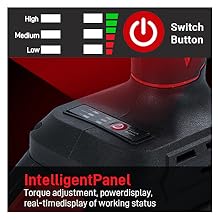
Figure 3.1: The 3.0Ah Lithium-ion battery and the intelligent panel for power display.
3.2 Attaching and Detaching Tool Heads
The TEENO multi-tool features a quick connect system for easy attachment and detachment of various tool heads.
- Ensure the main unit is powered off and the battery is removed for safety.
- To attach a tool head, align the head with the main unit's coupling system. Push the tool head firmly onto the main unit until it clicks into place.
- To detach a tool head, locate the attachment release button (or security lock button) on the main unit. Press and hold this button, then pull the tool head away from the main unit.

Figure 3.2: Quick conversion and disassembly mechanism for tool heads.
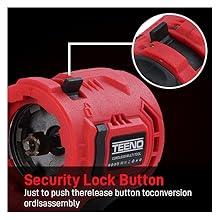
Figure 3.3: The security lock button for releasing tool attachments.
4. Operating Your Multi-Tool
4.1 General Operation
The main unit features a variable speed trigger, a three-speed gear shifting mechanism, and a reversing switch for optimal control during operation.
- Variable Speed Trigger: The tool's speed is controlled by the pressure applied to the trigger. Pressing the trigger further increases the speed.
- Three-Speed Gear Shifting: Adjust the gear setting (low, medium, high) based on the task requirements. Low speed provides higher torque, while high speed is for faster operation.
- Reversing Switch: Located near the trigger, this switch allows you to change the direction of rotation (clockwise for tightening/drilling, counter-clockwise for loosening/removing). Push to the middle for a lock position.

Figure 4.1: Brushless motor and speed control features.
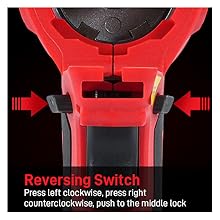
Figure 4.2: The reversing switch for directional control.
4.2 Specific Tool Operations
Below are general guidelines for using each specific tool attachment. Always refer to the specific instructions for the task at hand and wear appropriate safety gear.
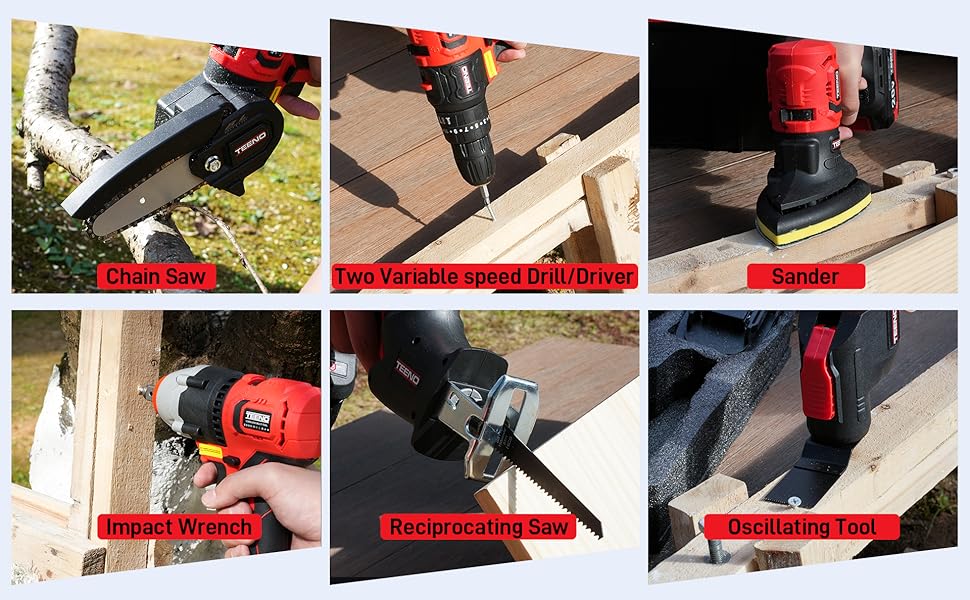
Figure 4.3: Examples of the multi-tool in various applications.
Drill/Driver:
Attach the drill/driver head. Select the appropriate drill bit or screwdriver bit for your material and task. Adjust the torque setting and speed as needed. Use for drilling holes in wood, metal, or plastic, and for driving or removing screws.
Impact Wrench:
Attach the impact wrench head. Select the correct socket size. Ideal for tightening or loosening nuts and bolts with high torque, such as automotive applications or heavy-duty assembly.
Reciprocating Saw:
Attach the reciprocating saw head and the appropriate blade (wood, metal). Use for rough cutting of various materials, including wood, plastic, and metal pipes. Ensure the workpiece is securely clamped.
Chain Saw:
Attach the chain saw head. Ensure the chain is properly tensioned and lubricated. Use for pruning branches or cutting small logs. Always maintain a firm grip and keep clear of the cutting path.
Oscillating Tool:
Attach the oscillating tool head with the desired accessory (e.g., cutting blade, sanding pad). This tool is highly versatile for cutting, sanding, scraping, and grinding in tight spaces or for flush cuts.
Sander:
Attach the sander head and secure the appropriate grit sandpaper. Use for smoothing surfaces, removing paint, or preparing materials for finishing. Move the sander evenly across the surface.
5. Maintenance and Care
Proper maintenance ensures the longevity and optimal performance of your TEENO multi-tool.
- Cleaning: Regularly clean the tool's main unit and attachments with a soft, damp cloth. Do not use harsh chemicals or abrasive cleaners. Keep ventilation openings free of dust and debris.
- Storage: Store the tool, battery, charger, and all accessories in the provided toolbox in a dry, secure location, away from direct sunlight and extreme temperatures.
- Battery Care: Do not store batteries in a discharged state. Recharge batteries regularly, even if not in use, to maintain their capacity. Avoid exposing batteries to water or extreme heat.
- Accessory Inspection: Before each use, inspect all attachments for wear, damage, or dullness. Replace worn or damaged accessories immediately to ensure safe and effective operation.
6. Troubleshooting
If you encounter issues with your TEENO multi-tool, refer to the following table for common problems and solutions.
| Problem | Possible Cause | Solution |
|---|---|---|
| Tool does not start | Battery not charged or improperly installed; Tool head not securely attached; Safety lock engaged. | Charge battery and ensure it's clicked into place; Re-attach tool head firmly; Disengage safety lock. |
| Reduced power or performance | Low battery charge; Worn or dull accessory; Overload protection activated. | Recharge battery; Replace accessory; Allow tool to cool down if overheated. |
| Tool head difficult to attach/detach | Misalignment; Debris in coupling mechanism; Release button not fully pressed. | Ensure proper alignment; Clean coupling area; Press release button completely. |
| Excessive vibration or noise | Loose accessory; Damaged accessory; Internal component issue. | Tighten accessory; Replace damaged accessory; If problem persists, contact customer support. |
7. Technical Specifications
Key specifications for the TEENO 20V Cordless Combo Kit:
| Feature | Specification |
|---|---|
| Brand | TEENO |
| Model Number | 6 Tool Combo Kit |
| Voltage | 20 Volts |
| Battery Type | Lithium Ion |
| Battery Capacity | 3.0Ah |
| Item Weight | 13 Pounds (approx. 5.9 kg) |
| Product Dimensions | 9 x 12 x 14 inches (approx. 22.86 x 30.48 x 35.56 cm) |
| Max Speed | 20000 RPM |
| Power Source | Battery Powered |
| Material | Metal, Plastic |
| Included Components | Battery Charger, Tool Heads, Main Unit, Toolbox |
| UPC | 755752014125 |
8. Warranty and Customer Support
For warranty information, please refer to the documentation included with your product packaging or visit the official TEENO website. The warranty typically covers defects in materials and workmanship under normal use.
If you require technical assistance, have questions about product operation, or need to report a defect, please contact TEENO customer support. Contact details can usually be found on the product packaging, in the included documentation, or on the official TEENO brand store page on Amazon (TEENO Store).
Please have your product model number (6 Tool Combo Kit) and purchase date ready when contacting support to expedite the process.