1. Introduction
Thank you for choosing the WEIMILOR 5500W Solar Inverter. This pure sine wave inverter is designed for off-grid solar power systems, converting 48V DC battery power to 110V/120V AC power. It features a built-in 120A MPPT charge controller, ensuring efficient solar energy harvesting. This manual provides essential information for safe installation, operation, and maintenance of your inverter.
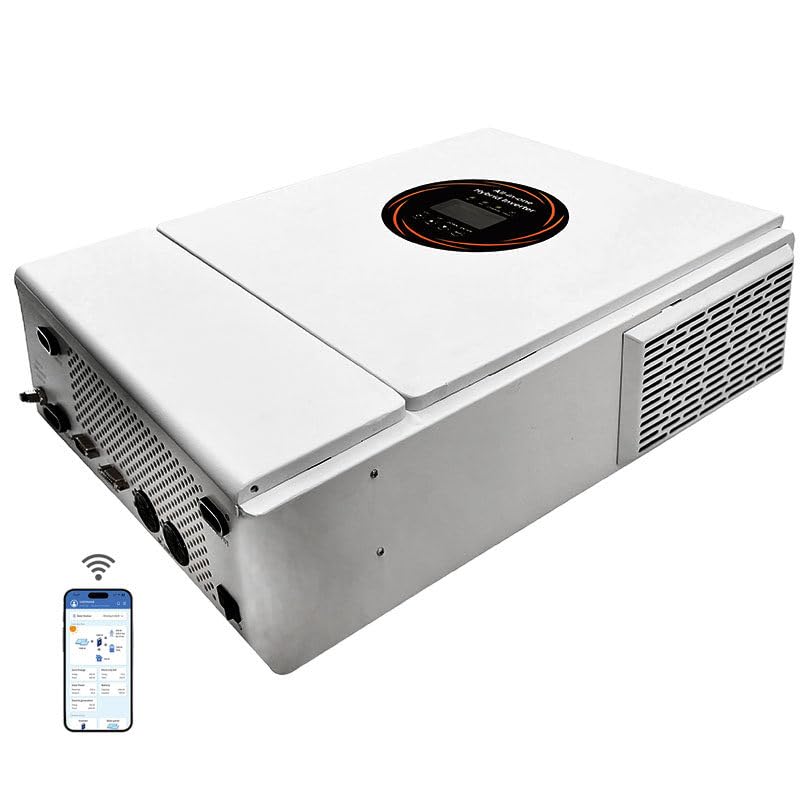
Image 1: Front view of the WEIMILOR 5500W Solar Inverter. This image displays the compact design and the integrated LCD screen on the front panel.
2. Safety Instructions
Please read all instructions and warnings carefully before installation and operation. Failure to follow these instructions may result in electric shock, fire, or severe injury.
- Installation must be performed by qualified personnel.
- Ensure all connections are tight and correct to prevent loose connections that can cause overheating.
- Do not disassemble the inverter. There are no user-serviceable parts inside.
- Keep the inverter away from flammable materials, moisture, and direct sunlight.
- Ensure adequate ventilation around the inverter to prevent overheating.
- Always disconnect all power sources (PV, battery, AC utility) before performing any maintenance or wiring.
- Use appropriate personal protective equipment (PPE) during installation.
3. Product Features
The WEIMILOR 5500W Solar Inverter is equipped with advanced features for reliable off-grid power generation:
- Pure Sine Wave Output: Provides clean and stable power suitable for sensitive electronics.
- Integrated MPPT Charge Controller: Built-in 120A MPPT controller with up to 99.9% efficiency for optimal solar charging.
- Wide Compatibility: Supports 48V Lead-Acid (Seal, AGM, Gel, Flooded) and Lithium batteries. Includes lithium battery activation function via solar or AC mains.
- Multiple Operating Modes: Four charging modes (PV priority, Utility Priority, Hybrid Charging, Only Solar Charging) and two output modes (mains bypass, inverter output) for versatile application.
- LCD Display: Segment LCD display shows real-time operational data and system status.
- Comprehensive Protection: Features overload, short circuit, and other electronic protection functions.
- Intelligent Cooling: Variable speed fan for efficient heat dissipation and extended system life.
- Parallel Functionality: Supports parallel operation of up to 6 inverters for increased power output (up to 30000W in split phase).
4. Setup and Installation
Proper installation is crucial for the inverter's performance and safety. Refer to the wiring diagram for detailed connection instructions.
4.1 Site Selection
- Mount the inverter vertically on a non-flammable surface.
- Ensure sufficient clearance (at least 20 cm) around the inverter for proper airflow.
- Avoid areas with high humidity, dust, or corrosive gases.
- Install in a location protected from direct sunlight and rain.
4.2 Wiring Connections
All wiring must comply with local electrical codes. Use appropriately sized cables for all connections.
- Battery Connection: Connect the 48V battery bank to the inverter's battery terminals. Ensure correct polarity. The battery must be connected for the inverter to operate.
- PV Input Connection: Connect the solar panel array to the PV input terminals. Ensure the PV input voltage and current are within the specified limits (Max.PV Input Power: 5500W, Max.PV Input Voltage: 500Vdc, Optimal working range of Vmp: 300-400Vdc).
- AC Input Connection: Connect the AC utility grid or generator to the AC input terminals.
- AC Output Connection: Connect your AC loads to the AC output terminals.
- Grounding: Always connect the protective earth (PE) conductor to the inverter's ground terminal.

Image 2: Detailed wiring diagram for the WEIMILOR 5500W Solar Inverter. This diagram illustrates connections for solar panels, battery, AC input (utility/generator), and AC output (loads), along with key technical specifications for each connection point.
4.3 Parallel Operation
The inverter supports parallel operation for increased capacity. Up to 6 units can be connected in parallel. For split-phase output (120/240V), a minimum of two inverters is required. Single unit operation does not support split-phase output.

Image 3: Diagram illustrating parallel connection configurations for the inverter. It shows setups for 2 inverters in single phase (up to 10000W), 3 inverters in three phase (up to 15000W), and 6 inverters in split phase (up to 30000W).
5. Operating Modes
The inverter offers various charging and output modes to suit different application requirements. These modes can be configured via the LCD display.
5.1 Charging Modes
- PV Priority: Solar power is the primary charging source. Utility power is used only when solar power is insufficient.
- Utility Priority: Utility power is the primary charging source. Solar power is used when utility power is unavailable.
- Hybrid Charging: Combines solar and utility power for charging, prioritizing solar.
- Only Solar Charging: Only solar power is used for charging the battery.
5.2 Output Modes
- Mains Bypass: AC loads are powered directly by the utility grid. The inverter acts as a charger.
- Inverter Output: AC loads are powered by the inverter, drawing energy from the battery (charged by solar or utility).

Image 4: Visual representation of the four charging modes (Solar First, Utility First, Solar and Utility, Only Solar) and three load output working modes (Utility First, Solar First, SBU First).
5.3 LCD Display and Controls
The segment LCD display provides real-time information about the inverter's operation, including input/output voltage, battery status, load percentage, and fault indicators. Navigation buttons allow for setting adjustments.

Image 5: Close-up view of the inverter's LCD HD display screen and control buttons. The display shows various operational parameters, while the buttons are labeled for functions like Enter/Exit Settings, Option Increase, Option Decrease, and OK/Enter Options. Icons for battery capacity, load percentage, utility, generator, solar power, and home appliances are also visible.
6. Maintenance
Regular maintenance ensures the longevity and optimal performance of your inverter.
- Cleaning: Periodically clean the inverter's exterior with a dry cloth. Ensure ventilation openings are free from dust and debris.
- Connections Check: Annually inspect all electrical connections for tightness and corrosion. Tighten any loose connections.
- Battery Inspection: Follow the battery manufacturer's maintenance guidelines for your specific battery type.
- Environmental Check: Ensure the installation environment remains within specified temperature and humidity ranges.
7. Troubleshooting
This section provides basic troubleshooting steps for common issues. For complex problems, contact customer support.
| Problem | Possible Cause | Solution |
|---|---|---|
| Inverter not turning on | No battery connection; Low battery voltage; Blown fuse | Check battery connections; Charge battery; Check and replace fuses. |
| No AC output | Overload; Short circuit; Inverter fault | Reduce load; Check for short circuits in wiring; Restart inverter. |
| Low PV charging current | Insufficient sunlight; Dirty solar panels; Incorrect PV wiring | Ensure panels are in direct sunlight; Clean panels; Verify PV wiring. |
| Overheating alarm | Blocked ventilation; Excessive ambient temperature; Overload | Clear obstructions; Ensure proper ventilation; Reduce load. |
8. Technical Specifications
Detailed specifications for the WEIMILOR 5500W Solar Inverter:
| Parameter | Value |
|---|---|
| Rated Output Power | 5500W |
| Output Voltage | 110V/120V/220V/240VAC ±5% |
| Output Frequency | 50/60Hz ±0.1% |
| Waveform | Pure Sine Wave |
| Peak Power | 11000VA |
| Peak Efficiency | >94% |
| Battery Rated Voltage | 48Vdc |
| PV Maximum Input Power | 5500W |
| MPPT Input Voltage Range | 120-500Vdc |
| Maximum PV Input Voltage | 500Vdc |
| Maximum PV Input Current | 20A |
| Maximum AC Charging Current | 100A |
| Maximum Charging Current (Total) | 120A |
| AC Input Voltage Range | 90-280VAC (Normal Mode) / 170-280VAC (Adaptive) |
| Noise Level | <50dB |
| Dimensions (L*W*H) | 536*352*135mm |
| Net Weight | 10.5 kg (23.15 lbs) |
| Communication Interfaces | BMS/RS232/RS485/CAN/USB/Dry Contact |
9. Customer Support
For any questions or technical assistance, please contact our customer service team. We aim to respond within 24 hours.
Contact Information: Refer to your purchase documentation or the manufacturer's website for the most current support details.