1. Introduction
Thank you for choosing the TESSAN TUS-2 Travel Voltage Converter. This device is designed to provide a safe and convenient power solution for your electronic devices when traveling internationally. It converts 220V-240V foreign electricity to 110V-120V for compatible devices and offers direct pass-through for dual voltage electronics. Please read this manual thoroughly before use to ensure proper operation and safety.
2. Important Safety Information
To prevent injury or damage to your devices, always observe the following precautions:
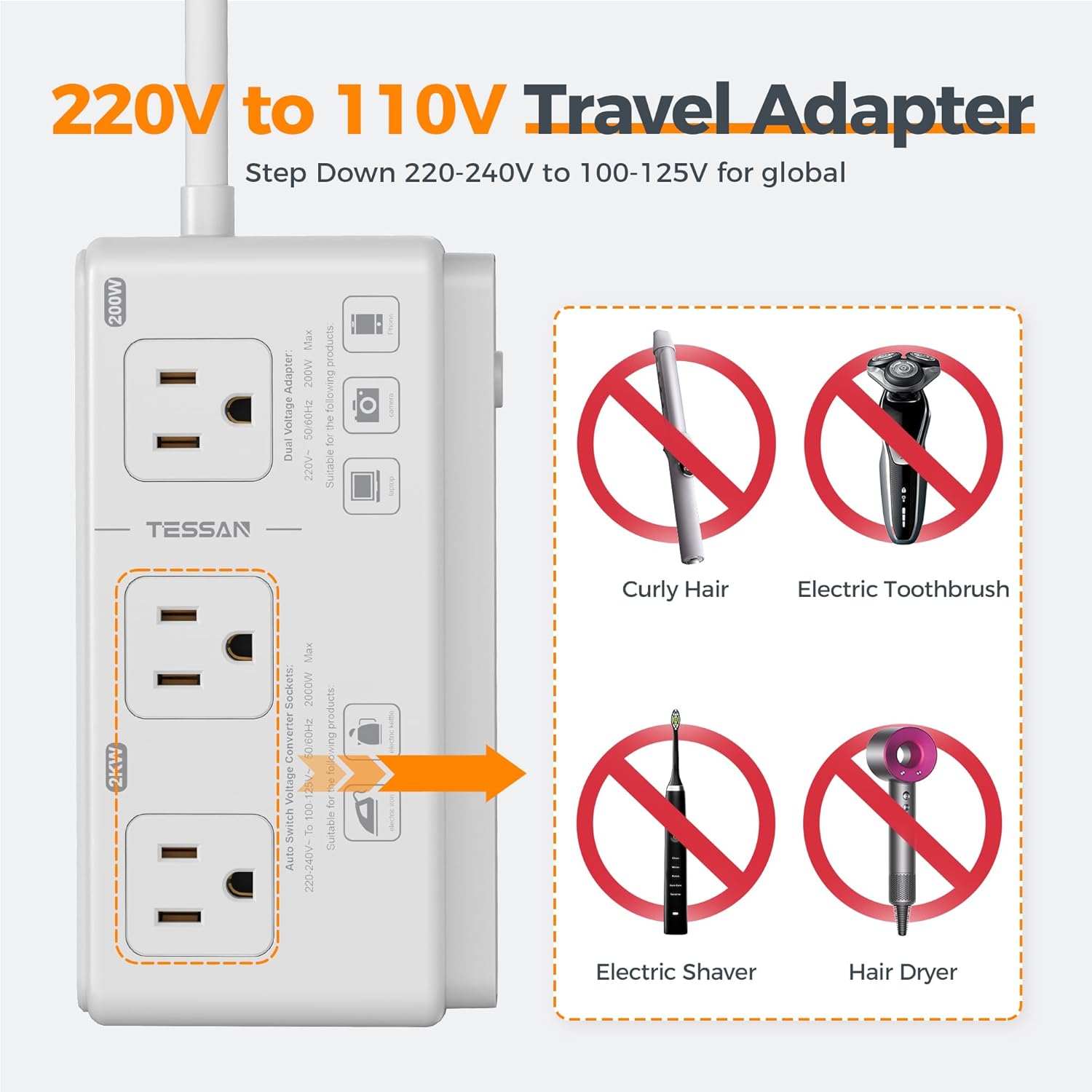
- Voltage Compatibility: The 2000W AC outlets are designed to convert 220V-240V to 110V-120V for devices with simple mechanical motors (e.g., electric kettles, irons).
- Incompatible Devices: DO NOT use the 2000W AC outlets with electronic controlled appliances or low wattage devices (0-5W) such as hair dryers, curling irons, electric shavers, or toothbrushes. These devices may be damaged or cause the converter to malfunction.
- Dual Voltage Adapter (200W AC outlet): This outlet does not convert voltage. It is suitable for dual voltage devices (100-240V) like laptops, cameras, smartphones, and tablets. Ensure your device is dual voltage compatible before plugging it into this outlet.
- Wattage Limit: Do not exceed the maximum wattage of 2000W for converter sockets and 200W for the dual voltage adapter socket.
- Overcurrent & Short-Circuit Protection: The converter features built-in safety mechanisms. However, always ensure proper usage to avoid triggering these protections.
- Indoor Use Only: This product is designed for indoor use.
- Continuous Use: This product is not designed for continuous use. It is recommended to use it for periods of time (approximately 10 minutes) for converter sockets.
- Children: Keep out of reach of children. Use under parental supervision.
3. Package Contents
Your TESSAN TUS-2 Travel Voltage Converter package includes:
- 1 x TESSAN TUS-2 Voltage Converter Unit (with attached 4-foot power cord)
- 6 x International Plug Adapters (Type C, G, I, L, D, M)
- 1 x User Manual

4. Product Overview
Familiarize yourself with the components of your TESSAN TUS-2 converter:
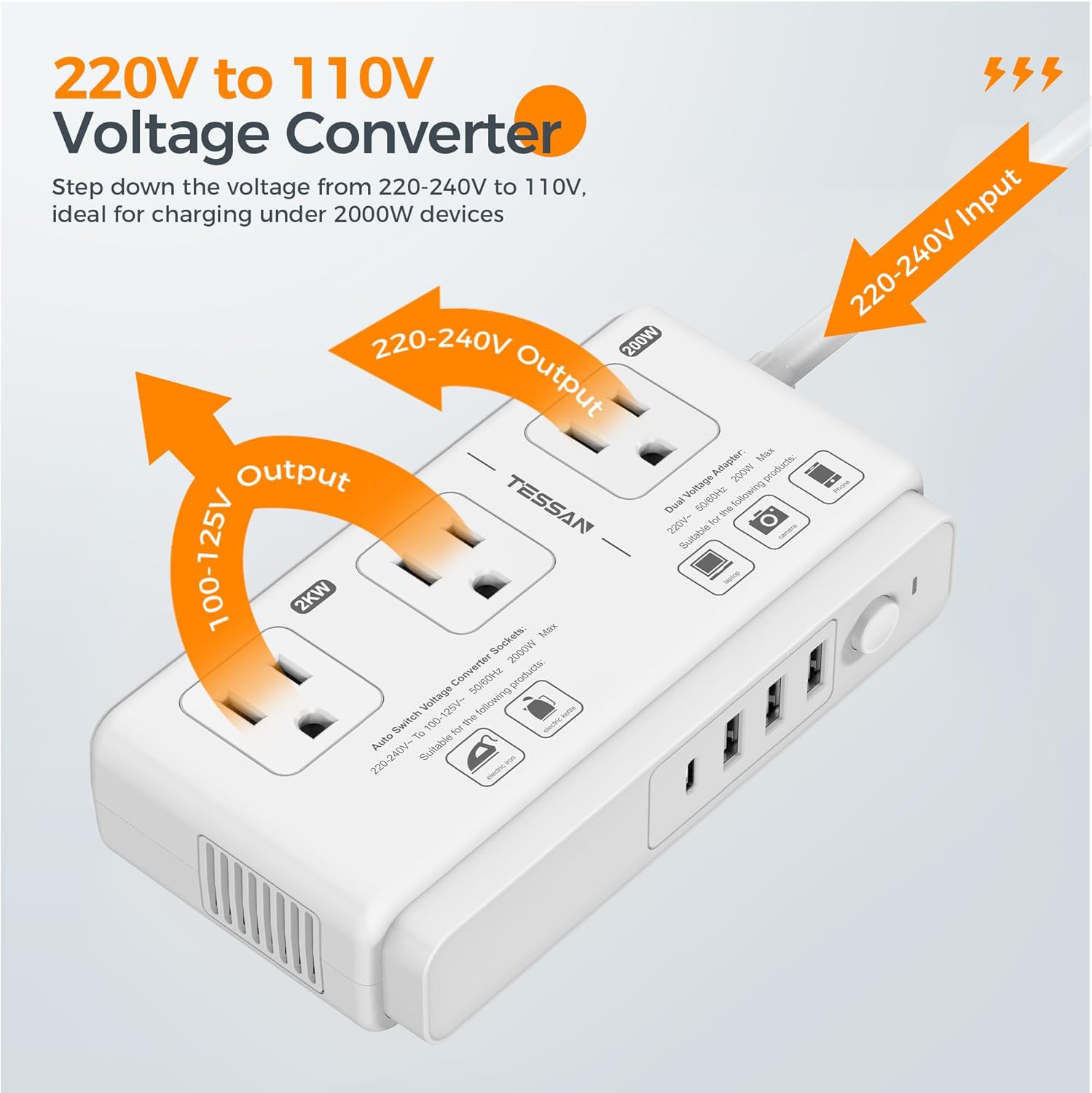
- Voltage Converter Sockets (2KW): Two AC outlets that convert 220V-240V to 110V-120V. Suitable for devices up to 2000W with mechanical controls (e.g., electric iron, electric kettle).
- Dual Voltage Adapter Socket (200W): One AC outlet that does NOT convert voltage. Provides direct pass-through for dual voltage devices (100-240V) up to 200W (e.g., laptops, cameras, smartphones).
- USB-A Ports: Three USB-A ports (2.4A each) for charging USB-powered devices.
- USB-C Port: One USB-C port (3A) for charging USB-C powered devices.
- AC Power Button: Controls power to the AC outlets.
- International Plug Adapters: Six interchangeable plugs (Type C, G, I, L, D, M) to fit various wall outlets worldwide.
- Extension Cord: A 4-foot cord for flexible placement.

5. Setup
Before using your converter, select the appropriate international plug adapter:
- Identify the type of wall outlet in your destination country. Refer to the table below or the included instruction sheet for common plug types.
- Select the corresponding international plug adapter (Type C, G, I, L, D, or M).
- Attach the selected adapter to the main plug of the converter's power cord. Ensure it is securely connected.

6. Operating Instructions
Once the correct adapter is attached, you can begin using your converter:
- Plug the converter into the wall outlet using the attached international adapter.
- For Voltage Conversion (2KW AC outlets):
- Use these two outlets for 110V-120V devices with mechanical controls, up to a total of 2000W.
- Examples include electric kettles, steam irons, and coffee machines.
- Ensure your device's wattage does not exceed 2000W.
- For Dual Voltage Devices (200W AC outlet):
- Use this single outlet for dual voltage devices (100-240V) up to 200W. This outlet does NOT convert voltage.
- Examples include laptops, cameras, headphones, game consoles, smartphones, and tablets.
- Always verify your device is dual voltage compatible before plugging it into this outlet.
- For USB Charging (USB-A & USB-C ports):
- Plug your USB-powered devices into the three USB-A ports (2.4A max per port) or the one USB-C port (3A max).
- These ports provide power directly and do not convert voltage.
- Press the AC Power Button to turn on the AC outlets. The LED indicator will light up.


7. Maintenance
To ensure the longevity and optimal performance of your TESSAN TUS-2 converter:
- Cleaning: Disconnect the converter from the power outlet before cleaning. Use a dry, soft cloth to wipe the surface. Do not use liquid cleaners or aerosols.
- Storage: When not in use, store the converter and its adapters in a cool, dry place away from direct sunlight and moisture. The included Velcro strap can help keep the cord organized.
- Inspection: Periodically check the power cord and plugs for any signs of damage. Do not use if any part is damaged.
8. Troubleshooting
If you encounter issues with your TESSAN TUS-2 converter, refer to the following:
- No Power:
- Ensure the converter is securely plugged into the wall outlet and the AC Power Button is pressed.
- Check the wall outlet with another device to confirm it is functioning.
- Device Not Charging/Working:
- Verify that your device is compatible with the specific outlet (voltage converting 2KW or dual voltage 200W).
- Check the wattage of your device to ensure it does not exceed the converter's limits (2000W for converter sockets, 200W for dual voltage adapter socket).
- Ensure your device is not an electronic controlled appliance or low wattage device if using the 2KW outlets.
- For USB ports, ensure your device's charging cable is properly connected.
- Overheating/Automatic Shutdown:
- This indicates an overload or internal protection mechanism. Disconnect all devices immediately.
- Allow the converter to cool down. Reduce the number of connected devices or ensure their combined wattage is within limits.
- Ensure adequate ventilation around the converter.
9. Specifications
| Feature | Specification |
|---|---|
| Model Number | TUS-2 |
| Input Voltage | 220V-240V AC (for converter function) |
| Converter Sockets Output | 100V-125V AC, 50/60Hz, 2000W Max |
| Dual Voltage Adapter Socket Output | 220V-240V AC, 50/60Hz, 200W Max (Pass-through, no conversion) |
| USB-A Output | 5V/2.4A (each port) |
| USB-C Output | 5V/3A |
| Total USB Output | Total 3.4A |
| Product Dimensions | 6.22 x 3.34 x 1.47 inches |
| Item Weight | 1.43 pounds (0.65 kg) |
| Power Cord Length | 4 feet |
| Included Adapters | Type C, G, I, L, D, M |
10. Warranty & Support
For warranty information and customer support, please refer to the documentation included with your purchase or visit the official TESSAN website. If you experience any issues not covered in this manual, please contact TESSAN customer service for assistance.


