
1. Introduction
This manual provides essential instructions for the safe and effective operation of your ChoiceMMed Wrist Blood Pressure Monitor, Model DBP-2206. Please read this manual thoroughly before using the device and retain it for future reference. This device is intended for home use to measure systolic and diastolic blood pressure and pulse rate.
2. Important Safety Information
- Consult your physician before using this device if you have any medical conditions.
- Do not use this device for diagnosis or treatment of any health problem or disease. Always consult a medical professional for interpretation of blood pressure readings.
- Keep the device out of reach of children.
- Do not disassemble or attempt to repair the device.
- Avoid strong electromagnetic fields (e.g., mobile phones, microwave ovens) near the device during use.
- Statements regarding dietary supplements have not been evaluated by the FDA and are not intended to diagnose, treat, cure, or prevent any disease or health condition. This device is not a dietary supplement.
3. Package Contents
Verify that all items are present in the package:
- 1 x ChoiceMMed Wrist Blood Pressure Monitor (DBP-2206)
- 1 x Adjustable Wrist Cuff
- 2 x AAA Batteries
- 1 x User Manual
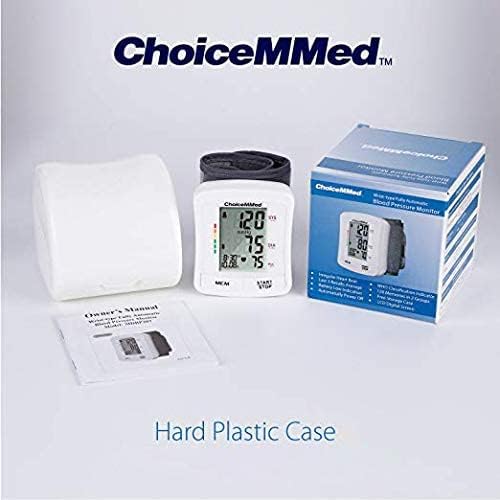
Image: Contents of the ChoiceMMed Wrist Blood Pressure Monitor package, including the monitor, cuff, and user manual.
4. Product Overview
Familiarize yourself with the components of the ChoiceMMed Wrist Blood Pressure Monitor.

Image: Diagram illustrating the various parts of the monitor, including Memory Group, Systolic, Diastolic, Pulse Rate, Time & Date, Start/Stop Button, and Memory Button.
- LCD Display: Shows blood pressure readings (systolic, diastolic), pulse rate, time, date, and other indicators.
- MEM Button: Accesses stored measurement records.
- START/STOP Button: Powers the device on/off and starts/stops a measurement.
- Wrist Cuff: Adjustable cuff for placement on the wrist.
5. Setup
5.1. Battery Installation
- Locate the battery compartment on the back of the monitor.
- Open the battery cover.
- Insert two AAA batteries, ensuring correct polarity (+/-).
- Close the battery cover securely.
5.2. Initial Settings (Date and Time)
Refer to the full user manual for detailed instructions on setting the date and time. This ensures accurate time-stamping of your measurements.
6. Operating Instructions
6.1. Preparing for Measurement
- Avoid eating, drinking alcohol, smoking, exercising, and bathing for 30 minutes before measurement.
- Rest for at least 5 minutes before taking a measurement.
- Sit in a comfortable position with your back supported and feet flat on the floor.
- Remove any tight clothing from your wrist.
6.2. Applying the Wrist Cuff
- Place the monitor on your left wrist with the display facing upwards.
- Ensure the cuff is positioned approximately 1-2 cm (0.4-0.8 inches) from your palm.
- Fasten the cuff snugly but not too tightly.
- Position your wrist at heart level during the measurement.

Image: A person demonstrating the correct placement of the wrist blood pressure monitor on the wrist.

Image: Visual guide on the cuff showing how to position the cuff 1-2cm from the palm and keep the wrist at heart level for accurate readings.
6.3. Taking a Measurement
- Press the START/STOP button to turn on the monitor. The cuff will automatically inflate.
- Remain still and silent during the measurement.
- Once the measurement is complete, the systolic, diastolic, and pulse readings will be displayed on the LCD screen.
- The device will automatically store the reading and power off after a period of inactivity.

Image: The ChoiceMMed monitor displaying systolic (120 mmHg), diastolic (75 mmHg), and pulse (75 bpm) readings on its large LCD screen.
6.4. Memory Function
The monitor stores up to 120 measurements for two users.
- Press the MEM button to view previous readings.
- Press MEM repeatedly to scroll through stored measurements.
- To switch between User 1 and User 2 memory, refer to the detailed instructions in the full user manual.

Image: The monitor highlighting its 2-user memory storage capability, storing up to 120 measurements.
7. Maintenance
7.1. Cleaning
- Wipe the monitor and cuff with a soft, dry cloth.
- If necessary, use a cloth lightly dampened with water or a mild detergent, then wipe dry.
- Do not use abrasive cleaners or immerse the device in water.
7.2. Storage
- Store the device in a cool, dry place, away from direct sunlight and extreme temperatures.
- If the device will not be used for an extended period, remove the batteries.

Image: The ChoiceMMed monitor placed inside its protective hard plastic case for storage.
8. Troubleshooting
| Problem | Possible Cause | Solution |
|---|---|---|
| Device does not power on. | Batteries are dead or incorrectly inserted. | Replace batteries with new AAA batteries, ensuring correct polarity. |
| Inaccurate readings. | Incorrect cuff placement, movement during measurement, or wrist not at heart level. | Ensure cuff is correctly applied, remain still, and position wrist at heart level. Repeat measurement after a few minutes. |
| "Err" or other error message on display. | Cuff not inflated properly, excessive movement, or other technical issue. | Re-apply cuff and try again. If error persists, consult the full user manual or contact customer support. |
9. Specifications
| Feature | Detail |
|---|---|
| Model Name | DBP-2206 |
| Display Type | LCD |
| Power Source | Battery Powered (2 x AAA batteries) |
| Memory Storage | 120 readings for 2 users |
| Cuff Type | Adjustable Wrist Cuff |
| Product Dimensions | 3.5"L x 3.8"W x 3.7"Th |
| Age Range | Adult |
10. Warranty and Support
For warranty information or technical support, please refer to the warranty card included with your product or contact ChoiceMMed customer service. Contact details can typically be found on the manufacturer's official website or on the product packaging.

