
1. Introduction
This manual provides instructions for the Effireli N2QAYB000752 replacement remote control, designed for various Panasonic Smart TV models. This remote control is engineered for immediate use without the need for programming or complex setup procedures.
1.1 Compatible Models
The N2QAYB000752 remote control is compatible with the following Panasonic Smart TV models:
- TX-L37ET5
- TXL37ETW5
- TX-L37ETW5
- TXL42ET5
- TX-L42ET5
- XL32ET5
- TX-L32ET5
- TXL32ETW5
- TX-L32ETW5
- TXL37ET5
If your specific TV model is not listed or if your original remote control has a different appearance, please contact customer support to verify compatibility.
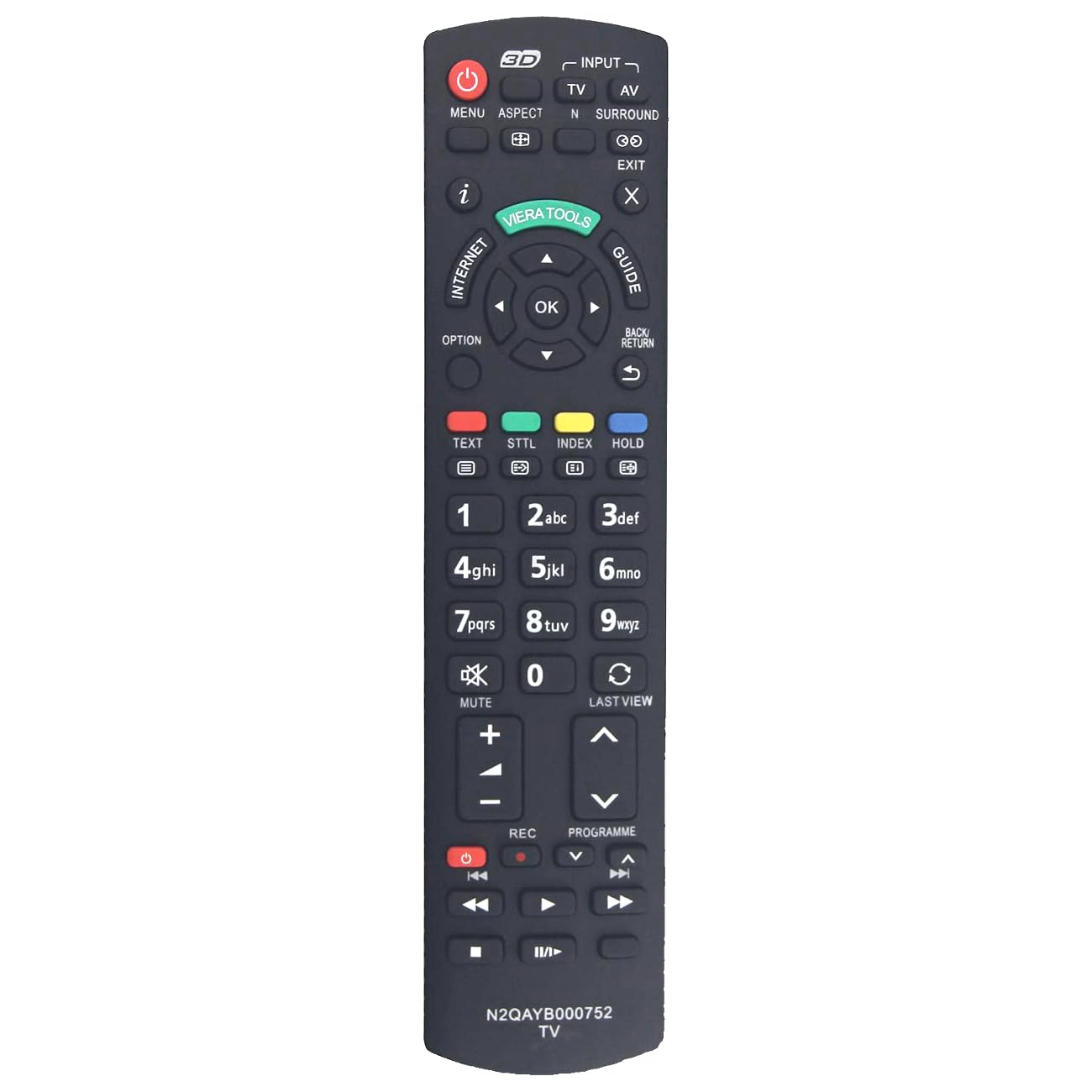
Figure 1: Effireli N2QAYB000752 Replacement Remote Control. This image displays the front view of the remote control, highlighting its button layout and design.
2. Setup
The Effireli N2QAYB000752 remote control requires no programming or complex setup. Simply insert batteries, and it is ready for use.
2.1 Battery Installation
- Locate the battery compartment on the back of the remote control.
- Slide the battery compartment cover downwards or in the direction indicated by an arrow to open it.
- Insert two AAA batteries (not included), ensuring the positive (+) and negative (-) terminals align correctly with the markings inside the compartment.
- Replace the battery compartment cover by sliding it back into position until it clicks securely.
Note: Always use new batteries and replace both batteries at the same time. Do not mix old and new batteries or different types of batteries.
3. Operating Instructions
Once batteries are installed, the remote control is ready to operate your compatible Panasonic Smart TV. Point the remote control directly at the TV's infrared receiver.
3.1 Basic Functions
- Power Button: Turns the TV on or off.
- Number Buttons (0-9): Selects channels directly.
- Channel Up/Down: Changes channels sequentially.
- Volume Up/Down: Adjusts the sound level.
- Mute Button: Silences the TV audio.
- Menu/Home Button: Accesses the TV's main menu or smart features.
- Navigation Buttons (Up, Down, Left, Right, OK/Enter): Navigates through menus and confirms selections.
- Back/Exit Button: Returns to the previous screen or exits a menu.
Refer to your Panasonic Smart TV's user manual for specific functions of advanced buttons, as their behavior may vary depending on the TV model.
Figure 2: Effireli N2QAYB000752 Remote Control Button Layout. This image illustrates the arrangement of buttons on the remote control for easy identification and use.
4. Maintenance
Proper care and maintenance will extend the life of your remote control.
4.1 Cleaning
- Wipe the remote control with a soft, dry cloth.
- For stubborn dirt, lightly dampen the cloth with water or a mild cleaning solution. Do not use abrasive cleaners or solvents.
- Ensure no liquid enters the remote control's interior.
4.2 Battery Care
- Remove batteries if the remote control will not be used for an extended period to prevent leakage.
- Dispose of used batteries according to local regulations.
4.3 Storage
Store the remote control in a cool, dry place, away from direct sunlight and extreme temperatures.
5. Troubleshooting
If you encounter issues with your remote control, refer to the following troubleshooting steps:
- Remote not responding:
- Check if the batteries are inserted correctly with the correct polarity.
- Replace old batteries with new ones.
- Ensure there are no obstructions between the remote control and the TV's infrared receiver.
- Confirm you are within the effective operating range and pointing the remote directly at the TV.
- Specific buttons not working:
- Clean the remote control, especially around the problematic buttons, to remove any dirt or debris that might be interfering with their function.
- Compatibility concerns:
- If your TV model is not listed in the compatible models section or if your original remote control looks significantly different, contact customer support for assistance.
6. Specifications
| Feature | Detail |
|---|---|
| Model Number | YK-N2QAYB000752 |
| Brand | Effireli |
| Connectivity Technology | Infrared |
| Compatible Devices | Television |
| Max Number of Supported Devices | 1 |
| Special Feature | No Programming Required |
| Item Weight | 2.82 ounces |
| Package Dimensions | 8.46 x 1.97 x 0.98 inches |
7. Warranty and Support
7.1 Warranty Information
This product is covered by a 12-month warranty from the date of purchase, covering manufacturing defects. Returns and exchanges are accepted within this warranty period for eligible issues.
7.2 Money-Back Guarantee
A 30-day money-back guarantee is offered, allowing for returns within 30 days of purchase if you are not satisfied with the product.
7.3 Customer Support
For technical assistance, warranty claims, or compatibility inquiries, please contact our customer support team. Refer to your purchase documentation or the seller's contact information for specific support channels.