Introduction
This manual provides detailed instructions for the installation, operation, and maintenance of your FELLOSTAR DUDU5 10-Inch Universal Fit Car Stereo. Please read this manual thoroughly before using the product to ensure proper function and safety.
Package Contents
Verify that all items listed below are included in your package:
- Main Head Unit (10-Inch Touch Screen)
- Vehicle Mount (Installation Bracket)
- Microphone (MIC)
- RCA Cable
- Reversing Camera Cable
- USB Plugs (x3)
- Fakra 4G Antenna
- Fakra GPS Antenna
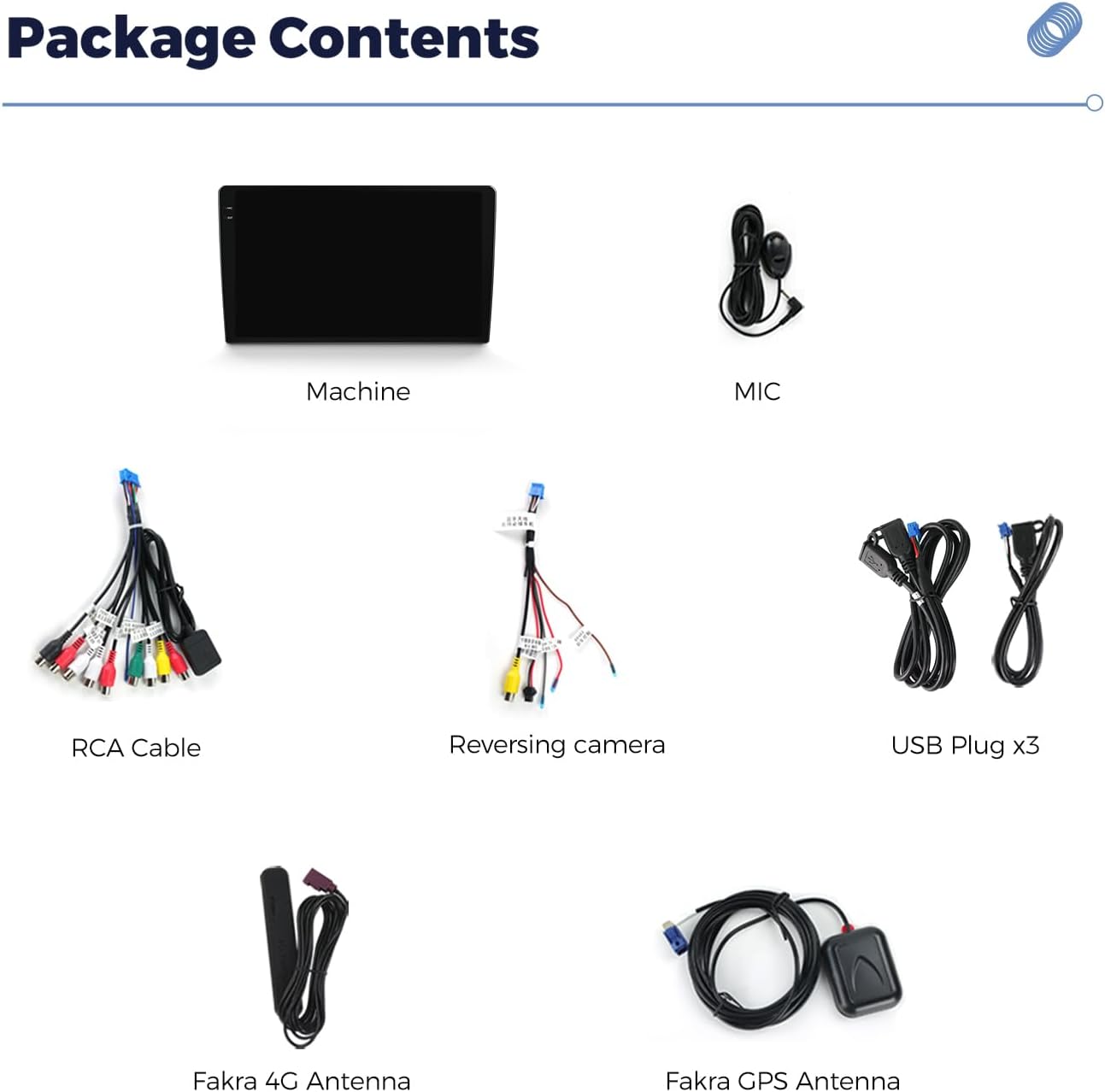
Image: All components included in the DUDU5 10-Inch Car Stereo package, laid out for identification.
Setup and Installation
Professional installation is recommended. Ensure the vehicle's power is disconnected before beginning installation.
- Mounting the Head Unit: Use the provided vehicle mount to secure the 10-inch head unit in your car's dashboard. Specific car frame kits are not included and may be required for a perfect fit.
- Connecting Power and Speakers: Connect the main power harness and speaker wires to your vehicle's wiring system. Refer to your vehicle's wiring diagram for correct connections.
- Antenna Connections:
- Connect the Fakra 4G Antenna for mobile data connectivity.
- Connect the Fakra GPS Antenna for accurate navigation.
- USB and RCA Connections: Connect the three USB plugs for external devices and the RCA cable for audio/video input/output as needed.
- Reversing Camera: Connect the reversing camera cable if you are installing a compatible camera.
- Microphone: Connect the external microphone for hands-free calling and voice commands.

Image: The DUDU5 10-Inch Car Stereo seamlessly integrated into a car's dashboard, showcasing its large display.
Operating Instructions
1. Power On/Off and Basic Navigation
Press and hold the power button (if available) or turn on your vehicle's ignition to power on the unit. The system will boot up to the main interface.
2. Touch Screen Interface (1280*720 In-cell)
The 10-inch in-cell touch screen offers a responsive and clear visual experience. Navigate through menus and applications by tapping, swiping, and pinching.

Image: A visual representation of the ultra-thin, full-fit 1280x720P in-cell screen, highlighting its clarity and design.
3. CarPlay and Android Auto
Connect your smartphone via USB for wired CarPlay or Android Auto. For wireless connection, ensure Bluetooth and Wi-Fi are enabled on your phone and pair with the head unit. Follow on-screen prompts to complete the setup.
4. GPS Navigation (Triple-mode L1, B1, E1)
The unit supports triple-mode GPS for enhanced accuracy. Access the navigation application from the main screen. Enter your destination to receive turn-by-turn directions.

Image: Graphic illustrating the triple-mode GPS system (L1, B1, E1) and its benefit of improved positioning accuracy for reliable navigation.
5. Bluetooth Connectivity
Go to the Bluetooth settings on the head unit to pair your phone for hands-free calls and audio streaming. Ensure your phone's Bluetooth is discoverable.
6. Customizable Screen Experience
The unit offers 6 layouts and 12 plug-ins for personalization. You can adjust the navigation bar placement (bottom, left, right) and customize themes. Access these options through the system settings.

Image: Screenshot showing various layout plugins and customization options for the head unit's interface.

Image: A grid display of 12 selectable plug-ins, including navigation, music, weather, compass, and vehicle data.

Image: Display showing a selection of over 70 themes available for download and options for creating custom themes.
7. Sound Master Features
The unit incorporates high-end audio technology, including AK7604 Velvet Audio Technology and TDA 7838 digitally enhanced amplifiers. Adjust sound settings, equalizer, and sound field correction through the audio menu for an optimized listening experience.

Image: Detailed view of the audio settings, including DTS 5.1 audio options and a sound field correction system with driver, passenger, rear, and all-car modes.
8. Split Screen Functionality (PIP)
The Picture-in-Picture (PIP) function allows you to run two applications simultaneously on the screen. You can adjust the size and position of the split windows by dragging the divider. This feature supports most Android applications.
Video: Demonstration of the DUDUAUTO Series PIP (Picture-in-Picture) and plugin functionality, showing how to split the screen and use multiple applications simultaneously.
Video: A video showcasing the Dudu Series user interface, including various themes and layout customization options.
Video: A demonstration of the DUDUAUTO Head Unit's operation, focusing on the minimalist UI mode and how to switch and resize application windows.
Maintenance
- Screen Cleaning: Use a soft, lint-free cloth to clean the touch screen. Do not use abrasive cleaners or solvents.
- Software Updates: Periodically check for software updates through the system settings to ensure optimal performance and access to new features.
- Temperature: Avoid exposing the unit to extreme temperatures.
- Connections: Ensure all cables and connections are secure to prevent intermittent issues.
Troubleshooting
| Problem | Possible Cause | Solution |
|---|---|---|
| Unit does not power on. | Loose power connection, blown fuse. | Check power cables and vehicle fuses. Consult a professional if needed. |
| No sound. | Volume too low, incorrect audio source, loose speaker wires. | Increase volume, select correct audio source, check speaker connections. |
| GPS signal lost or inaccurate. | GPS antenna obstruction or faulty connection. | Ensure GPS antenna has a clear view of the sky and is securely connected. |
| CarPlay/Android Auto not connecting. | Incorrect USB cable, phone settings, or software issue. | Use a certified USB cable, check phone settings (permissions), restart phone and head unit. |
| Touch screen unresponsive. | Temporary software glitch. | Restart the head unit. If problem persists, contact support. |
Specifications
- Model Name: DUDU5
- Screen Size: 10 Inches
- Screen Resolution: 1280*720 (In-cell Touch Screen)
- Processor: 8-Core UIS7862 Multimedia Processor
- RAM: 4GB
- ROM: 32GB
- GPS: Triple-mode (L1, B1, E1)
- Connectivity: USB, Bluetooth, GPS, 4G (via antenna)
- Special Features: Wired/Wireless CarPlay, Android Auto, Customizable Layouts/Themes, Sound Master (AK7604, TDA 7838), Split Screen (PIP)
- Vehicle Service Type: Car (Universal Fit)
Warranty and Support
For warranty information, please refer to the documentation provided with your purchase or contact FELLOSTAR customer service. For technical support or inquiries, please reach out to:
Email: fello-service@outlook.com

Image: FELLOSTAR customer support contact details, including email address.


