Introduction
This manual provides detailed instructions for the installation, operation, and maintenance of the SBNPLXMN WiFi Smart Circuit Breaker. This device allows for remote control, power metering, and offers voltage and current protection, enhancing the safety and efficiency of your electrical system. Please read this manual thoroughly before installation and use.
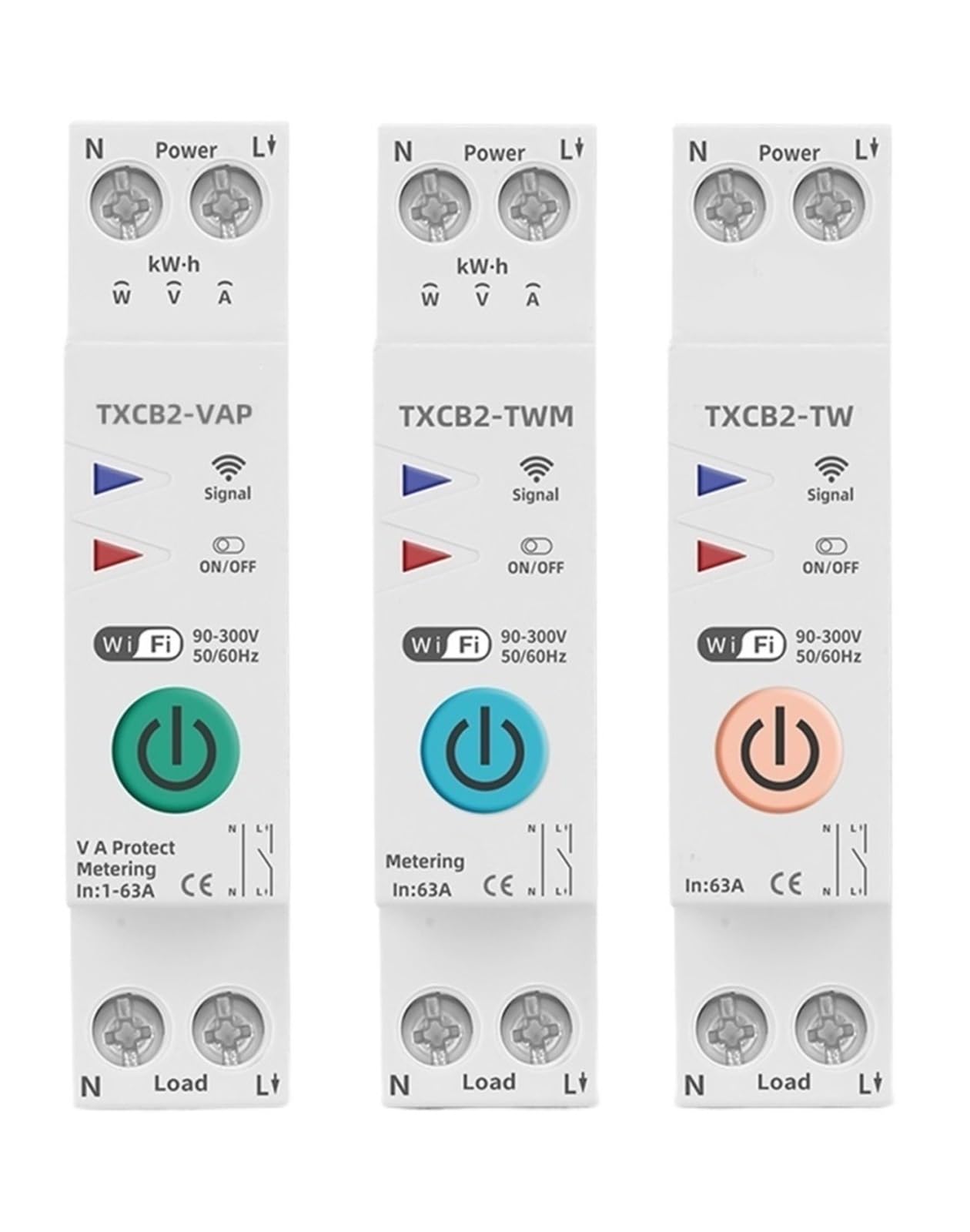
Image: The SBNPLXMN WiFi Smart Circuit Breaker, demonstrating its integration with a smartphone application for real-time monitoring and remote control of electrical parameters like power, voltage, and current. The app interface shows total and daily energy consumption (kWh).
Product Features
- WiFi Connectivity: Remote control and monitoring via smartphone app (Smart Life).
- Power Metering: Real-time monitoring of energy consumption (kWh), voltage, and current.
- Remote Switch: Turn the circuit on or off from anywhere.
- Timer Function: Schedule automatic on/off times.
- Voltage Protection (VAP): Adjustable over/under voltage protection.
- Current Protection (VA Protect): Adjustable overcurrent protection.
- Relay Status: View the current status of the circuit breaker.
- Voice Control: Compatible with smart home assistants like Alexa and Google Home.
Models and Variants
The SBNPLXMN Smart Circuit Breaker series offers different models with varying functionalities:
TXCB2-TW (No Metering)

Image: The TXCB2-TW model, which includes WiFi connectivity, timer function, on/off switch, and relay status, but does not feature power metering capabilities.
- ✓ WiFi
- ✓ Timer
- ✓ On/Off Switch
- ✓ Relay Status
TXCB2-TWM (Metering)

Image: The TXCB2-TWM model, which adds kWh, voltage, and current metering to the features of the TXCB2-TW model.
- ✓ WiFi
- ✓ kWh Metering
- ✓ Voltage Monitoring
- ✓ Current Monitoring
- ✓ Timer
- ✓ On/Off Switch
- ✓ Relay Status
TXCB2-VAP (V+A Protect)

Image: The TXCB2-VAP model, which includes all features of the TXCB2-TWM and adds adjustable voltage and current protection capabilities.
- ✓ WiFi
- ✓ kWh Metering
- ✓ Voltage Monitoring
- ✓ Current Monitoring
- ✓ Timer
- ✓ On/Off Switch
- ✓ Current Limit Protection
- ✓ Voltage Protection
- ✓ Relay Status
This manual specifically details the TXCB2-VAP (1-63A Adjustable) model, which includes all listed features.
Safety Information
WARNING: Electrical shock hazard. Installation and maintenance should only be performed by qualified personnel. Always disconnect power before working with electrical circuits.
- Ensure the main power supply is turned off before installation.
- Follow all local electrical codes and regulations.
- Do not operate the device if it is damaged.
- Keep the device away from water and high humidity environments.
- The device is designed for indoor use only.
Setup
1. Installation
- Disconnect Power: Turn off the main power supply at your electrical panel before beginning any installation.
- Mounting: Mount the circuit breaker securely onto a DIN rail within your electrical panel.
- Wiring: Connect the incoming live (L) and neutral (N) wires to the "Power" terminals (top) of the circuit breaker. Connect the outgoing live (L') and neutral (N') wires to the "Load" terminals (bottom) of the circuit breaker. Ensure all connections are tight and secure.
- Restore Power: Once wiring is complete and verified, restore power to the circuit. The circuit breaker's indicator lights should illuminate.
2. App Pairing (Smart Life App)
- Download App: Download the "Smart Life" app from your smartphone's app store (iOS or Android).
- Register/Login: Open the app and register a new account or log in to an existing one.
- Add Device: Tap the "+" icon in the top right corner of the app to add a new device.
- Select Device Type: Choose "Electrical Engineering" -> "Circuit Breaker (Wi-Fi)".
- Enter Wi-Fi Details: Ensure your phone is connected to a 2.4GHz Wi-Fi network. Enter your Wi-Fi network password.
- Pairing Mode: On the circuit breaker, press and hold the ON/OFF button for 5-10 seconds until the Wi-Fi indicator light flashes rapidly. This indicates pairing mode.
- Confirm in App: In the app, confirm that the indicator light is flashing rapidly and proceed. The app will search for and connect to the device.
- Device Added: Once connected, you can rename the device and begin using its smart features.
Operating Instructions
1. Remote Control
From the Smart Life app, you can remotely turn the circuit breaker on or off. The app interface will display the current status of the circuit.
2. Power Metering
For TXCB2-TWM and TXCB2-VAP models, the app provides real-time data on:
- Total Ele (kWh): Cumulative energy consumption.
- Today Ele (kWh): Daily energy consumption.
- Power (W): Instantaneous power usage.
- Voltage (V): Current line voltage.
- Current (A): Current load amperage.
3. Timer Function
Set schedules within the Smart Life app to automatically turn the circuit breaker on or off at specific times or days of the week.
4. Voltage and Current Protection (TXCB2-VAP only)
The TXCB2-VAP model allows you to set thresholds for over/under voltage and overcurrent protection. If the monitored values exceed or fall below these thresholds, the circuit breaker will automatically trip to protect connected appliances and the electrical system.
- Access the protection settings in the Smart Life app for your device.
- Adjust the desired voltage and current limits.
- The device will automatically disconnect the load if these limits are breached.
5. Voice Control
Integrate your SBNPLXMN Smart Circuit Breaker with Amazon Alexa or Google Home for convenient voice control. Follow the instructions in the Smart Life app to link your account with your preferred smart assistant.

Image: Illustration of the smart circuit breaker being controlled via voice commands through a smart speaker, demonstrating compatibility with platforms like Alexa or Google Home.
Maintenance
- Regular Checks: Periodically inspect the circuit breaker for any signs of physical damage or loose connections.
- Cleaning: Ensure the device is clean and free from dust. Use a dry, soft cloth for cleaning. Do not use liquids or abrasive cleaners.
- Firmware Updates: Keep the Smart Life app and device firmware updated to ensure optimal performance and security. Check the app for available updates.
- Power Cycle: If the device becomes unresponsive, try power cycling it by turning off the main power, waiting a few seconds, and then turning it back on.
Troubleshooting
- Device Not Connecting to Wi-Fi:
- Ensure your Wi-Fi network is 2.4GHz. The device does not support 5GHz networks.
- Check if the Wi-Fi password entered in the app is correct.
- Make sure the device is in pairing mode (Wi-Fi indicator flashing rapidly).
- Move the device closer to your Wi-Fi router.
- Restart your Wi-Fi router and try pairing again.
- Device Not Responding to App Commands:
- Check your internet connection and the device's Wi-Fi connection status in the app.
- Ensure the device has power.
- Try power cycling the circuit breaker.
- Circuit Breaker Trips Frequently:
- For TXCB2-VAP models, check the voltage and current protection settings in the app. They might be set too sensitively.
- Verify that the total load connected to the circuit breaker does not exceed its rated current (e.g., 63A).
- Consult a qualified electrician to check for potential electrical faults in your wiring or connected appliances.
Specifications
| Working Voltage | AC90-300V, 50/60Hz |
| Connection Type | 1P+N |
| Current Rating (Adjustable) | 1-63A (for TXCB2-VAP model) |
| Mechanical Life | Over 100,000 Times |
| Working Temperature | -25°C to 70°C |
| Wireless Type | Wi-Fi 2.4GHz |
| Item Weight | 50 Grams |
| Manufacturer | SBNPLXMN |
Warranty and Support
SBNPLXMN products are designed for reliability and performance. For warranty information and technical support, please refer to the contact details provided with your purchase or visit the official SBNPLXMN website. Keep your purchase receipt as proof of purchase for warranty claims.


