Introduction
Thank you for choosing the NIXON Fremont 40 A1444-513-00 Analog Field Watch. This timepiece combines robust design with reliable quartz movement, offering 100 meters of water resistance. This manual provides essential information for setting up, operating, maintaining, and troubleshooting your watch to ensure its longevity and optimal performance.
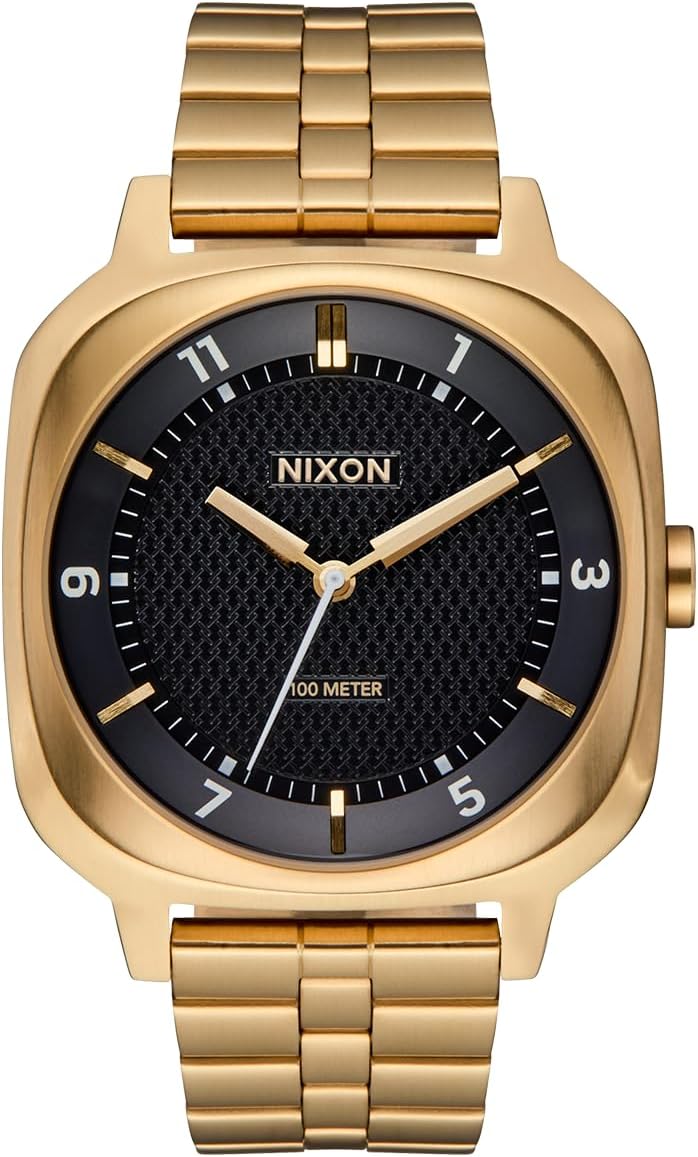
Image: Front view of the NIXON Fremont 40 watch in Gold/Black, showcasing its square case and textured dial.
Setup
1. Setting the Time
- Locate the crown on the right side of the watch case.
- Gently pull the crown outwards to the time-setting position. You may feel a slight click.
- Rotate the crown clockwise or counter-clockwise to adjust the hour and minute hands to the correct time.
- Once the time is set, push the crown back into its original position firmly to ensure water resistance and to start the watch movement.

Image: Close-up view of the watch crown, indicating its position for time adjustment.
2. Band Adjustment
The NIXON Fremont 40 features a stainless steel 3-link band with a deployment clasp. For proper fit, the band may need to be adjusted by adding or removing links. It is recommended to have this adjustment performed by a professional watchmaker or jeweler to prevent damage to the band or clasp.

Image: Rear view of the NIXON Fremont 40 watch, highlighting the stainless steel band and deployment clasp mechanism.
Operating the Watch
Timekeeping
Your NIXON Fremont 40 watch is powered by a reliable quartz movement, providing accurate timekeeping. Once the time is set and the crown is pushed in, the watch will continuously display the current time.
Water Resistance (100 Meters / 10 ATM)
This watch is designed with a water resistance rating of 100 meters (10 ATM). This means it is suitable for recreational swimming, snorkeling, and showering. It is not suitable for high-impact water sports, diving, or prolonged submersion at depths beyond its rating. Always ensure the crown is fully pushed in before any contact with water.

Image: Close-up of the NIXON Fremont 40 watch dial, clearly showing the "100 METER" water resistance marking.
Maintenance
Cleaning Your Watch
- For the case and metal band, use a soft, damp cloth to wipe away dirt and grime.
- Avoid using harsh chemicals, solvents, or abrasive cleaning materials, as these can damage the watch's finish.
- After exposure to saltwater, rinse the watch with fresh water and dry it thoroughly with a soft cloth.
Battery Replacement
The NIXON Fremont 40 watch is powered by a 9V battery (included). When the watch stops running, it indicates the battery needs replacement. It is highly recommended to have the battery replaced by an authorized NIXON service center or a qualified watch technician to ensure the watch's water resistance is maintained.
Storage
When not wearing your watch, store it in a cool, dry place away from direct sunlight, extreme temperatures, and strong magnetic fields. The original packaging or a watch box is ideal for storage.
Troubleshooting
| Problem | Possible Cause | Solution |
|---|---|---|
| Watch is not running. | Crown is pulled out; battery is depleted. | Push the crown fully in. If it still doesn't run, the battery may need replacement. Contact NIXON service. |
| Condensation under the crystal. | Water ingress due to improper crown sealing or damage. | Immediately contact NIXON customer support or an authorized service center. Do not attempt to open the watch. |
| Time is inaccurate. | Weak battery; exposure to strong magnetic fields. | Replace the battery. Keep the watch away from strong magnets (e.g., speakers, certain electronics). |
If you encounter issues not listed here or if the suggested solutions do not resolve the problem, please contact NIXON customer support for further assistance.
Specifications
| Feature | Detail |
|---|---|
| Model Name | Fremont 40 |
| Model Number | A1444-513-00 |
| Movement Type | Quartz |
| Display Type | Analog |
| Case Material | Stainless Steel |
| Case Diameter | 40 Millimeters |
| Case Thickness | 10.8 Millimeters |
| Band Material | Stainless Steel |
| Band Width | 20 Millimeters (tapered to 18mm) |
| Crystal Type | Mineral Glass |
| Water Resistance | 100 Meters (10 ATM) |
| Clasp Type | Deployment Clasp |
| Power Source | Battery Powered (1 9V battery included) |
| Item Weight | 0.5 Pounds |

Image: Detailed view of the NIXON Fremont 40 watch dial, showing the textured pattern and hour markers.
Warranty Information
The NIXON Fremont 40 A1444-513-00 watch comes with a 2-year limited manufacturer's warranty from the date of purchase. This warranty covers defects in materials and workmanship under normal use. It does not cover damage resulting from improper handling, accidents, unauthorized repairs, or normal wear and tear (e.g., battery, crystal, strap). For warranty claims, please retain your proof of purchase and contact NIXON customer support.
Support
For further assistance, technical support, or service inquiries regarding your NIXON Fremont 40 watch, please visit the official NIXON website or contact their customer service department. You can often find FAQs, service request forms, and contact details on their support pages.
Official NIXON Website: www.nixon.com
When contacting support, please have your watch model number (A1444-513-00) and proof of purchase readily available.
Product Video
Watch this official video for an introduction to the NIXON Fremont 40 watch, highlighting its design and features.
Video: An introductory video showcasing the NIXON Fremont 40 watch, its aesthetic, and key functionalities.


