
Heinrich DVA8-500
Heinrich DVA8-500 Digital Voice Evacuation Controller User Manual
Model: DVA8-500
EN54 Approved Evacuation, Paging, PA, and Background Music System
1. Introduction
This manual provides detailed instructions for the installation, operation, and maintenance of the Heinrich DVA8-500 Digital Voice Evacuation Controller. The DVA8-500 is a comprehensive system designed for safety and communication, integrating evacuation, paging, public address (PA), and background music (BGM) functionalities. It complies with BS EN54-32 & EN60849 standards and holds EN54 approval, ensuring adherence to rigorous safety protocols.
2. Product Overview and Key Features
The DVA8-500 controller is equipped with advanced features to manage emergency communications and daily audio needs efficiently.
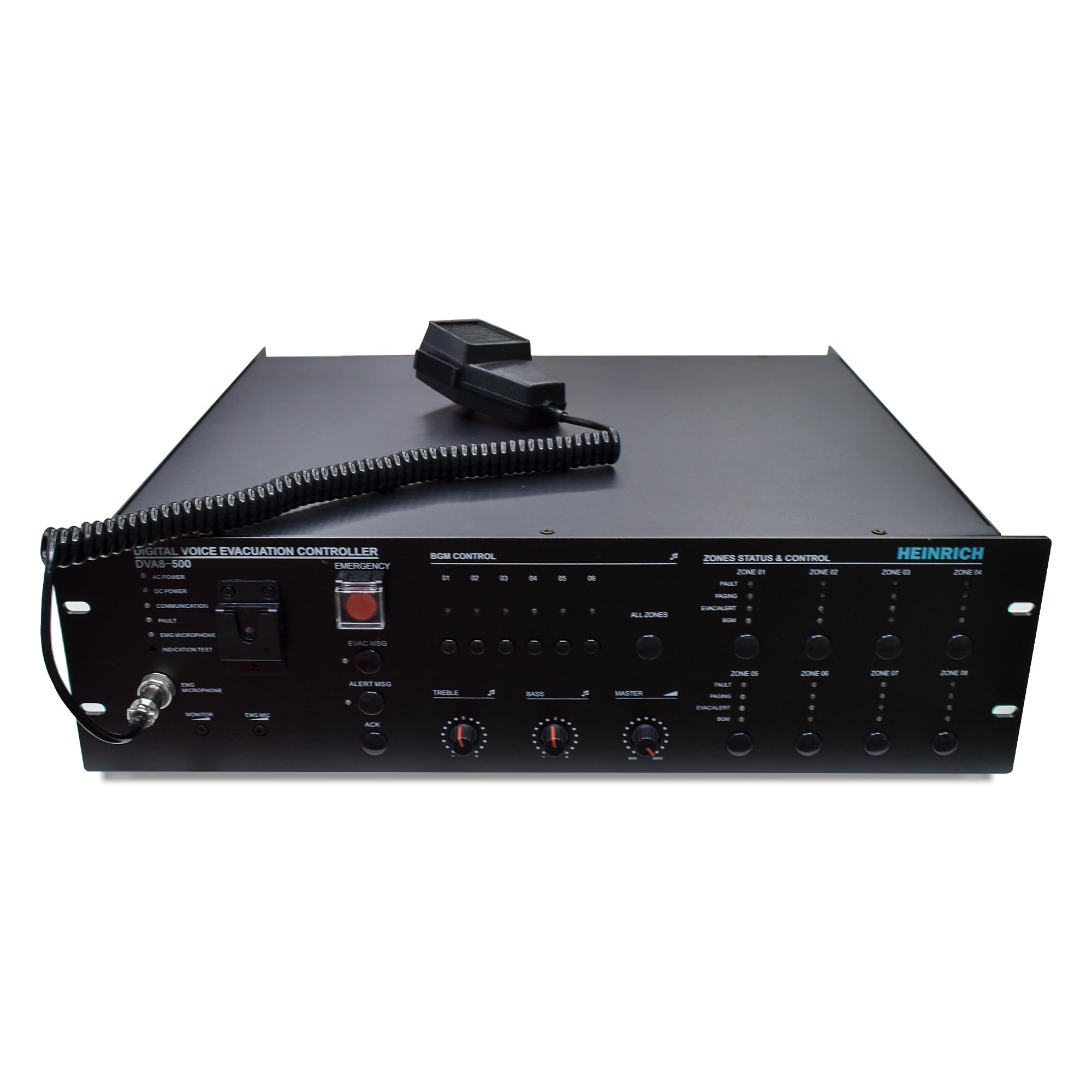
Figure 1: Front Panel of the DVA8-500 Controller
- Flexible Zone Control: 8-zone speaker output with individual volume control.
- EN54-Approved: Meets stringent European safety standards for voice alarm systems.
- All-in-One Solution: Combines EVAC, paging, PA, and BGM systems.
- Powerful Amplification: Built-in 500W 8-zone Class-D amplifier.
- Reliable Operation: Automatic switching to battery backup during power failures.
- Network Capability: Supports IP network integration for remote monitoring and control.
- User-Friendly Interface: Intuitive controls for easy operation.
- Scalable Design: Expandable to 160 zones with additional routers.
- Prioritized Communication: Fireman microphone with highest priority for emergency messages.
- Robust Construction: Durable metal enclosure for long-term use.
3. What's in the Box
Upon unpacking, please verify that all items listed below are present and undamaged:
- DVA8-500 Controller Unit
- Microphone
If any items are missing or damaged, please contact your supplier immediately.
4. Setup and Installation
The DVA8-500 is designed for 8U rack mounting. Proper installation is crucial for optimal performance and safety.
4.1 Rack Mounting
Mount the DVA8-500 controller securely into a standard 8U equipment rack. Ensure adequate ventilation around the unit to prevent overheating.
4.2 Power Connection
Connect the unit to a stable AC power source. The system also supports DC battery input for backup power, ensuring continuous operation during power failures. Ensure correct polarity when connecting DC power.
4.3 Speaker Connections
Connect loudspeakers to the 8-zone speaker outputs. The system features built-in low impedance supervision for 8 zone A/B speaker lines. Refer to the rear panel diagram for correct wiring.

Figure 2: Rear Panel Connections
4.4 Input/Output Connections
Connect external devices such as fire alarm systems, MP3 players, and additional paging microphones to the appropriate input ports (AUX, Ethernet, HDMI, USB, XLR). The system provides 8 programmable control inputs and outputs for integration with third-party systems.
4.5 Network Configuration
For network integration and remote control, connect the unit via its RJ45 Ethernet ports. The system supports network redundancy for enhanced reliability. Configure network settings as per your system requirements.
5. Operating Instructions
The DVA8-500 offers various operational modes for emergency evacuation, paging, and background music.
5.1 Front Panel Controls

Figure 3: Detailed Front Panel Controls
The front panel includes controls for BGM (Background Music), zone selection, and emergency functions. Indicators show power status, fault conditions, and active zones.
5.2 Emergency Evacuation (EVAC)
- Initiating EVAC: In an emergency, activate the EVAC function. The system will broadcast pre-recorded evacuation messages stored on the SD card.
- Fireman Microphone: The dedicated fireman microphone has the highest priority. Use it to deliver live emergency announcements, overriding all other audio sources.
- Alert Messages: The system can also broadcast alert messages via a separate player.
5.3 Paging System
Use the connected paging microphone to make announcements to selected zones or all zones. Priority levels ensure that paging announcements override background music.
5.4 Background Music (BGM)
The system supports background music playback. Select desired zones for BGM distribution. BGM will be automatically muted or lowered during paging or emergency announcements.
5.5 Zone Control
Individual zone buttons and indicators on the front panel allow for selection and monitoring of each of the 8 zones. Volume can be adjusted per zone.
5.6 System Expansion
The DVA8-500 can be expanded to control up to 160 zones by cascading additional routers. Refer to the expansion module manual for detailed setup.
6. Maintenance
Regular maintenance ensures the longevity and reliable operation of your DVA8-500 system.
- Cleaning: Periodically clean the exterior of the unit with a soft, dry cloth. Do not use liquid cleaners or solvents.
- Ventilation: Ensure that ventilation openings are clear of dust and obstructions to prevent overheating.
- Cable Connections: Regularly check all cable connections for secure fit and signs of wear.
- Battery Backup: If using DC battery backup, ensure batteries are in good condition and regularly tested as per manufacturer guidelines.
- Firmware Updates: Check the Heinrich website for any available firmware updates to ensure optimal performance and security.
7. Troubleshooting
This section addresses common issues you might encounter with the DVA8-500 controller.
| Problem | Possible Cause | Solution |
|---|---|---|
| No power indicator light | Power cable disconnected; no AC power; DC battery depleted. | Check power cable connection; verify AC power supply; check DC battery status. |
| No audio output from speakers | Speaker cables disconnected; zone not selected; volume too low; amplifier fault. | Check speaker connections; ensure correct zone is active; increase volume; check fault indicators. |
| Paging microphone not working | Microphone not connected; microphone fault; incorrect priority settings. | Ensure microphone is securely connected; test with another microphone if possible; verify priority settings. |
| EVAC message not playing | SD card issue; EVAC function not activated; message file corrupted. | Check SD card; ensure EVAC is activated; re-upload message files if necessary. |
If the problem persists after attempting these solutions, please contact Heinrich customer support.
8. Technical Specifications
| Feature | Specification |
|---|---|
| Brand | Heinrich |
| Model Number | DVA8-500 |
| Item Dimensions (L x W x H) | 48.5 x 40.8 x 13.3 Centimeters |
| Mounting Type | 8U Rack Mount |
| Enclosure Material | Metal |
| Power Source | AC Power, DC Battery Input |
| Output Wattage | 500 Watts |
| Number of Channels | 8 (Zones) |
| Frequency Response | 20 KHz |
| Audible Noise | 14.5 Decibels |
| Impedance | 10 Ohms (Speaker Line Supervision) |
| Connectivity Technology | AUX, Ethernet, HDMI, USB |
| Connector Type | XLR (Microphone) |
| Audio Input | Microphone, Fireman Microphone |
| Compatible Devices | Fire alarm system, Loudspeakers, MP3 Player, Paging Microphone |
| Item Weight | 21 Kilograms |
| Certifications | EN54 Approved, BS EN54-32 & EN60849 standards |
9. Warranty and Support
9.1 Warranty Information
The Heinrich DVA8-500 Digital Voice Evacuation Controller comes with a 1 Year Warranty from the date of purchase.
9.2 Customer Support
For technical assistance, warranty claims, or any other inquiries, please contact Heinrich customer support:
- Company: Heinrich Corporation India Pvt Ltd.
- Address: A62 DDA Sheds Okhla Industrial Area Phase 2, Delhi-110020
- Contact Number: 1800 419 1117
- Email: Info@heinrichlimited.com
Related documentsDVA8-500


Ask a question about this manual
Ask about setup, troubleshooting, compatibility, parts, safety, or missing instructions. Manuals+ will review the question and use this page’s manual context to help answer it.