Introduction
This manual provides essential information for the safe operation, assembly, and maintenance of your Hipicute Electric Ride-On Truck. Please read it thoroughly before use.
This electric ride-on truck is designed for children aged 37-96 months, offering two driving modes, LED headlights, a Bluetooth speaker, and parental remote control for enhanced safety and enjoyment.
Safety Information
Important Safety Guidelines
- Always use under direct adult supervision.
- Ensure the child is secured with the seat belt.
- The parental remote control features an emergency brake for immediate stopping.
- Recommended age: 3 years and up.
- Maximum load capacity: 27.66 kg (61 lbs).
Package Contents
What's in the Box
- 1 x Kid Electric Car
- 1 x Remote Control
- 1 x 12V Battery (included)
- 1 x Charger
Setup and Assembly
The Hipicute Electric Ride-On Truck requires some assembly. Refer to the separate assembly guide included with your purchase for detailed instructions.
Battery Charging
Locate the charging port, typically near the seat. Connect the charger to the port and then to a standard wall outlet. Allow several hours for a full charge before first use. Do not overcharge the battery.

This image illustrates the dimensions of the truck, which are 39.06 x 26.23 x 26.23 inches.
Operating Instructions
Starting the Vehicle
The truck features a simple one-key start. Press the power button on the control console to turn on the vehicle.
Driving Modes
- Autonomous Driving Mode: The child can operate the vehicle using the foot pedal and steering wheel.
- Parental Remote Control Mode: Parents can control the vehicle's direction and speed using the provided remote control. This mode also includes an emergency brake function.
Control Panel Features
- Forward/Reverse Switch: Located on the control console to select driving direction.
- Speed Adjustment: The control console allows for adjustable speed settings.
- Bluetooth Speaker: Connect a device via Bluetooth to play music.
- Horn: Activate the horn via a button on the steering wheel.
- LED Headlights: Turn on/off the headlights for visibility.

This image displays the layout and functions of the 2.4G remote control, including directional controls, speed settings, and an LED indicator. It also visually explains the slow start function, which ensures a smooth acceleration for the child.
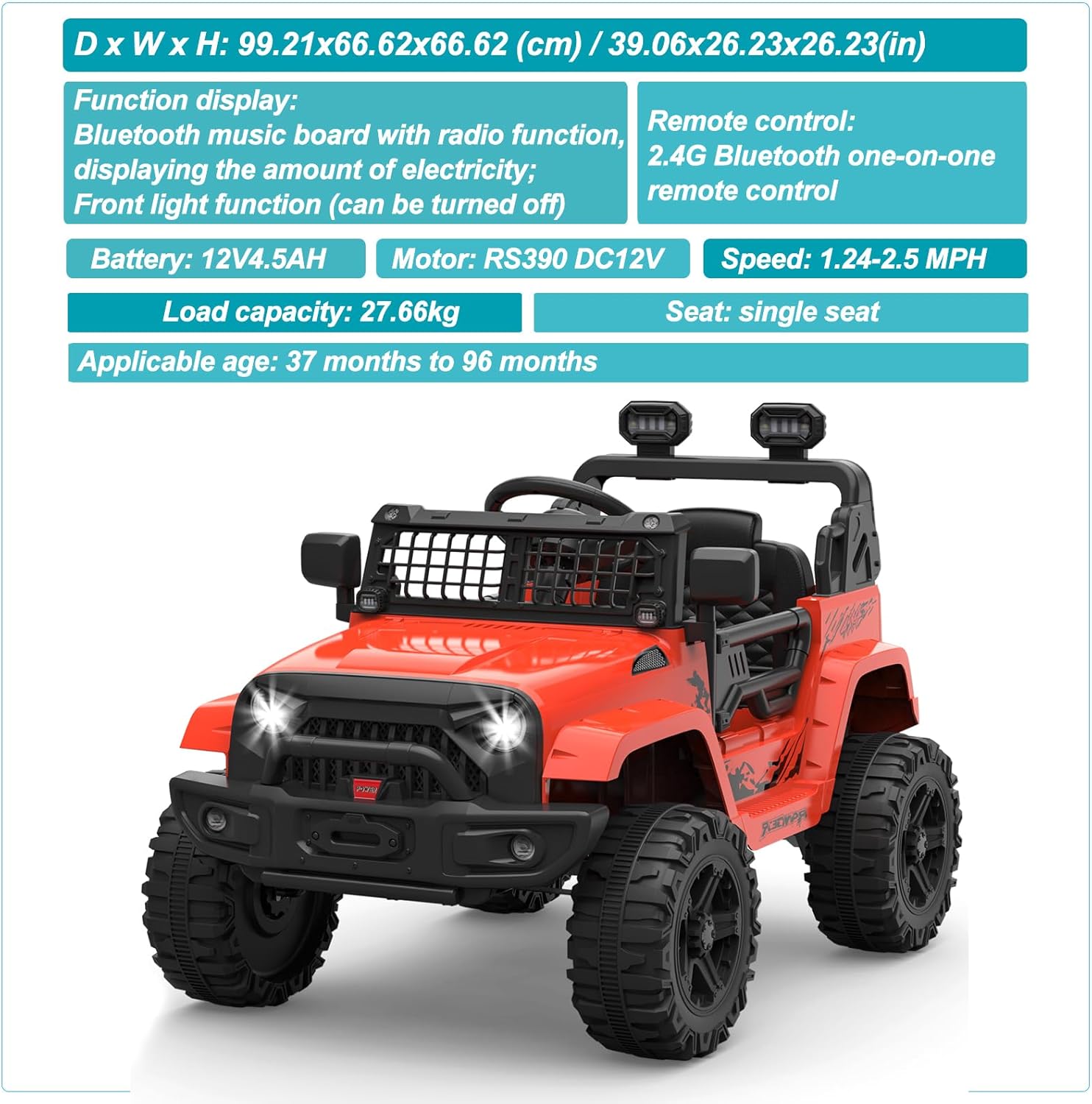
This image details the functional display of the truck's interior, including the Bluetooth music board, battery level indicator, front light control, and specifications for the remote control, battery, motor, speed, load capacity, and seating.
Doors and Seat Belt
The truck features secure, working doors on both sides for easy entry and exit. Always ensure the child is fastened with the adjustable seat belt before operation.
Maintenance
General Care
- Regularly inspect the vehicle for any loose parts or damage.
- Clean the truck with a damp cloth. Do not use harsh chemicals.
- Store the vehicle in a dry place when not in use.
Battery Care
- Charge the battery fully after each use.
- Do not overcharge the battery.
- If storing for an extended period, charge the battery every 3 months to maintain its lifespan.
Troubleshooting
Common Issues and Solutions
Vehicle Not Moving
- Check if the battery is charged.
- Ensure all connections are secure.
- Verify the forward/reverse switch is in the correct position.
Remote Control Not Working
- Check the batteries in the remote control.
- Ensure the remote is properly paired with the vehicle (refer to pairing instructions in the full manual, if available).
Specifications
Product Specifications
- Brand: Hipicute
- Model Number: 4P0tXvTL2k-xfJDlGGQlUAh6xZfD
- Product Dimensions: 39.06 x 26.23 x 26.23 inches
- Item Weight: 42.3 pounds
- Battery: 1 x 12V 4.5Ah (included)
- Motor: RS390 DC12V
- Speed: 1.24-2.5 MPH
- Load Capacity: 27.66 kg
- Recommended Age: 37-96 months (3-8 years)
- Features: Spring Suspension, LED Lights, Bluetooth Speaker, Two Speeds, Parental Remote Control with Emergency Brake, Seat Belt, Secure Doors.
Warranty and Support
For warranty details and customer support, please refer to the documentation included with your purchase or contact Hipicute customer service directly.
Specific warranty terms are not provided in this document. Please consult your product packaging or the manufacturer's official website for the most up-to-date information.