
Real HD 8MP 4K Dual Lens PoE IP Security Camera
Contents
Real HD 8MP 4K Dual Lens PoE IP Security Camera Instruction Manual
Model: 8MP 4K Dual Lens PoE IP Security Camera
1. Introduction
This manual provides comprehensive instructions for the installation, operation, and maintenance of your Real HD 8MP 4K Dual Lens PoE IP Security Camera. Please read this manual thoroughly before using the product to ensure proper setup and functionality. This camera is designed for outdoor surveillance, offering a 180-degree panoramic view and full-color night vision capabilities.

Image 1.1: Front view of the Real HD 8MP 4K Dual Lens PoE IP Security Camera, showcasing its dual lenses and integrated lighting.
2. Safety Information
Observe the following safety precautions to prevent damage to the product or injury to yourself and others:
- Power Source: Use only the specified Power over Ethernet (PoE) connection. Do not use unauthorized power adapters.
- Installation: Ensure the camera is securely mounted to prevent it from falling. Professional installation is recommended if you are unfamiliar with electrical wiring or mounting procedures.
- Water and Moisture: While the camera is IP66 weatherproof, avoid submerging it in water or exposing it to high-pressure water jets.
- Cleaning: Disconnect power before cleaning. Use a soft, dry cloth. Do not use liquid or aerosol cleaners.
- Operating Temperature: Operate the camera within its specified temperature range.
3. Package Contents
Verify that all items are present in your package:
- 1 x 4K Dual Lens IP PoE Camera 180 Degree
- Mounting Screws and Anchors
- Waterproof Connector Kit
- Quick Start Guide (if included)
4. Product Overview
The Real HD 8MP 4K Dual Lens PoE IP Security Camera features advanced technology for comprehensive surveillance. Key features include:
- 180° Panoramic Ultra Wide Angle: Dual lenses provide an expansive field of view, ideal for monitoring large outdoor areas.
- HD 8MP 4K Resolution: Delivers clear and sharp images and video.
- Full Color Night Vision: Captures detailed, colorful images even in low-light conditions, up to 65ft.
- Dual H.265/H.264 Compression: Efficient video compression reduces file sizes and storage requirements.
- Power over Ethernet (PoE): Simplifies installation by providing power and data over a single Ethernet cable.
- IP66 Weatherproof Rating: Ensures reliable performance in various weather conditions.

Image 4.1: Illustration of the 180-degree panoramic view achieved by the dual-lens camera, showing a wide outdoor scene.
5. Setup
5.1 Physical Installation
The camera is designed for both ceiling and wall mounting. Choose a location that provides the desired field of view and is within reach of an Ethernet cable for PoE connectivity.
- Select Location: Identify a suitable outdoor location for optimal surveillance coverage.
- Mounting: Use the provided screws and anchors to securely attach the camera to the chosen surface. Ensure the camera is oriented correctly for the desired panoramic view.
- Cable Management: Route the Ethernet cable to the camera, ensuring it is protected from environmental elements. Use the waterproof connector kit for outdoor connections.

Image 5.1: Various installation environments, including outdoor building exteriors and indoor rooms, demonstrating the camera's versatility.
5.2 Connectivity
This camera utilizes Power over Ethernet (PoE) for both power and data transmission.
- Connect to PoE Switch/Injector: Connect one end of an Ethernet cable to the camera's Ethernet port and the other end to a PoE switch or PoE injector.
- Connect to Network: Connect the PoE switch/injector to your network router.
- NVR Compatibility: The camera is compatible with 8MP NVRs. Connect the PoE switch/injector to your NVR for recording and management. Note: Not compatible with Reolink/Lorex/Amcrest NVRs.
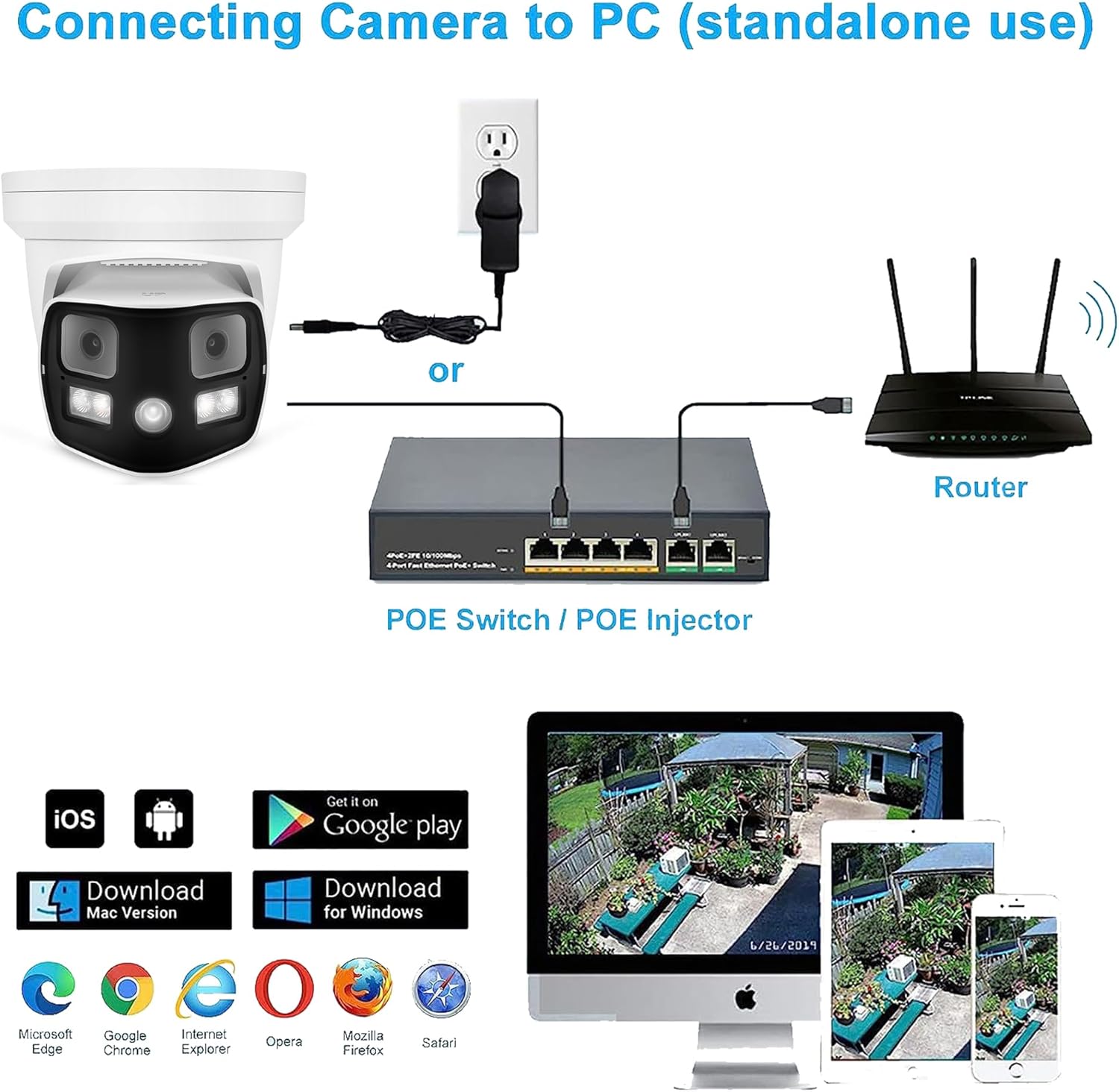
Image 5.2: Connection diagram illustrating how the camera connects to a PoE switch/injector and then to a router, with monitoring options on PC, tablet, and smartphone.
5.3 Initial Configuration
After physical installation and network connection, access the camera for initial setup.
- Software/App Access: Use compatible NVR software, PC client software (Windows/Mac), or a mobile application (iOS/Android) to discover and configure the camera on your network.
- Network Settings: Configure IP address, subnet mask, and gateway settings as required by your network.
- Password Setup: Create a strong password for camera access to ensure security.
6. Operating Instructions
6.1 Accessing the Camera Feed
You can view the live feed and recorded footage through various platforms:
- NVR: Access through your connected 8MP NVR interface.
- PC Software: Use the dedicated PC client software for Windows or Mac.
- Mobile App: Download the compatible mobile application from Google Play (Android) or the App Store (iOS) for remote viewing.
- Web Browser: Access the camera's web interface via a compatible browser (e.g., Microsoft Edge, Google Chrome, Mozilla Firefox, Safari).
6.2 Night Vision
The camera features advanced full-color night vision, providing clear and colorful images even in complete darkness.
- Automatic Activation: The camera automatically switches to night vision mode based on ambient light conditions.
- Infrared (IR) LEDs: Integrated IR LEDs provide illumination for night vision up to 65 feet.

Image 6.1: A side-by-side comparison showing the vibrant, detailed image captured by the full-color night vision camera versus a standard black and white night vision image.
6.3 Video Compression
The camera supports H.265 and H.264 video compression formats. H.265 offers superior compression efficiency, reducing file sizes and storage requirements while maintaining video quality.
7. Maintenance
Regular maintenance ensures optimal performance and longevity of your security camera.
- Cleaning the Lens: Gently wipe the camera lenses with a soft, lint-free cloth to remove dust or smudges. Do not use abrasive cleaners.
- Housing Cleaning: Clean the camera housing with a damp cloth. Avoid harsh chemicals.
- Firmware Updates: Periodically check for and install firmware updates to ensure the camera has the latest features and security enhancements.
- Weather Protection: The IP66 weatherproof rating protects against dust and water ingress. Ensure all cable connections are properly sealed using the provided waterproof kit.

Image 7.1: A close-up view of the camera with water droplets on its surface, emphasizing its IP66 weatherproof and durable design.
8. Troubleshooting
If you encounter issues with your camera, refer to the following common problems and solutions:
- No Power/No Image:
- Ensure the Ethernet cable is securely connected to both the camera and the PoE switch/injector.
- Verify that the PoE switch/injector is powered on and functioning correctly.
- Poor Image Quality:
- Clean the camera lens.
- Check network bandwidth. Insufficient bandwidth can affect video streaming quality.
- Ensure the camera is configured for 8MP 4K resolution in your NVR or software settings.
- Cannot Access Camera on Network:
- Verify network cable connections.
- Check the camera's IP address and ensure it is within the same subnet as your network devices.
- Temporarily disable any firewall settings that might be blocking communication.
- Night Vision Issues:
- Ensure there are no obstructions blocking the IR LEDs.
- Check for strong light sources near the camera that might interfere with automatic night vision activation.
9. Specifications
| Feature | Specification |
|---|---|
| Indoor/Outdoor Usage | Outdoor |
| Compatible Devices | 8MP NVR |
| Power Source | Corded Electric (PoE) |
| Connectivity Protocol | Ethernet |
| Controller Type | NVR |
| Mounting Type | Ceiling/Wall Mount |
| Video Capture Resolution | 4K (8MP) |
| Number of Items | 1 |
| Included Components | 1 x 4K Dual Lens IP PoE camera 180 Degree |
| Viewing Angle | 180 Degrees |
| Material | Metal |
| Item Dimensions (L x W x H) | 5.5 x 5.5 x 5.7 inches |
| Water Resistance Level | Waterproof (IP66) |
| Batteries Required? | No |
| Item Weight | 2.01 pounds (0.91 Kilograms) |
| Focus Type | Fixed Lens |
| Low Light Technology | Night Color |
| Light Source Type | Infrared |
| Video Capture Format | MP4 |
| Effective Still Resolution | 8 MP |
| Maximum Webcam Image Resolution | 8 MP |
| Number of IR LEDs | 4 |
| Model Name | 8MP 4K Dual Lens Wide Angle PoE IP Camera |
| Connectivity Technology | Wired |
| Special Feature | 4K Dual Lens IP PoE Camera 180 Degree, HD Resolution |
10. Warranty and Support
For technical assistance or warranty inquiries, please contact Real HD customer support. Real HD offers US local tech support available from 9 AM to 5 PM CST.
For support, please refer to the contact information provided with your purchase or visit the official Real HD website.
Ask a question about this manual
Ask about setup, troubleshooting, compatibility, parts, safety, or missing instructions. Manuals+ will review the question and use this page’s manual context to help answer it.