
1. Product Overview
The LONGRUF 2025 Car GPS Navigator G916 is designed to provide reliable navigation for various vehicle types. It features a 7-inch 2.5D touchscreen, pre-loaded maps for North America, and intelligent voice guidance.
Package Contents
- LONGRUF 2025 Car GPS Navigator G916
- Car Charger
- USB Cable
- Suction Cup Mount
- Clip Holder
- Sunshade

Image 1.1: LONGRUF 2025 Car GPS Navigator G916 with included suction cup mount.
2. Setup and Installation
Mounting the GPS Device
The GPS device comes with a suction cup mount for secure placement on your vehicle's windshield or dashboard. Follow these steps for proper installation:
- Ensure the suction cup handle is in the released (unlocked) position.
- Attach the clip holder to the back of the GPS unit.
- Connect the suction cup mount to the clip holder.
- Press the suction cup firmly against a clean, smooth surface on your windshield or dashboard.
- Flip the handle on the suction cup mount to the locked position to secure the device.
- Adjust the angle of the GPS unit for optimal viewing, then tighten any adjustable screws on the mount.
Video 2.1: Demonstration of assembling and mounting the GPS unit to a car windshield.
Initial Power Up and Charging
Connect the GPS unit to your vehicle's power outlet using the provided car charger. The device requires charging for optimal performance. The internal battery provides approximately 30 minutes of operation without external power.
3. Operating Instructions
Power On/Off
- To power on, press and hold the power button located on the device's side until the screen illuminates.
- To power off, press and hold the power button until a shutdown prompt appears, then confirm.
Map Navigation and Features
The GPS Navigator comes pre-installed with the latest North America maps (USA, Canada, Mexico) and supports 2D/3D map display. No internet connection is required for navigation.
- Smart Voice Broadcast: Provides turn-by-turn voice navigation in multiple languages, offering real-time safety navigation directions.
- Intelligent Error Correction: If you deviate from the route, the system will automatically generate new routes.
- Search Options: Supports Postcode, Address, Coordinates, Favorite locations, and Points of Interest (POI) search.
- Route Options: Choose from four route preferences: Fast, Green, Short, or Easy.
- Alerts: Provides intelligent current speed camera alerts, sound warnings, street name broadcasts, current speed display, and active lane assistance.
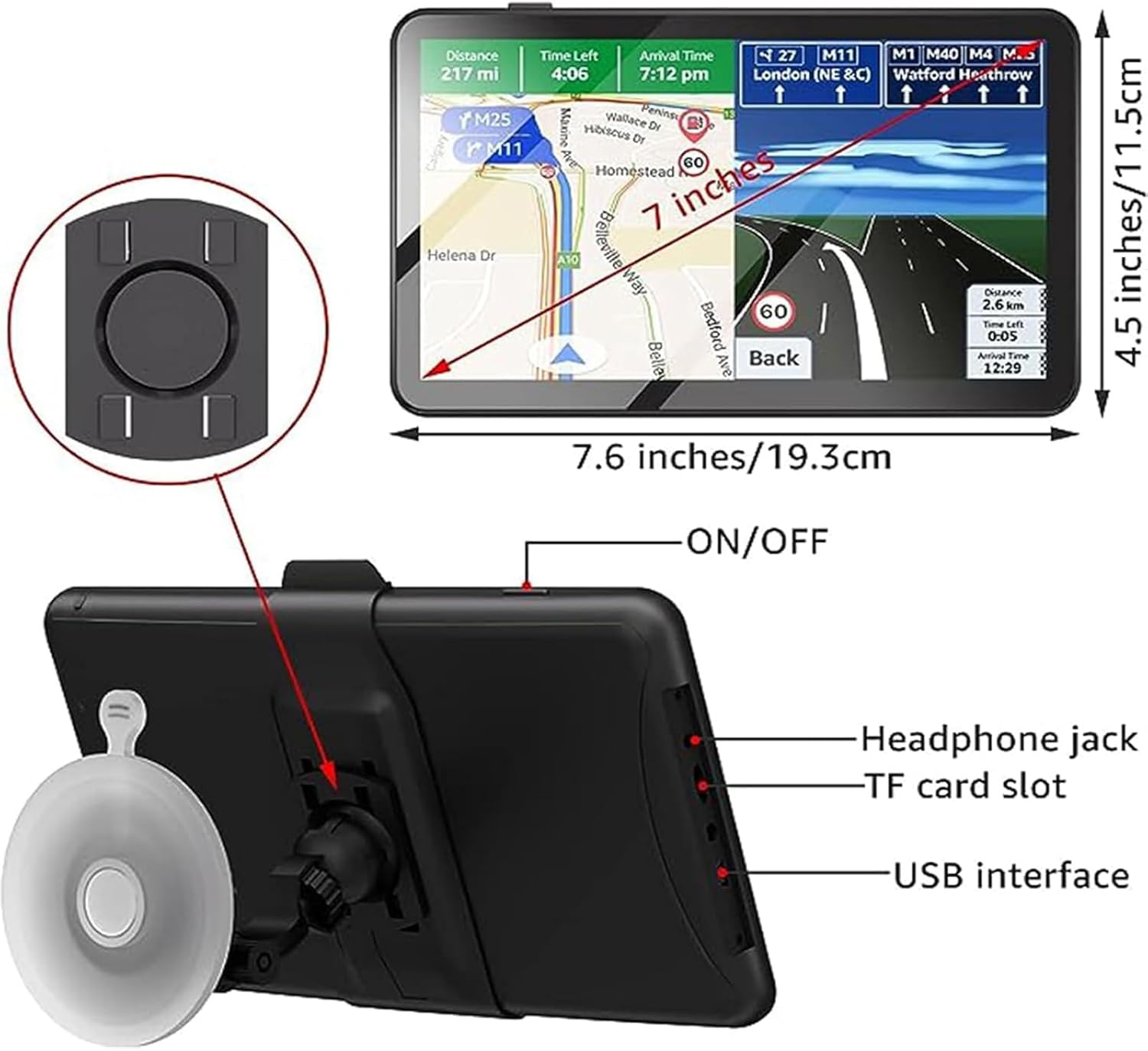
Image 3.1: Rear view of the GPS unit highlighting the ON/OFF button, headphone jack, TF card slot, and USB interface.

Image 3.2: Screen display showing multifunction smart GPS navigation features including traffic light reminders, speed limit reminders, truck mode availability, and speed camera alerts.
Vehicle Modes
The GPS Navigator supports 7 vehicle modes: car, truck, bus, taxi, bicycle, emergency, and pedestrian. When selecting a vehicle mode, you can input specific vehicle data such as length, width, height, and weight for customized routing.
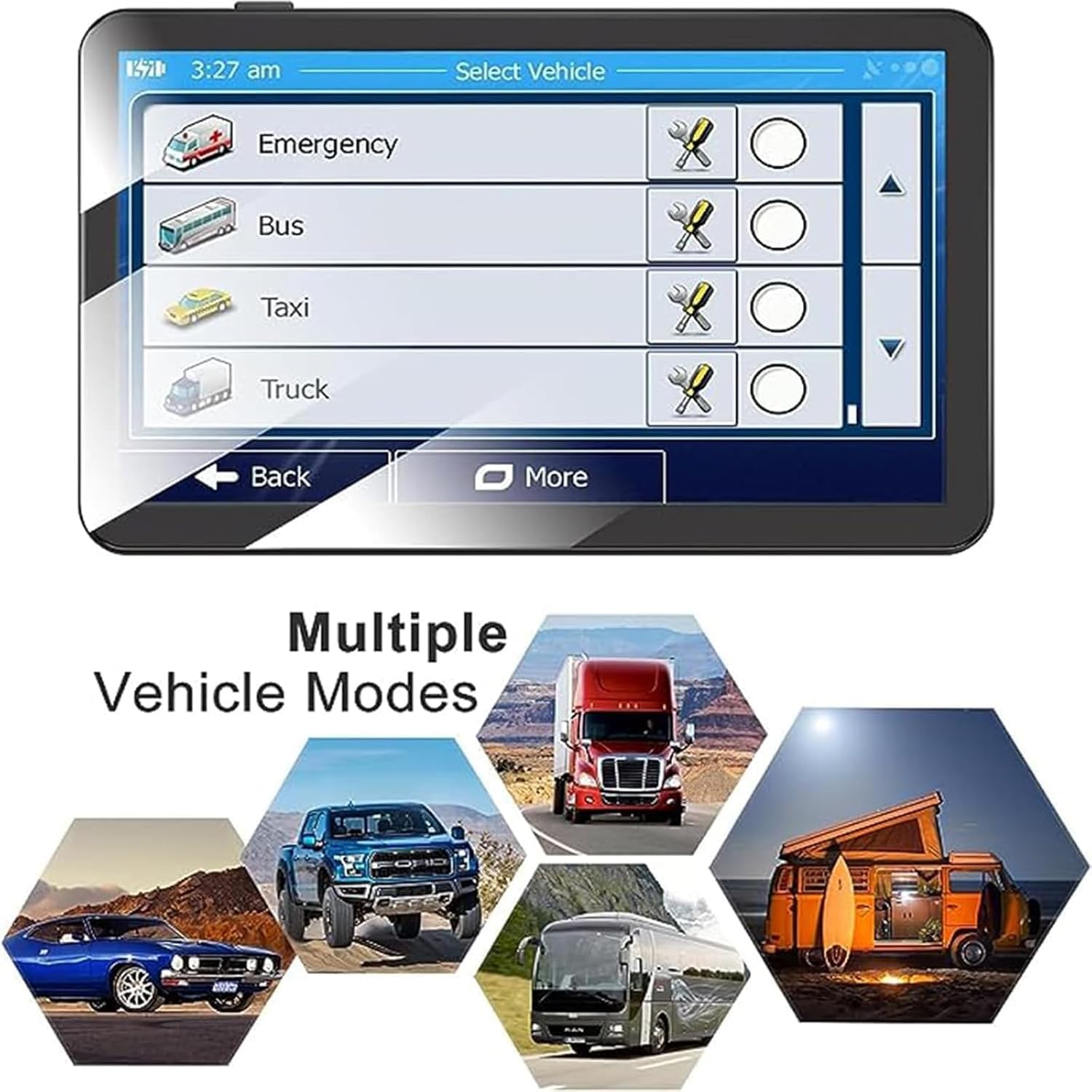
Image 3.3: The GPS unit's screen showing the selection interface for multiple vehicle modes.
4. Maintenance
Cleaning the Device
To maintain the clarity of the 2.5D touchscreen and the device's exterior, use a soft, lint-free cloth. Dampen the cloth slightly with water if necessary. Avoid using harsh chemicals or abrasive materials.

Image 4.1: Close-up of the 2.5D curved screen, emphasizing its design and viewing angles.
Map Updates
The LONGRUF GPS Navigator offers lifetime free map updates. To update your maps, please contact customer support for the download address and guide. Downloadable maps for regions like Europe, Australia, and South America are available upon request.

Image 4.2: Illustration of the map update process, showing a laptop connected to the GPS device for downloading and installing new map data.
5. Troubleshooting
Common Issues and Solutions
- No GPS Signal: Ensure the device has a clear view of the sky. Move away from tall buildings or dense foliage.
- Screen Unresponsive: Perform a soft reset by pressing the reset button (if available) or holding the power button for 10-15 seconds.
- Incorrect Route Calculation: Verify that the correct vehicle mode is selected and that map data is up to date.
- Battery Drains Quickly: Ensure the device is properly connected to the car charger during use.
6. Specifications
| Feature | Specification |
|---|---|
| Model Number | G916 |
| Display Size | 7 Inches |
| Product Dimensions | 0.63 x 0.06 x 0.37 inches |
| Item Weight | 1.94 pounds |
| Batteries | 1 Lithium Polymer battery (included) |
| Battery Life | 30 minutes |
| Connectivity Technology | USB |
| Special Features | Custom Truck Routing, Free Lifetime Update Maps, Lane Assist, Road Warnings, Touchscreen |
| Vehicle Service Type | Truck, Car, Bus, Pedestrian, Cab, Bicycle, Emergency |
| Mounting Type | Dashboard Mount |
7. Warranty and Support
Warranty Information
This LONGRUF GPS Navigator G916 is covered by a 1-year manufacturer's warranty from the date of purchase. This warranty covers defects in materials and workmanship under normal use.
Customer Support
For technical assistance, warranty claims, or map update inquiries, please contact LONGRUF customer support. Refer to the product packaging or the official LONGRUF website for current contact details.