
Product Overview
The LuminFan Flush Mount Ceiling Fan (Model FS-8836X-46-01) combines efficient air circulation with integrated LED lighting. Designed for low-profile installation, this 46-inch fan features a powerful DC motor for quiet and energy-efficient operation. It is suitable for indoor and covered outdoor spaces such as bedrooms, living rooms, patios, gazebos, and balconies. The fan includes a remote control for convenient adjustment of fan speed, light brightness, and other functions.
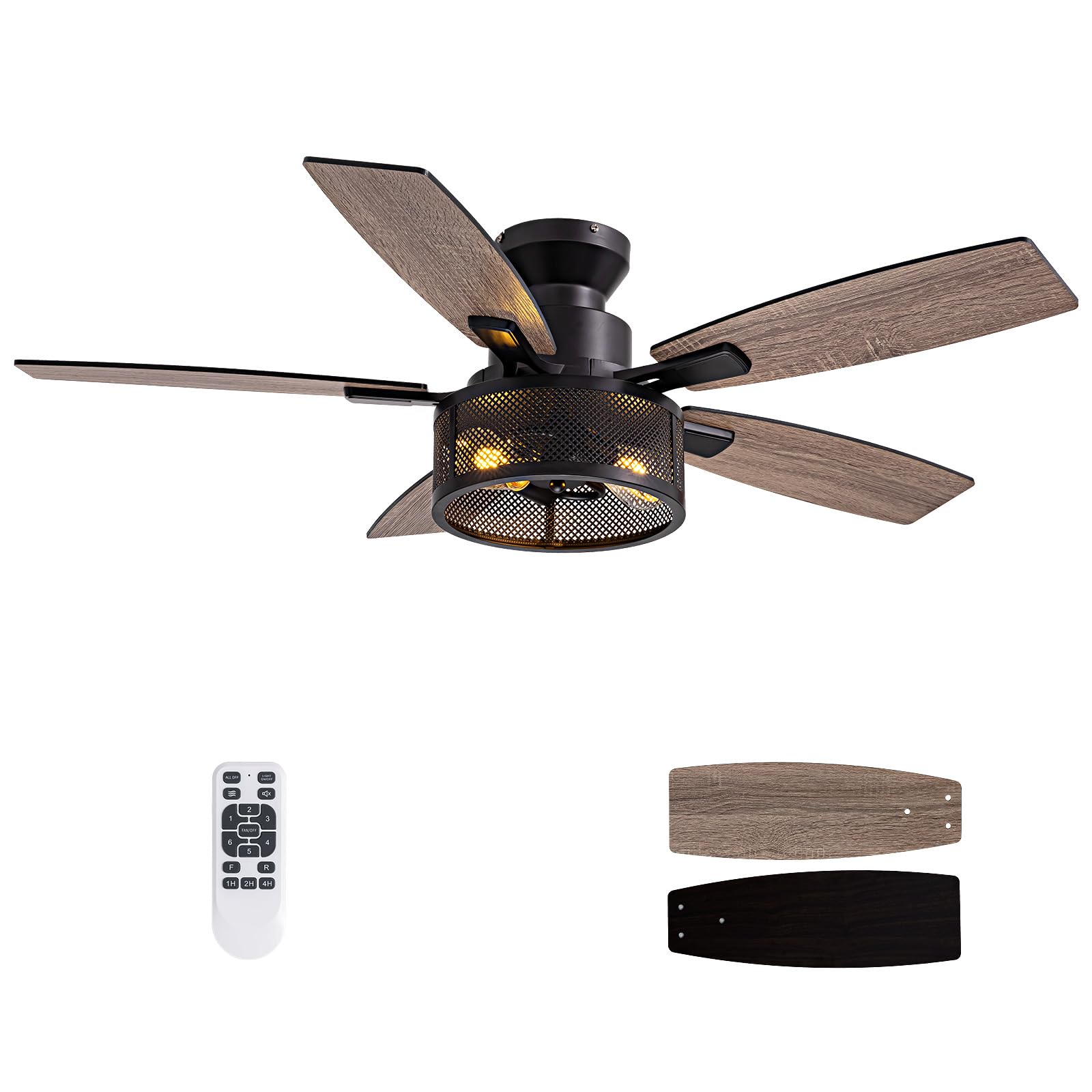
Image: LuminFan 46-inch Flush Mount Ceiling Fan, showcasing its design and integrated lighting.
Safety Information
Please read and understand all instructions before beginning installation. Improper installation may result in electric shock, fire, or personal injury.
- Ensure the power is disconnected at the circuit breaker before installation or servicing.
- All wiring must be in accordance with national and local electrical codes.
- The mounting structure must be capable of supporting the fan's weight (approximately 12 pounds).
- Do not bend the blade holders during installation or cleaning.
- Maintain a minimum clearance of 7 feet from the floor to the fan blades.
- Avoid direct exposure of the fan to rain if installed in covered outdoor areas.
Package Contents
Verify that all components are present and undamaged before beginning assembly.

Image: Exploded view of the fan components, including blades, motor housing, light kit, and remote.
- Ceiling Fan Motor Assembly
- Fan Blades (5) - Reversible (Oak/Black)
- Blade Holders (5)
- Light Kit Assembly (Caged design with 2 E26 bulb bases)
- Remote Control with Receiver
- Mounting Hardware (screws, wire nuts, washers, downrod)
- Instruction Manual
Specifications
| Feature | Detail |
|---|---|
| Brand | LuminFan |
| Model Number | FS-8836X-46-01 |
| Color | Blacksmith - Flush Mount |
| Product Dimensions | 46"D x 46"W x 14"H |
| Blade Length | 46 Inches |
| Number of Blades | 5 |
| Blade Material | Wood |
| Motor Type | DC Motor |
| Wattage | 60 watts (Max) |
| Light Type | LED (E26 bulb base, bulbs not included) |
| Control Type | Remote Control |
| Indoor/Outdoor Usage | Indoor / Covered Outdoor |
| Item Weight | 12 Pounds |
Setup and Installation
Follow these steps for proper installation of your LuminFan ceiling fan. It is recommended to have a qualified electrician perform the installation if you are unsure about any steps.
- Prepare for Installation: Turn off power at the circuit breaker. Ensure the electrical box is securely mounted and rated for ceiling fan support.
- Assemble Motor Housing: Attach the downrod to the motor housing, ensuring all screws are tightened.
- Mount Bracket: Secure the mounting bracket to the electrical box in the ceiling.
- Wiring Connections: Connect the fan's electrical wires to the household wiring according to the wiring diagram in the manual. Ensure all connections are secure with wire nuts.
- Attach Fan to Bracket: Carefully lift the fan assembly and hang it on the mounting bracket.
- Install Blades: Attach each fan blade to its blade holder, then secure the blade holder to the motor housing. Ensure screws are tight. Note: Blades are reversible (Oak/Black).
- Install Light Kit: Connect the light kit wiring to the fan motor wiring. Secure the light kit to the bottom of the fan motor.
- Install Light Bulbs: Screw in two E26 base light bulbs (not included) into the light kit sockets.
- Restore Power: Turn on power at the circuit breaker.
Video: Detailed installation guide for the LuminFan 46-inch Flush Mount Caged Ceiling Fan (Model 8836X).
Operating Instructions
Your LuminFan ceiling fan comes with a remote control for convenient operation. Ensure the remote has working batteries.

Image: Remote control for the LuminFan ceiling fan, showing various buttons for fan and light control.
- Power On/Off: Press the 'FAN/OFF' button to turn the fan on or off.
- Fan Speed: Select from 6 fan speeds using buttons 1-6.
- Light Control: Press 'LIGHT ON/OFF' to toggle the light.
- Reverse Function: Use the 'F' (Forward) and 'R' (Reverse) buttons to change blade direction. Forward mode (downward airflow) is ideal for summer cooling. Reverse mode (upward airflow) helps circulate warm air in winter.
- Timer Function: Set the fan to turn off automatically after 1, 2, or 4 hours using the '1H', '2H', '4H' buttons.
- Natural Wind Mode: Activate the natural wind mode for varying fan speeds that simulate a natural breeze.
- Quiet Operation: The DC motor ensures quiet operation, ideal for bedrooms and living rooms.
Video: Demonstration of the LuminFan Caged Ceiling Fan's features and remote control functions.
Maintenance
Regular maintenance helps ensure the longevity and optimal performance of your ceiling fan.
- Cleaning: Periodically clean the fan blades and motor housing with a soft, damp cloth. Do not use abrasive cleaners or solvents.
- Tighten Fasteners: Check all screws and fasteners on the fan and mounting hardware periodically to ensure they are secure.
- Blade Balancing: If the fan wobbles, check that all blades are securely attached and balanced. A balancing kit (not included) may be used if necessary.
- Light Bulbs: Replace light bulbs as needed. Ensure power is off before replacing bulbs.
Troubleshooting
If you experience issues with your fan, refer to the following common troubleshooting steps:
- Fan Does Not Operate:
- Check if power is supplied to the fan at the circuit breaker.
- Ensure all wire connections are secure.
- Verify remote control batteries are fresh and correctly inserted.
- Confirm the remote receiver is properly installed and connected.
- Light Does Not Work:
- Check if light bulbs are securely screwed in and not burnt out.
- Verify light kit wiring connections.
- Fan Wobbles:
- Ensure all blade screws are tightened.
- Check that the mounting bracket is securely fastened to the electrical box.
- Verify that the fan is properly hung on the mounting bracket.
- Excessive Noise:
- Ensure all screws are tight. Loose screws can cause rattling.
- Check for any obstructions in the fan's path.
- Confirm the fan is properly balanced.
Warranty and Support
For warranty information or technical support, please refer to the contact details provided in your product packaging or visit the official LuminFan website. Keep your purchase receipt for warranty claims.