
Important Safety Information
WARNING: Read the ENTIRE instruction manual to become familiar with the features of the product before operating. Failure to operate the product correctly can result in damage to the product, personal property and cause serious injury. This is a sophisticated hobby product. It must be operated with caution and common sense and requires some basic mechanical ability. Failure to operate this Product in a safe and responsible manner could result in injury or damage to the product or other property. This product is not intended for use by children without direct adult supervision. Do not use with incompatible components or alter this product in any way outside of the instructions provided by Horizon Hobby, LLC. The product manual contains instructions for safety, operation and maintenance. It is essential to read and follow all the instructions and warnings in the manual, prior to assembly, setup or use, in order to operate correctly and avoid damage or serious injury.
Product Overview
The Axial SCX10 III Base Camp 4X4 Rock Crawler is a highly capable and durable remote-controlled vehicle designed for challenging off-road terrain. This Ready-to-Run (RTR) model comes factory assembled, providing an excellent balance of performance and scale realism.
Key Features
- Strong SCX10 III steel C-channel chassis
- High clearance AR45 portal axles
- Durable LCXU transmission
- Factory assembled and ready-to-run
- Loaded with scale accessories
What's in the Box
- (1) Axial SCX10 III Base Camp 1/10 Scale 4X4 RTR
- (1) Axial Slickrock 35T 540 Brushed Motor (AXI-1376)
- (1) Spektrum SLT3 3-Channel SLT Radio (SPMRSLT320)
- (1) Spektrum SR515 DSMR 5-Channel Receiver (SPMSR515)
- (1) Spektrum S664 15kg WP Servo 25T (SPMS664)
- (1) Spektrum 40A Waterproof Brushed ESC (SPMXSE1040)
- (4) AA Transmitter Batteries
- (1) Instruction Manual
Needed to Complete
The Axial SCX10 III Base Camp requires a suitable battery and charger, which are not included in the package. Please ensure you acquire these items before operation.

Illustration of a battery and charger, indicating these are required for operation.

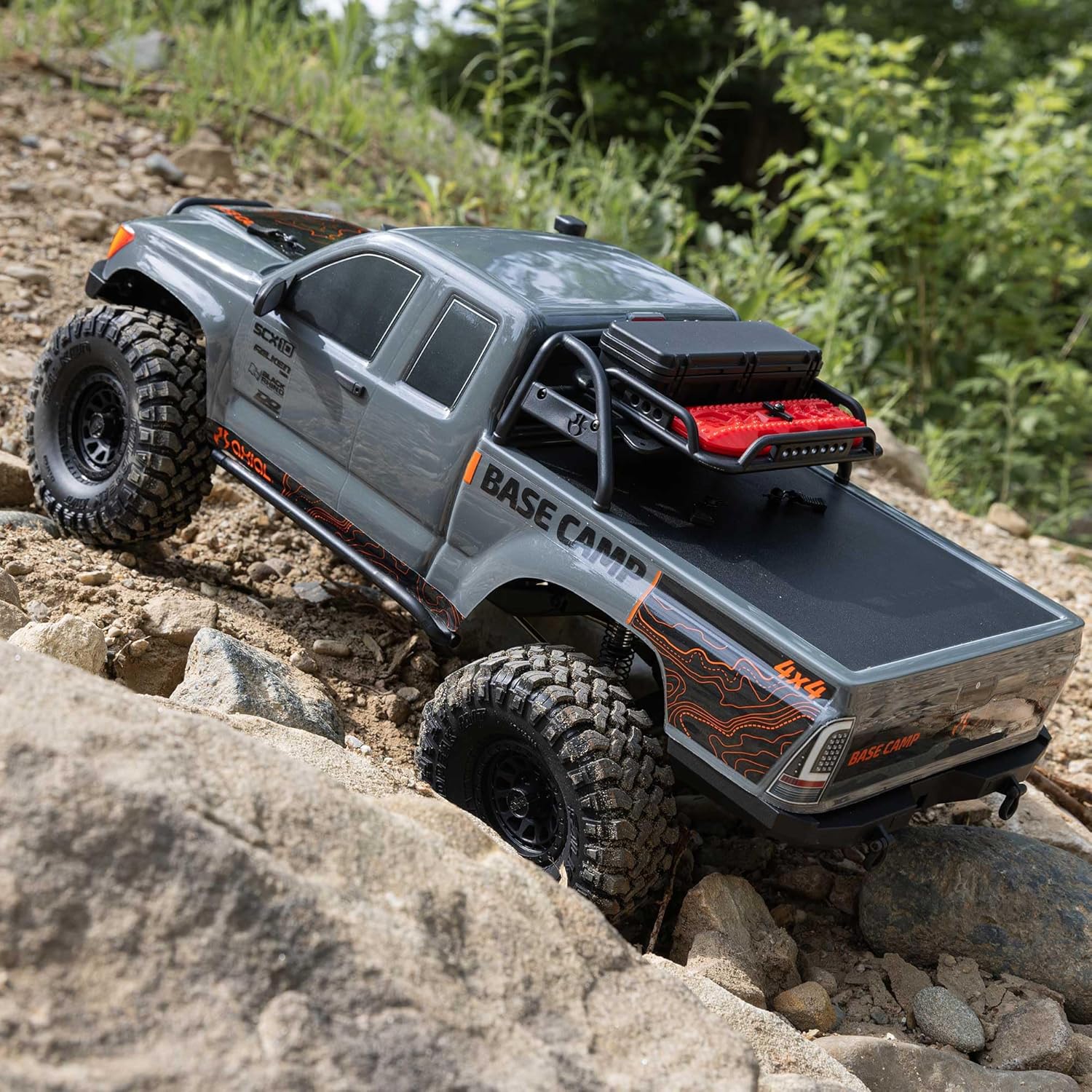
The Axial SCX10 III Base Camp 4X4 Rock Crawler, ready for action on rugged terrain.
Setup
1. Battery Installation
- Ensure the vehicle and transmitter are turned OFF.
- Locate the battery tray on the vehicle chassis.
- Securely place your charged battery into the tray.
- Connect the battery to the ESC (Electronic Speed Controller) using the appropriate connector.
2. Remote Control Setup
- Install the four (4) AA batteries into the Spektrum SLT3 transmitter.
- Turn ON the transmitter. The LED indicator should light up.
- Turn ON the vehicle's power switch. The vehicle's receiver should automatically bind with the transmitter. If not, refer to the binding instructions in the full manual.
3. Body Installation
- Carefully align the body with the chassis.
- Secure the body using the provided body clips or mounting system.

Side view of the Axial SCX10 III Base Camp, highlighting its robust design and high ground clearance.
Operating Instructions
Once the battery is charged and installed, and the remote control is set up, you are ready to operate your Axial SCX10 III Base Camp.
Basic Controls
- Steering: Use the steering wheel on the transmitter to control the direction of the vehicle (left/right).
- Throttle: Use the trigger on the transmitter to control forward and reverse movement. Pull the trigger for forward, push for reverse/brake.
Driving Tips for Rock Crawling
- Start slowly and learn the vehicle's response to inputs.
- Utilize the low-speed control for precise maneuvering over obstacles.
- Observe the terrain and plan your lines to maximize traction and avoid rollovers.
- The high clearance AR45 portal axles and durable LCXU transmission are designed for extreme articulation and obstacle negotiation.
Front view of the Axial SCX10 III Base Camp, ready to tackle challenging terrain.
Product in Action
A short video showcasing the Axial SCX10 III Base Camp 4X4 Rock Crawler in action, demonstrating its capabilities.
Maintenance
Regular maintenance will ensure the longevity and optimal performance of your Axial SCX10 III Base Camp.
1. General Cleaning
- After each use, especially in dirty or wet conditions, clean the vehicle thoroughly.
- Use a soft brush or compressed air to remove dirt and debris from the chassis, suspension, and drivetrain.
- Wipe down the body with a damp cloth.
2. Component Inspection
- Regularly inspect all screws, nuts, and bolts for tightness. Tighten as necessary.
- Check the suspension components (shocks, links) for any damage or excessive wear.
- Inspect the tires for cuts or punctures and ensure they are securely mounted to the wheels.
- Examine the drivetrain components (gears, driveshafts) for debris or signs of wear.

Detailed view of the Axial SCX10 III Base Camp chassis, revealing its robust internal components.
Troubleshooting
If you encounter issues with your Axial SCX10 III Base Camp, refer to the following common troubleshooting steps:
- No Power: Ensure the battery is fully charged and correctly connected. Check the vehicle's power switch and the transmitter's power switch.
- Unresponsive Controls: Verify that the transmitter batteries are fresh and correctly installed. Re-bind the transmitter and receiver if necessary. Check for any loose wiring connections.
- Poor Performance: Inspect the drivetrain for obstructions or damaged gears. Check the suspension for proper movement and ensure no components are binding. Ensure tires are clean and have good grip.
For more detailed troubleshooting, please consult the full instruction manual or contact customer support.
Specifications
| Feature | Detail |
|---|---|
| Product Dimensions | 24.5 x 12.3 x 13.6 inches |
| Item Weight | 11.48 pounds |
| ASIN | B0DN3DDDK6 |
| Item Model Number | AXI-1375T2 |
| Manufacturer Recommended Age | 14 - 16 years |
| Manufacturer | Axial |
| Date First Available | November 14, 2024 |
Warranty and Support
For warranty information, detailed support, or to purchase replacement parts, please visit the official Axial website or contact their customer service department. Ensure you have your model number (AXI-1375T2) ready for faster assistance.
You can also find additional resources and community forums for Axial products online.
