
1. Introduction
This manual provides essential information for the safe and effective use of the qrcamule KEYENCE FS-V21R Sensor Amplifier. Please read this manual thoroughly before installation and operation, and retain it for future reference.
The FS-V21R is a high-performance fiber optic sensor amplifier designed for industrial applications, offering precise detection capabilities. It is compatible with various fiber optic cables (sold separately) to suit diverse sensing requirements.
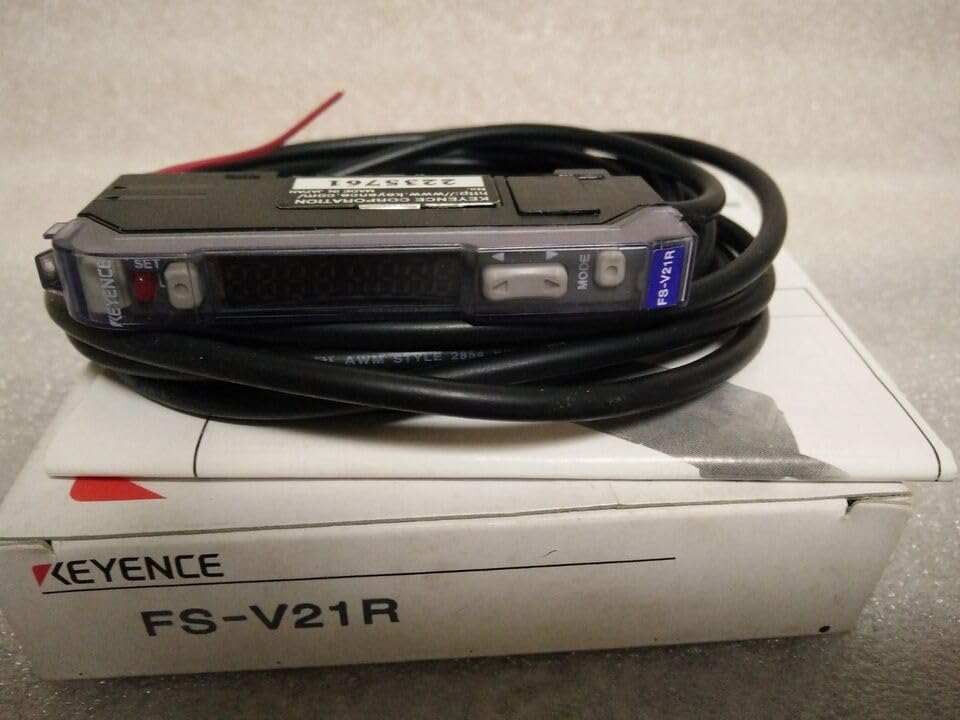
Figure 1: The KEYENCE FS-V21R Sensor Amplifier shown with its coiled cable and original packaging. The device features a digital display, 'SET' and 'MODE' buttons, and a status indicator light.
2. Setup and Installation
Follow these steps for proper installation of the FS-V21R Sensor Amplifier:
- Mounting: Securely mount the amplifier in a stable location, away from excessive vibration, heat, or moisture. Ensure adequate ventilation.
- Power Connection: Connect the power supply wires to the appropriate terminals. Refer to the wiring diagram (if available with the physical product) for correct polarity and voltage requirements. The device typically operates on a DC power supply.
- Fiber Optic Cable Connection: Insert the fiber optic cables into the designated ports on the amplifier. Ensure a firm and secure connection.
- Output Wiring: Connect the output wires to your control system or indicator device. Verify all connections are correct before applying power.
Caution: Ensure power is disconnected before making any wiring connections to prevent electrical shock or damage to the device.
3. Operating Instructions
The FS-V21R Sensor Amplifier is designed for user-friendly operation. Here are the basic steps:
- Power On: Apply power to the amplifier. The digital display should illuminate, and the status indicator light may show an initial state.
- Initial Setup (Sensitivity Adjustment):
- Place the target object in the desired sensing position.
- Press the SET button (visible on the device, near the red indicator light) to initiate auto-tuning or sensitivity adjustment. The display may show a value indicating the current sensitivity.
- Remove the target object and press SET again, if required by the specific sensing mode, to set the background.
- The amplifier will automatically adjust its sensitivity for optimal detection.
- Mode Selection: Use the MODE button (visible on the device) to cycle through different operating modes or settings. Refer to the full product datasheet for detailed descriptions of each mode.
- Monitoring: Observe the digital display for real-time sensing values and the status indicator light for detection status.
For advanced settings and specific application configurations, consult the detailed technical documentation provided by KEYENCE for the FS-V21R model.
4. Maintenance
To ensure long-term performance and reliability of your FS-V21R Sensor Amplifier, follow these maintenance guidelines:
- Cleaning: Regularly clean the amplifier's housing and fiber optic cable ends with a soft, dry cloth. Avoid using abrasive cleaners or solvents. Ensure fiber optic cable ends are free from dust and debris for optimal light transmission.
- Inspection: Periodically inspect all wiring and cable connections for signs of wear, damage, or loose contacts.
- Environment: Ensure the operating environment remains within the specified temperature and humidity ranges to prevent damage.
Warning: Do not attempt to open or repair the amplifier yourself. Refer all servicing to qualified personnel.
5. Troubleshooting
If you encounter issues with your FS-V21R Sensor Amplifier, consider the following common troubleshooting steps:
| Problem | Possible Cause | Solution |
|---|---|---|
| No power/Display off | Incorrect wiring, no power supply, faulty cable. | Check power connections and supply voltage. Ensure all wires are securely connected. |
| Unstable detection | Incorrect sensitivity setting, dirty fiber optic cable ends, environmental interference. | Re-adjust sensitivity using the SET button. Clean fiber optic cable ends. Check for sources of interference. |
| No output signal | Output wiring error, amplifier not detecting target, faulty output. | Verify output wiring. Ensure the amplifier is correctly detecting the target (check status indicator). |
If the problem persists after attempting these solutions, contact the manufacturer's technical support.
6. Specifications
Key specifications for the qrcamule KEYENCE FS-V21R Sensor Amplifier:
- Model: FS-V21R
- Manufacturer: qrcamule
- ASIN: B0DN1W796M
- Manufacturer Reference: ELE11-24-14D30
- Date First Available: November 14, 2024
- Note: For detailed electrical, environmental, and performance specifications, please refer to the official KEYENCE FS-V21R datasheet.
7. Warranty and Support
Information regarding the warranty period and specific support procedures for the qrcamule KEYENCE FS-V21R Sensor Amplifier is not provided within this manual. For warranty claims, technical assistance, or service inquiries, please contact the seller or the manufacturer directly.
You may find additional support resources and contact information on the official KEYENCE website or through your product supplier.