Introduction
This manual provides detailed instructions for the installation, operation, and maintenance of your Strex Wired Reversing Camera Set. Designed for a wide range of vehicles including campers, vans, trucks, and buses, this system enhances driving safety and simplifies parking. The set features a 7-inch HD 1080P monitor, two cameras with 18-LED night vision up to 15 meters, a 120° wide-angle lens, and an IP69 waterproof rating, ensuring reliable performance in various conditions.

Image: The Strex Wired Reversing Camera Set, showing the 7-inch monitor and two compact cameras.
Setup and Installation
The Strex Wired Reversing Camera Set is designed for straightforward installation, typically completed within minutes. Ensure your vehicle has a 12V/24V DC power connection.
Package Contents
Before beginning installation, verify all components are present:
- 1x 7-inch Display Monitor
- 2x HD Cameras
- 2x 15-meter Power Cables
- 1x Sturdy Mounting Bracket for Monitor
- Accessories (screws, adhesive pads, remote control)
- 1x User Manual

Image: All components included in the Strex Reversing Camera Set package.
Installation Steps
- Mount the Monitor: Use the provided sturdy mounting bracket to securely attach the 7-inch display monitor to your dashboard or desired location. Ensure the monitor is positioned for optimal visibility without obstructing your view of the road.
- Position the Cameras: Install the two cameras at the rear of your vehicle. The cameras are designed to be discreet and durable. The camera angle can be easily adjusted by loosening the screw on the bracket.
- Connect Power Cables: Connect the cameras and monitor to your vehicle's 12V/24V DC power supply using the included 15-meter power cables. The wired connection ensures optimal and interference-free signal transmission.
- Route Cables: Carefully route all cables to prevent damage and ensure a neat installation.
- Test the System: Once all connections are made, turn on your vehicle and test the camera system to ensure both cameras are displaying correctly on the monitor.

Image: Illustration of the camera system installed on a vehicle, suitable for various vehicle types.
Operating Instructions
The Strex Reversing Camera Set provides clear, real-time visuals to assist with reversing and parking.
Monitor Functions
- 7-inch HD Display: The large 7-inch screen with 1080P resolution provides a clear and detailed view of the area behind your vehicle.
- Dual Camera View: The system supports simultaneous viewing from both cameras on the screen, allowing for comprehensive rear visibility.
- Real-time Response: Experience real-time video feedback without delay, crucial for safe maneuvering.
- Parking Lines: The monitor features adjustable parking lines that can be enabled or disabled according to your preference, aiding in precise parking.
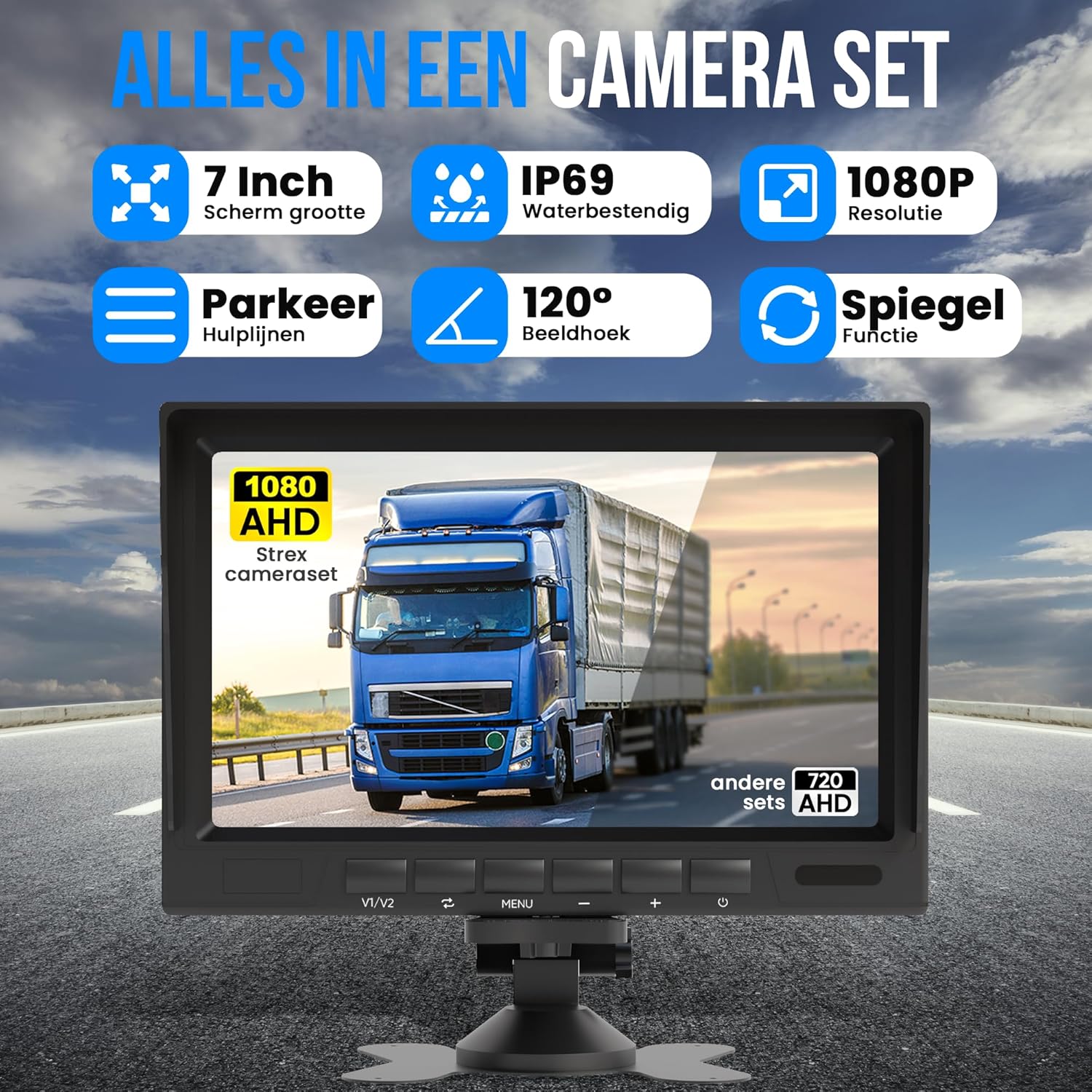
Image: Overview of key features of the Strex Camera Set.
Camera Features
- 120° Wide-Angle Lens: The wide-angle lens provides an expansive view, covering up to 90% of the area behind your vehicle, minimizing blind spots.
- 18-LED Night Vision: Equipped with 18 infrared LEDs, the cameras offer excellent night vision capabilities, allowing you to see up to 15 meters in low-light conditions.
- IP69 Waterproof: The cameras are rated IP69 waterproof, ensuring reliable operation in all weather conditions, including heavy rain and extreme temperatures.

Image: Demonstrating the extra wide 120-degree viewing angle of the camera.

Image: Display showing night mode vs. day mode and parking assist lines on vs. off.
Maintenance
The Strex Reversing Camera Set is built for durability and requires minimal maintenance due to its robust design and IP69 waterproof rating.
- Cleaning: Periodically clean the camera lenses and monitor screen with a soft, damp cloth to ensure clear visibility. Avoid abrasive cleaners that could scratch the surfaces.
- Cable Inspection: Occasionally inspect the power cables for any signs of wear or damage. Ensure all connections remain secure.
- Weather Resistance: The IP69 rating means the cameras are highly resistant to dust and water ingress, making them suitable for harsh weather conditions without special protection.

Image: The IP69 waterproof feature of the camera, showing its resilience to water.
Troubleshooting
If you encounter any issues with your Strex Reversing Camera Set, refer to the following common troubleshooting tips:
- No Image on Screen:
- Check all power connections to the monitor and cameras. Ensure they are securely plugged in and receiving power.
- Verify the vehicle's power supply (12V/24V DC) is active.
- Ensure the correct video input channel is selected on the monitor if applicable.
- Poor Image Quality / Blurred Image:
- Clean the camera lenses with a soft, lint-free cloth. Dirt or condensation can obscure the view.
- Check for any physical damage to the camera lens or cables.
- Ensure the camera angle is adjusted correctly and not pointing at an obstruction.
- No Night Vision:
- Verify that the infrared LEDs on the cameras are functioning in low light conditions.
- Ensure there are no obstructions blocking the IR LEDs.
- Parking Lines Not Appearing/Disappearing:
- Consult the monitor's controls or remote control (if provided) to toggle the parking lines feature on or off.
If problems persist after following these steps, please contact Strex customer support for further assistance.
Specifications
Monitor Specifications
| Feature | Detail |
|---|---|
| Screen Size | 7 inches (18 cm) |
| Resolution | 1920x1080 (1080P HD) |
| Display Technology | LCD |
| Voltage | 12V/24V DC |
Camera Specifications
| Feature | Detail |
|---|---|
| Infrared LEDs | 18 pieces |
| Night Vision Distance | Up to 15 meters |
| Waterproof Rating | IP69 |
| Wide-Angle Lens / Viewing Angle | 120° |
| Voltage | 12V/24V DC |
| Housing Material | Aluminum |
| Mounting Bracket Material | Metal |
| Dimensions (Camera) | Approx. 72mm (L) x 60mm (W) x 45mm (H) |

Image: Detailed view of the compact camera with dimensions and 360-degree rotation.
Warranty and Support
For warranty information, please refer to the documentation included with your purchase or contact the retailer where the product was acquired. Strex is committed to providing high-quality products and customer satisfaction.
If you require technical support or have questions not covered in this manual, please visit the official Strex website or contact their customer service department. Keep your purchase receipt handy as proof of purchase may be required for warranty claims.


