
EUQQ Q10-Blue
Contents
EUQQ Wireless Earbuds Bluetooth 5.4 Headphones User Manual
Model: Q10-Blue
Introduction
Thank you for choosing EUQQ Wireless Earbuds. These earbuds feature advanced Bluetooth 5.4 technology, Active Noise Cancellation (ANC), CVC 8.0 noise-cancelling for calls, and IPX7 waterproofing, designed to provide a superior audio experience for music, calls, and sports activities. This manual will guide you through the setup, operation, and maintenance of your new earbuds.

Image: The EUQQ Wireless Earbuds in blue, alongside their charging case.
What's in the Box
Please check the contents of your package to ensure all items are present:
- 2 x EUQQ Bluetooth 5.4 Earbuds
- 1 x Charging Case
- 1 x Type-C Charging Cable
- 3 x Pairs of S/M/L Ear Caps (Ear Tips)
- 1 x User Manual (this document)
- 1 x Product Box

Image: A visual representation of the earbuds, charging case, charging cable, and ear tips included in the package.
Setup
1. Charging the Earbuds and Case
Before first use, fully charge the earbuds and the charging case. The charging case features a power display to indicate battery levels.
- Connect the Type-C charging cable to the charging port on the case and a USB power source.
- The LED display on the case will show the charging progress.
- Place the earbuds into the charging case. They will automatically begin charging.
- A full charge for the earbuds takes approximately 1 hour. The case provides up to 36 hours of total playtime.

Image: The earbuds inside their charging case, connected via a USB-C cable, with the digital power display visible.
2. Initial Pairing
Follow these steps to pair your earbuds with your device for the first time:
- Ensure the earbuds are charged and inside the charging case.
- Open the charging case lid. The earbuds will automatically power on and enter pairing mode.
- On your device (smartphone, tablet, etc.), go to Bluetooth settings and turn Bluetooth on.
- Search for available devices and select "YYK-Q10" from the list.
- Once connected, you will hear a confirmation tone, and the earbuds will be ready for use.

Image: The earbuds in their open charging case, with a smartphone displaying Bluetooth settings and showing 'YYK-Q10' as connected.
3. Auto-Connect
After the initial pairing, the earbuds will automatically connect to the last paired device when you open the charging case lid, provided Bluetooth is enabled on your device.

Image: A visual representation of the upgraded Bluetooth 5.4 technology, highlighting increased connection range, stability, and transfer speed.
Operating Instructions
Touch Controls
The earbuds feature intuitive touch controls on their stems. A small click sound confirms touch input.
| Action | Function |
|---|---|
| Single Tap (Left/Right Earbud) | Play/Pause Music, Answer/End Call |
| Double Tap (Right Earbud) | Next Track |
| Double Tap (Left Earbud) | Previous Track |
| Triple Tap (Right Earbud) | Volume Up |
| Triple Tap (Left Earbud) | Volume Down |
| Long Press (2 seconds) | Activate Voice Assistant / Reject Call |
| Long Press (3 seconds) | Switch between ANC On / ANC Off / Transparency Mode |
Active Noise Cancellation (ANC) and Transparency Mode
The earbuds feature dual ANC technology to reduce ambient noise and a Transparency Mode to allow you to hear your surroundings.
- ANC On: Provides an immersive music experience by actively canceling external noise.
- Transparency Mode: Allows you to hear your surrounding environment clearly without removing the earbuds, enhancing safety and awareness.
- Switching Modes: Long press the touch button on either earbud for approximately 3 seconds to cycle through ANC On, ANC Off, and Transparency Mode.
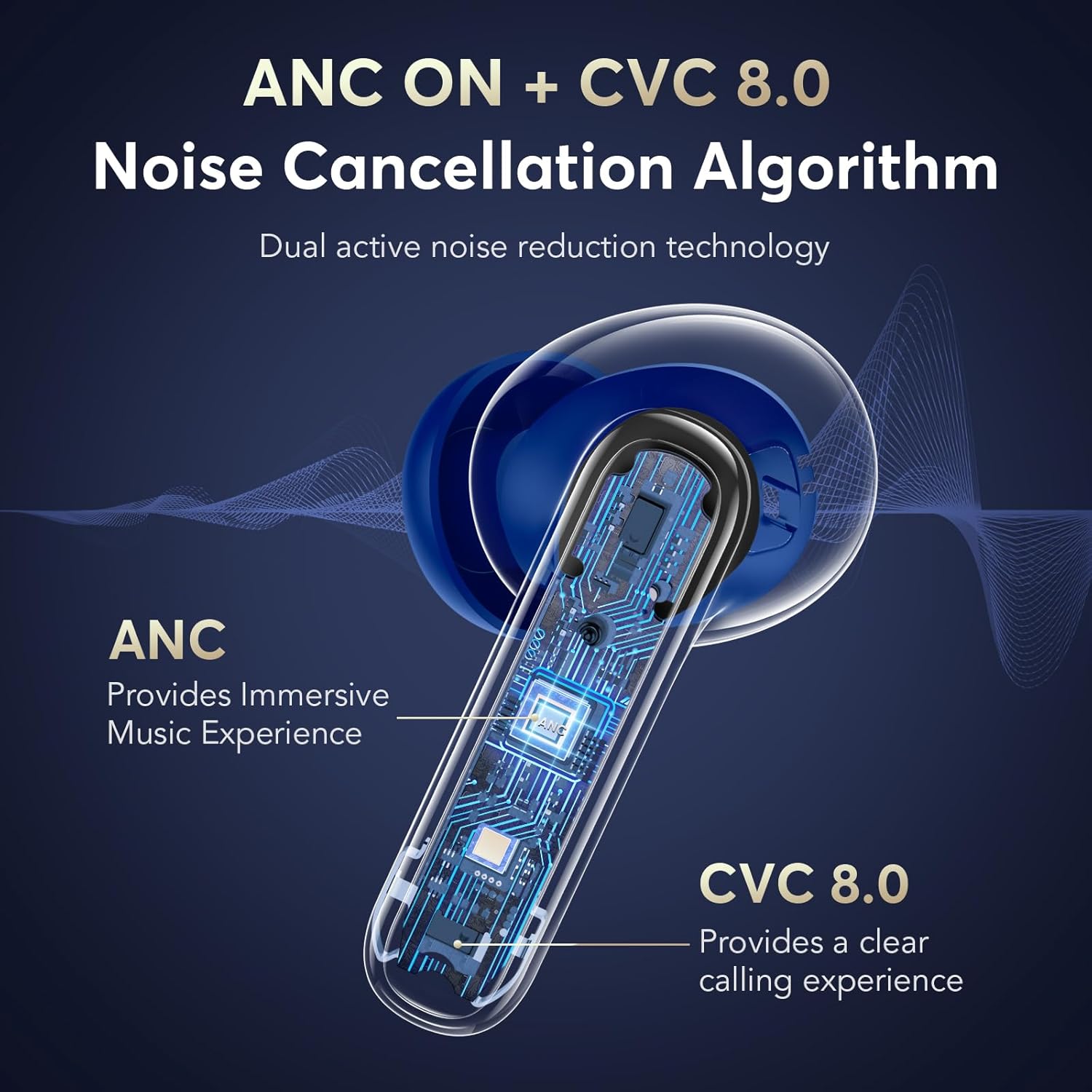
Image: An illustration showing the internal components of the earbud, highlighting the ANC and CVC 8.0 noise cancellation features.

Image: A person wearing the earbuds, demonstrating the use of Transparency Mode to hear surrounding sounds like traffic or conversations.
Sound Quality and Calls
The earbuds are equipped with 13.0mm dynamic drivers for deep bass and HiFi sound quality. The built-in CVC 8.0 algorithm ensures clear call quality, even in noisy environments.
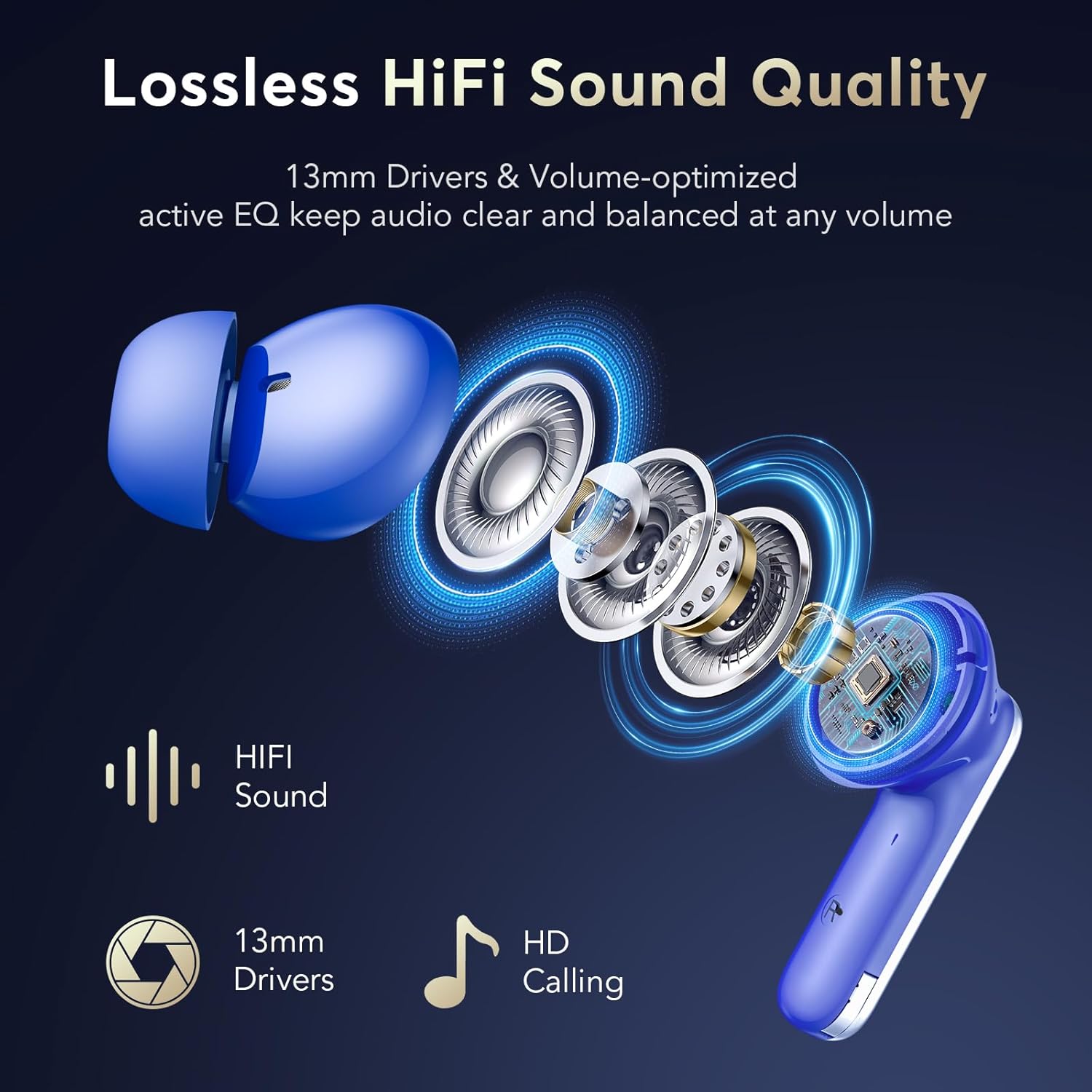
Image: An exploded view of the earbud's internal components, emphasizing the 13mm drivers and HiFi sound capabilities.
Maintenance
Cleaning
To maintain optimal performance and hygiene, regularly clean your earbuds and charging case:
- Use a soft, dry, lint-free cloth to wipe the earbuds and charging case.
- Gently remove any earwax or debris from the ear tips and speaker mesh using a small, clean brush or cotton swab.
- Do not use abrasive materials, solvents, or aerosol sprays.
Water Resistance
The earbuds are IPX7 waterproof, meaning they can withstand submersion in up to 1 meter of water for 30 minutes. This makes them suitable for workouts and rainy conditions. However, the charging case is not waterproof. Avoid exposing the charging case to water.

Image: A visual demonstrating the ergonomic fit of the earbuds and the different sizes of ear tips (S, M, L) for comfortable wear.
Troubleshooting
If you encounter any issues with your EUQQ Wireless Earbuds, please refer to the following common solutions:
| Problem | Possible Solution |
|---|---|
| Earbuds not pairing/connecting |
|
| Only one earbud working |
|
| Low volume or poor sound quality |
|
| Earbuds not charging |
|
| Call quality issues (robotic voice, cutting out) |
|
Specifications
| Feature | Detail |
|---|---|
| Model Name | Q10-Blue |
| Brand | EUQQ |
| Connectivity Technology | Wireless (Bluetooth) |
| Bluetooth Version | 5.4 |
| Bluetooth Range | Up to 15 Meters |
| Noise Control | Adaptive Noise Cancellation (ANC) |
| Microphone Technology | CVC 8.0 Noise-Cancelling |
| Audio Driver Type | Dynamic Driver |
| Audio Driver Size | 13 Millimeters |
| Playtime (Earbuds) | 6-7 hours (single charge) |
| Total Playtime (with Case) | Up to 36 hours |
| Charging Time (Earbuds) | Approx. 1 hour |
| Water Resistance Level | IPX7 (Earbuds only) |
| Control Type | Touch Control |
| Ear Placement | In Ear |
| Form Factor | In Ear |
| Material | Plastic |
| Item Weight | 4.2 ounces |
| Included Components | User Manual |
Warranty and Support
EUQQ products are designed for reliability and performance. For any questions, technical support, or warranty claims, please refer to the contact information provided with your purchase or visit the official EUQQ support website. Please retain your proof of purchase for warranty purposes.
For further assistance, you may contact the seller directly through the platform where the product was purchased.
Ask a question about this manual
Ask about setup, troubleshooting, compatibility, parts, safety, or missing instructions. Manuals+ will review the question and use this page’s manual context to help answer it.