
AODK OKTB01081101001JP
AODK L-Shaped Gaming Desk with RGB Lighting and Power Outlets (120cm Width, White)
Instruction Manual - Model: OKTB01081101001JP
1. Introduction
Thank you for purchasing the AODK L-Shaped Gaming Desk. This manual provides essential information for the safe assembly, operation, and maintenance of your new desk. Please read these instructions carefully before assembly and retain them for future reference.
This versatile L-shaped desk is designed to enhance both your work and gaming experience, featuring integrated RGB lighting, convenient power outlets, and ample storage solutions.

Image 1.1: The AODK L-Shaped Gaming Desk in a typical setup, showcasing its RGB lighting and various accessories.
2. Safety Information
WARNING: This product requires assembly. Please exercise caution during assembly to prevent injury. Always follow the correct usage methods outlined in this manual.
- Ensure all components are securely fastened before use.
- Do not overload the desk or shelves beyond their stated weight capacity.
- Keep liquids away from electrical components, including the RGB lighting and power outlets.
- Avoid placing hot items directly on the desk surface without protection.
- Children should not climb on or play with the desk.
3. Package Contents
Before beginning assembly, please verify that all parts listed below are present and undamaged. If any parts are missing or damaged, please contact customer support.
- L-shaped Desktop Panels (Main and Side)
- Monitor Stand Panel
- Side Shelf Panels (Adjustable)
- Metal Frame Components (Legs, Support Bars)
- Fabric Drawers (x2)
- RGB LED Light Strip with Controller
- Integrated Power Outlet Unit (2 AC, 2 USB)
- Assembly Hardware (Screws, Bolts, Allen Wrench)
- Instruction Manual
4. Setup and Assembly
Assembly typically requires two adults and approximately 1-2 hours. Follow the numbered steps in the included diagrammatic instructions for best results. Ensure you have adequate space for assembly.
4.1. Overview of Dimensions

Image 4.1: Detailed dimensions of the desk, including the main desktop (120cm width), side extension (80cm depth), monitor stand, and shelves.
4.2. General Assembly Steps
- Unpack and Organize: Carefully unpack all components and lay them out on a clean, soft surface to prevent scratches. Group similar hardware.
- Assemble the Main Frame: Attach the metal legs and support bars according to the diagrams. Do not fully tighten screws until all parts are aligned.
- Attach Desktop Panels: Secure the L-shaped desktop panels to the assembled frame.
- Install Monitor Stand: The monitor stand can be adjusted to three different heights (10cm, 13cm, 16cm) during installation. Choose the height that best suits your ergonomic needs.
- Install Side Shelves: The side shelves are also height-adjustable. Position them to accommodate your PC tower or other items.
- Insert Fabric Drawers: Place the two fabric drawers into their designated slots under the main desktop.
- Install RGB Light Strip: Adhere the RGB LED light strip to the underside of the monitor stand or desired location. Connect it to the controller.
- Install Power Outlet Unit: Secure the power outlet unit to the designated area on the desktop.
- Final Tightening: Once all components are in place and aligned, fully tighten all screws.
4.3. Adjustable Shelf Configuration
The side shelves offer flexibility to accommodate various items, including a PC tower. You can adjust their height during assembly to best fit your equipment.
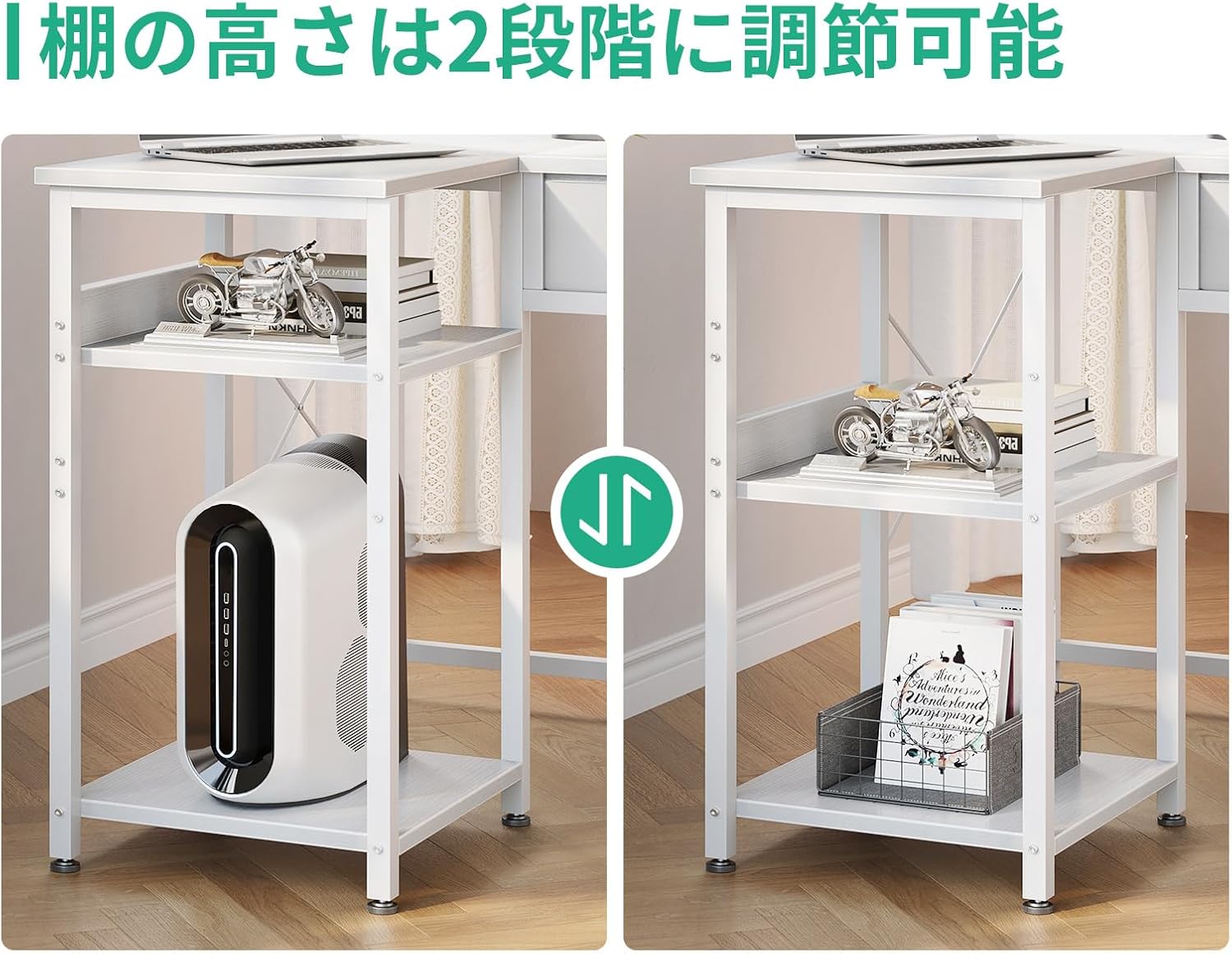
Image 4.2: Illustration of the adjustable height feature for the side shelves, allowing customization for PC towers or other storage needs.
5. Operating Instructions
5.1. RGB LED Lighting System
The desk features an integrated RGB LED light strip to enhance your environment. The lighting can be controlled via the attached controller.
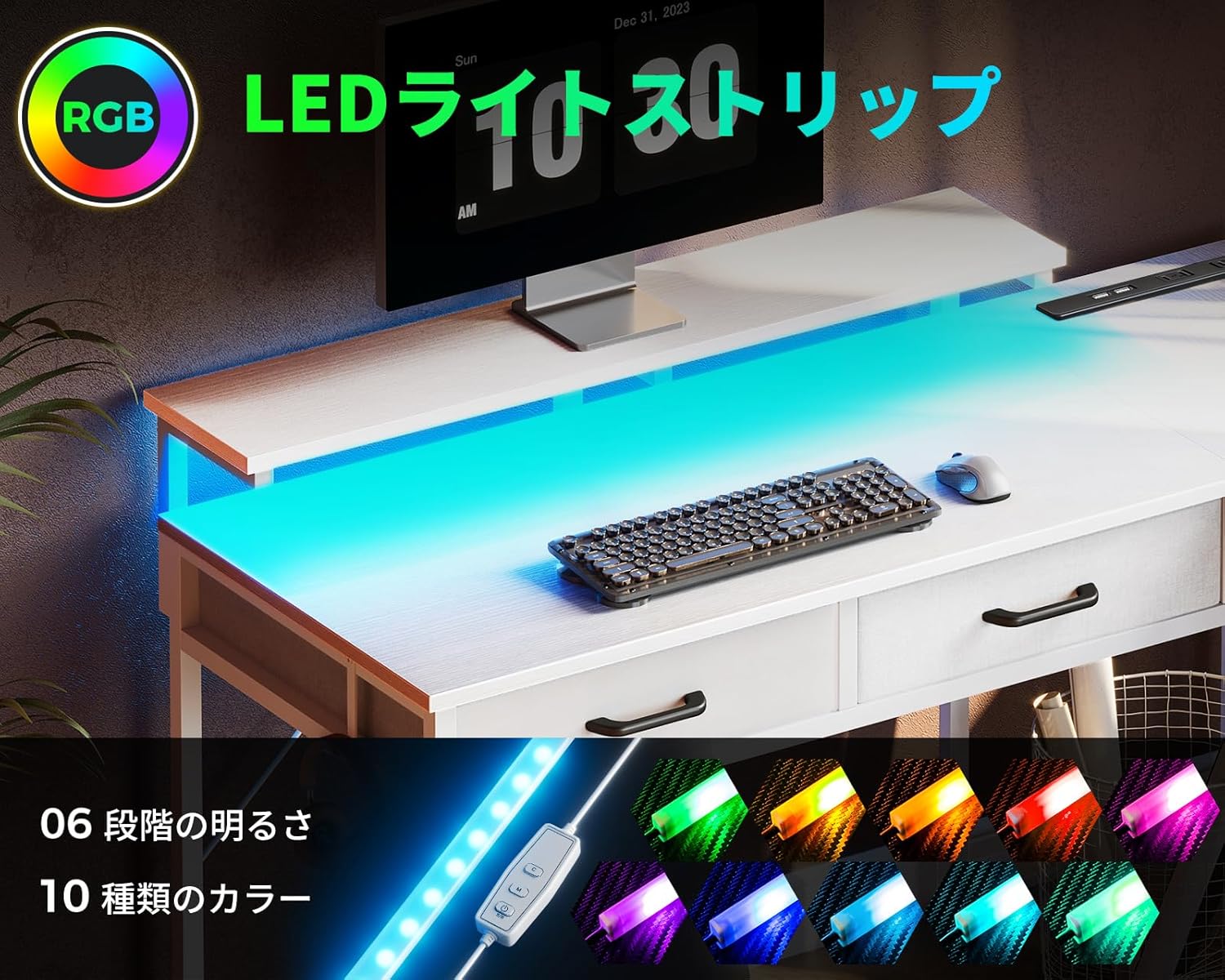
Image 5.1: Close-up of the RGB LED light strip and its controller, showing buttons for color, mode, and brightness/speed adjustments.
- Power Button: Press to turn the lights On/Off.
- 'C' Button (Static Color): Cycle through 10 different static colors.
- 'M' Button (Dynamic Mode): Select from various dynamic lighting effects.
- Brightness/Speed Buttons: Adjust the brightness of static colors or the speed of dynamic modes (6 levels).
5.2. Integrated Power Outlets
The desk includes a convenient power outlet unit with two AC outlets and two USB ports (5V-2A) for charging your devices.

Image 5.2: The integrated power strip with two AC outlets and two USB ports, shown in use for charging devices.
- Plug the desk's main power cord (200cm length) into a wall outlet.
- Use the 2 AC outlets (120V/12A) for monitors, laptops, or other electronics.
- Use the 2 USB ports (5V-2A) to charge smartphones, tablets, or other USB-powered devices.
- Ensure devices are compatible with the provided voltage and amperage.
5.3. Monitor Stand Adjustment
The monitor stand can be set at three different heights (10cm, 13cm, 16cm) during assembly to optimize your viewing angle and posture.
5.4. Fabric Drawers
The two fabric drawers provide convenient storage for small items, helping to keep your desktop organized and clutter-free.
6. Maintenance
Regular maintenance will help prolong the life and appearance of your AODK L-Shaped Gaming Desk.
- Cleaning: Wipe the desk surfaces with a soft, damp cloth. For stubborn stains, use a mild soap solution and dry immediately. Avoid abrasive cleaners or harsh chemicals.
- Spills: The desk surface is waterproof and stain-resistant. Wipe up spills immediately to prevent potential damage.
- Hardware: Periodically check all screws and bolts to ensure they remain tight. Retighten if necessary.
- Electrical Components: Keep the RGB light strip and power outlets free from dust and debris. Do not attempt to disassemble or repair electrical components yourself.
7. Troubleshooting
If you encounter any issues with your desk, please refer to the following common problems and solutions.
| Problem | Possible Cause | Solution |
|---|---|---|
| Missing or damaged parts upon delivery | Shipping error or manufacturing defect. | Contact customer support immediately with your order details. |
| Difficulty during assembly (e.g., holes not aligning) | Incorrect orientation of parts, screws not fully loosened, or slight manufacturing variance. | Review the assembly diagrams carefully. Loosen all screws, adjust alignment, then retighten. If issues persist, contact support. |
| RGB lights not turning on or functioning incorrectly | Loose connection, power issue, or faulty light strip/controller. | Check all connections to the light strip and controller. Ensure the desk's main power cord is plugged in. If still not working, contact support. |
| Power outlets/USB ports not working | Desk's main power cord not plugged in, circuit breaker tripped, or faulty outlet unit. | Verify the desk's main power cord is securely plugged into a working wall outlet. Check your home's circuit breaker. Test with another device. If issue persists, contact support. |
| Desk feels unstable or wobbly | Screws not fully tightened, uneven floor, or incorrect assembly. | Ensure all assembly screws are fully tightened. Use the adjustable feet (if present) to level the desk on uneven floors. Re-check assembly steps. |
8. Specifications
| Feature | Detail |
|---|---|
| Brand | AODK |
| Model Number | OKTB01081101001JP |
| Product Dimensions | Approx. 120cm (Width) x 80cm (Depth) x 78cm (Height) |
| Monitor Stand Height (Adjustable) | 88cm / 91cm / 94cm (from floor to top of monitor stand) |
| Color | White |
| Product Weight | 16.1 kg |
| Package Weight | 17.7 kg |
| Base Material | Metal (Steel Frame) |
| Finish Type | Wooden |
| Special Features | Integrated USB Power Outlets, RGB Lighting, Adjustable Monitor Stand, Adjustable Side Shelves, 2 Fabric Drawers |
| Power Outlet Unit | 2 AC Outlets (120V/12A), 2 USB Ports (5V-2A), 200cm Power Cord |
| Assembly Required | Yes |
9. Warranty and Support
AODK is committed to providing high-quality products. If you experience any initial defects with your purchased product, please do not hesitate to contact our customer support team.
For assistance with assembly, missing parts, or any other product-related inquiries, please reach out to the seller or AODK customer service through your purchase platform.
Please have your order number and product model (OKTB01081101001JP) ready when contacting support to ensure a swift resolution.
Related documentsOKTB01081101001JP

Ask a question about this manual
Ask about setup, troubleshooting, compatibility, parts, safety, or missing instructions. Manuals+ will review the question and use this page’s manual context to help answer it.