
SYNCO Xtalk XMax2
SYNCO Xtalk XMax2 Full-Duplex Wireless Intercom System User Manual
Model: Xtalk XMax2 | Brand: SYNCO
1. Introduction
The SYNCO Xtalk XMax2 is a professional full-duplex wireless intercom system designed for seamless, real-time two-way communication. Ideal for live production teams, film crews, event organizers, and stage operations, this system ensures clear and reliable communication over long distances. Featuring advanced noise cancellation, versatile connectivity, and extended battery life, the XMax2 enhances team coordination in demanding environments.
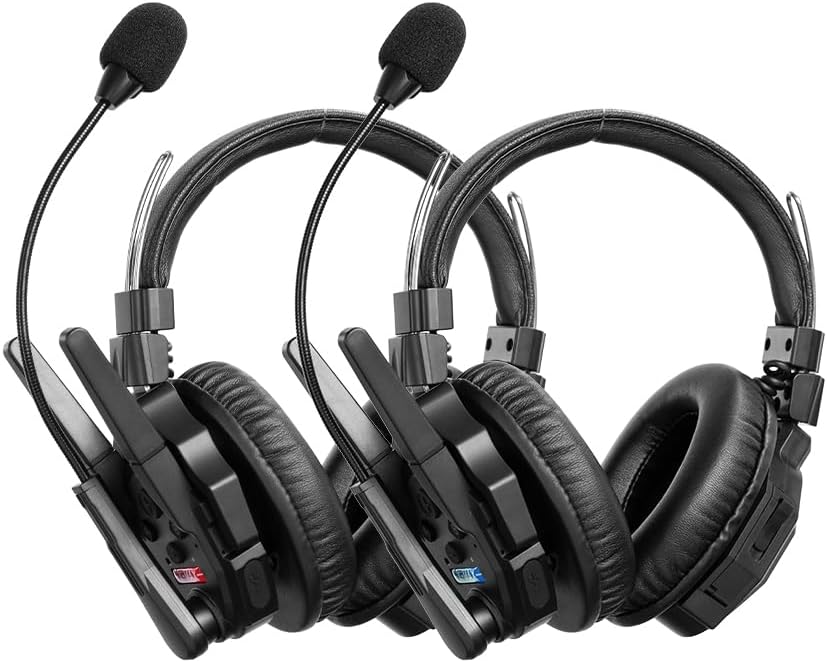
2. What's in the Box
Your SYNCO Xtalk XMax2 package includes the following components:
- Xtalk XMax2 Headset x2
- Rechargeable Battery x4 (2 per headset)
- Cable x2 (for charging/data)
- Charging Station x1 (for multiple batteries)
- Mic Windshield x4 (2 per headset)
- One-Ear Foam Cushion x4 (2 per headset)

3. Setup
3.1 Initial Charging
Before first use, ensure all rechargeable batteries are fully charged using the provided charging station and cable. Insert the batteries into the charging slots and connect the cable to a power source. The charging indicator will show the status.
3.2 Headset Assembly
- Attach the microphone boom to the designated port on the headset.
- Place a mic windshield over the microphone for improved audio clarity and protection.
- Ensure the ear cushions are securely fitted for comfort and sound isolation.
3.3 Pairing and Master Device Configuration
The XMax2 headsets come pre-paired from the factory. For initial setup or re-pairing, use the Xtalk EasyGo software for seamless configuration. This software allows for one-button pairing and interconnection across all headset models, reducing latency to as low as 80ms for up to 13 devices.

Any headset can be assigned as the system master. The system features automatic fallback if the master device is disconnected, ensuring continuous communication.
4. Operating Instructions
4.1 Power On/Off
To power on, press and hold the power button until the indicator light illuminates. To power off, press and hold the power button until the indicator light turns off.
4.2 Full-Duplex Communication
The XMax2 system supports full-duplex communication, allowing all connected users to speak and listen simultaneously without interruption. This is ideal for dynamic team environments.

4.3 AI-Powered Noise Cancellation
The headset features ENC dual microphones and advanced AI algorithms to automatically filter out background noise while preserving voice clarity. The over-ear design further blocks ambient sound, ensuring clear communication in noisy environments.

4.4 Dual-Mode Function: Intercom + Bluetooth
In addition to intercom use, the XMax2 supports Bluetooth connection to your phone. This allows for private calls or music playback. Easily switch between intercom and Bluetooth modes without removing the headset.

4.5 One-Button Remote Muting Function
The Dominant mode allows for one-button muting of all remote headsets, addressing issues caused by multiple devices speaking simultaneously. This provides the master user with control over the communication flow.

4.6 Signal Boost Mode
Activate Boost Mode for stronger signal stability in complex environments or wide-open spaces. This feature allows for one-button frequency switching, instantly amplifying the signal to overcome interference from walls, buildings, or high-speed movement.

4.7 Real-time Monitoring
The XMax2 features SmartFlow Sync with a unique 3.5mm real-time monitoring port. This allows you to seamlessly communicate with your team while monitoring audio from devices like cameras and recorders, eliminating the need for an additional headset.

5. Features Overview
- Long-Range Communication: Up to 500 meters (1640 ft) with advanced 2.4GHz wireless technology.
- AI-Powered Dual Mic Noise Cancellation: Filters out background noise for clear voice transmission.
- Dual-Mode Functionality: Seamlessly switch between intercom and Bluetooth for calls or music.
- Extended Battery Life: Up to 24 hours of runtime with a 1050mAh removable battery.
- Swappable Battery Design: Allows for quick battery changes with the included 6-slot charging dock.
- Intelligent Master Control: Any headset can be assigned as master with automatic fallback.
- Dominant Function: One-button mute for all remote users.
- Signal Boost Mode: Enhances signal stability in challenging environments.
- Comfortable Dual-Ear Design: Over-ear design provides sound isolation and comfort for extended use.


6. Maintenance
6.1 Cleaning
- Wipe the headsets and charging station with a soft, dry cloth.
- For stubborn dirt, use a slightly damp cloth with mild soap, then dry thoroughly.
- Do not use harsh chemicals or abrasive cleaners.
- Regularly clean the microphone windshields and replace if damaged.
6.2 Storage
- Store the system in a cool, dry place away from direct sunlight and extreme temperatures.
- If storing for extended periods, ensure batteries are partially charged (around 50%) to prolong their lifespan.
6.3 Battery Care
- Use only SYNCO-approved replacement batteries.
- Avoid fully discharging batteries frequently.
- Do not expose batteries to high temperatures or puncture them.
7. Troubleshooting
| Problem | Possible Cause | Solution |
|---|---|---|
| No audio/intermittent audio | Out of range, low battery, interference, incorrect pairing. | Move closer to master unit, charge batteries, activate Boost Mode, re-pair headsets using EasyGo software. |
| Poor audio quality/muffled sound | Microphone position, damaged windshield, excessive background noise, signal interference. | Adjust microphone closer to mouth, replace windshield, ensure AI noise cancellation is active, activate Boost Mode. |
| Headset not powering on | Battery depleted, battery not inserted correctly, faulty battery. | Charge battery, re-insert battery, try a different charged battery. |
| Bluetooth connection issues | Headset not in Bluetooth mode, device not discoverable, interference. | Ensure headset is in Bluetooth mode, make sure phone/device Bluetooth is on and discoverable, move closer to device. |
| Delay in speech (latency) | Environmental factors, distance, number of connected devices. | While some latency is inherent in wireless systems, ensure optimal signal strength and minimize environmental obstructions. Use EasyGo software to optimize settings. |
8. Specifications
| Feature | Detail |
|---|---|
| Model Name | Xtalk XMax2 |
| Connectivity Technology | Wireless (RF) |
| Frequency Response | 2.4 GHz (20 Hz - 20,000 Hz) |
| Noise Control | Active Noise Cancellation |
| Headphones Jack | 3.5 mm Jack (for monitoring) |
| Battery Type | Lithium Ion (2 required, included) |
| Battery Life | Up to 24 hours |
| Material | Aluminum, Plastic |
| Color | Black |
| Item Weight | 2 pounds |
| Manufacturer | SYNCO |
| Country of Origin | China |
9. Warranty and Support
For warranty information and technical support, please refer to the official SYNCO website or contact their customer service directly. Keep your purchase receipt as proof of purchase for any warranty claims.
You can visit the official SYNCO Store for more information and support: SYNCO Store on Amazon
Related documentsXtalk XMax2


Ask a question about this manual
Ask about setup, troubleshooting, compatibility, parts, safety, or missing instructions. Manuals+ will review the question and use this page’s manual context to help answer it.