
1. Introduction
This manual provides detailed instructions for the setup, operation, and maintenance of your EXOTON S-1002 10-inch Bluetooth PA System. Please read this manual thoroughly before using the product to ensure proper function and longevity. The EXOTON S-1002 is a complete and versatile sound system designed for various indoor and outdoor applications, offering clear and powerful audio performance.
2. Package Contents
Verify that all items listed below are included in your package. If any items are missing or damaged, please contact customer support.
- (1) 4-Channel Powered Bluetooth Mixer
- (2) 10-inch Passive Speakers
- (2) Rugged Tripod Speaker Stands
- (1) Wired Microphone
- (2) 1/4" Cables for Mixer to Passive Speakers
- (1) Power Cable
- (1) Remote Control
- (1) User Manual (this document)
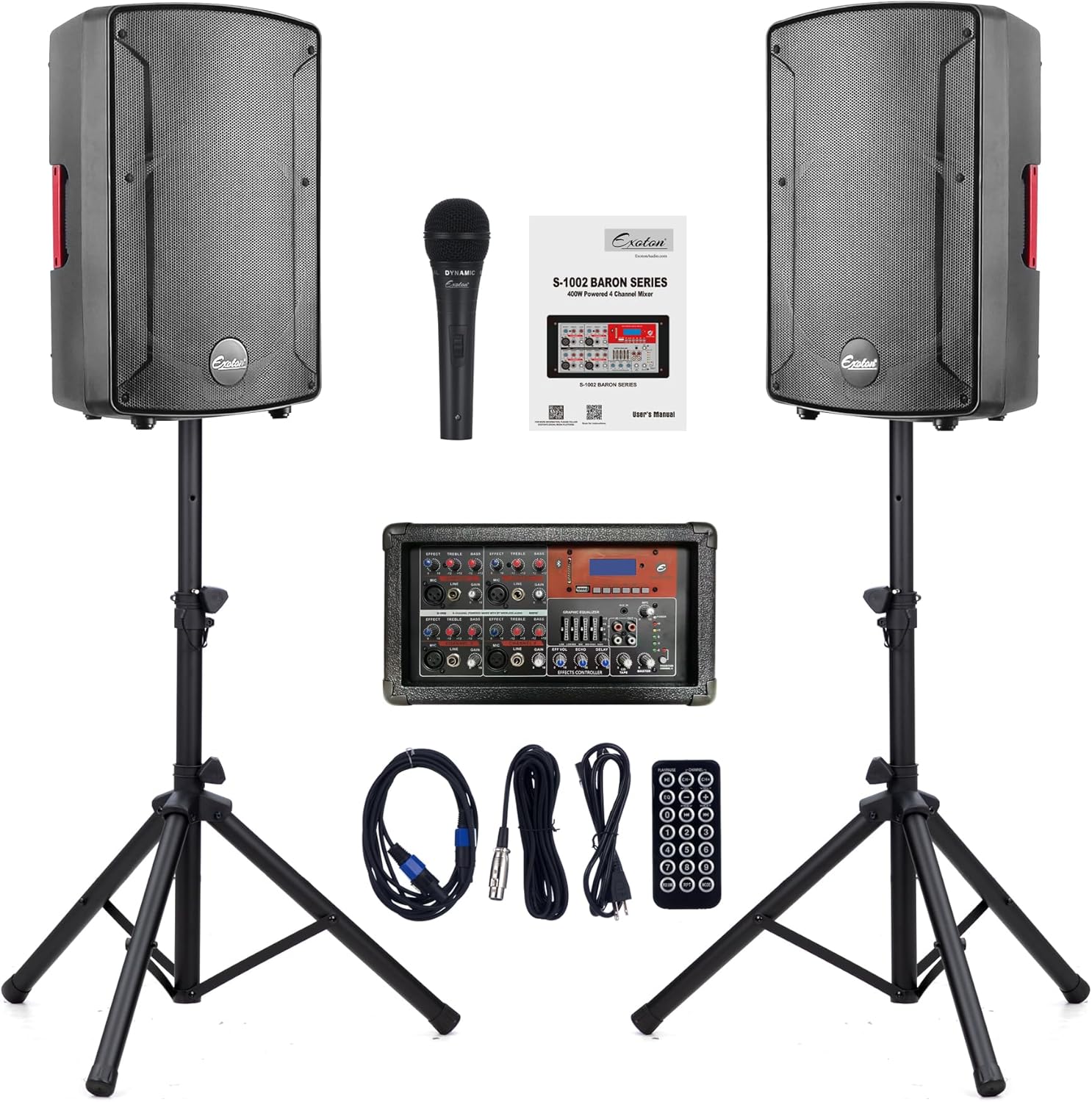
Image 2.1: All components of the EXOTON S-1002 PA System, including the mixer, two passive speakers, two tripod stands, a wired microphone, and various cables.
3. Product Features
- 4-Channel Powered Mixer: Equipped with individual volume controls, effect, treble, and bass adjustments for each channel.
- Bluetooth Connectivity: Seamlessly pair with Bluetooth-enabled devices (iPhone, iPod, iPad, Android) within a line of sight of up to 66 feet.
- USB Playback: Built-in USB drive interface allows for MP3 file playback from a PC or USB storage.
- Microphone Compatibility: Supports condenser and dynamic microphones with +48V phantom power.
- RCA Input & Output: Provides versatile connectivity options for various audio sources.
- High Power Output: Delivers 400 Watts RMS / 700 Watts Program Power / 1800 Watts Peak for clear and distortion-free sound.
- Wide Frequency Response: 40-20KHz frequency response suitable for amplifying music and vocals.
- Portable Design: Ergonomically shaped side handles on the mixer and passive speakers, along with foldable tripod stands, ensure easy transport and setup.

Image 3.1: Detailed view of the 4-channel powered mixer's control panel, highlighting input jacks, volume knobs, and equalization sliders.

Image 3.2: A hand utilizing the integrated side handle on one of the passive speakers, illustrating the portable design feature.
4. Setup Instructions
- Position Speaker Stands: Place the two tripod speaker stands in desired locations, ensuring they are stable and on a level surface. Extend the legs fully for maximum stability.
- Mount Speakers: Carefully lift each passive speaker and mount it onto the top pole of a tripod stand. Ensure the speaker is securely seated.
- Place Mixer: Position the 4-channel powered mixer in a convenient location, ensuring adequate ventilation and access to power.
- Connect Speakers to Mixer: Use the provided 1/4" cables to connect the passive speakers to the "SPEAKER OUTPUT" jacks on the back of the mixer. Ensure a firm connection.
- Connect Microphone: Plug the wired microphone into one of the "MIC" input channels on the mixer. If using a condenser microphone, activate the +48V phantom power button for that channel.
- Connect Power: Connect the power cable to the mixer's power input and then to a suitable electrical outlet.
- Initial Power On: Before turning on the mixer, ensure all volume controls are set to their minimum position. Then, switch on the power.
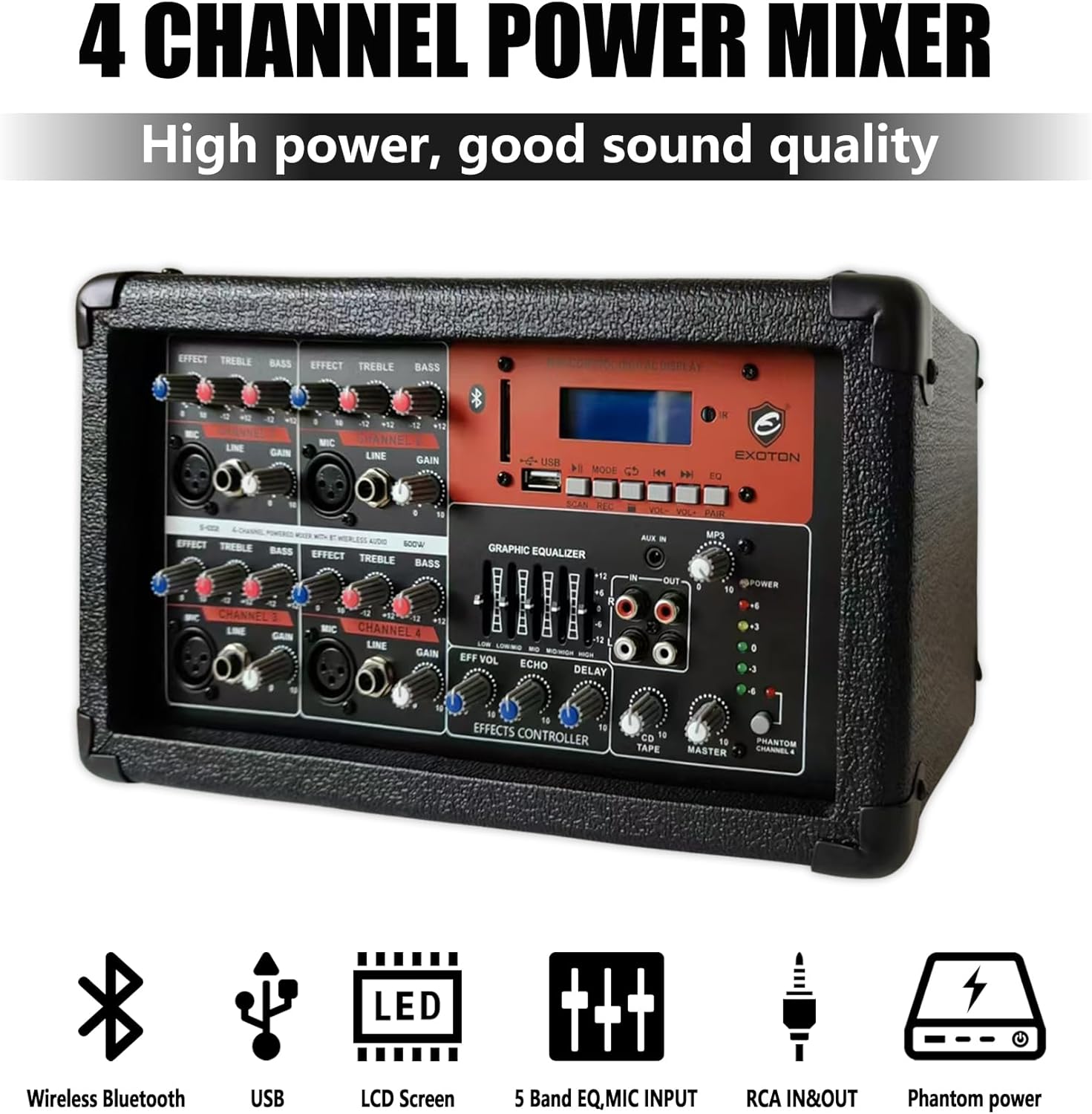
Image 4.1: The EXOTON S-1002 PA System fully assembled, showing the mixer connected to two speakers mounted on tripod stands.
5. Operating Instructions
5.1. Basic Audio Connection
Connect your audio sources (microphones, instruments, external players) to the appropriate input channels on the mixer. Each channel has dedicated controls for Effect, Treble, Bass, Line, and Gain.

Image 5.1: An illustration demonstrating how to connect various audio equipment, such as guitars, wired microphones, wireless microphones, computers, and effectors, to the EXOTON S-1002 mixer.
5.2. Bluetooth Pairing
- Ensure the mixer is powered on.
- Press the "MODE" button on the MP3 control digital display until "Bluetooth" mode is selected.
- On your Bluetooth-enabled device, search for available devices and select "EXOTON S-1002" (or similar name).
- Once paired, you can stream audio wirelessly to the PA system.
5.3. USB Playback
- Insert a USB drive containing MP3 files into the USB port on the mixer.
- The mixer should automatically switch to USB mode and begin playing. If not, press the "MODE" button to select USB.
- Use the control buttons (Play/Pause, Next, Previous) on the MP3 control digital display to manage playback.
5.4. Adjusting Sound
- Gain: Adjusts the input sensitivity for each channel. Start low and increase until the signal is strong without clipping.
- Treble/Bass: Use these controls on each channel to fine-tune the high and low frequencies of the input source.
- Effect: Controls the amount of effect (e.g., echo, delay) applied to each channel.
- Graphic Equalizer: The master graphic equalizer allows for overall frequency adjustment of the main output.
- Master Volume: Controls the overall output volume of the PA system.
6. Maintenance
- Cleaning: Use a soft, dry cloth to clean the surfaces of the mixer and speakers. Avoid using abrasive cleaners or solvents.
- Storage: When not in use, store the PA system in a cool, dry place, away from direct sunlight and extreme temperatures.
- Cable Care: Regularly inspect all cables for damage. Replace any frayed or broken cables immediately to prevent electrical hazards and ensure optimal performance.
- Ventilation: Ensure the mixer's ventilation openings are clear and unobstructed during operation to prevent overheating.
7. Troubleshooting
| Problem | Possible Cause | Solution |
|---|---|---|
| No sound output |
|
|
| Distorted sound |
|
|
| Bluetooth not connecting |
|
|
8. Technical Specifications
| Feature | Detail |
|---|---|
| Model Number | S-1002 |
| Mounting Type | Floor Standing |
| Power Source | Corded Electric |
| Connector Type | RCA, 1/4" Jack, XLR |
| Material | Plastic |
| Item Weight | 45 Pounds (total system) |
| Number of Channels | 4 |
| Audio Input | Microphone, Line, USB, Bluetooth, RCA |
| Recommended Uses | Wedding, Meeting, Speech, Church, Classroom, Gymnastics, Conference, Home Theater |
| Frequency Response | 40Hz - 20KHz (System), 18 KHz (Mixer specified) |
| Impedance | 4 Ohm (Speakers) |
| Product Dimensions (Speaker) | 12.6 x 10.6 x 19.3 inches (L x W x H) |
| Connectivity Technology | Bluetooth, USB |
| Color | Black |
| Compatible Devices | Guitar, Microphones, Bluetooth devices, USB devices |
| UPC | 765939917682, 765939917668 |

Image 8.1: Diagram illustrating the dimensions of the passive speaker: 19.29 inches height, 12.6 inches width, and 10.63 inches depth.

Image 8.2: The rear panel of the EXOTON S-1002 mixer, displaying the power switch, speaker outputs (2x 8 Ohm), and effect loop connections.
9. Warranty and Support
EXOTON offers a 90-day refund and exchange policy for this product. If you encounter any issues or have questions regarding your EXOTON S-1002 PA System, please contact EXOTON customer support for assistance. We are committed to providing a satisfactory shopping experience.
For further support, please refer to the official EXOTON website or contact their customer service department directly.


