
Puroma CLL43C
Puroma 6 Pack TSA Approved 4-Digit Combination Luggage Locks Instruction Manual
Model: CLL43C
Introduction
This manual provides instructions for the proper setup, operation, and maintenance of your Puroma 6 Pack TSA Approved 4-Digit Combination Luggage Locks. These locks are designed to secure your belongings during travel and are approved by the Transportation Security Administration (TSA).

Image: Overview of the Puroma 6 Pack TSA Approved Luggage Locks.
Safety Information
Always ensure the lock is properly engaged before leaving your luggage unattended. While these locks provide enhanced security, no lock can guarantee complete protection against theft. Keep your combination confidential and do not share it with unauthorized individuals.
Setup: Setting Your Combination
Your Puroma TSA Approved Combination Lock comes with a default combination of 0-0-0-0. Follow these steps to set your personalized combination:
- Default Code Alignment: Turn the dials to the default code 0-0-0-0 and align the numbers in the password window.
- Push in the Reset Button: Locate the small reset button on the bottom of the lock. Use a sharp tool (e.g., a pen tip or SIM ejector tool) to press and hold this button until it remains recessed.
- Set Your New Combination: While the reset button is recessed, turn the dials to your desired 4-digit combination. Ensure the numbers are completely visible and aligned in the password window.
- Release the Reset Button: Press the oval button on the top of the lock body. The recessed reset button will now pop back out, and your new password is saved successfully.

Image: Step-by-step guide for setting the lock combination.
Note: If you cannot open the lock with the default code "0000" on first use, please try with the codes "1000", "0001", "9000", or "0009" to open again. Always ensure the numbers are completely in the window when setting a new combination; otherwise, you may fail to set it.
Operating Your Lock
Locking Your Luggage
- Align the lock's cable through the zipper pulls of your luggage.
- Insert the end of the cable into the lock body until it clicks securely into place.
- Scramble the dials to a random set of numbers to secure the lock.
Unlocking Your Luggage
- Turn the dials to your personal 4-digit combination.
- Press the oval unlock button on the top of the lock body. The cable will release, allowing you to open your luggage.

Image: The unlock button and quick-read design for easy operation.
TSA Approved Feature
These locks are TSA Approved, meaning Transportation Security Administration agents can open your luggage for inspection using a special master key without damaging your lock or luggage. After inspection, the agent will relock your luggage, ensuring your belongings remain secure.

Image: Explanation of the TSA Approved feature.
Video: Official Puroma demonstration of the TSA Approved Luggage Locks and combination setting.
Features and Applications
- Enhanced Security: 4-digit combination offers 10,000 unique possibilities, providing greater security than standard 3-digit locks.
- Durable Construction: Crafted from premium zinc alloy and sturdy steel, designed to resist sawing, hammering, and prying attempts.
- Flexible Cable: The flexible cable design allows for versatile use on various items, including luggage, backpacks, equipment cases, and gym lockers.
- Quick-read Design: White numerals on black dials ensure easy readability, even in low-light conditions.
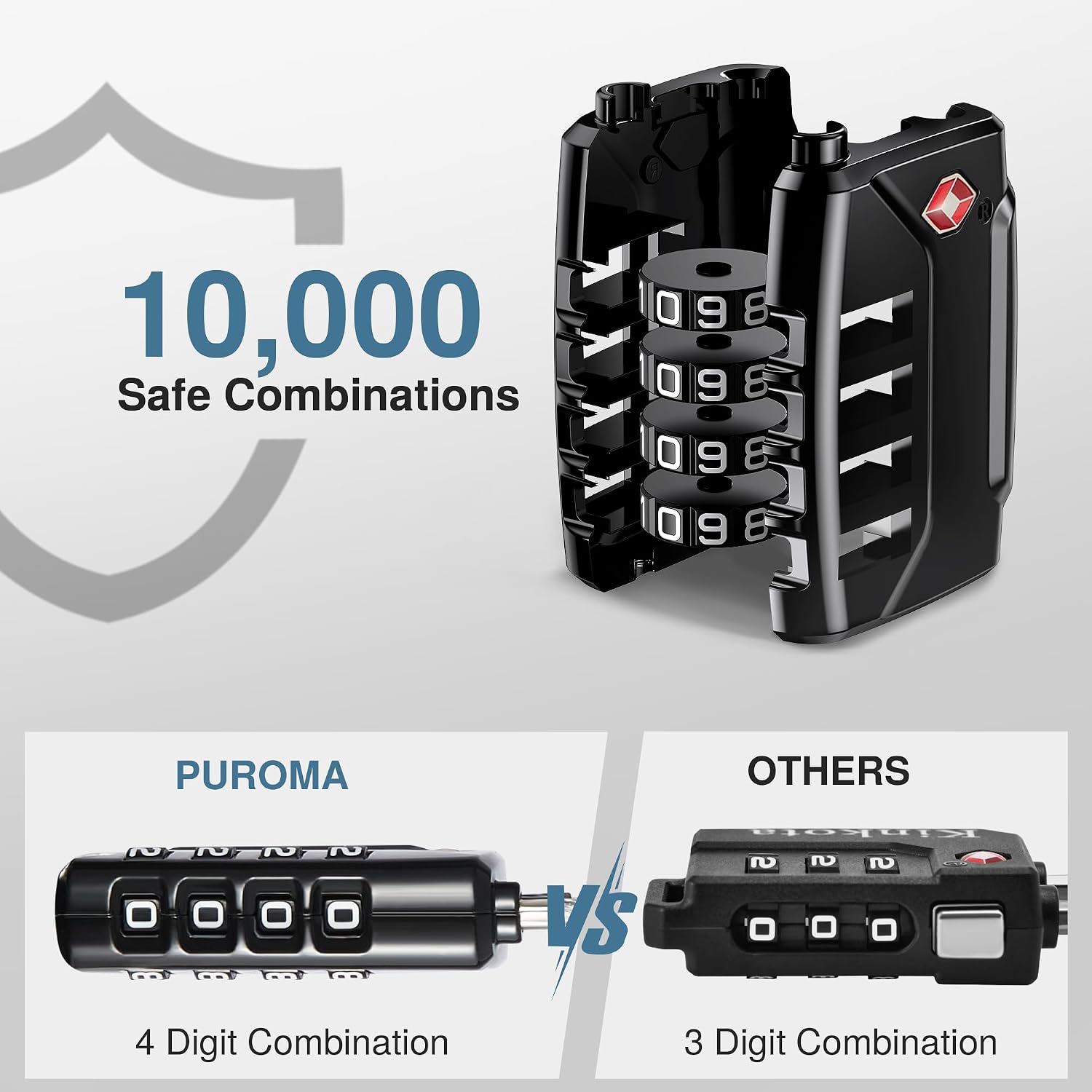
Image: Highlighting the 10,000 possible combinations of the 4-digit lock.

Image: Details on the durable construction materials.

Image: Examples of the lock's wide application on luggage and backpacks.
Maintenance
To ensure the longevity and smooth operation of your locks:
- Keep the locks clean and free from dirt or debris.
- Avoid exposing the locks to extreme temperatures or harsh chemicals.
- Periodically check the cable and lock body for any signs of wear or damage. Replace if necessary.
Troubleshooting
Lock Does Not Open with Correct Combination
Ensure that all four digits of your combination are perfectly aligned in the viewing window. Sometimes, a slight misalignment can prevent the lock from opening. If the issue persists, try re-entering the combination carefully.
Unable to Reset Combination
Verify that the lock is set to the current correct combination before attempting to press the reset button. The reset button will only remain recessed if the lock is in the unlocked state (set to the current combination). Ensure you are using a sufficiently sharp, thin tool to fully depress the reset button.
Specifications
| Brand | Puroma |
| Model Name | CLL43C |
| Lock Type | Combination Lock |
| Material | Alloy Steel, Zinc |
| Color | Basic Black |
| Number of Pieces | 6 |
| Item Weight | 1.1 pounds (0.5 Kilograms) |
| UPC | 840064903134 |

Image: Dimensions and weight of the Puroma luggage lock.
Warranty and Support
For any product inquiries or support, please contact Puroma customer service at: support@puroma.net.
Ask a question about this manual
Ask about setup, troubleshooting, compatibility, parts, safety, or missing instructions. Manuals+ will review the question and use this page’s manual context to help answer it.