
1. Product Overview
The Veinasa XS-WDS01 is a digital wind direction anemometer designed for outdoor use. It provides accurate measurement of wind direction and angle, offering reliable data for various applications. Its robust design ensures high performance and durability in diverse environmental conditions.
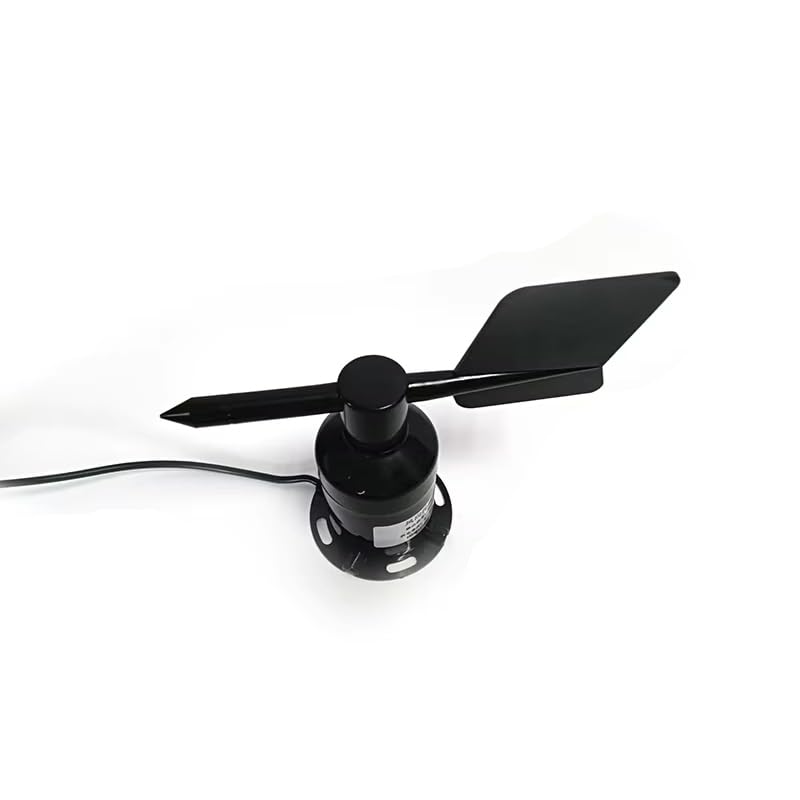
Image 1.1: The Veinasa XS-WDS01 Digital Wind Direction Anemometer, showing its compact and functional design.
Key Features:
- Reasonable structural design, compact size, and easy portability.
- High performance for accurate wind direction measurement.
- Flange installation method supports both bottom and side outlet configurations.
- High data transmission efficiency and reliable operation.
- Wide power supply adaptation range and good data linearity.
- Provides both wind direction angle and wind direction parameters.
- Protection Level IP65 for outdoor durability.
2. Setup and Installation
Proper installation is crucial for the accurate operation of the XS-WDS01 anemometer. Follow these steps carefully:
2.1 Mounting the Anemometer
- Select a suitable location: Choose an open area free from obstructions (buildings, trees) that could interfere with wind flow. The mounting height should be appropriate for the measurement requirements.
- Prepare the mounting surface: Ensure the surface is stable and level. The anemometer can be mounted using its flange base.
- Secure the device: Use appropriate screws or bolts to firmly attach the anemometer's flange base to the mounting pole or surface. The flange design allows for either bottom or side cable exit.

Image 2.1: Close-up of the anemometer's base, showing the wiring outlet and flange mounting points.
2.2 Electrical Connection (4-20mA Output)
The XS-WDS01-4-20mA model provides a 4-20mA current output signal. Connect the anemometer to your data acquisition system or controller as follows:
- Power Supply: Connect the power input wires to a stable DC power source within the specified voltage range. Refer to the specifications table for exact voltage requirements.
- Signal Output: Connect the 4-20mA output wires to the corresponding analog input channels of your data logger or PLC. Ensure correct polarity.
- Grounding: Properly ground the device to prevent electrical interference and ensure safety.
3. Operating Instructions
Once installed and connected, the Veinasa XS-WDS01 operates continuously to provide real-time wind direction data.
3.1 Data Output Interpretation
The anemometer outputs a 4-20mA current signal, which corresponds to the measured wind direction. This signal needs to be converted by your receiving device (e.g., PLC, data logger) into a meaningful wind direction value (e.g., degrees, cardinal points).
- Wind Direction Angle: The output signal directly correlates to the wind direction angle, typically covering 0-360 degrees. Consult the product's calibration sheet or technical documentation for the precise mapping of mA values to degrees.
- Wind Direction: The device provides comprehensive data, allowing for interpretation into standard wind direction indicators (e.g., North, Northeast, East).
Ensure your data acquisition system is configured to correctly interpret the 4-20mA signal range and scale it to the appropriate wind direction units.
4. Maintenance
The Veinasa XS-WDS01 is designed for low maintenance, but periodic checks can ensure its longevity and accuracy.
4.1 Routine Checks
- Visual Inspection: Periodically inspect the anemometer for any physical damage, debris accumulation (leaves, dust), or signs of wear.
- Cleaning: Gently clean the exterior of the device with a soft, damp cloth. Avoid using abrasive cleaners or solvents. Ensure the wind vane moves freely.
- Cable Integrity: Check all electrical connections and cables for signs of fraying, corrosion, or loose connections. Ensure the cable glands are tight to maintain the IP65 protection.
- Mounting Stability: Verify that the anemometer remains securely mounted and that there is no wobbling or looseness.

Image 4.1: High-quality internal bearings contribute to the anemometer's smooth operation and durability, requiring minimal maintenance.
4.2 Environmental Protection
The device has an IP65 protection level, meaning it is protected against dust ingress and low-pressure water jets from any direction. While robust, extreme weather conditions may still warrant additional protective measures if prolonged exposure is expected.
5. Troubleshooting
If you encounter issues with your XS-WDS01 anemometer, refer to the following common problems and solutions:
| Problem | Possible Cause | Solution |
|---|---|---|
| No output signal or incorrect readings |
|
|
| Inconsistent readings |
|
|
| Wind vane not rotating freely |
|
|
If the problem persists after attempting these solutions, please contact customer support.
6. Specifications
Technical specifications for the Veinasa XS-WDS01-4-20mA Digital Wind Direction Anemometer:
| Parameter | Value |
|---|---|
| Brand | Veinasa |
| Model Number | XS-WDS01-4-20mA |
| Output Signal | 4-20mA |
| Product Dimensions | Approximately 6"W x 6"H |
| Protection Level | IP65 |
| Item Weight | 2.2 pounds |
| Manufacturer | Veinasa |
| Number of Items | 1 |
7. Warranty Information
This product comes with a standard manufacturer's warranty. For details regarding warranty coverage, duration, and terms, please refer to the warranty card included with your purchase or contact Veinasa customer support. Keep your proof of purchase for warranty claims.
8. Customer Support
For technical assistance, troubleshooting not covered in this manual, or warranty inquiries, please contact Veinasa customer support. Provide your product model number (XS-WDS01-4-20mA) and a detailed description of your issue for efficient service.
Contact Information: Please refer to the contact details provided on the product packaging or the official Veinasa website.