
Monoptilon MOT02
Monoptilon Digital Hose Timer (Model MOT02) User Manual
Model: MOT02 | Brand: Monoptilon
1. Introduction and Overview
The Monoptilon Digital Hose Timer (Model MOT02) is designed to automate your garden, lawn, yard, or farm irrigation system. This device offers precise control over watering schedules, ensuring your plants receive optimal hydration while conserving water. Its robust construction and intelligent features make it a reliable solution for outdoor watering needs.
Key features include a fully customizable digital program with watering durations from 1 second to 99 minutes and frequencies from 1 hour to 15 days. It boasts an IPX5 waterproof and dustproof rating, preventing leaks and ensuring durability. The smart power system displays remaining battery life, and the timer automatically shuts down before batteries are completely depleted. For added convenience and safety, it includes a child lock mode and a smart rain delay function to prevent overwatering and water waste.
2. Safety Information
- Read all instructions carefully before operating the device.
- This product is designed for outdoor use with cold water only. Do not use with hot water or other liquids.
- Do not immerse the timer in water. While it is IPX5 rated for water resistance, prolonged submersion can cause damage.
- Ensure all connections are tight to prevent leaks.
- Use only recommended battery types (typically alkaline AA batteries, refer to battery compartment for specifics).
- Remove batteries if the timer will not be used for an extended period or during freezing weather to prevent damage.
- Keep out of reach of children and pets when not in use, or activate the child lock feature.
3. Package Contents
Please check the package to ensure all items are present:
- 1 x Monoptilon Digital Hose Timer (Model MOT02)
- 1 x User Manual
4. Product Diagram
Familiarize yourself with the components of your Monoptilon Digital Hose Timer.
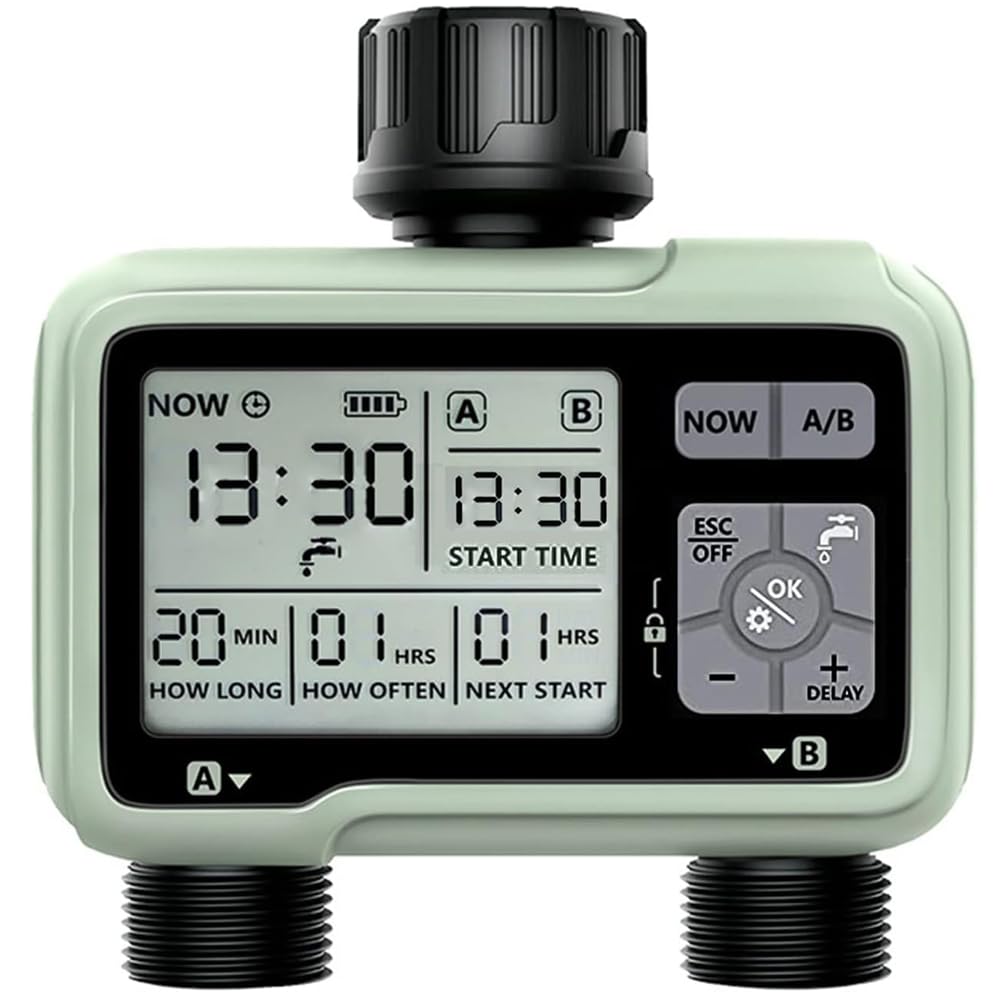
Image: The Monoptilon Digital Hose Timer features a main unit with a digital display and control buttons, a top connector for faucet attachment, and two independent outlets for connecting hoses. The robust green casing indicates its outdoor suitability.
5. Setup
5.1 Battery Installation
- Locate the battery compartment on the back of the timer.
- Open the battery compartment cover.
- Insert the required number of AA alkaline batteries (typically 2, check compartment markings for exact quantity and polarity).
- Close the battery compartment cover securely to ensure a watertight seal.
5.2 Connecting the Timer
- Screw the top connector of the timer onto your outdoor faucet. Ensure the connection is hand-tight to prevent leaks. The connector features a 3/4 inch universal thread.
- Connect your garden hoses to the two outlets at the bottom of the timer. Tighten these connections as well.
- Turn on your faucet fully. The timer is designed to withstand water pressure from 0.05 to 0.8 MPa.
6. Operating Instructions
6.1 Setting the Current Time and Day
Upon initial power-on or after battery replacement, you may need to set the current time and day. Refer to the timer's display and buttons (usually 'SET', 'UP', 'DOWN', 'OK') to navigate through the settings menu. Follow the on-screen prompts to adjust the time and day.
6.2 Programming Watering Schedules
The timer allows for fully customizable watering programs for each of its two outlets.
- Select Outlet: Use the designated button (if available) to select which outlet (1 or 2) you wish to program.
- Set Watering Duration: Navigate to the 'Duration' setting. You can set the watering time from 1 second up to 99 minutes.
- Set Watering Frequency: Navigate to the 'Frequency' setting. You can choose how often the timer waters, ranging from every 1 hour up to every 15 days.
- Save Settings: Confirm your settings, usually by pressing an 'OK' or 'SAVE' button.
6.3 Manual Watering Mode
To water manually outside of programmed schedules:
- Press the 'MANUAL' or 'ON/OFF' button.
- Select the desired outlet (if applicable).
- Set the desired manual watering duration.
- The timer will water for the specified duration and then return to its programmed schedule.
6.4 Rain Delay Function
The rain delay feature helps conserve water by pausing your watering schedule during and after rainfall.
- Press the 'RAIN DELAY' button.
- Select the desired delay period (e.g., 24, 48, 72 hours).
- The timer will pause all programmed watering cycles for the selected duration and resume automatically afterward.
6.5 Child Lock Function
To prevent accidental changes to your settings by children or pets:
- Locate the 'CHILD LOCK' button or combination (e.g., press and hold two buttons simultaneously).
- Activate the child lock. The display may show a lock icon.
- To deactivate, repeat the same action.
7. Maintenance
7.1 Cleaning
Wipe the exterior of the timer with a damp cloth. Do not use abrasive cleaners or solvents. Ensure no water enters the battery compartment or other sensitive areas.
7.2 Battery Replacement
The smart power system will indicate low battery. Replace batteries promptly to ensure continuous operation. Always replace all batteries at once with new ones of the same type.
7.3 Winterization
Before the first frost, disconnect the timer from the faucet and hoses. Remove the batteries. Store the timer indoors in a dry, protected area to prevent damage from freezing temperatures.
8. Troubleshooting
| Problem | Possible Cause | Solution |
|---|---|---|
| Timer not turning on/display blank | Dead or incorrectly installed batteries. | Replace batteries with new ones, ensuring correct polarity. |
| No water flow | Faucet is off; low water pressure; timer not programmed; manual override active. | Ensure faucet is fully open. Check water pressure. Verify program settings. Deactivate manual override. |
| Water leaking from connections | Loose connections; worn washers. | Tighten all connections. Check and replace rubber washers if damaged. |
| Timer not following schedule | Incorrect programming; rain delay active; child lock active. | Review and adjust program settings. Check if rain delay is active. Deactivate child lock. |
| Display shows low battery icon | Batteries are low. | Replace all batteries immediately. |
9. Specifications
| Feature | Detail |
|---|---|
| Brand | Monoptilon |
| Model Number | MOT02 |
| Part Number | HCT-322 |
| UPC/GTIN | 746433565715 |
| Material | 30% Reinforced Nylon, Plastic |
| Color | Green |
| Product Dimensions (D x W x H) | 5 cm x 10 cm x 13 cm |
| Number of Outlets | 2 |
| Watering Duration Range | 1 second to 99 minutes |
| Watering Frequency Range | Every 1 hour to every 15 days |
| Water Pressure Range | 0.05 MPa to 0.8 MPa |
| Water Resistance Rating | IPX5 (Waterproof and Dustproof) |
| Power Source | AA Batteries (not included) |
| Country of Origin | China |
| Manufacturer | Ningbo Hanqi Jidian Youxian Gongsi |
10. Warranty and Support
Monoptilon products are manufactured to high-quality standards. For information regarding warranty coverage, please refer to the warranty card included with your purchase or contact Monoptilon customer support.
If you encounter any issues or have questions about your Digital Hose Timer, please contact our customer support team. Details for contacting support can typically be found on our official website or on the product packaging.
Ask a question about this manual
Ask about setup, troubleshooting, compatibility, parts, safety, or missing instructions. Manuals+ will review the question and use this page’s manual context to help answer it.