1. Introduction
This manual provides detailed instructions for the safe and efficient operation, setup, and maintenance of your Mecpow X4 22W Laser Engraver. Please read this manual thoroughly before using the device to ensure proper functionality and to prevent damage or injury.
2. Safety Information
Operating a laser engraver involves inherent risks. Adhere to all safety precautions to prevent accidents and ensure personal safety.
- Eye Protection: Always wear appropriate laser safety goggles when the laser is in operation. The laser beam can cause severe eye damage.
- Ventilation: Ensure adequate ventilation in the work area to dissipate fumes and smoke produced during engraving and cutting.
- Fire Safety: Keep a fire extinguisher nearby. Do not leave the machine unattended during operation, especially when working with flammable materials. The Mecpow X4 is equipped with a flame sensor for added safety.
- Emergency Stop: Familiarize yourself with the location and function of the emergency stop button. In case of any malfunction or emergency, press the emergency stop button immediately.
- Laser Protective Cover: The machine includes a built-in laser shield to help contain the laser beam. Ensure it is properly in place during operation.
- Limit Switches: The X4 is equipped with 4-way limit switches to prevent the laser head from moving beyond the engraving area.
- Tilt Sensor: A tilt sensor is integrated to detect if the machine is moved or tilted during operation, triggering an alarm and stopping the process.
- Material Compatibility: Only engrave or cut materials specified as safe. Avoid reflective or transparent materials directly, as they can reflect the laser beam and cause damage.
- Children and Pets: Keep children and pets away from the operating area.
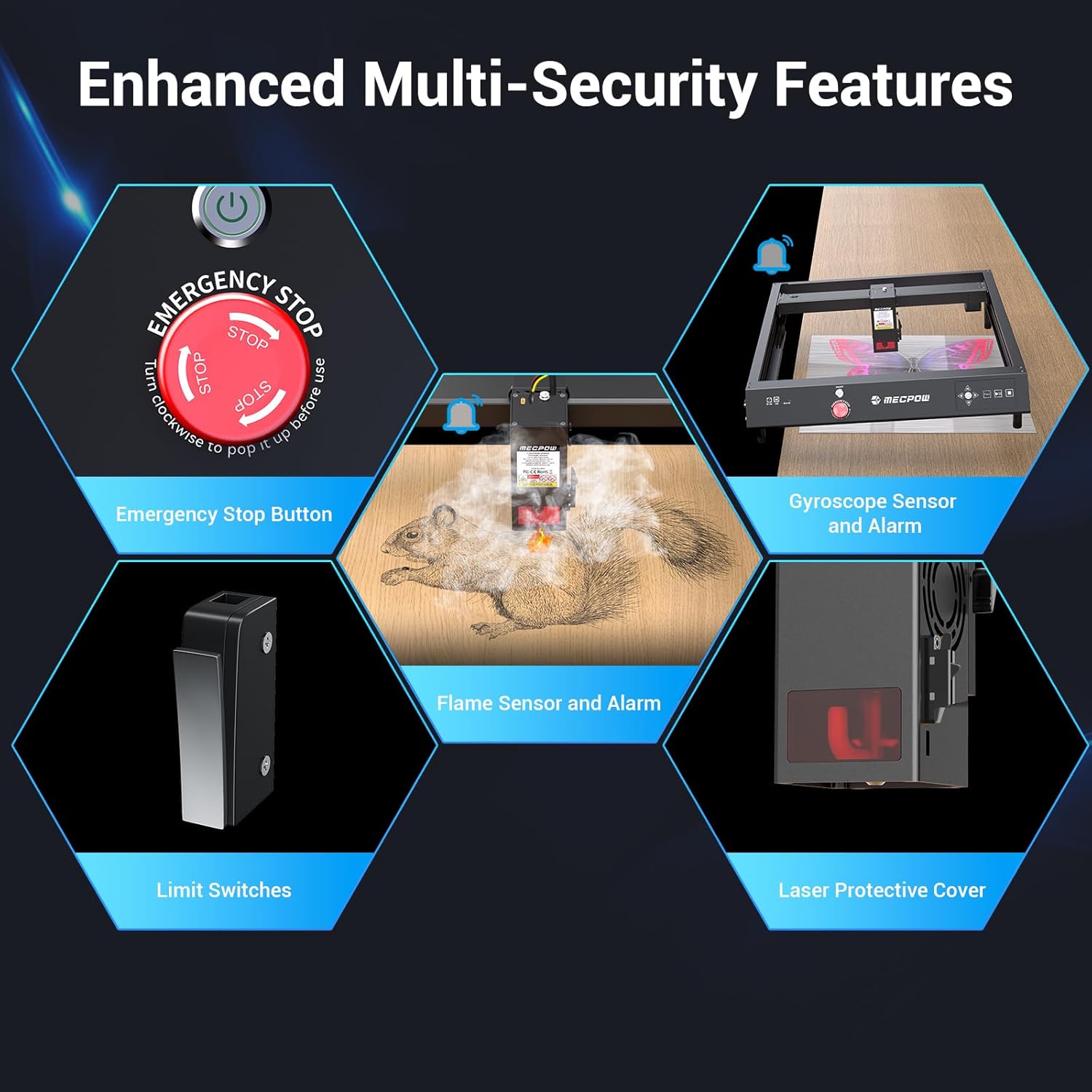
Image: Enhanced Multi-Security Features. This image illustrates the various safety mechanisms of the Mecpow X4, including the emergency stop button, flame sensor, limit switches, gyroscope sensor (tilt sensor), and laser protective cover.
3. Product Overview and Features
The Mecpow X4 is a high-performance 22W laser engraver designed for precision engraving and cutting across a variety of materials.
Key Features:
- High Efficiency & Accuracy: 22W laser power capable of cutting 10mm wood, 6mm black acrylic, and 0.08mm stainless steel in a single pass. Engraving speeds up to 22000 mm/min with a laser spot size of 0.08 mm x 0.1 mm.
- Offline Operation: Supports engraving via TF card or mobile app (MKSLaser APP) over Wi-Fi, in addition to USB connectivity.
- Auto-Assisted Air Pump: A 30 L/MIN air pump clears debris and prevents burns, ensuring clean and smooth engraving results.
- 5-Pronged Safety: Includes flame sensor, 4-way limit switches, tilt sensor, built-in laser shield, and an emergency stop button.
- Wide Compatibility: Compatible with various engraving software such as MKSLaser APP, LaserGRBL, and LightBurn, and supports Windows, Mac, Linux, Android, and iOS operating systems.
- Large Engraving Area: Offers a generous working area of 410x400mm.

Image: Mecpow X4 22W Laser Engraver. This image displays the overall design of the Mecpow X4 laser engraver, highlighting its 22W laser power and 410x400mm engraving area, along with various engraved samples.

Image: Stronger Power Makes Thicker Cuts. This graphic compares the cutting capabilities of the Mecpow 22W laser (10mm wood, 6mm acrylic, 0.08mm stainless steel) against lower wattage lasers.
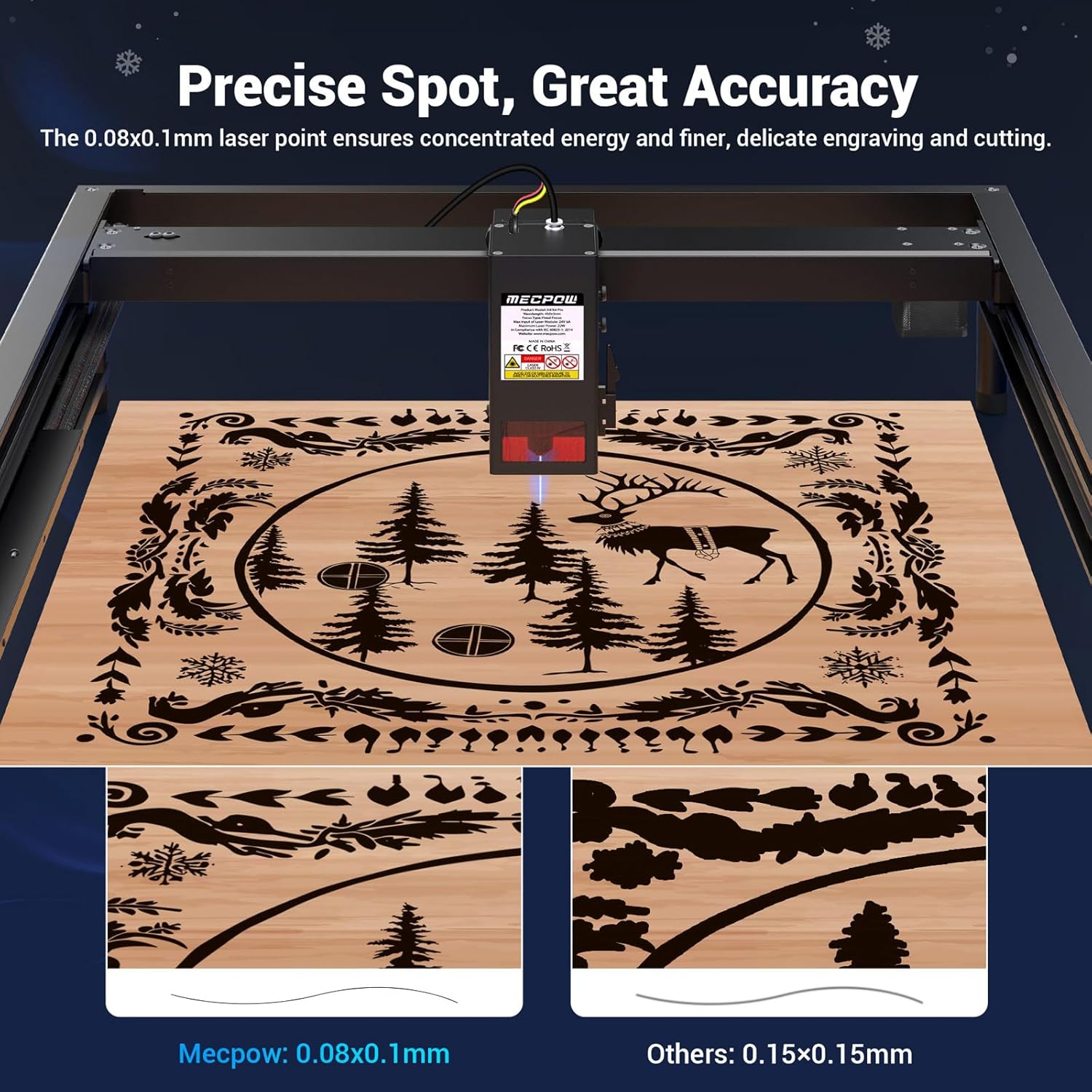
Image: Precise Spot, Great Accuracy. This image demonstrates the finer detail achievable with the Mecpow's 0.08x0.1mm laser spot compared to a larger 0.15x0.15mm spot from other engravers.

Image: Amazing Efficiency: 22000mm/min. This visual compares the Mecpow X4's engraving speed of 22000mm/min, indicating it is 2.2 times faster than typical 10000mm/min engravers.
4. Setup and Assembly
The Mecpow X4 is designed for easy assembly, with the main part of the machine pre-assembled.
Assembly Steps:
- Unpack all components and verify against the packing list.
- Place the main pre-assembled unit on a stable, level surface.
- Attach any remaining frame components or legs as per the included quick start guide. The distance between the engraver's base brackets can be adjusted to fit different sized worktops.
- Connect the air pump to the designated port on the laser module.
- Ensure all cables are securely connected.

Image: Adjustable Base Brackets. This image shows the underside of the Mecpow X4, illustrating the two adjustable holes on the bottom of the machine that allow for different table sizes (38cm and 54cm).
5. Operating Instructions
5.1 Power On/Off
- Connect the power adapter to the machine and a suitable power outlet.
- Press the power button located on the control panel to turn the machine on.
- To power off, press the power button again or the emergency stop button in an emergency.
5.2 Focusing the Laser
Achieving the correct focus is crucial for optimal engraving and cutting results.
- The Mecpow X4 features a fast focusing mechanism. Simply pull down the focus bar located on the laser module until it touches the material surface.
- Once the focus bar touches the material, retract it. The laser is now focused.
5.3 Air Assist System
The integrated 30 L/MIN air pump helps to clear smoke and debris from the engraving area, resulting in cleaner cuts and engravings and preventing material discoloration.
- Ensure the air pump is connected and powered on during engraving or cutting operations, especially for materials that produce significant smoke or residue.

Image: Automatic Air Assist. This image shows the Mecpow X4 with its external 30 L/Min air pump connected, demonstrating how air assist improves engraving quality by preventing burns and keeping the surface clean, comparing results with and without air assist.
5.4 Offline Operation
The Mecpow X4 supports offline engraving, providing flexibility without requiring a constant computer connection.
- TF Card Operation: Save your G-code files to a TF card. Insert the TF card into the designated slot on the machine. Use the control panel buttons to select and start the engraving process.
- Mobile App (MKSLaser APP): Connect your mobile phone to the laser engraver's Wi-Fi network. Use the MKSLaser APP to send designs and control the engraving process wirelessly.

Image: Offline Operation. This image illustrates the ability to operate the Mecpow X4 offline using either a TF card or the MKSLaser mobile application, showing a smartphone connected to the engraver's Wi-Fi and the control panel.
5.5 Software Compatibility
The X4 laser engraver is compatible with popular laser engraving software:
- LightBurn: A powerful and versatile laser engraving software.
- LaserGRBL: A free and open-source G-code streamer for GRBL-based laser engravers.
- MKSLaser APP: The dedicated mobile application for wireless control.
It supports a wide range of operating systems including Windows, Mac, Linux, Android, and iOS.

Image: Compatible with Various Software. This image displays the compatibility of the Mecpow X4 with LightBurn, LaserGRBL, and MKSLaser APP, and various operating systems including Windows, Mac, iOS, and Android.
5.6 Applicable Materials
The Mecpow X4 can engrave and cut a wide variety of materials. Always test on a scrap piece first to determine optimal settings.
| Category | Examples |
|---|---|
| Wood & Wood Products | Plywood, MDF, Bamboo, Cork |
| Plastics | Acrylic, ABS, Delrin, some types of plastic |
| Fabrics & Leather | Cotton, Felt, Denim, Leather, Non-woven fabric |
| Paper & Cardboard | Paper, Cardstock, Corrugated cardboard |
| Metals | Stainless steel (cutting 0.08mm), Anodized aluminum, Painted metals |
| Other | Glass, Ceramics (engraving), Slate, Rubber, Food |

Image: Applicable Materials. This image showcases a wide range of materials that can be engraved or cut, including wood, rubber, leather, bamboo, carton, paper, non-woven, fabric, plastic, slate, fruit, food, ceramics, lacquered metal, glass, acrylic, and anode oxide aluminum tablets.
5.7 Materials to Avoid
Certain materials should not be processed with the laser engraver as they can be dangerous or damage the machine.
- Transparent and Reflective Materials: Materials like clear acrylic, mirror aluminum, mirror rust steel, mirror iron, and mirror copper sheet cannot be engraved directly as they reflect the laser beam, potentially damaging the laser module or causing fire. Use high-temperature adhesive paper to cover the surface before engraving if necessary.
- Materials with High Hardness and Melting Points: Materials such as jade, amber, gemstones, and walls are not suitable for laser engraving.
- PVC/Vinyl: Avoid PVC (Polyvinyl Chloride) or vinyl as it releases highly toxic chlorine gas when burned, which is hazardous to health and corrosive to the machine.
- Other Hazardous Materials: Any material that produces toxic fumes, corrosive gases, or highly flammable byproducts when exposed to laser should be avoided.

Image: Objects with high hardness and melting points. This image shows examples of materials like jade, amber, gemstones, and walls that are not suitable for laser engraving.

Image: Transparent and reflective materials cannot be engraved directly. This image illustrates materials such as mirror aluminum, mirror rust steel, mirror iron, and mirror copper sheet that should not be directly engraved due to their reflective properties, which can damage the laser module.
6. Maintenance
Regular maintenance ensures the longevity and optimal performance of your Mecpow X4 laser engraver.
- Cleaning the Lens: Periodically clean the laser lens with a specialized lens cleaning solution and a lint-free cloth to maintain laser beam quality.
- Cleaning the Machine: Use a soft, dry cloth to wipe down the machine's frame and components. Remove any dust or debris from the rails and moving parts.
- Lubrication: Apply a small amount of lubricant to the guide rails and lead screws as recommended in the quick start guide to ensure smooth movement of the laser head.
- Air Pump Maintenance: Ensure the air pump intake is clear of obstructions.
- Firmware Updates: Check the Mecpow official website periodically for any available firmware updates to ensure your machine has the latest features and improvements.
7. Troubleshooting
This section addresses common issues you might encounter. For more complex problems, contact customer support.
| Problem | Possible Cause | Solution |
|---|---|---|
| Laser not firing or weak output | Incorrect focus, dirty lens, loose connection, low power setting. | Re-focus the laser. Clean the laser lens. Check all cable connections. Increase laser power setting in software. |
| Engraving/Cutting quality is poor | Incorrect speed/power settings, material not flat, dirty lens, no air assist. | Adjust speed and power settings for the specific material. Ensure material is flat and secured. Clean the laser lens. Activate air assist. |
| Machine not connecting to computer/app | Incorrect USB driver, Wi-Fi issue, software settings. | Install/reinstall USB drivers. Ensure Wi-Fi is enabled and connected to the engraver's network. Check software port settings. Restart both machine and computer/app. |
| Machine stops unexpectedly | Safety sensor triggered (flame, tilt, limit switch), power interruption. | Check for flame, tilt, or limit switch activation. Clear any obstructions. Ensure stable power supply. Reset the machine. |
8. Specifications
| Feature | Detail |
|---|---|
| Model Number | X4 |
| Laser Power | 22W |
| Engraving Area | 410 x 400 mm |
| Laser Spot Size | 0.08 mm x 0.1 mm |
| Engraving Speed | Up to 22000 mm/min |
| Product Dimensions | 28.15 x 25.39 x 5.71 inches |
| Item Weight | 19.8 pounds |
| Air Pump | 30 L/MIN Auto-Assisted |
| Safety Features | Flame Sensor, 4-way Limit Switch, Tilt Sensor, Built-in Laser Shield, Emergency Stop Button |
| Connectivity | USB, TF Card, Wi-Fi (MKSLaser APP) |
| Software Compatibility | MKSLaser APP, LaserGRBL, LightBurn |
| Operating Systems | Windows, Mac, Linux, Android, iOS |
9. Warranty and Support
Mecpow provides a 1-Year Warranty for the X4 Laser Engraver, covering manufacturing defects and malfunctions under normal use.
For technical support, warranty claims, or any inquiries, please contact Mecpow customer service through their official website or the contact information provided with your product packaging. Mecpow aims to provide 24-hour service to its users.

Image: Mecpow Support Information. This image highlights Mecpow's commitment to customer support, including coverage in 100+ countries, 3.5 Million+ users, 24H services, and a 1-year warranty.


