
HAYLOU T016
HAYLOU Mori Pro Wireless Earbuds User Manual
Model: T016
Introduction
Thank you for choosing the HAYLOU Mori Pro Wireless Earbuds. These earbuds are designed to provide a high-quality audio experience with advanced features such as 43dB auto-adjustable Active Noise Cancellation (ANC), 10mm composite drivers for balanced sound, and 6 AI Environmental Noise Cancellation (ENC) microphones for clear calls. This manual will guide you through the setup, operation, and maintenance of your new earbuds.
What's in the Box
- 1 x HAYLOU Mori Pro Wireless Earbuds
- 1 x Charging Case
- 1 x USB-C Charging Cable
- 1 x User Manual
- Eartips (S/M/L sizes)

Image: HAYLOU Mori Pro Wireless Earbuds and their charging case, as typically found in the product packaging.
Setup
1. Charging the Earbuds and Case
Before first use, fully charge the earbuds and charging case. Connect the provided USB-C cable to the charging port on the case and a power source. The case will charge the earbuds automatically when they are placed inside.
- Charging Time: Approximately 2 hours for a full charge.
- Battery Life: Up to 4 hours with ANC on, 5 hours with ANC off. The charging case extends total playtime to 28 hours.

Image: The HAYLOU Mori Pro earbuds inside their charging case, illustrating the battery life with and without ANC, and the Type-C charging port.
2. Selecting Eartips
Choose the eartip size (S, M, L) that provides the most comfortable and secure fit for your ears. A proper seal is crucial for optimal sound quality and noise cancellation performance.

Image: Diagram showing the ergonomic angle of the earbuds, available S/M/L eartip sizes, and IPX4 waterproof rating.
3. Pairing with Your Device
- Open the charging case. The earbuds will automatically enter pairing mode.
- On your device (smartphone, tablet, etc.), enable Bluetooth.
- Search for "HAYLOU Mori Pro" in the list of available Bluetooth devices and select it to connect.
- Once connected, you will hear a confirmation tone, and the earbuds are ready for use.
The earbuds feature Bluetooth 6.0 for a fast and stable connection.

Image: Illustration of Bluetooth 6.0 technology, highlighting faster data transfer and stable connection for the earbuds.
Operating Instructions
Touch Controls
The HAYLOU Mori Pro earbuds feature intuitive touch controls on each earbud for easy management of audio and calls.
- Double tap either earbud: Play/Pause music.
- Triple tap the left earbud: Skip track backward.
- Triple tap the right earbud: Skip track forward.
- Press and hold the right earbud for 2 seconds: Switch between ANC modes.
- Press and hold the left earbud for 2 seconds: Turn on/off low latency mode.
- Double tap left/right earbud: Answer/Hang up a call.
- Press and hold the left/right earbud for 1.5 seconds: Reject a call.
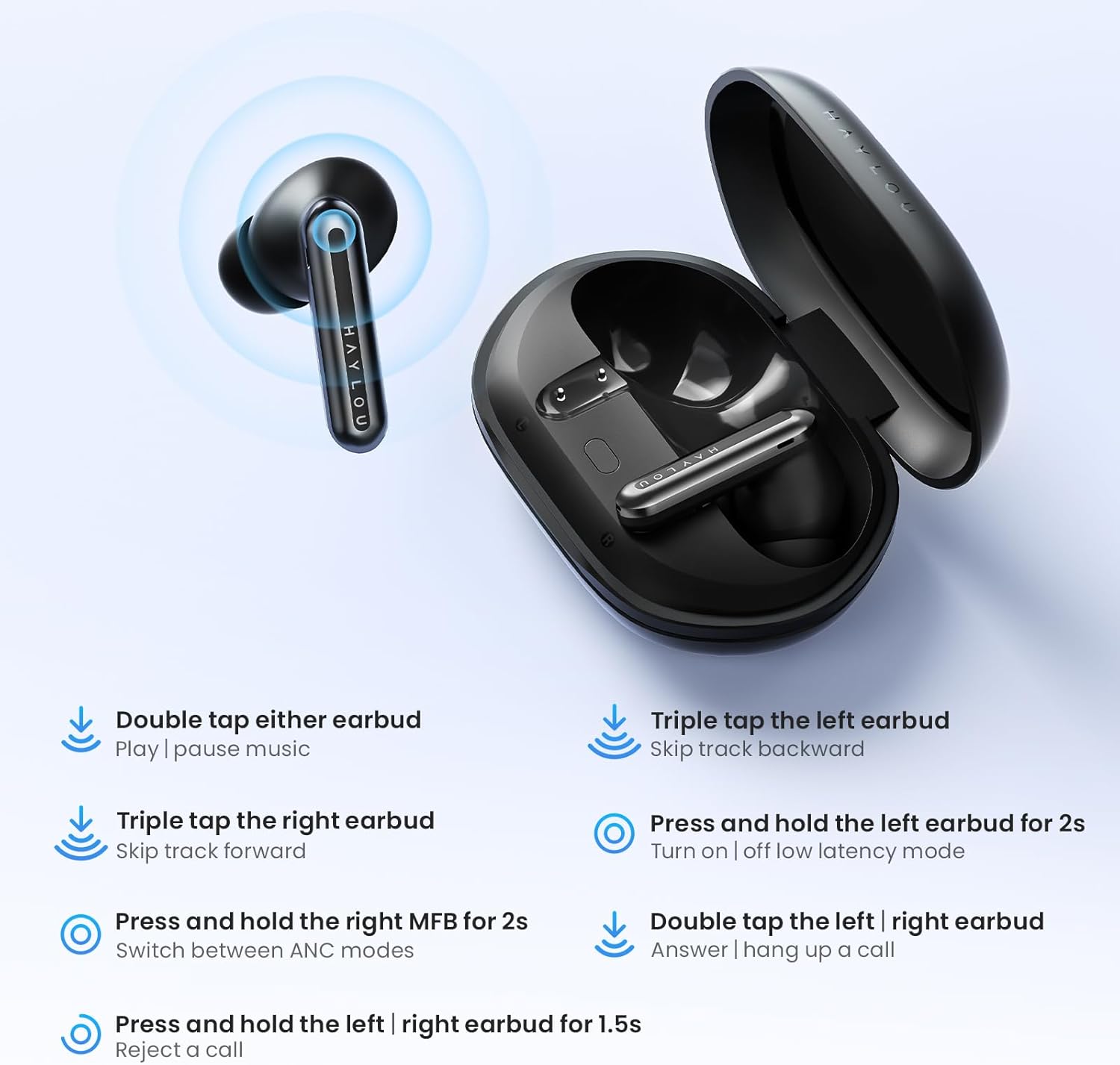
Image: A visual guide to the touch control gestures for the HAYLOU Mori Pro earbuds, detailing actions like play/pause, skipping tracks, managing calls, and switching ANC modes.
Active Noise Cancellation (ANC) Modes
The earbuds offer three adaptive noise reduction modes to suit your environment:
- Full Noise Control: Maximizes noise cancellation, ideal for noisy environments like buses, subways, or airplanes.
- Ambient Sound: Allows you to hear your surroundings while enjoying audio, suitable for libraries, cafes, or offices.
- Transparency Mode: Enhances ambient sounds, enabling clear conversations without removing the earbuds, useful for outdoor activities or shopping.
Download the Haylou Sound app for customized noise control settings and to fine-tune your audio experience.

Image: Visual representation of the three ANC modes (ANC ON, ANC OFF, Transparency Mode) and their recommended usage environments.

Image: Screenshots of the Haylou Sound mobile application, demonstrating options for customizing sound, settings, and ANC modes.
Clear Calls
Equipped with six microphones (three per earbud) and advanced Environmental Noise Cancellation (ENC) technology, the earbuds isolate your voice for crystal-clear conversations, even in noisy environments.
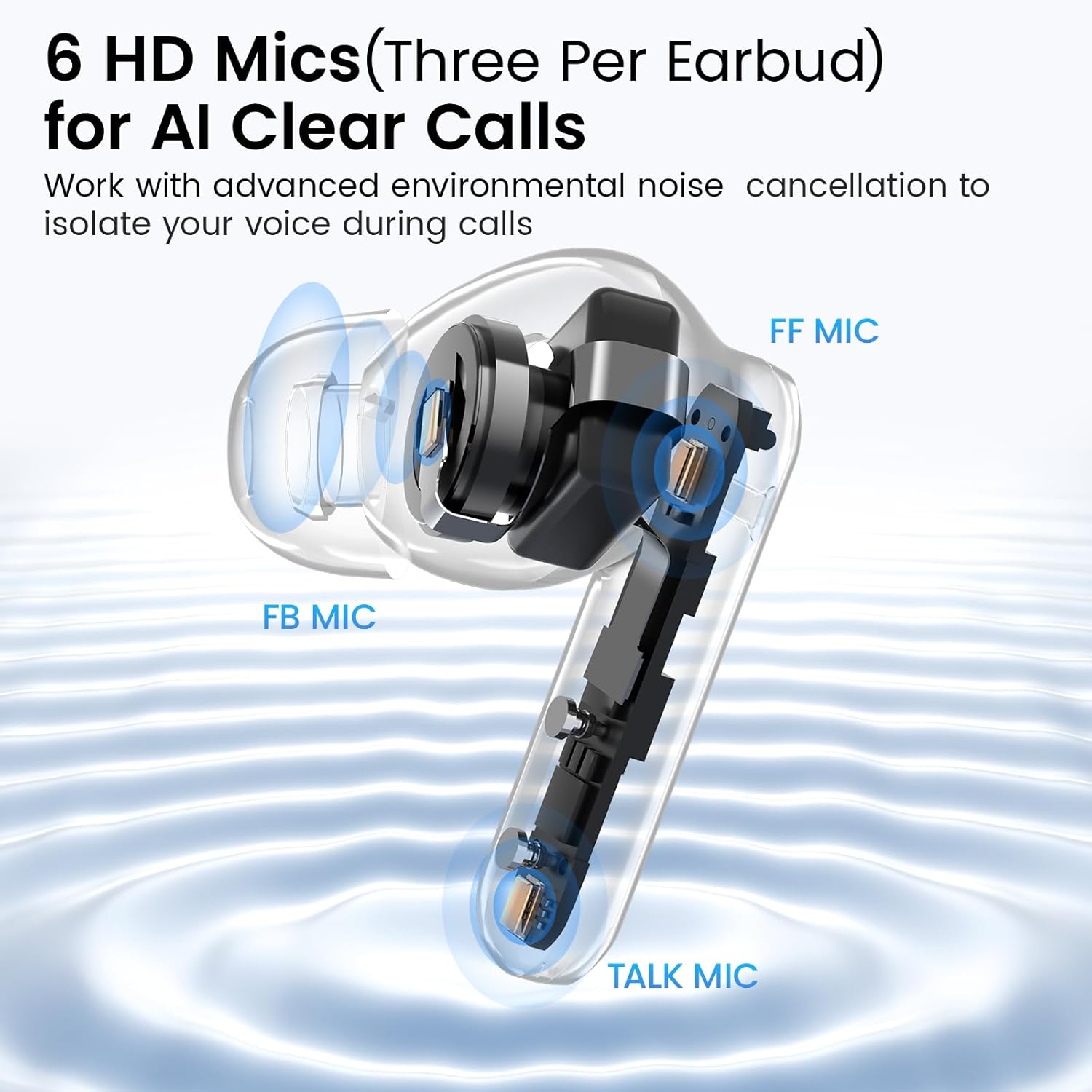
Image: An exploded view diagram highlighting the placement of the three microphones (FF MIC, FB MIC, TALK MIC) within each earbud for enhanced call clarity.
Maintenance
- Cleaning: Regularly clean the earbuds and charging case with a soft, dry cloth. Avoid using harsh chemicals or abrasive materials.
- Water Resistance: The earbuds have an IPX4 rating, protecting them against sweat and light splashes. Do not submerge them in water.
- Storage: Store the earbuds in their charging case when not in use to protect them and ensure they remain charged.
Troubleshooting
- No Sound: Ensure earbuds are charged, properly paired, and volume is adjusted on both the earbuds and your device.
- Pairing Issues: Turn off Bluetooth on your device, place earbuds back in the case, close and reopen the case, then try pairing again.
- Poor Sound Quality: Check eartip fit for a proper seal. Ensure earbuds are clean and free from debris.
- Noise Cancellation Not Working: Verify that ANC mode is activated. Adjust settings via the Haylou Sound app if necessary.
Specifications
| Model Name | HAYLOU T016 |
| Noise Control | Adaptive Noise Cancellation (43dB) |
| Audio Driver Size | 10mm Composite Drivers |
| Microphones | 6 AI ENC Microphones (3 per earbud) |
| Connectivity Technology | Bluetooth 6.0 |
| Bluetooth Range | 10 Meters |
| Battery Life (Earbuds) | 4 hours (ANC on), 5 hours (ANC off) |
| Total Playtime (with Case) | 28 Hours |
| Charging Port | Type-C |
| Charging Time | 2 Hours |
| Water Resistance | IPX4 (sweatproof) |
| Control Type | Touch Control |
| Item Weight | 50 Grams (total), 1.76 ounces (product) |
| Product Dimensions | 1.54 x 0.63 x 3.54 inches |
| Material | Acrylonitrile Butadiene Styrene (ABS), Plastic |
Warranty and Support
For warranty information, technical support, or customer service inquiries, please refer to the official HAYLOU website or contact their customer support directly. Keep your purchase receipt for warranty claims.
Related documentsT016


Ask a question about this manual
Ask about setup, troubleshooting, compatibility, parts, safety, or missing instructions. Manuals+ will review the question and use this page’s manual context to help answer it.