Introduction
This manual provides detailed instructions for the assembly, operation, and maintenance of your DWVO TV Stand with Mount. This versatile entertainment center is designed to accommodate TVs from 30 to 70 inches, featuring a built-in power outlet, adjustable viewing height, and RGB LED lighting. Please read all instructions carefully before assembly and use to ensure safe and proper operation.
Safety Information
WARNING:
- This product comes with safety warnings. Please read and follow all instructions carefully to ensure safe assembly, use, and maintenance.
- Keep small children and pets away from the product during assembly and while in use.
- Do not overload the shelves or place heavy objects on the edges to prevent tip-over.
- Always unplug the power cord when not in use or when performing maintenance.
- Keep electrical components dry and away from heat sources.
Product Features
- Adjustable Viewing Height: Customize the TV height for optimal viewing comfort.
- Integrated Power Outlet: Equipped with 2 standard outlets and 2 USB ports for convenient device charging.
- RGB LED Lighting: Features 7 colors and 21 modes to enhance your entertainment experience.
- Ample Storage: Three-tier open shelves provide space for media devices, books, and decor.
- Cable Management: Open-back design helps keep cords organized and tidy.
- Durable Construction: Made from sturdy MDF and steel, supporting up to 300 lbs.
- Versatile Design: Sleek trapezoidal shape suitable for various room layouts, fitting TVs from 30-70 inches.
Setup and Assembly
Assembly of the DWVO TV Stand with Mount typically takes 40-50 minutes with two people. Ensure all parts are present before beginning assembly. Refer to the included hardware pack for specific components.
- Unpack all components and verify against the parts list.
- Assemble the metal frame structure according to the diagrams provided in the separate assembly guide.
- Attach the MDF shelves to the frame, ensuring all screws are tightened securely.
- Install the TV mounting bracket to the stand, adjusting to your desired height.
- Mount your TV to the bracket, ensuring it is centered and stable.
- Connect the power outlet and LED lighting components as instructed.
- Place the stand in its desired location, ensuring it is on a flat, stable surface.
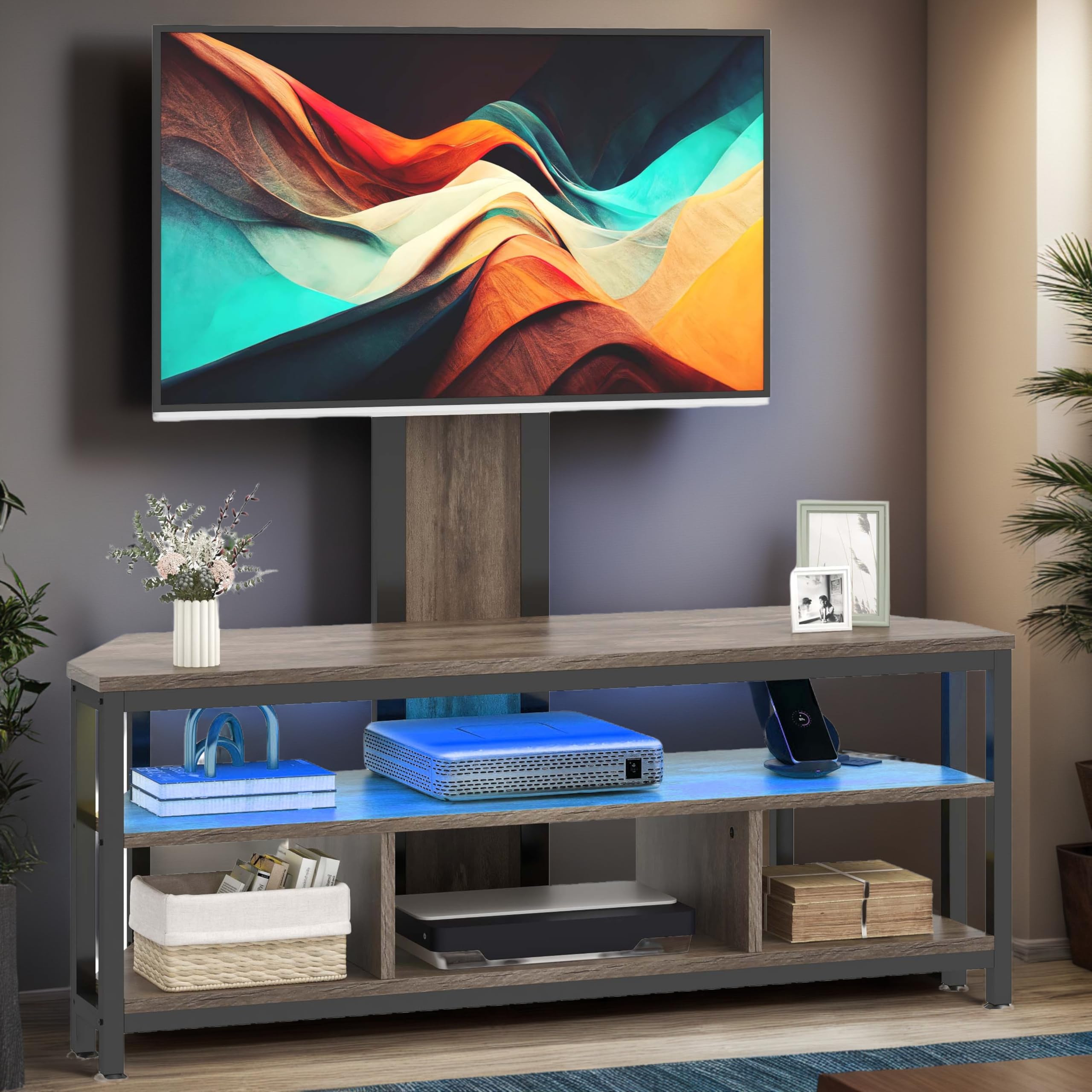
This image displays the fully assembled DWVO TV Stand with Mount, featuring a large television mounted above it. The stand includes open shelving, LED lighting, and is shown in a living room environment with a Christmas tree and other decorations.
Operating Instructions
LED Lighting System
The integrated RGB LED lighting system offers 7 colors and 21 dynamic modes to customize your ambiance. Use the included remote control to operate the lights.
- Power On/Off: Press the power button on the remote to turn the lights on or off.
- Color Selection: Use the color buttons to select from 7 static colors.
- Mode Selection: Cycle through 21 dynamic lighting modes using the mode button.
- Brightness Adjustment: Adjust the intensity of the lights using the brightness controls.
Integrated Power Outlet
The TV stand includes a built-in power strip with 2 standard AC outlets and 2 USB ports. This allows for convenient powering of your TV, media devices, and charging of mobile devices.
- Plug the stand's main power cord into a wall outlet.
- Connect your TV and other media devices to the AC outlets.
- Use the USB ports to charge compatible devices.
- Ensure total power consumption does not exceed the rated capacity of the power strip.
Official product video demonstrating the LED lighting features and power outlet functionality of the DWVO TV Stand with Mount. The video shows various color changes and devices being plugged into the power strip.
Maintenance
To ensure the longevity and appearance of your DWVO TV Stand, follow these maintenance guidelines:
- Cleaning: Wipe surfaces with a soft, damp cloth. Avoid harsh chemicals or abrasive cleaners that may damage the finish.
- Dusting: Regularly dust the shelves and frame to prevent buildup.
- Spills: Clean up spills immediately to prevent staining or damage to the wood finish.
- Electrical Components: Ensure the power outlet and LED components remain dry. Do not immerse in water.
- Fasteners: Periodically check all screws and fasteners to ensure they remain tight. Retighten if necessary.
Troubleshooting
If you encounter any issues with your TV stand, refer to the following common troubleshooting steps:
- LED Lights Not Working:
- Ensure the LED power adapter is securely plugged into both the stand and a working wall outlet.
- Check the remote control battery.
- Verify that the LED strip connection is secure.
- Power Outlets Not Functioning:
- Confirm the stand's main power cord is fully plugged into a live wall outlet.
- Test the wall outlet with another device to ensure it is working.
- Check if the power strip has an overload protection reset button (if applicable).
- Stand Wobbles or is Unstable:
- Ensure the stand is placed on a level surface.
- Check all assembly screws and bolts to ensure they are fully tightened.
- Distribute weight evenly on the shelves.
- TV Mount Issues:
- Verify that the TV mounting screws are compatible with your TV and securely fastened.
- Ensure the TV is properly seated on the mounting bracket.
- Re-check the height adjustment mechanism for proper locking.
If problems persist, please contact DWVO customer support for assistance.
Specifications
| Attribute | Detail |
|---|---|
| Brand | DWVO |
| Model Number | MADWVvRR0X |
| Material | Engineered Wood, Steel |
| Color | Grey |
| Product Dimensions (L x W x H) | 47.2 x 15.7 x 18.9 inches |
| Assembled Length | 47.2 inches |
| Assembled Width | 15.7 inches |
| Assembled Height | 18.9 inches |
| Item Weight | 54.6 pounds |
| Maximum Weight Capacity | 300 lbs |
| Compatible TV Size | 30-70 inches |
| Power Outlet | 2 AC Outlets, 2 USB Ports |
| LED Lighting | RGB, 7 Colors, 21 Modes |
| Assembly Required | Yes |
| UPC | 197839506862 |
| ASIN | B0DMVZM1WM |
Warranty and Support
For warranty information or technical support, please contact DWVO customer service. Keep your purchase receipt and model number (MADWVvRR0X) handy for faster service.
You can typically find support contact details on the DWVO official website or through your retailer's customer service portal.


