
Varstrom EKD01
Varstrom EKD01 TFT LCD Display User Manual
Model: EKD01
For BAFANG Mid Motors (BBS02B, BBS-HD)
1. Introduction
The Varstrom EKD01 is a 2.4-inch IPS color TFT LCD display designed for BAFANG mid-drive electric bicycle motors. It features an intuitive interface with three integrated buttons, offering essential functions for your e-bike experience. This manual provides detailed instructions for the proper installation, operation, and maintenance of your EKD01 display.

Figure 1.1: The Varstrom EKD01 TFT LCD Display, showing its screen and control buttons.
2. Product Specifications
The EKD01 display is built with robust materials and designed for reliable performance in various conditions. Key specifications are detailed below:
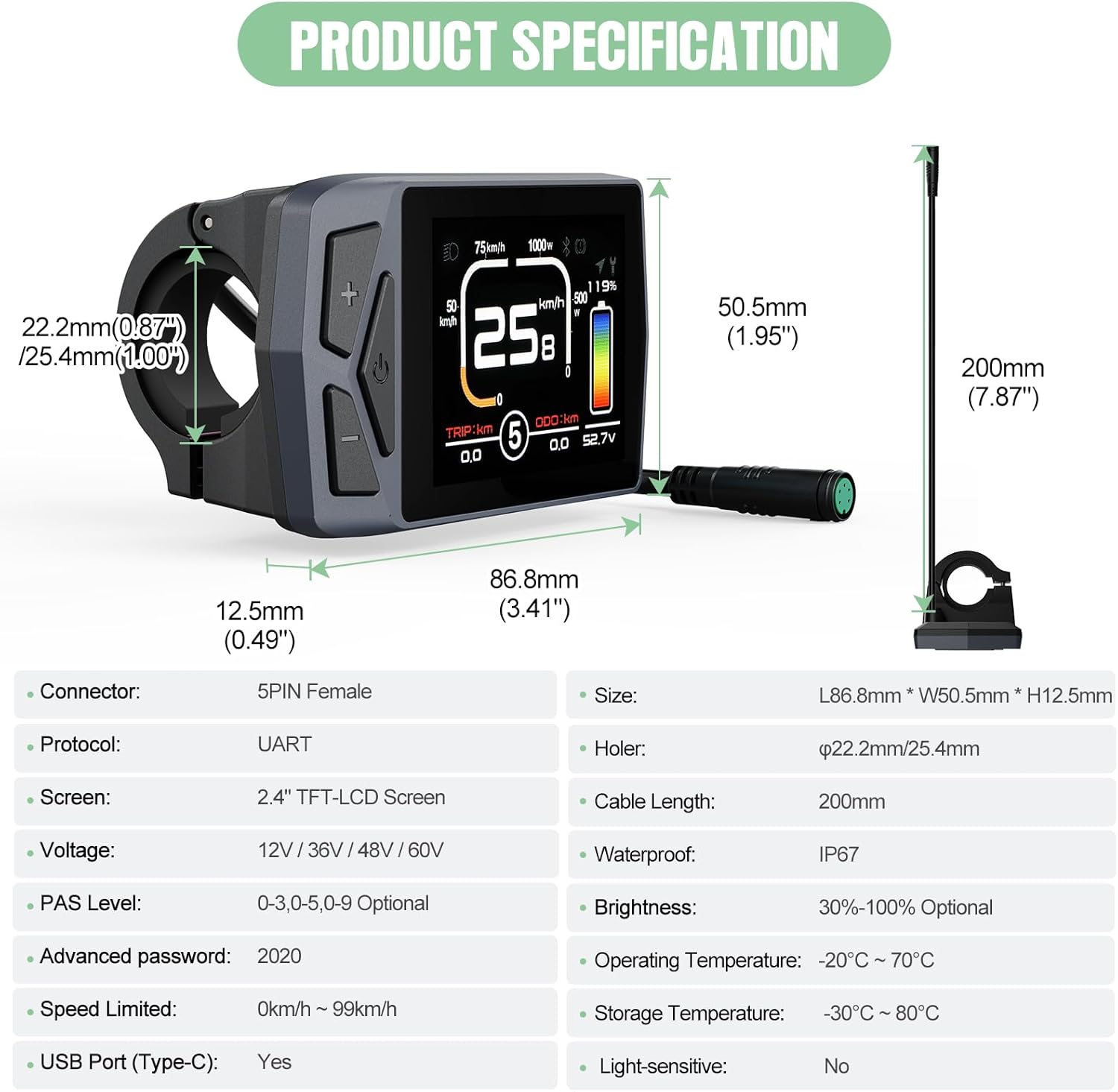
Figure 2.1: Diagram illustrating the physical dimensions and key specifications of the EKD01 display.
| Specification | Detail |
|---|---|
| Model | EKD01 |
| Screen Size | 2.4" IPS Color Matrix |
| Resolution | 320*240px |
| Dimensions | 86.8*50.5*12.5 mm |
| Waterproof Grade | IP67 |
| Connector Type | 5-Pin Female Round (M5 Waterproof Connector) |
| Voltage Compatibility | 12V/32V/48V/60V |
| Working Temperature | -20°C to +70°C |
| Storage Temperature | -30°C to +80°C |
| USB Charger | Type-C |
| Default Password | 2020 |
| PAS Levels | 0-3 / 0-5 / 0-9 (Optional) |
| Handlebar Fit | Ø22.2mm / Ø25.4mm |
| Communication Protocol | UART (versions 5.0 to 5.8) |
3. Setup and Installation
Proper installation is crucial for the display's functionality and your safety. Follow these steps carefully.
3.1 Compatibility Check
The EKD01 display is specifically designed for BAFANG motors that utilize the UART communication protocol (versions 5.0 to 5.8). It features a 5-pin female round connector. Ensure your motor's connector and protocol match these specifications. It is not compatible with CAN protocol motors or other connector types.
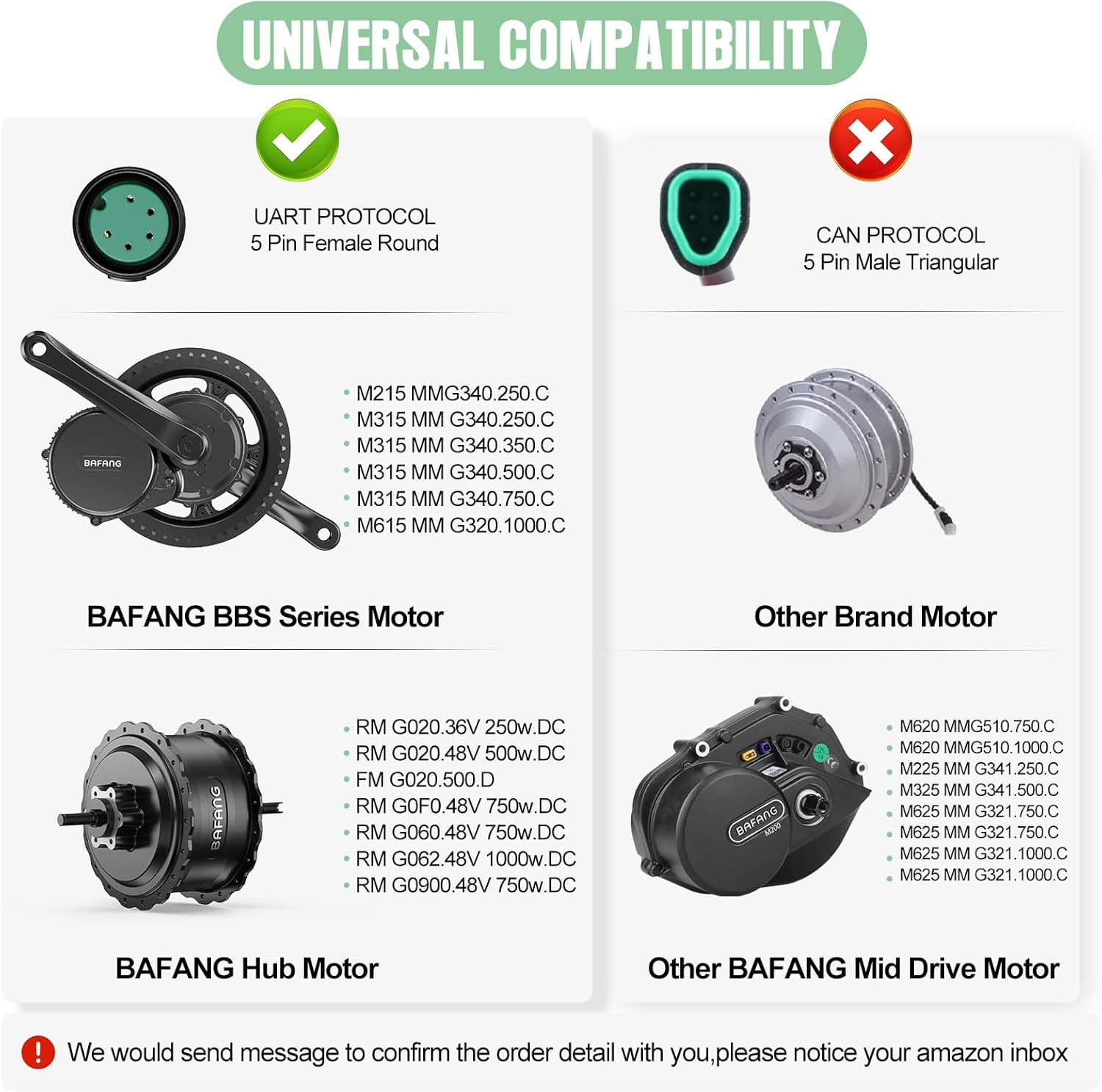
Figure 3.1: Compatibility diagram showing supported BAFANG BBS Series and Hub Motors (UART protocol) versus incompatible CAN protocol motors.
3.2 Mounting the Display
- Select a suitable position on your e-bike's handlebar (compatible with Ø22.2mm or Ø25.4mm diameters).
- Loosen the clamp screws on the display's mounting bracket.
- Place the display bracket around the handlebar and tighten the screws securely, ensuring the display is stable and visible. Do not overtighten.
3.3 Wiring Connection
Connect the EKD01 display to your e-bike's motor system using the 5-pin female round connector. Refer to the wiring diagram below to ensure correct pin alignment. Incorrect wiring can damage the display or motor.
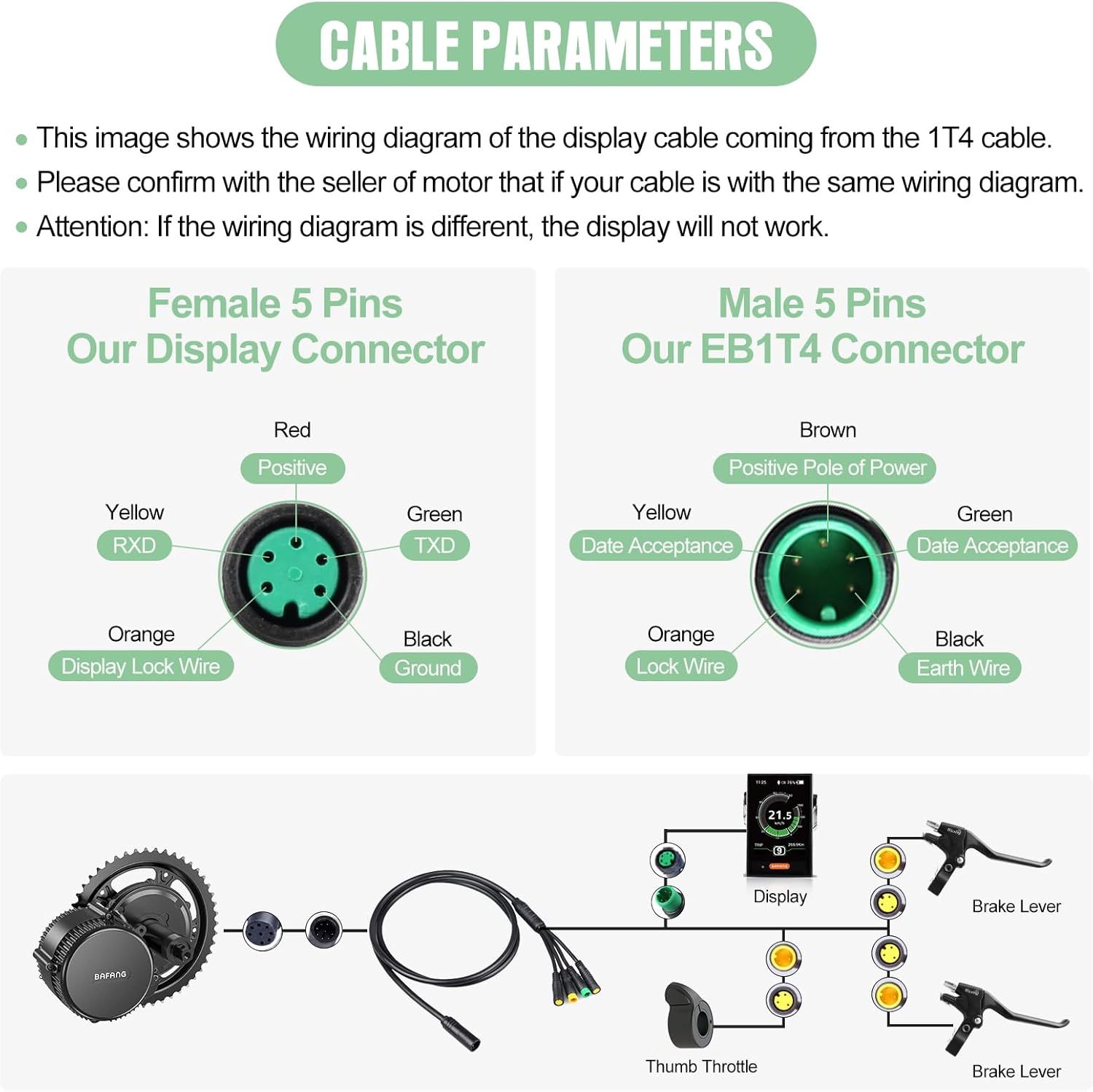
Figure 3.2: Detailed wiring diagram for the EKD01 display's 5-pin female connector and the corresponding male EB1T4 connector. Ensure your cable matches this configuration.
- Red: Positive
- Yellow: RXD (Receive Data)
- Orange: Display Lock Wire
- Green: TXD (Transmit Data)
- Black: Ground
Important: Confirm with your motor's seller that your cable's wiring diagram is identical to the one shown. If the wiring diagram differs, the display will not function correctly.
4. Operating the Display
The EKD01 display provides comprehensive information and control over your e-bike's functions.
4.1 Power On/Off
Press and hold the power button (⏻) located on the display to turn it on or off.
4.2 Display Interface Overview
The EKD01's color screen presents various data points to monitor your ride. Refer to the diagram below for an explanation of each indicator.
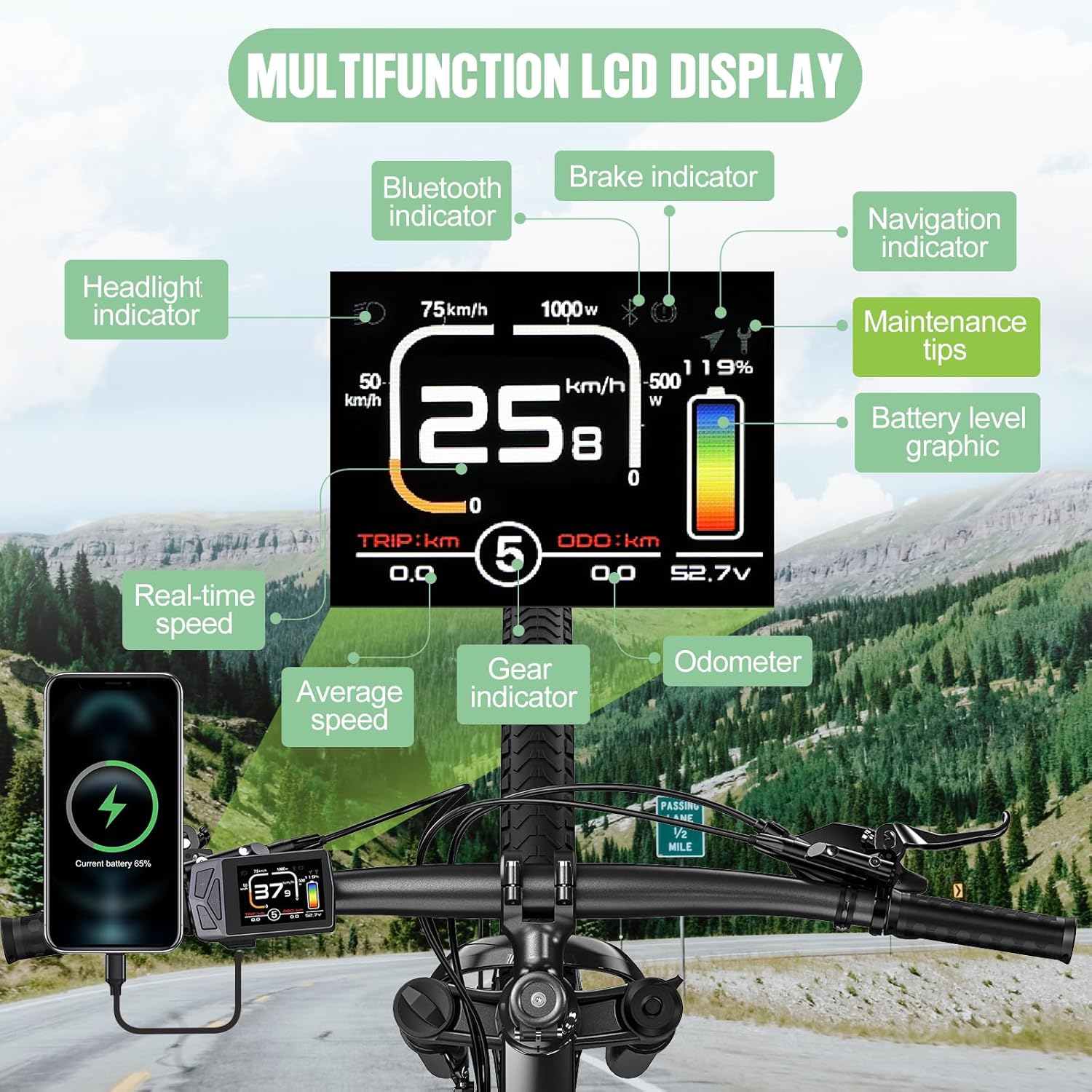
Figure 4.1: Annotated diagram of the EKD01 display, detailing the various indicators and their meanings.
- Headlight Indicator: Shows if the bike's headlights are on.
- Bluetooth Indicator: Indicates Bluetooth connection status.
- Brake Indicator: Illuminates when brakes are applied.
- Navigation Indicator: Displays navigation prompts (requires activation).
- Maintenance Tips: Alerts for service or maintenance.
- Battery Level Graphic: Visual representation of remaining battery charge.
- Real-time Speed: Current riding speed.
- Average Speed: Average speed of the current trip.
- Gear Indicator: Current PAS (Pedal Assist System) level.
- Odometer (ODO): Total distance traveled by the e-bike. This value can be cleared on the EKD01.
- Trip Distance (TRIP): Distance traveled during the current ride.
4.3 Adjusting PAS Levels
Use the + and - buttons to cycle through the available Pedal Assist System (PAS) levels. The EKD01 supports 0-3, 0-5, or 0-9 PAS levels, depending on your motor's configuration.
4.4 Settings and Functions
The EKD01 offers several customizable settings:
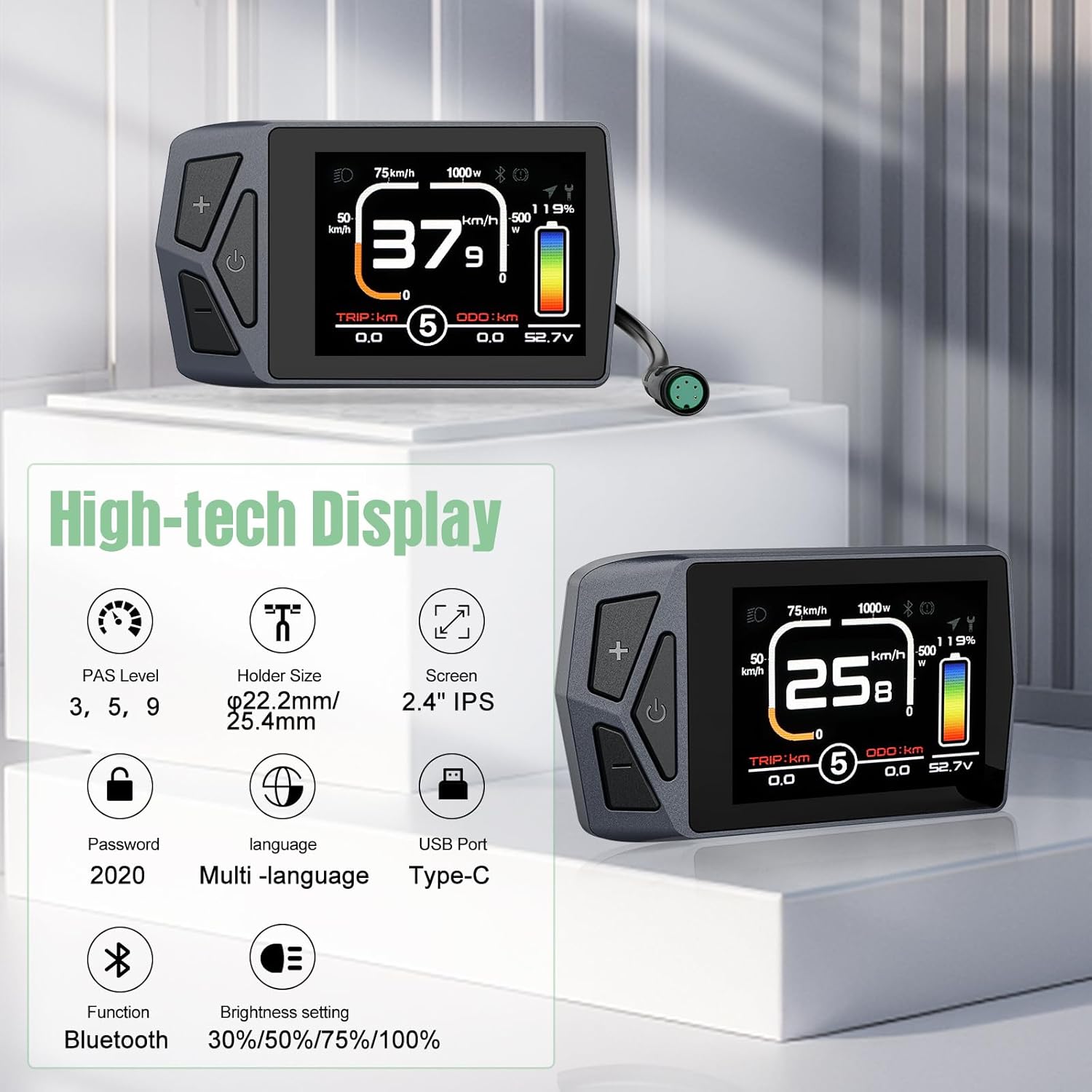
Figure 4.2: Summary of advanced features available on the EKD01 display.
- Language Selection: The display supports 8 languages: English, French, German, Spanish, Italian, Polish, Dutch, and Czech. Navigate through the settings menu to change the language.
- Brightness Setting: Adjust screen brightness to 30%, 50%, 75%, or 100% for optimal visibility in different lighting conditions.
- Navigation Function: The display includes a navigation feature. Note that this function typically offers 5 free trials, and continued use may require payment. It provides seamless connection for real-time navigation and data synchronization.
- Password: The default password for accessing certain settings is 2020.
- USB Port (Type-C): Use the integrated Type-C USB port for charging compatible devices.
- ODO Reset: Unlike some other models, the EKD01 allows the Odometer (ODO) to be cleared. Consult the display's menu for this option.
5. Maintenance
To ensure the longevity and optimal performance of your EKD01 display, follow these maintenance guidelines:
- Cleaning: The display has an IP67 waterproof rating, meaning it is protected against dust and temporary immersion in water. However, for cleaning, use a soft, damp cloth. Avoid abrasive cleaners, solvents, or high-pressure water jets, which can damage the screen or housing.
- Temperature: Operate the display within its specified working temperature range of -20°C to +70°C. For storage, ensure temperatures are between -30°C and +80°C. Extreme temperatures can affect performance and lifespan.
- Physical Protection: While durable, avoid dropping the display or subjecting it to strong impacts. Ensure the connector is clean and free of debris before connecting.
6. Troubleshooting
If you encounter issues with your EKD01 display, refer to the following common problems and solutions:
| Problem | Possible Cause / Solution |
|---|---|
| Display does not power on. |
|
| Display shows no data or incorrect data. |
|
| Navigation function not working or asking for payment. |
|
| Display is loose on the handlebar. |
|
If you are unable to resolve an issue using the troubleshooting steps above, please contact Varstrom customer support for assistance.
7. Warranty and Support
7.1 Warranty Information
The Varstrom EKD01 display comes with a warranty that includes a 30-day return period and 365 days for repair or replacement from the date of purchase. This warranty covers manufacturing defects and malfunctions under normal use. It does not cover damage caused by misuse, accidents, unauthorized modifications, or improper installation.
7.2 Customer Support
For technical support, warranty claims, or any questions regarding your Varstrom EKD01 display, please contact Varstrom customer service. Provide your product model (EKD01) and purchase details when contacting support to expedite assistance.
You can typically find contact information on the Varstrom official website or through the retailer where you purchased the product.
Related documentsEKD01


Ask a question about this manual
Ask about setup, troubleshooting, compatibility, parts, safety, or missing instructions. Manuals+ will review the question and use this page’s manual context to help answer it.