
Retevis RB658
Retevis RB658 Walkie Talkie User Manual
Model: RB658 | Brand: Retevis
1. Introduction
Thank you for choosing the Retevis RB658 Walkie Talkie. This manual provides detailed instructions for the proper use, maintenance, and troubleshooting of your device. Please read this manual carefully before operation to ensure optimal performance and safety.
The Retevis RB658 is a versatile two-way radio designed for reliable communication in various environments. Key features include APP control, Bluetooth 5.0 connectivity, AI noise suppression, a clear 1.77-inch LCD, and an 1800mAh battery for extended use.

Image 1.1: Two Retevis RB658 walkie-talkies with accompanying wireless earphones.
2. Package Contents
Please check the package contents upon unboxing. If any items are missing or damaged, contact your retailer immediately.
- Retevis RB658 Walkie Talkie (x2)
- 1800mAh Li-ion Battery (x2)
- Wireless Headphone (x2)
- Belt Clip (x2)
- User Manual (x2)
- Type-C Charging Cable (x2)
- Hand Strap (x2)

Image 2.1: All components included in the Retevis RB658 package.
3. Product Overview
Familiarize yourself with the main components of your Retevis RB658 walkie talkie.
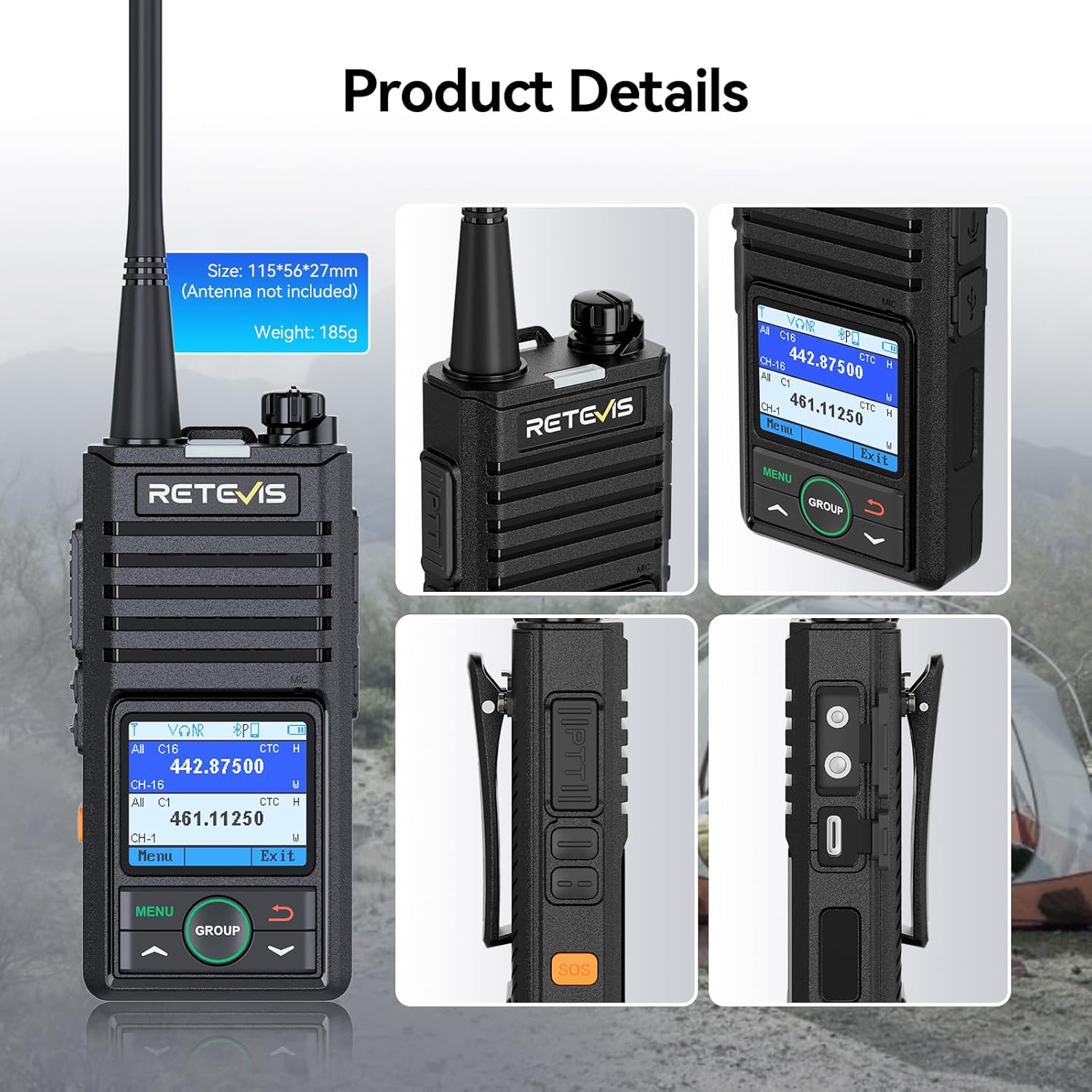
Image 3.1: Detailed views of the Retevis RB658 walkie-talkie, showing its dimensions and key features.
Key Components:
- Antenna: For transmitting and receiving signals.
- Power/Volume Knob: Turn clockwise to power on and increase volume; counter-clockwise to decrease volume and power off.
- LCD Display: 1.77-inch screen showing channel, frequency, battery status, and other information. Brightness is adjustable (15 levels).
- PTT (Push-to-Talk) Button: Press and hold to transmit, release to receive.
- SOS Button: For emergency alarm activation.
- Menu Button: Accesses the radio's settings menu.
- Group Button: Initiates group calls.
- Type-C Charging Port: For charging the device.
- Belt Clip: For attaching the radio to clothing or a belt.
4. Setup
4.1 Charging the Battery
Before first use, fully charge the battery. The RB658 uses an 1800mAh Li-ion battery and charges via a standard Type-C port.
- Connect the Type-C charging cable to the radio's charging port and a suitable USB power adapter.
- The charging indicator on the screen will show charging status.
- A full charge takes approximately 5 hours and provides up to 18 hours of continuous use or 90 hours of standby time.

Image 4.1: Charging the 1800mAh Li-ion battery via Type-C port.
4.2 Attaching Accessories
- Battery: Align the battery with the compartment on the back of the radio and push until it clicks into place.
- Belt Clip: Attach the belt clip to the designated slot on the back of the radio.
- Hand Strap: Thread the hand strap through the loop on the top side of the radio.
4.3 APP Control (Android Only)
The RB658 supports APP control via Bluetooth, allowing you to manage settings from your Android phone.
- Download the official Retevis APP from the Google Play Store.
- Ensure Bluetooth is enabled on your phone and the RB658.
- Open the APP and follow the on-screen instructions to connect to your radio.
- You can now edit walkie-talkie settings directly from your phone, enhancing flexibility and operational ease.
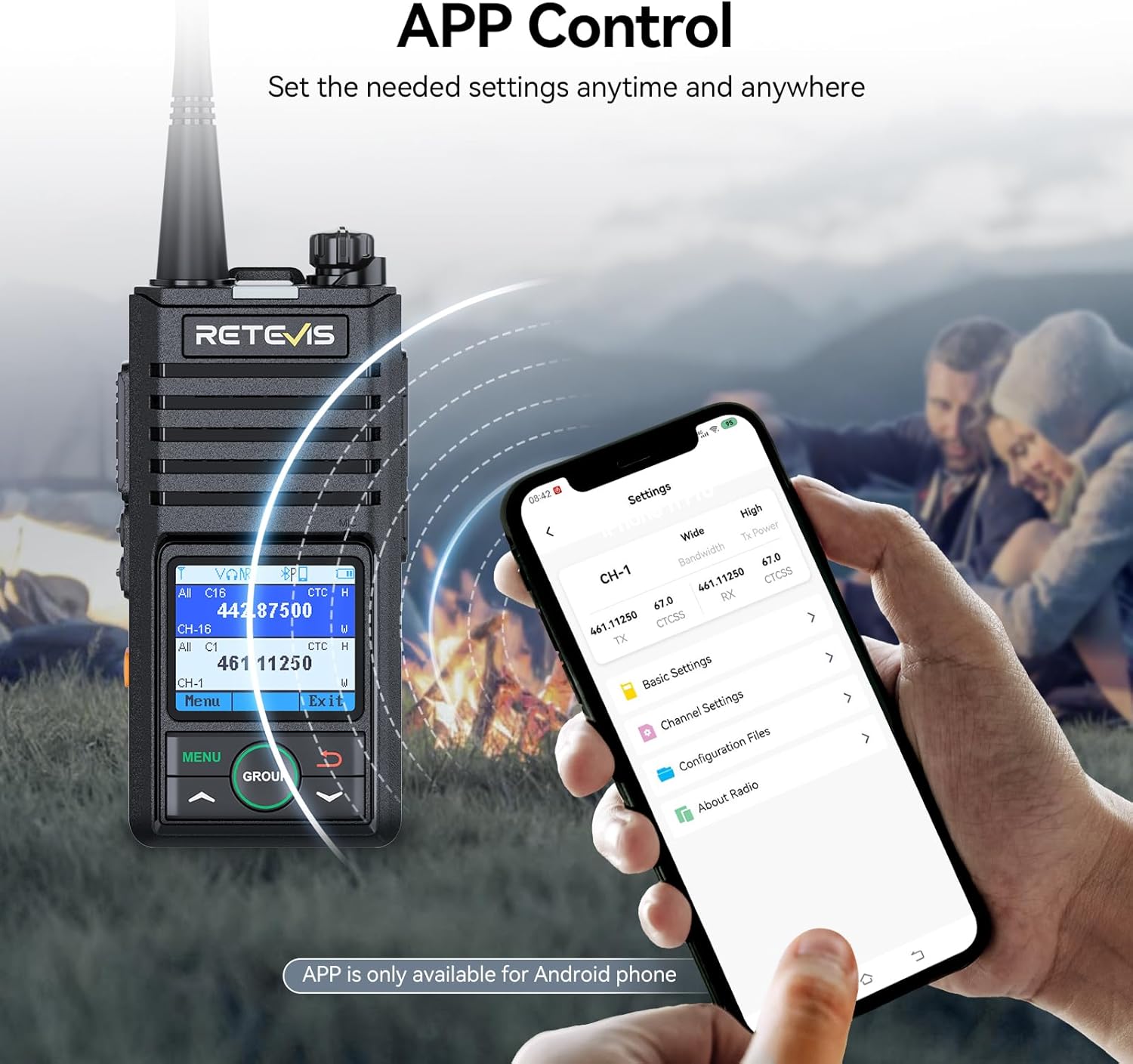
Image 4.2: Managing radio settings via the Retevis APP on an Android phone.
4.4 Bluetooth 5.0 Connectivity
Connect wireless earphones or other Bluetooth-enabled devices to your RB658 for hands-free operation.
- Access the Bluetooth settings through the radio's menu or the APP.
- Enable Bluetooth and search for available devices.
- Select your wireless earphone or phone to pair.

Image 4.3: The RB658's wireless function allowing connection to Bluetooth headphones.
5. Operating Instructions
5.1 Power On/Off and Volume Adjustment
- Power On: Rotate the Power/Volume knob clockwise until you hear a click. The display will light up.
- Volume Adjustment: Continue rotating the Power/Volume knob clockwise to increase volume, or counter-clockwise to decrease it.
- Power Off: Rotate the Power/Volume knob counter-clockwise until you hear a click. The display will turn off.
5.2 Basic Communication
- Selecting a Channel: Use the navigation buttons (up/down arrows) to select your desired channel. Ensure all parties are on the same channel.
- Transmitting: Press and hold the PTT (Push-to-Talk) button on the side of the radio. Speak clearly into the microphone. Release the PTT button to stop transmitting.
- Receiving: When the PTT button is not pressed, the radio is in receive mode. You will hear incoming transmissions.

Image 5.1: Illustrating long-distance communication with the RB658.
5.3 AI Noise Suppression
The RB658 features AI noise suppression to reduce background noise, ensuring clear communication even in noisy environments.

Image 5.2: AI Noise Canceling technology for crisp audio.
5.4 LCD Display and Readability
The 1.77-inch LCD provides clear information. Adjust the brightness (15 levels) for optimal viewing in any lighting condition, day or night, indoors or outdoors.

Image 5.3: The RB658's display showing channel and frequency information.
5.5 Emergency Alarm and Lone Worker Function
For enhanced safety, the RB658 includes emergency features:
- Emergency Alarm: Press the dedicated SOS button to activate an emergency alarm, signaling for help.
- Lone Worker Function: The RB658 can automatically alert after a prolonged period of inactivity, ensuring the safety of lone workers.
5.6 Group Call Function
The group call function allows you to quickly communicate with multiple members simultaneously with a single button press.

Image 5.4: Activating the group call function on the RB658.
6. Maintenance
6.1 Battery Care
- Always use the original charger and cable provided.
- Avoid overcharging or completely draining the battery.
- Store the battery in a cool, dry place when not in use for extended periods.
6.2 Cleaning
- Wipe the radio's surface with a soft, damp cloth.
- Do not use harsh chemicals or abrasive cleaners.
- Ensure the charging port is free of dust and debris.
6.3 Durability
The RB658 is constructed from durable ABS material, designed to withstand various environments. While robust, avoid dropping the device or exposing it to extreme conditions beyond its specifications.
Image 6.1: The RB658's robust design for durability and stability.
7. Troubleshooting
| Problem | Possible Cause | Solution |
|---|---|---|
| Radio does not power on. | Battery is low or not installed correctly. | Charge the battery. Reinstall the battery securely. |
| No sound or low volume. | Volume is too low; speaker is blocked; earphone not connected properly. | Increase volume. Check speaker for obstructions. Reconnect earphone. |
| Cannot communicate with other radios. | Different channels or frequencies; out of range; low battery. | Ensure all radios are on the same channel/frequency. Move closer. Charge battery. |
| Bluetooth connection issues. | Bluetooth not enabled; device not in pairing mode; interference. | Ensure Bluetooth is on for both devices. Put device in pairing mode. Move away from other electronic devices. |
| APP control not working. | Not an Android phone; APP not installed; Bluetooth not connected. | Ensure you are using an Android phone. Install the APP. Connect via Bluetooth. |
8. Specifications
| Feature | Specification |
|---|---|
| Brand | Retevis |
| Model Number | RB658 |
| Color | Black |
| Special Features | TOT, VOX, APP Control, AI Noise Suppression, Emergency Alarm, Lone Worker |
| Compatible Devices | Wireless headphones, mobile phones, same brand two-way radios, same frequency band two-way radios |
| Battery Composition | Lithium-ion |
| Rechargeable Battery | Yes (1800mAh) |
| Number of Channels | 256 |
| Frequency Range | 136-174 MHz, 450-470 MHz |
| Maximum Range | 3 Kilometers (approx. 3.4 km stated in features) |
| Voltage | 3.7 Volts (DC) |
| Water Resistance Level | Not waterproof |
| Product Dimensions (LxWxH) | 2.7D x 5.6W x 11.5H centimeters (Antenna not included) |
| Weight | 185g (approx.) |
9. Warranty and Support
Retevis offers comprehensive warranty and support for your RB658 walkie talkie:
- Manufacturer Warranty: We provide a 2-year warranty for the radio body and a 1-year warranty for accessories.
- Return Policy: Enjoy a 30-day no-reason return period.
- Post-Warranty Service: Beyond the warranty period, we continue to offer maintenance services. Buyers are responsible for any associated costs.
- Customer Support: For any inquiries or support needs, please contact us directly on Amazon. We commit to responding within 12 hours.
Related documentsRB658


Ask a question about this manual
Ask about setup, troubleshooting, compatibility, parts, safety, or missing instructions. Manuals+ will review the question and use this page’s manual context to help answer it.