
1. Introduction
This manual provides comprehensive instructions for the installation, operation, and maintenance of your MekedeTech DUDUAUTO DUDU7 2K Android Car Radio. Designed specifically for Ford F150 models from 2009 to 2014, this intelligent navigation head unit offers a 9.5-inch 2K touch screen, advanced connectivity, and multimedia capabilities. Please read this manual thoroughly before installation and use to ensure proper functionality and safety.
2. Package Contents
Verify that all items listed below are included in your package. If any items are missing or damaged, please contact customer support.
- MekedeTech DUDUAUTO DUDU7 Head Unit (9.5 inch 2K Touch Screen)
- Dash frame for Ford F150 2009-2014
- Power harness with Canbus plug and Play for Ford F150 2009-2014
- Reverse cable
- USB cables (multiple)
- RCA harness
- GPS antenna
- Radio Antenna
- Microphone

Figure 2.1: Included Package Contents. This image displays the main unit, power cables, Canbus box, microphone, RCA cables, reversing camera cable, USB plugs, Fakra 4G antenna, Fakra GPS antenna (for DUDU7), and Fakra GPS antenna (for DUDU6).
3. Product Overview
The MekedeTech DUDUAUTO DUDU7 is an advanced Android car radio designed to upgrade the infotainment system in your Ford F150 (2009-2014). It features a high-resolution 9.5-inch 2K+ touch screen, an Octa-core processor, 8GB RAM, and 128GB ROM for smooth performance. The unit supports a wide range of features including wireless CarPlay, Android Auto, dual-band GPS, and 360-degree camera integration.

Figure 3.1: MekedeTech DUDUAUTO DUDU7 Head Unit with Dash Kit.
4. Setup and Installation
The DUDUAUTO DUDU7 is designed for a plug-and-play installation in compatible Ford F150 models (2009-2014). While the unit comes with a precision-fit frame kit and wiring harness, professional installation is recommended to ensure correct wiring and functionality.
4.1. Pre-Installation Checklist
- Ensure the vehicle's battery is disconnected before starting installation.
- Confirm all package contents are present.
- Review your vehicle's specific dashboard removal and installation procedures.
4.2. Installation Steps
- Carefully remove the original factory radio and dashboard trim. Refer to your vehicle's service manual for specific instructions.
- Connect the provided wiring harness to the vehicle's factory wiring. The Canbus box ensures compatibility with steering wheel controls and other vehicle systems.
- Connect the GPS antenna, radio antenna, and any optional accessories (e.g., reverse camera, USB cables) to the corresponding ports on the DUDU7 head unit.
- Mount the DUDU7 head unit into the provided dash frame.
- Carefully re-install the assembled unit into the dashboard opening, ensuring all cables are tucked away and not pinched.
- Reconnect the vehicle's battery.
- Power on the unit and perform initial setup and testing.

Figure 4.1: Dashboard appearance before and after DUDU7 installation.
5. Operating Instructions
The DUDUAUTO DUDU7 operates on the Android 13 OS, offering a familiar and intuitive user experience similar to a tablet or smartphone.
5.1. Basic Operation
- Power On/Off: Press and hold the power button (if available) or turn the vehicle ignition on/off.
- Touch Screen: Navigate the interface by tapping, swiping, and pinching on the 9.5-inch display.
- Volume Control: Adjust volume using the on-screen controls or retained steering wheel controls.
- Home Screen: Customize with widgets and app shortcuts. The DUDU OS 3.0 supports dynamic wallpapers.
5.2. Android OS Features
- App Installation: Download and install applications from the Google Play Store or other trusted sources.
- Settings: Access system settings to configure Wi-Fi, Bluetooth, display, sound, and other preferences.
- Multitasking: Run multiple applications simultaneously, such as navigation and music playback.

Figure 5.1: DUDU OS 3.0 User Interface.
5.3. Connectivity
- Wireless CarPlay & Android Auto: Connect your smartphone wirelessly for seamless integration of navigation, music, calls, and messages. Wired connection is also supported.
- Bluetooth 5.0: Pair your phone for hands-free calling and audio streaming. Features a Qualcomm 3031 chip for stable and fast transmission.
- Dual-band Wi-Fi: Connect to Wi-Fi hotspots for internet access, app updates, and online streaming.
- 4G LTE: Utilize the built-in 4G LTE connectivity for internet access on the go (requires a SIM card, not included).
5.4. Navigation and GPS
The DUDU7 features a built-in Dual Band GPS 6-mode positioning chip (L1+L5) for enhanced positioning speed and accuracy. This supports lane-level navigation and precise location tracking.

Figure 5.2: Dual Band GPS and Digital Noise Cancelling Microphone.
5.5. Audio Features
Experience immersive audio with the integrated DSP (Digital Signal Processor) featuring AKM7739 Velvet Audio Technology. This allows for precise sound tuning and customization through an equalizer, optimizing your car's speaker system. The unit also includes a digital noise-canceling microphone for clear voice calls.

Figure 5.3: AKM7739 DSP Velvet Audio Technology.
5.6. 360° Camera Support
The DUDU7 supports connection to a 4-channel camera system (sold separately) to provide a real-time 360-degree bird's-eye view of your vehicle. This feature assists with parking and maneuvering in tight spaces.
6. Maintenance
Proper maintenance ensures the longevity and optimal performance of your DUDUAUTO DUDU7 car radio.
- Screen Cleaning: Use a soft, lint-free cloth slightly dampened with water or a screen cleaner specifically designed for electronics. Avoid abrasive materials or harsh chemicals.
- Software Updates: Regularly check for and install firmware updates (OTA - Over-The-Air) to ensure the system has the latest features, improvements, and security patches.
- Environmental Conditions: Avoid exposing the unit to extreme temperatures, direct sunlight for prolonged periods, or excessive moisture.
7. Troubleshooting
If you encounter issues with your DUDUAUTO DUDU7, refer to the following common problems and solutions. If the problem persists, contact customer support.
| Problem | Possible Cause | Solution |
|---|---|---|
| Unit does not power on | Loose power connection, blown fuse, vehicle battery issue. | Check power harness connections. Inspect vehicle fuses. Ensure vehicle battery is charged. |
| No sound output | Volume too low, incorrect audio source, speaker wiring issue. | Increase volume. Select correct audio source. Check speaker connections. |
| GPS signal weak or inaccurate | GPS antenna obstruction, antenna not properly connected. | Ensure GPS antenna has a clear view of the sky. Check antenna connection to the unit. |
| CarPlay/Android Auto not connecting | Bluetooth/Wi-Fi off, phone compatibility, incorrect settings. | Ensure Bluetooth and Wi-Fi are enabled on both devices. Check phone compatibility. Restart phone and head unit. |
| Touch screen unresponsive | System freeze, temporary software glitch. | Perform a soft reset (refer to device settings for reset option). If unresponsive, disconnect and reconnect vehicle battery. |
8. Specifications
Key technical specifications for the MekedeTech DUDUAUTO DUDU7 model.
| Feature | Specification |
|---|---|
| Model Name | MKD-DUDU7-8-128 |
| Display Size | 9.5 Inches |
| Display Resolution | 2000x1200 (2K+) |
| Processor | Octa-core (UIS 7870, A76 2.7GHz 6nm process) |
| RAM | 8GB |
| ROM (Storage) | 128GB (UFS 3.1) |
| Operating System | Android 13 (API=33) |
| CarPlay/Android Auto | Wireless & Wired Support |
| Bluetooth | Bluetooth 5.0 (Qualcomm 3031 chip) |
| Wi-Fi | Dual-band Wi-Fi |
| Network | 4G LTE external card slot |
| GPS | Dual Band 6-mode positioning (L1+L5) |
| Audio Output Mode | Digital (AKM7739 DSP Velvet Audio Technology) |
| Microphone | Digital Noise Cancelling Mic |
| Item Weight | 5.26 pounds |
| Package Dimensions | 16.93 x 13.54 x 5.51 inches |
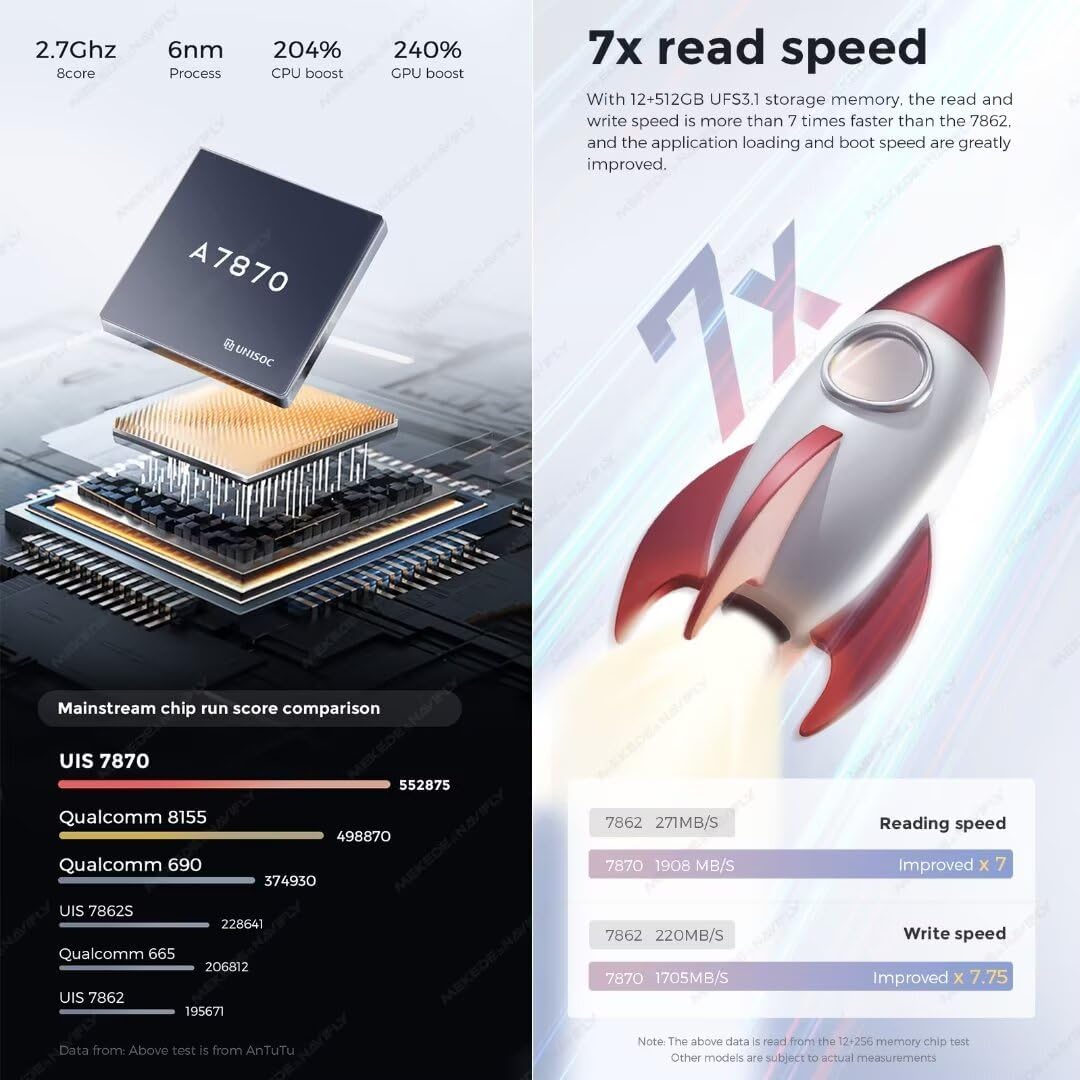
Figure 8.1: DUDU Series Model Comparison.

Figure 8.2: CPU Performance and Read Speed.
9. Warranty and Support
The MekedeTech DUDUAUTO DUDU7 comes with a 1-Year Warranty from the date of purchase. This warranty covers manufacturing defects and ensures the product meets its specified performance standards.
For technical assistance, troubleshooting, or warranty claims, please contact MekedeTech customer support. Free firmware updates are available directly via OTA (Over-The-Air) to keep your device optimized.