1. Introduction
Thank you for choosing the Meilen K80H Precision Coffee Espresso Scale. This digital scale is designed for accurate measurements in coffee brewing and various kitchen tasks. It features 0.1g precision, a 3kg capacity, a built-in timer, and USB-C rechargeable battery for convenience. Please read this manual thoroughly before use to ensure proper operation and maintenance.

Image 1.1: Meilen K80H Precision Coffee Espresso Scale. This image shows the scale with a clear bowl filled with coffee beans on its weighing surface. The digital display shows a weight of 155.0 grams and a timer set to '0000'. The scale is black with a textured weighing platform.
2. Safety Information
- Do not immerse the scale in water or other liquids.
- Avoid dropping or subjecting the scale to strong impacts.
- Do not place the scale near high temperatures or direct sunlight.
- Clean the scale with a soft, damp cloth. Do not use abrasive cleaners.
- Ensure the scale is placed on a stable, flat surface for accurate readings.
- The maximum weight capacity is 3kg. Do not exceed this limit to prevent damage.
3. Package Contents
Please check the package for the following items:
- Meilen K80H Precision Coffee Espresso Scale
- USB Type-C Charging Cable
- User Manual
4. Product Features
- High Precision: Measures from 0.3g to 3kg with 0.1g accuracy.
- Integrated Timer: Essential for precise coffee brewing.
- Multiple Units: Easily switch between grams (g), ounces (oz), and milliliters (ml).
- USB Rechargeable: Built-in 250mAh Type-C rechargeable battery provides up to 90 days of standby time.
- Four Independent Buttons: Dedicated buttons for Power, Tare, Unit, and Timer for intuitive control.
- Auto-Off Function: Automatically shuts off after 5 minutes of inactivity to conserve battery.
- Durable Design: Features a heat-resistant acrylic platform for longevity and easy cleaning.
- HD LED Display: Clear and bright display for visibility in various lighting conditions.

Image 4.1: Key Features of the Meilen K80H Scale. This image illustrates several functional aspects of the scale, including its high precision, low battery warning, auto-off feature, maximum weight capacity (6.61 lbs), overload indication, and the ability to convert between three units. The scale is shown in use with coffee beans and brewing equipment.
5. Setup
- Unpack: Carefully remove the scale from its packaging.
- Placement: Place the scale on a firm, flat, and level surface to ensure accurate measurements. Avoid placing it on soft or uneven surfaces.
- Initial Charge: For optimal performance, fully charge the scale before first use. Connect the provided USB Type-C cable to the scale's charging port and a suitable USB power source. The charging indicator will show the charging status.
6. Operating Instructions
6.1 Button Functions
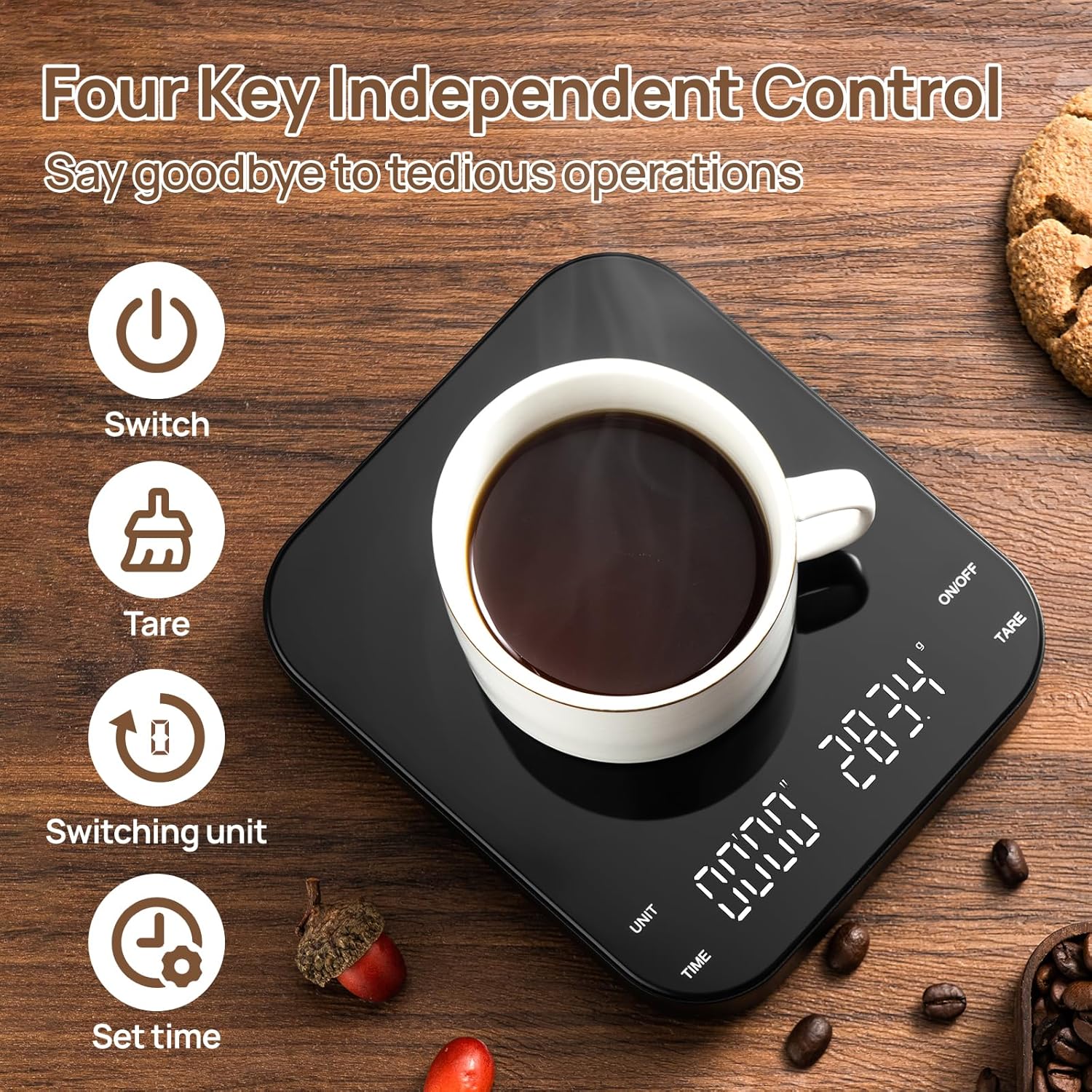
Image 6.1: Four Independent Control Buttons. This image highlights the four distinct buttons on the scale: 'Switch' for power, 'Tare' for zeroing the weight, 'Switching unit' for changing measurement units, and 'Set time' for controlling the timer. A cup of coffee is placed on the scale.
- ON/OFF Button: Press to turn the scale on or off.
- TARE Button: Press to zero out the weight of a container or previous ingredients.
- UNIT Button: Press to cycle through available weighing units (g, oz, ml).
- TIME Button: Press to start, pause, or reset the timer.
6.2 Power On/Off
- To turn on, press the ON/OFF button. The display will light up and show '0.0g'.
- To turn off, press and hold the ON/OFF button for approximately 3 seconds.
6.3 Weighing Function
- Place the item directly onto the weighing platform. The weight will be displayed.
- If using a container, place the empty container on the platform first. Press the TARE button to zero the display. Then add your ingredients to the container. The display will show the net weight of the ingredients.
6.4 Unit Conversion
- Press the UNIT button to switch between grams (g), ounces (oz), and milliliters (ml).
- Note: The 'ml' unit is based on the density of water. For other liquids, the measurement may not be exact.
6.5 Timer Function
- Press the TIME button to start the timer. The timer will count up in minutes and seconds.
- Press the TIME button again to pause the timer.
- To reset the timer, press and hold the TIME button for approximately 3 seconds.
7. Charging the Scale
The Meilen K80H scale is equipped with a built-in rechargeable battery.
- When the battery is low, a low battery indicator will appear on the display.
- Connect the provided USB Type-C cable to the charging port on the side of the scale and plug the other end into a standard USB power adapter (not included) or a computer USB port.
- The charging indicator light will illuminate during charging and turn off or change color when fully charged.
- A full charge typically provides up to 90 days of standby time, depending on usage.

Image 7.1: Rechargeable Battery Loading. This image provides a visual representation of the scale's internal battery and charging features, including its 250mAh capacity, 90-day standby time, 5-minute automatic shutdown, and USB Type-C portable charging capability.
8. Maintenance and Care
- Cleaning: Wipe the scale surface with a soft, slightly damp cloth. Do not use harsh chemicals, abrasive cleaners, or immerse the scale in water.
- Storage: Store the scale in a cool, dry place away from extreme temperatures and humidity.
- Protection: Avoid placing heavy objects on the scale when not in use to prevent damage to the sensors.
- Heat Resistance: The acrylic platform is designed to be heat-resistant up to 220°F (104°C).

Image 8.1: Heat Resistance Feature. This image demonstrates the scale's ability to withstand heat, showing a glass carafe filled with hot coffee placed on the scale. Text indicates '220°F No deformation' and mentions the acrylic panel cover.
9. Troubleshooting
| Problem | Possible Cause | Solution |
|---|---|---|
| Scale does not turn on | Low battery; Power button not pressed correctly | Charge the scale; Press and hold the ON/OFF button firmly. |
| Inaccurate readings | Uneven surface; Overload; External interference | Place on a flat, stable surface; Do not exceed 3kg; Avoid drafts or vibrations. |
| Display shows 'Err' | Overload | Remove item immediately; Do not exceed 3kg capacity. |
| Timer not working | Timer not started/reset | Press TIME button to start; Press and hold TIME to reset. |
10. Specifications
- Model: K80H
- Brand: Meilen
- Weight Capacity: 0.3g - 3000g (3kg)
- Accuracy: 0.1g
- Weighing Units: Grams (g), Ounces (oz), Milliliters (ml)
- Display: HD LED
- Battery: 250mAh USB Type-C Rechargeable Lithium Battery
- Auto-Off: 5 minutes of inactivity
- Material: Plastic body, Acrylic weighing platform
- Product Dimensions: 5.9 x 5.2 x 0.9 inches (15 x 13.2 x 2.3 cm)
- Item Weight: 1.21 pounds (0.55 kg)
11. Warranty and Support
For warranty information or technical support, please refer to the contact details provided with your purchase or visit the official Meilen website. Keep your purchase receipt as proof of purchase for any warranty claims.


