
1. Product Overview
The Greadio R12 is a versatile portable radio designed for outdoor activities and emergency preparedness. It features multiple radio bands, Bluetooth connectivity, various charging methods, and essential emergency functions.
1.1. Components and Controls
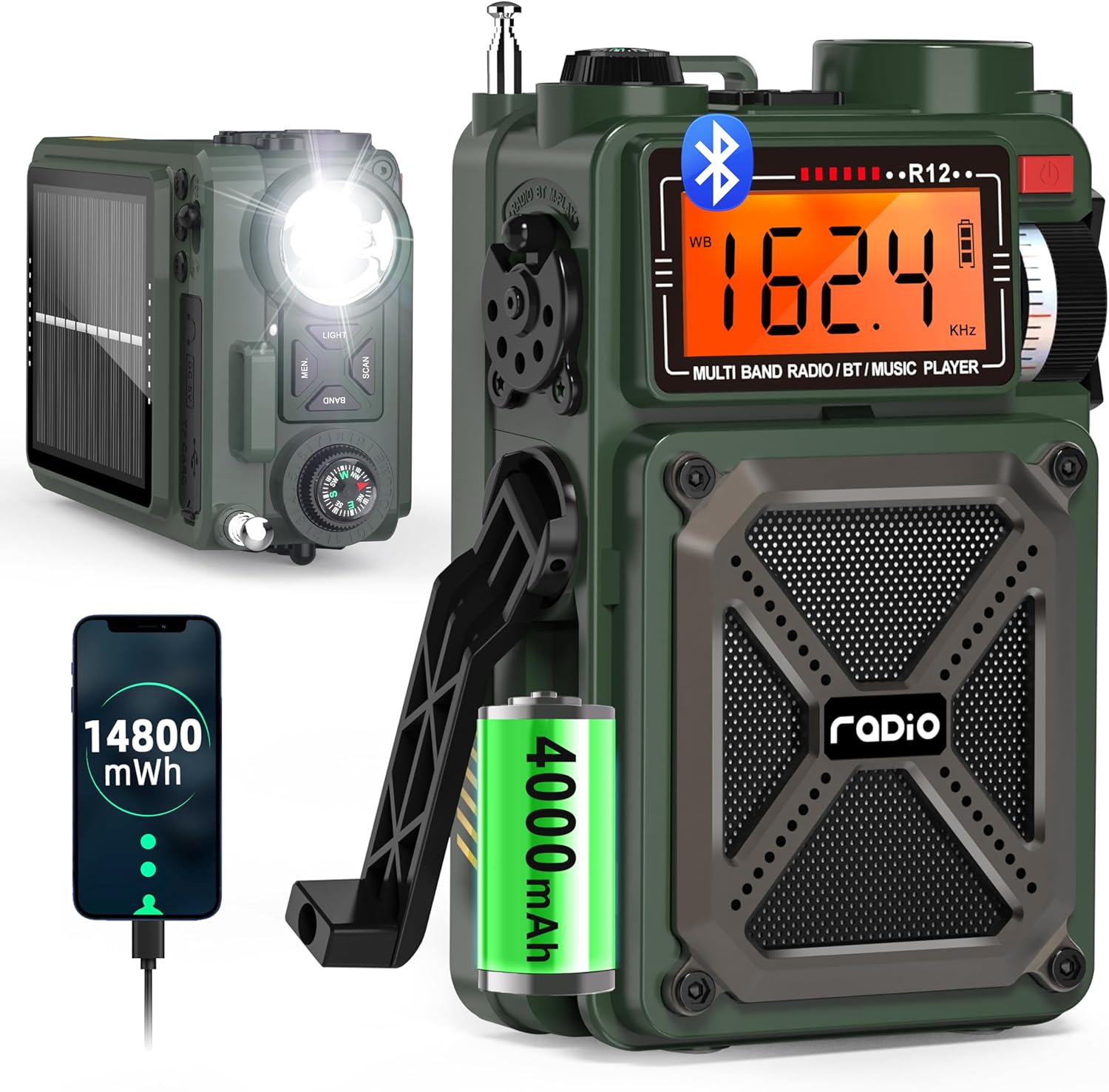
Figure 1: Greadio R12 Portable Multi-Band Emergency Radio. This image displays the front and side views of the green Greadio R12 radio, highlighting its compact design, digital display, speaker grille, flashlight, and hand crank.

Figure 2: Greadio R12 Multi-Function Radio Diagram. This diagram illustrates the various ports and controls on the side of the radio, including the 3.5mm earphone jack, USB Type-C charging port, TF/SD card slot, and USB port.
Front Panel:
- LCD Display: Shows frequency, mode, battery level, and other indicators.
- Speaker: Audio output.
- Tuning Knob: Adjusts radio frequency.
- Power Switch: Turns the radio on/off.
- Charging Indicator: Lights up when charging.
Top Panel:
- LED Flashlight: Provides illumination.
- Compass: Integrated for navigation.
- Volume Knob: Adjusts audio volume.
- Antenna: Extendable for improved radio reception.
- LIGHT Button: Activates the flashlight.
- MEM. Button: Accesses and stores preset stations.
- BAND Button: Switches between radio bands (FM/AM/SW/WB).
- SCAN Button: Initiates automatic station search.
Side Panel:
- Function Switch: Selects between Radio, Bluetooth (BT), TF/SD Card, and USB modes.
- Hand Crank: For manual power generation.
- SOS Switch: Activates the emergency alarm.
- Earphone Jack (3.5mm): For private listening.
- Type-C Charging Port: For external power input.
- TF/SD Card Slot: For playing audio from memory cards.
- USB Port: For playing audio from USB drives or charging external devices.
Rear Panel:
- Solar Panel: For solar charging.
2. Setup and Charging
2.1. Initial Power On/Off
- To turn on the radio, long press the Power Switch for approximately 2 seconds.
- To turn off the radio, long press the Power Switch again for approximately 2 seconds.
2.2. Charging the Radio
The Greadio R12 offers three methods for charging its internal 4000mAh battery:

Figure 3: Three Ways to Charge the Greadio R12. This image visually explains the three charging methods: Type-C cable, hand crank, and solar panel.
- Type-C Charging: Connect a standard Type-C charging cable (5V 1A/2A adapter, not included) to the Type-C charging port on the side of the radio. The charging indicator light will turn red during charging.
- Solar Charging: Place the radio with its solar panel facing direct sunlight. The charging indicator lights will turn red when solar charging is active. This method is ideal for maintaining charge or slow charging in outdoor conditions.
- Hand Crank Charging: Extend the hand crank on the side of the radio. Turn the hand crank clockwise or anti-clockwise. The red charging indicator will light up, indicating that power is being generated. Continuous cranking is required for effective charging.
Video 1: How to Use USB-C, Hand Crank and Solar Charging. This video demonstrates the three charging methods for the Greadio R12 radio: connecting a USB-C cable, utilizing the solar panel, and operating the hand crank.
3. Operating Instructions
3.1. Radio Modes (AM/FM/SW/NOAA)

Figure 4: Greadio R12 Radio Bands. This image highlights the supported radio frequencies for WB (NOAA Weather Band), AM, FM, and SW (Shortwave) bands.
- Band Selection: Press the BAND button on the top panel to cycle through FM, AM, SW, and WB (NOAA Weather Band) modes.
- Tuning: Use the Tuning Knob on the front panel to manually adjust the frequency within the selected band.
- Automatic Search: Long press the SCAN button to automatically search for and stop at available stations.
- Preset Stations: Long press the MEM. button to automatically search and store stations as presets. Short press the MEM. button to recall preset stations, then use the Tuning Knob to switch between them.
Video 2: How to Perform Radio Channel Switching and Feature Switching. This video demonstrates how to switch between different radio bands (AM, FM, SW, WB) and other features using the radio's controls.
Video 3: How to Preset Stations and Operate Bluetooth/TF/USB Modes. This video guides users through presetting radio stations and operating the Bluetooth, TF card, and USB playback modes.
3.2. Bluetooth Mode

Figure 5: Greadio R12 Bluetooth 5.4 Connectivity. This image shows the radio connected via Bluetooth to a smartphone, illustrating the wireless audio streaming capability.
- Adjust the Function Switch on the side of the radio to the "BT" position to enter Bluetooth mode.
- On your mobile device, enable Bluetooth and search for the device named "R12".
- Select "R12" to pair and connect. Once connected, you can stream audio from your device to the radio.
3.3. USB/TF Card Playback
- Adjust the Function Switch to the "M-PLAY" position.
- Insert a Micro SD (TF) card or a USB drive into the respective slot/port. The radio supports MP3 and WAV formats up to 256GB.
- Use the Previous/Next buttons (often integrated with scan/mem buttons or separate controls) to navigate tracks. Short press the Play/Pause button to control playback.
4. Emergency Features
4.1. SOS Alarm

Figure 6: Greadio R12 SOS Alarm. This image shows the radio with its SOS alarm activated, emitting a loud sound and flashing light for emergency signaling.
In an emergency, slide the SOS Switch on the side of the radio to activate a loud siren and flashing light to attract attention.
Video 4: Emergency Outdoor Radio. This video highlights the emergency features of the Greadio R12, including the SOS alarm and flashlight, demonstrating their use in outdoor scenarios.
4.2. Flashlight
Press the LIGHT button on the top panel to turn on the integrated LED flashlight. Press it again to turn it off.
4.3. Power Bank Function (USB Output)

Figure 7: Greadio R12 USB Output Charging Phone. This image shows the radio being used to charge a smartphone via its USB output port.
The radio can act as a power bank to charge external devices:
- Push the Function Switch to the lightning symbol position (USB output mode).
- Plug your device's charging cable into the USB output port.
- Ensure the radio has sufficient charge to power your external device.
4.4. Compass
The integrated compass on the top panel provides basic directional guidance. Ensure the radio is held level for an accurate reading.
5. Specifications
| Feature | Detail |
|---|---|
| Product Dimensions | 3.19 x 2.05 x 5.2 inches |
| Item Weight | 12.3 ounces |
| Item Model Number | R12 |
| Batteries | 2 Lithium Ion batteries required (built-in 4000mAh) |
| Brand | Greadio |
| Special Features | Built-In AM Antenna, Built-In Flashlight, Portable, Rechargeable, SOS Alarm |
| Connectivity Technology | Bluetooth 5.4, USB |
| Tuner Technology | AM/FM/SW/WB |
| Power Source | Hand crank/Solar/Type-C Charging |
| Radio Bands Supported | 4-Band (AM/FM/SW/WB) |
| Included Components | Shortwave Radio *1, Type-C Cord*1, Owner's Manual, Military Style Gift Box*1, Hand Strap*1 |
6. Maintenance and Care
- Keep the radio dry and away from extreme temperatures.
- Clean the exterior with a soft, damp cloth. Do not use harsh chemicals or abrasive cleaners.
- Regularly charge the battery, even if not in use, to prolong its lifespan. Avoid complete discharge for extended periods.
- Store the radio in a cool, dry place when not in use.
7. Troubleshooting
- No Power: Ensure the battery is charged. Try charging via Type-C, solar, or hand crank.
- Poor Radio Reception: Extend the antenna fully. Try repositioning the radio. In AM/SW modes, rotating the radio may improve reception.
- Bluetooth Not Connecting: Ensure the radio is in BT mode and your device's Bluetooth is enabled and discoverable. Check if other devices are connected to the radio.
- USB/TF Card Playback Issues: Ensure the card/drive is inserted correctly and contains supported audio formats (MP3, WAV). Check if the radio is in M-PLAY mode.
- SOS Alarm Not Working: Verify the SOS switch is fully engaged.
8. Warranty and Support
Greadio is committed to providing quality products and customer service. For warranty information, technical support, or any inquiries regarding your Greadio R12 radio, please refer to the contact details provided in the included 'Greadio Card' or visit the official Greadio website.
Please retain your proof of purchase for any warranty claims.


