
GPGPG B0DMSZHZ5B
Android Car Radio Canbus Box & Wiring Harness User Manual
Model: B0DMSZHZ5B | Brand: GPGPG
Introduction
This manual provides essential information for the installation, operation, and maintenance of your GPGPG Android Car Radio Canbus Box and 16-Pin Wiring Harness. This product is designed to integrate an aftermarket Android car radio with specific Mercedes-Benz vehicle models, enabling communication between the radio and the vehicle's CAN bus system for functions such as steering wheel controls, door status, and reverse gear signals.
Please read this manual thoroughly before installation and keep it for future reference.
Safety Information
- Professional Installation Recommended: Due to the complexity of vehicle electrical systems, professional installation by a qualified technician is highly recommended to prevent damage to the product or your vehicle.
- Disconnect Power: Always disconnect the vehicle's battery negative terminal before beginning any electrical installation to avoid short circuits and electrical shock.
- Correct Wiring: Ensure all connections are made correctly according to the wiring diagram. Incorrect wiring can cause damage to the unit, vehicle electronics, or lead to fire.
- Avoid Moisture: Do not expose the Canbus box or wiring harness to water or excessive moisture.
- Secure Connections: Ensure all plugs and connectors are securely fastened to prevent loose connections and intermittent operation.
Package Contents
Verify that all components listed below are present in your package:
- 1x GPGPG Canbus Decoder Box
- 1x 16-Pin Android Car Radio Wiring Harness
- 1x Radio Antenna Adapter Cable
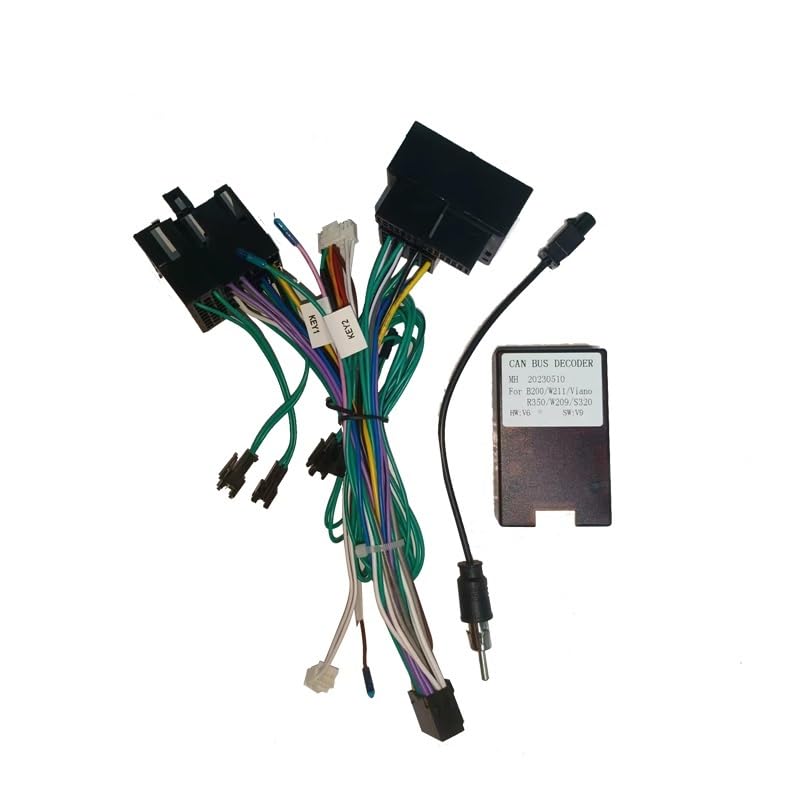
Image: Complete GPGPG Android Car Radio Canbus Box and Wiring Harness Kit. This image shows the main components including the Canbus decoder box, the multi-pin wiring harness, and an antenna adapter cable.
Product Overview
Familiarize yourself with the components of the wiring harness and Canbus box:
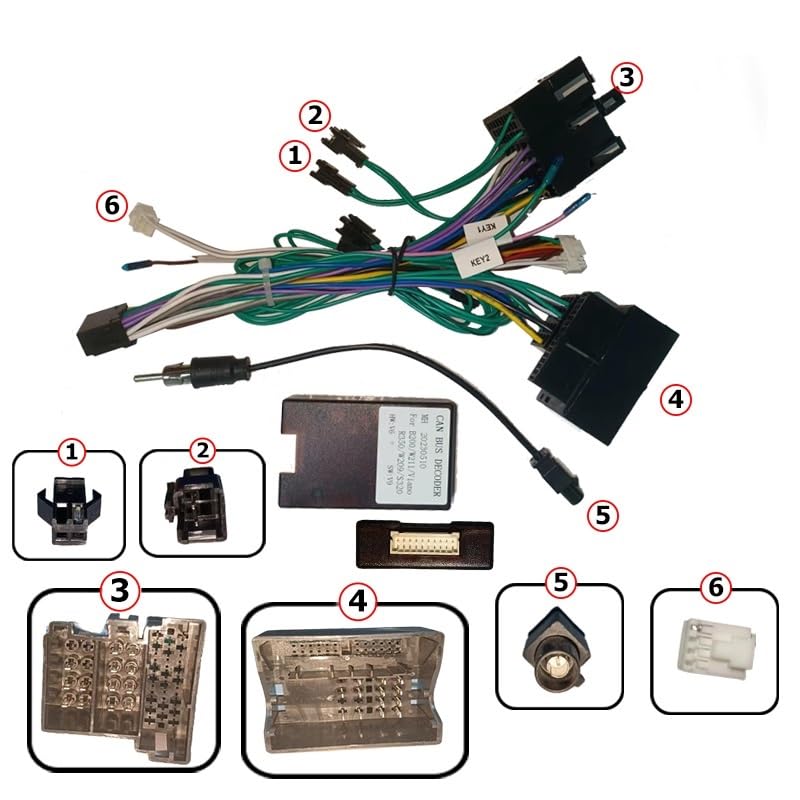
Image: Detailed view of the GPGPG wiring harness and Canbus box with numbered components for identification.
- (1) KEY1/KEY2 Wires: Typically used for connecting to the steering wheel control input of the Android head unit.
- (2) Power/Speaker Wires: Standard ISO or specific vehicle power and speaker connections.
- (3) Vehicle Main Connector: Plugs into the vehicle's factory radio harness.
- (4) Android Head Unit Connector (16-Pin): Connects to the 16-pin power/Canbus input of the aftermarket Android head unit.
- (5) Radio Antenna Adapter: Connects the vehicle's antenna cable to the Android head unit's antenna input.
- (6) Auxiliary Wires: May include wires for reverse signal, parking brake, illumination, etc., depending on the specific harness design.
- Canbus Decoder Box: Processes vehicle data from the CAN bus and translates it into signals for the Android head unit.
Setup and Installation
This wiring harness and Canbus box are designed for specific Mercedes-Benz models including B200, W211, Viano, Vito, W209, and S320. Ensure compatibility with your vehicle before proceeding.
Installation Steps:
- Prepare Vehicle: Park the vehicle on a level surface, engage the parking brake, and turn off the ignition. Disconnect the negative terminal of the vehicle's battery.
- Remove Factory Radio: Carefully remove the existing factory car radio from the dashboard. Refer to your vehicle's service manual for specific removal instructions.
- Connect Canbus Box: Connect the Canbus decoder box to the designated connector on the wiring harness. Ensure it clicks securely into place.
- Connect to Android Head Unit: Plug the 16-pin connector (4) from the harness into the corresponding 16-pin port on your aftermarket Android car radio.
- Connect to Vehicle Harness: Connect the vehicle main connector (3) of the GPGPG harness to the factory wiring harness in your vehicle's dashboard.
- Connect Antenna: Use the provided radio antenna adapter (5) to connect the vehicle's antenna cable to the antenna input on your Android head unit.
- Auxiliary Connections: If your Android head unit requires additional signals (e.g., reverse camera trigger, parking brake, illumination), connect the corresponding auxiliary wires (6) from the GPGPG harness to the correct inputs on your head unit. Consult your Android head unit's manual for its wiring diagram.
- Test Connections: Before fully reassembling the dashboard, reconnect the vehicle's battery. Turn on the ignition and test the Android head unit's basic functions: power on/off, audio output, steering wheel controls (if applicable), and any other integrated features.
- Secure and Reassemble: Once all functions are verified, carefully route and secure all cables to prevent pinching or interference. Reinstall the Android head unit and reassemble the dashboard components.
Operating Principles
The GPGPG Canbus Box and Wiring Harness primarily serve as an interface between your Mercedes-Benz vehicle's electrical system and an aftermarket Android car radio. It is not an active operating device in itself, but rather a passive decoder and connector.
- CAN Bus Decoding: The Canbus box reads digital data from the vehicle's CAN bus network (e.g., ignition status, door open/close, reverse gear, steering wheel button presses).
- Signal Conversion: It converts these digital CAN bus signals into analog or specific digital signals that the Android head unit can understand and utilize. This allows features like steering wheel controls, automatic reverse camera activation, and vehicle information display (if supported by the head unit) to function correctly.
- Power and Speaker Integration: The wiring harness provides the necessary power, ground, and speaker connections from the vehicle to the Android head unit, ensuring proper audio and electrical supply.
Once installed, the operation of the Canbus box is automatic and transparent to the user. The functionality it enables will be controlled directly through your Android car radio.
Maintenance
The GPGPG Canbus Box and Wiring Harness are designed for long-term, maintenance-free operation. However, periodic checks can help ensure continued performance:
- Connection Integrity: If you experience intermittent issues, check all connections behind the radio to ensure they are secure and free from corrosion.
- Cable Inspection: Periodically inspect the visible parts of the wiring harness for any signs of wear, fraying, or damage.
- Cleanliness: Keep the area around the Canbus box and connections free from dust and debris.
Do not attempt to open the Canbus decoder box, as it contains no user-serviceable parts and doing so will void any potential warranty.
Troubleshooting
If you encounter issues after installation, refer to the following common troubleshooting steps:
| Problem | Possible Cause | Solution |
|---|---|---|
| Android radio does not power on. | Loose power connection, incorrect wiring, blown fuse. | Check all power connections (constant 12V, accessory/ignition). Verify vehicle fuses and the fuse on the Android radio's harness. Ensure the 16-pin connector is fully seated. |
| Steering wheel controls do not work. | Canbus box not connected, incorrect Canbus settings on Android radio, KEY1/KEY2 wires not connected. | Ensure the Canbus box is properly connected to the harness. Check the Android radio's settings for Canbus protocol selection and steering wheel control learning function. Verify KEY1/KEY2 wires are connected to the radio's SWC inputs. |
| No sound from speakers. | Loose speaker connections, incorrect speaker wiring, amplifier issue (if applicable). | Verify all speaker wires are correctly connected and not shorting. Check the Android radio's audio settings. |
| Reverse camera does not activate automatically. | Reverse signal wire not connected or Canbus not providing signal. | Ensure the reverse signal wire from the harness is connected to the reverse input on the Android radio. Check Android radio settings for reverse camera activation. |
If problems persist, consult a professional car audio installer or contact GPGPG customer support.
Specifications
| Feature | Detail |
|---|---|
| Product Type | Android Car Radio Canbus Box & Wiring Harness |
| Brand | GPGPG |
| Model Number | B0DMSZHZ5B |
| Connector Type | 16-Pin (for Android Head Unit) |
| Vehicle Compatibility | Mercedes-Benz B200, W211, Viano, Vito, W209, S320 |
| Function | CAN Bus Decoding, Power & Speaker Integration, Steering Wheel Control Support |
Warranty and Support
Specific warranty information for this product is not provided in this manual. Please refer to the product listing on the retailer's website or contact the seller directly for details regarding warranty coverage and customer support.
For technical assistance or inquiries, please reach out to the manufacturer, GPGPG, through their official support channels if available, or contact the point of purchase.
Ask a question about this manual
Ask about setup, troubleshooting, compatibility, parts, safety, or missing instructions. Manuals+ will review the question and use this page’s manual context to help answer it.