
1. Introduction
The KOSCHEAL M1001 Wireless Lavalier Microphone system is designed to provide clear and stable audio for various recording needs, including video recording, vlogging, interviews, and live streaming. This manual provides essential information for setting up, operating, and maintaining your microphone system.
What's in the Box:
- 2 x Wireless Transmitters (Microphones)
- 1 x 3-in-1 Universal Receiver (USB-C, Lightning, 3.5mm Jack)
- 2 x Plush Windshields
- 2 x Sponge Wind Covers
- 1 x USB Charging Cable (dual USB-C output)
- 1 x Organizer/Carrying Pouch
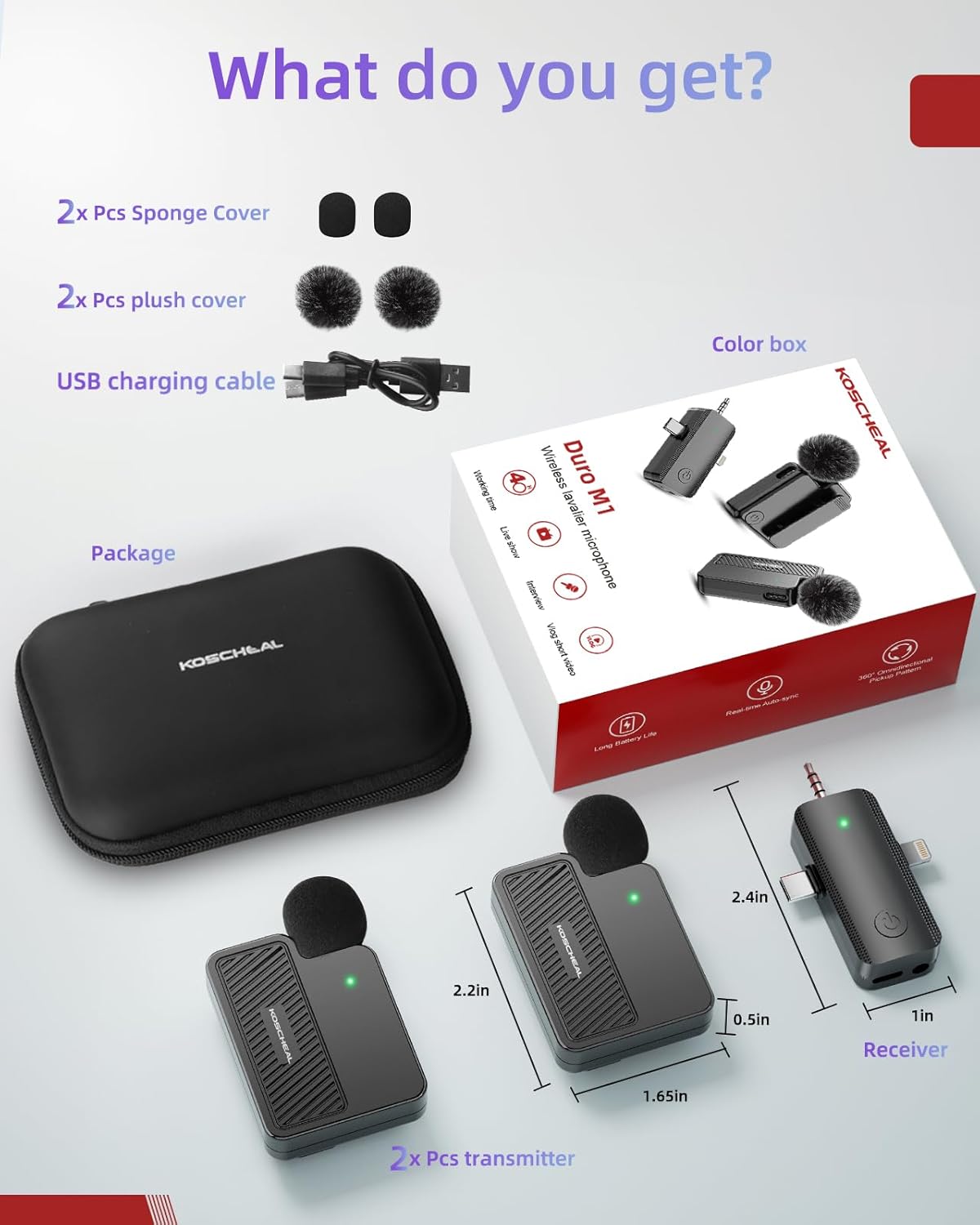
Image: All components included in the KOSCHEAL M1001 Wireless Lavalier Microphone package.
2. Components Overview
The KOSCHEAL M1001 system consists of the following key components:
- Wireless Transmitters (Microphones): These are the clip-on units that capture audio. Each transmitter has a built-in rechargeable battery and a power button. They feature intelligent noise reduction and multiple audio modes.
- 3-in-1 Universal Receiver: This unit connects to your recording device. It features USB-C, Lightning, and 3.5mm jack connectors for broad compatibility. It does not require charging as it draws power from the connected device.
- Plush Windshields & Sponge Wind Covers: These accessories are designed to reduce wind noise and improve audio clarity, especially in outdoor environments.
- USB Charging Cable: A dual USB-C output cable allows simultaneous charging of both transmitters.

Image: Overview of the KOSCHEAL M1001 Wireless Lavalier Microphone system components.
3. Setup Instructions
The KOSCHEAL M1001 system is designed for plug-and-play operation, requiring no Bluetooth pairing or app installation.
- Charge Transmitters: Ensure both wireless transmitters are fully charged using the provided USB charging cable. Each transmitter has a 300mAh battery, providing up to 20 hours of use per charge.
- Connect Receiver: Plug the appropriate connector (USB-C, Lightning, or 3.5mm jack) of the 3-in-1 universal receiver into your recording device (smartphone, tablet, camera).
Note: The 3.5mm connector on the receiver is not suitable for laptops as most laptop 3.5mm audio jacks do not support audio input.
Image: The 3-in-1 universal receiver showing compatibility with iPhone, Android, and other audio devices.
- Power On Transmitters: Press and hold the power button on each wireless transmitter until the indicator light begins to blink.
- Automatic Pairing: The transmitters and receiver will automatically pair. A successful connection is indicated by a solid green light on both the receiver and the transmitters. If pairing is unsuccessful, turn off the devices and try again.
4. Operating the Microphone
Wearing the Microphones:
The transmitters can be worn in two ways:
- Clip-on: Use the integrated clip to attach the microphone to your clothing, such as a collar or shirt lapel.
- Magnetic Attachment: For a more discreet placement, use the magnetic clips to secure the microphone under your clothing. The strong magnet ensures the microphone stays in place.
Audio Modes and Features:
- Intelligent Noise Reduction: The built-in professional-grade intelligent noise reduction chip provides clear and stable audio, even in noisy environments. This feature is automatically active.
- Multiple Audio Modes: The microphone supports various audio modes suitable for different scenarios. Refer to the indicator lights on the transmitter to identify the active mode.

Image: Visual representation of different audio modes for the KOSCHEAL M1001 microphone.
- Battery Life: Each transmitter offers up to 20 hours of continuous recording on a single 3-hour charge, providing a total of 40 hours with both microphones.
- Wireless Range: The system utilizes 2.4G wireless signal technology for stable transmission up to 30 meters (85 feet) in unobstructed environments.
Official Product Video:
Video: KOSCHEAL 3-in-1 Wireless Lavalier Microphone for iPhone - A seller-provided video demonstrating the product's features and usage.
5. Maintenance
- Cleaning: Use a soft, dry cloth to clean the microphone transmitters and receiver. Avoid using liquids or abrasive cleaners.
- Wind Covers: Regularly check and clean the plush windshields and sponge covers. Replace them if they become worn or damaged to maintain optimal audio quality.
- Storage: Store the microphone system in the provided organizer pouch when not in use to protect it from dust and physical damage.
6. Troubleshooting
- Microphone Not Pairing: If the indicator light on the transmitter is blinking and not turning solid green after connecting the receiver, turn off both the transmitter and receiver, then restart the pairing process. Ensure the receiver is securely connected to your device.
- No Audio Input on Laptop: If using the 3.5mm jack with a laptop, note that some laptop 3.5mm audio connectors do not support audio input. Verify your laptop's audio port specifications.
- Poor Audio Quality: Ensure the plush windshields or sponge covers are properly installed, especially in windy conditions. Check that the microphones are positioned correctly and not obstructed.
- Short Battery Life: Ensure transmitters are fully charged before use. Charging takes approximately 3 hours.
7. Specifications
| Feature | Detail |
|---|---|
| Model Name | M1001 |
| Brand | KOSCHEAL |
| Connectivity Technology | USB, Wireless |
| Connector Type | 3.5 mm Jack, USB Type-C, Lightning |
| Special Features | 1-Touch Recording, 40H Ultra-long battery life, Battery Indicator Light, Clip, Noise Reduction |
| Compatible Devices | Camera, Laptop, Smartphone (iPhone, Android) |
| Microphone Form Factor | Lavalier |
| Polar Pattern | Omnidirectional |
| Audio Sensitivity | 70 Decibels |
| Item Weight | 8 Grams (0.282 ounces) |
| Product Dimensions | 1.52 x 0.8 x 2.2 inches |
| Power Source | Battery Powered (1 P76 Lithium Ion battery included per transmitter) |
8. Warranty and Support
KOSCHEAL products are designed for reliability and performance. For any questions, concerns, or technical assistance, please contact KOSCHEAL customer support. Specific warranty details may vary; please refer to the product packaging or the official KOSCHEAL website for the most up-to-date warranty information.