
1. Introduction
This manual provides essential information for the safe and efficient operation of your MFUZOP 12V-2000W Pure Sine Wave Inverter. Please read it thoroughly before installation and use, and retain it for future reference.
The MFUZOP 12V-2000W Pure Sine Wave Inverter converts 12V DC battery power into 230/240V AC household power. It delivers a continuous output of 2000W and a peak power of 4000W, with a conversion efficiency exceeding 95%. Equipped with two European AC outlets, one USB-C port, and one USB-A port, it is suitable for various applications including solar systems, camping, RVs, outdoor work, and emergency power during outages.

2. Safety Instructions
Always observe the following safety precautions to prevent injury and damage to the inverter or connected devices:
- Do not open the inverter casing. High voltage is present inside.
- Ensure proper ventilation around the inverter to prevent overheating.
- Connect the inverter only to a 12V DC power source. Connecting to a 24V or higher DC source will damage the unit.
- Ensure the total power consumption of connected AC devices does not exceed the inverter's continuous power rating (2000W).
- Avoid connecting devices with high surge power requirements that exceed the inverter's peak power rating (4000W).
- Keep the inverter away from water, moisture, flammable materials, and direct sunlight.
- Always connect the battery cables with correct polarity (red to positive, black to negative). Reverse polarity protection is integrated, but incorrect connection should be avoided.
- Disconnect the inverter from the power source before performing any maintenance or cleaning.
3. Product Overview
3.1 Key Features
- Pure Sine Wave Output: Provides stable and clean power, suitable for sensitive electronics, equivalent to grid power quality.
- High Efficiency: Conversion efficiency greater than 95%.
- LCD Display: Intelligent display shows input voltage, output voltage, real-time power, battery level, and output frequency.
- Multiple Output Ports: Two 230V AC outlets, one USB-C port, and one USB-A (2.1A) port.
- Comprehensive Protection: Includes overload, overheat, high voltage, low voltage, short circuit, low voltage alarm, high voltage alarm, and reverse polarity protection.
- Efficient Cooling: Dual-fan design for effective heat dissipation.

3.2 Component Identification
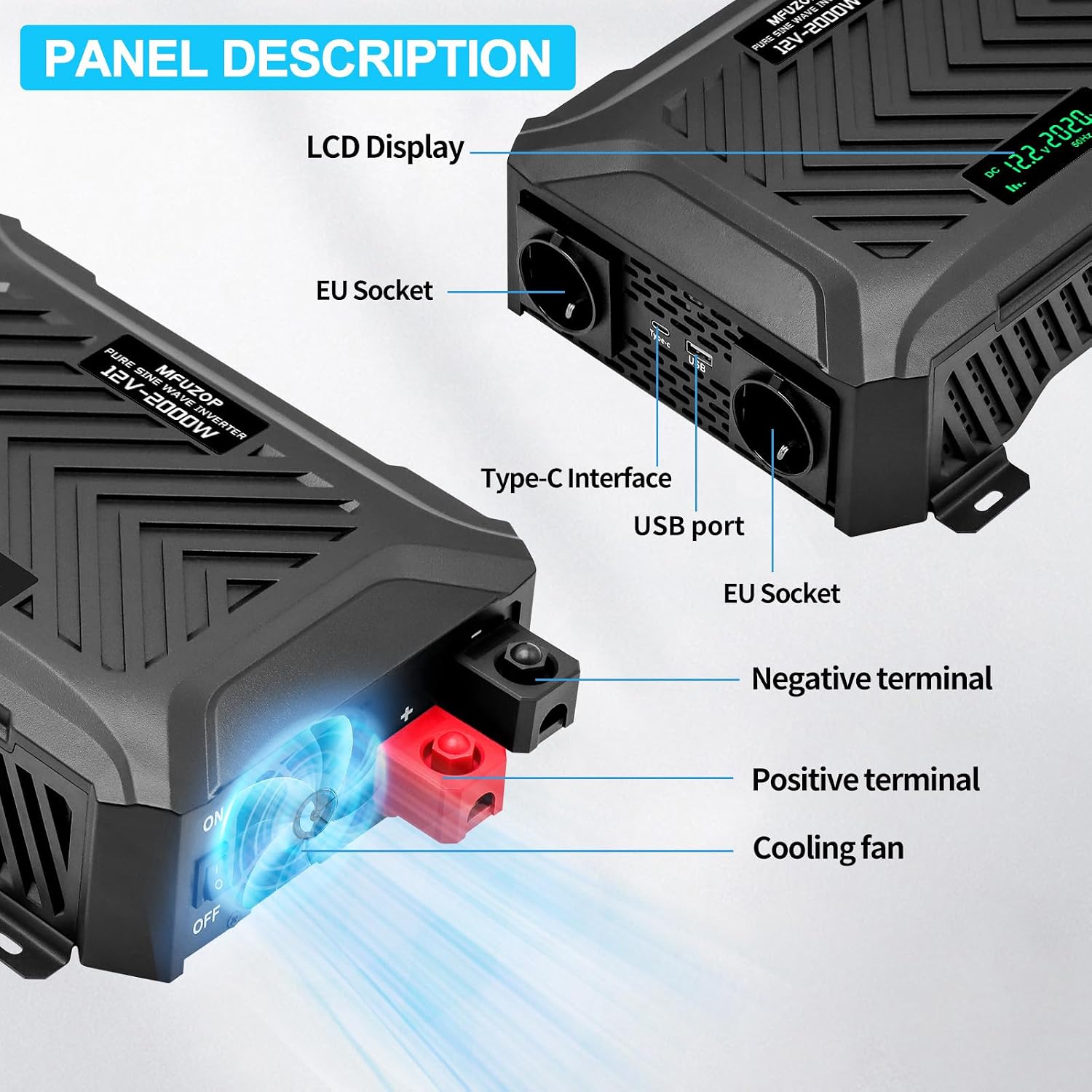
Refer to the diagrams for a visual guide to the inverter's components:
- Front Panel: LCD Display, 2 AC Outlets, USB-C Port, USB-A Port.
- Rear Panel: DC Input Terminals (Positive Red, Negative Black), ON/OFF Switch, Cooling Fan.

4. Setup
4.1 What's in the Box
- 1 x MFUZOP 12V-2000W Pure Sine Wave Inverter
- 2 x Battery Connection Cables (Red for Positive, Black for Negative)
- 1 x Instruction Manual
4.2 Connection Steps
- Prepare the Battery: Ensure your 12V DC battery is fully charged and in good condition.
- Connect Battery Cables to Inverter: Connect the red battery cable to the positive (+) terminal of the inverter and the black battery cable to the negative (-) terminal of the inverter. Ensure connections are tight.
- Connect Battery Cables to Battery: Connect the other end of the red battery cable to the positive (+) terminal of your 12V battery and the black battery cable to the negative (-) terminal of the battery. Ensure connections are secure.
- Verify Connections: Double-check all connections for correct polarity and tightness.
- Power On: Flip the ON/OFF switch on the inverter to the 'ON' position. The LCD display should illuminate, showing the input voltage and other parameters.

5. Operating Instructions
5.1 Connecting AC Devices
- Ensure the inverter is powered on and the LCD display is active.
- Plug your AC device into one of the 230V AC outlets on the inverter.
- Turn on your AC device. Monitor the inverter's display for real-time power consumption.
- If connecting multiple devices, ensure their combined wattage does not exceed 2000W continuous power.
5.2 Connecting USB Devices
- Plug your USB-C or USB-A device into the corresponding port on the inverter.
- The inverter will automatically provide power for charging or operation.
5.3 Powering Down
- Turn off all connected AC and USB devices.
- Flip the ON/OFF switch on the inverter to the 'OFF' position.
- Disconnect the battery cables from the battery terminals if the inverter will not be used for an extended period.


6. Maintenance
- Cleaning: Regularly clean the exterior of the inverter with a dry, soft cloth. Do not use liquid cleaners or solvents. Ensure ventilation openings are free from dust and debris.
- Connections: Periodically check all electrical connections (battery terminals, AC outlets, USB ports) to ensure they are secure and free from corrosion.
- Storage: When not in use for extended periods, store the inverter in a cool, dry place, away from direct sunlight and extreme temperatures. Disconnect it from the battery.
7. Troubleshooting
The MFUZOP inverter is equipped with multiple protection features. If an issue occurs, the LCD display may show an error code or the inverter may shut down automatically.
| Problem | Possible Cause | Solution |
|---|---|---|
| No output power / Inverter not turning on | Loose battery connections, low battery voltage, inverter switch off, internal fuse. | Check battery cable connections. Charge or replace battery. Ensure ON/OFF switch is on. Contact support if fuse is suspected. |
| Overload alarm / Inverter shuts down | Connected load exceeds 2000W continuous or 4000W peak power. | Reduce the total wattage of connected devices. Disconnect and restart the inverter. |
| Overheat alarm / Inverter shuts down | Poor ventilation, high ambient temperature, prolonged high load. | Ensure adequate airflow around the inverter. Reduce load. Allow inverter to cool down. |
| Low voltage alarm / Inverter shuts down | Battery voltage is too low (below 10.5V). | Recharge the 12V battery. |
| High voltage alarm / Inverter shuts down | Input voltage is too high (above 15V). | Check the battery charging system. Ensure only 12V batteries are connected. |
| Short circuit protection | Short circuit detected in AC output. | Disconnect all AC devices. Check for faulty wiring or appliances. Restart inverter. |

8. Specifications
| Feature | Specification |
|---|---|
| Brand | MFUZOP |
| Model Name | PSW 12V E2000W |
| Input Voltage | 12 Volt DC |
| Output Voltage | 230 Volt AC |
| Continuous Output Power | 2000 Watt |
| Peak Output Power | 4000 Watt |
| Output Waveform | Pure Sine Wave |
| Conversion Efficiency | 95%+ |
| Screen Type | LCD |
| AC Outlets | 2 (European standard) |
| USB Ports | 1 x USB-C, 1 x USB-A (2.1A) |
| Dimensions (L x W x H) | 33 cm x 24 cm x 9.5 cm (13 in x 9.5 in x 3.7 in) |
| Weight | 3.5 Kilograms |
| Certifications | CE |
| Recommended Uses | Photovoltaic equipment, Trucks, Caravans, Vehicles |

9. Warranty and Support
The MFUZOP 12V-2000W Pure Sine Wave Inverter comes with a 1-year manufacturer's warranty. This warranty covers defects in materials and workmanship under normal use.
For technical support, warranty claims, or any questions regarding your product, please contact MFUZOP customer service. Refer to the contact information provided with your purchase or on the official MFUZOP website.
MFUZOP is committed to providing reliable products and customer satisfaction, with a reported 24/7 customer service and a product lifespan of 10 years.


