
1. Introduction
Thank you for choosing the aonidi 20000mAh Portable Power Bank. This device is designed to provide reliable and efficient charging for your electronic devices on the go. Featuring built-in cables, an AC wall plug, and fast charging capabilities, it offers convenience and versatility. Please read this manual carefully to ensure proper use and maintenance of your power bank.

Image 1.1: The aonidi 20000mAh Portable Power Bank, showcasing its compact design and integrated features.
2. Product Overview
2.1 Key Features
- High Capacity: 20000mAh battery for extended use.
- Integrated Cables: Built-in Type-C and iOS cables for direct device charging.
- AC Wall Plug: Foldable AC plug for convenient direct recharging from a wall outlet.
- Fast Charging: PD20W USB-C output and 22.5W fast charging support.
- Multiple Ports: Includes USB-A output port and an additional USB-C input/output port.
- LED Display: Digital LED screen to show remaining battery percentage.
- Universal Compatibility: Charges a wide range of smartphones, tablets, and other USB-powered devices.
2.2 Package Contents
Upon unpacking, please ensure all items listed below are present:
- 1 x aonidi 20000mAh Portable Power Bank (Model AC-02DP)
- 1 x USB Type-C Charging Cable (additional, for recharging or device charging)
- 1 x User Manual (this document)

Image 2.1: Overview of the power bank's integrated features, including the AC wall plug, built-in cables, and various ports.
3. Setup and Initial Charging
Before first use, it is recommended to fully charge your power bank.
3.1 Recharging the Power Bank
The aonidi power bank offers two convenient methods for recharging:
- Using the Built-in AC Wall Plug:
Fold out the integrated AC wall plug and insert it directly into a standard wall outlet. The LED display will show the charging progress. A full charge typically takes approximately 10 hours. - Using the USB-C Input Port:
Connect the provided USB Type-C cable to the power bank's USB-C port and the other end to a compatible USB wall adapter (not included). For faster recharging, use a 9V-2A adapter. A full charge via USB-C takes approximately 6 hours with a suitable adapter.
The LED display will show '100%' when fully charged.
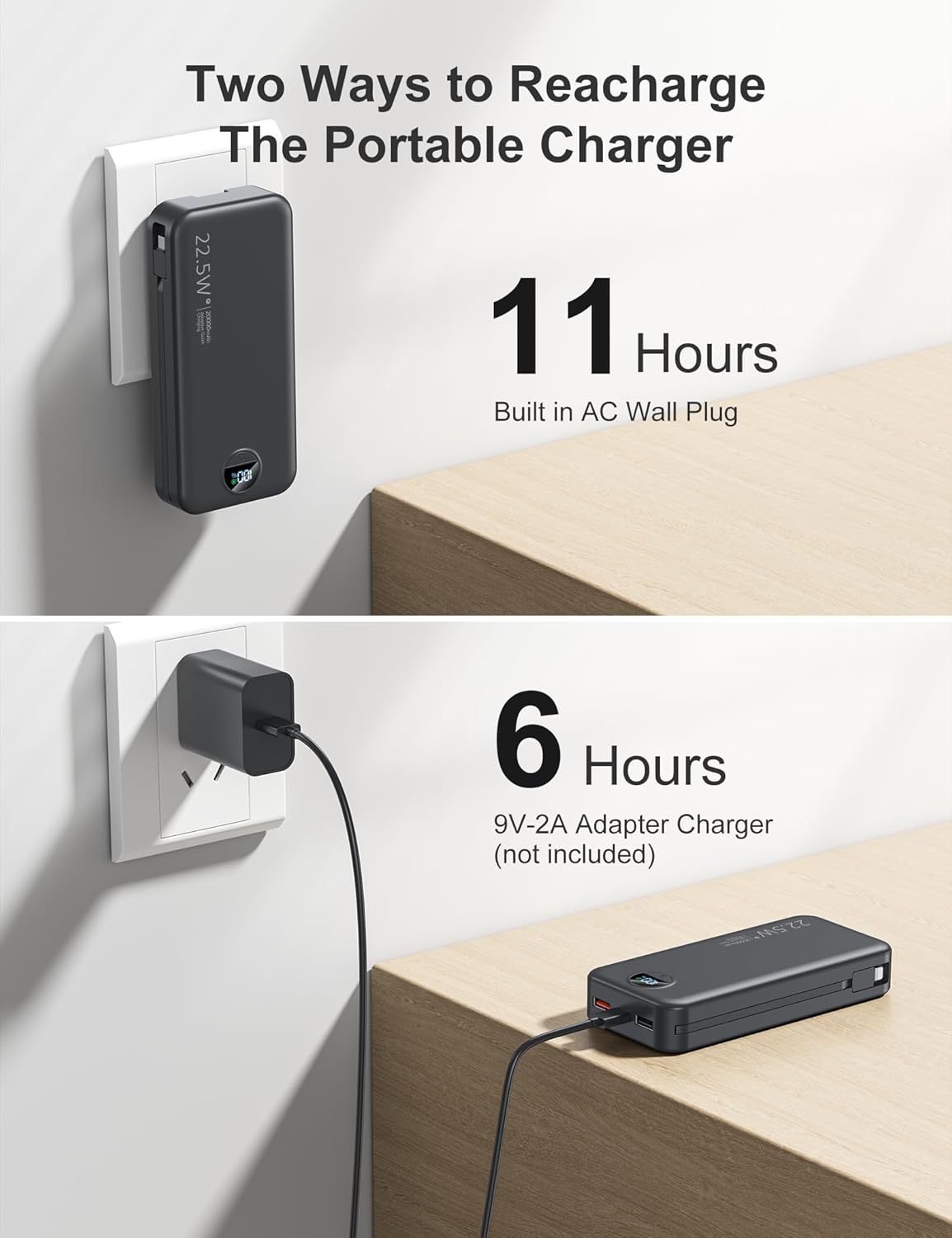
Image 3.1: The two methods for recharging the power bank: directly from a wall outlet using the AC plug, or via the USB-C port.
4. Operating Instructions
4.1 Charging Your Devices
The power bank can charge up to 5 devices simultaneously using its various outputs:
- Built-in iOS Cable: Pull out the built-in iOS cable and connect it to your Apple device.
- Built-in Type-C Cable: Pull out the built-in Type-C cable and connect it to your USB-C compatible device.
- USB-A Output Port: Use your device's standard USB-A charging cable and plug it into the USB-A port on the power bank.
- USB-C Output Port: Use your device's USB-C charging cable and plug it into the USB-C port on the power bank. This port supports PD20W fast charging.
The power bank will automatically begin charging when a device is connected. The LED display will show the remaining battery percentage.

Image 4.1: The power bank charging multiple devices concurrently.
4.2 Checking Battery Level
The integrated LED digital display shows the precise remaining battery percentage of the power bank. This allows you to monitor the charge level at a glance.
4.3 Universal Compatibility
The power bank is compatible with a wide range of devices, including:
- iPhones: iPhone 15 Series, iPhone 14/13 Series, iPhone 12 Series, and older models.
- Android Phones: Samsung, Sony, Motorola, Huawei, and other Android devices.
- iPads: iPad Pro Series, iPad Air Series, iPad Mini Series.
- Other Devices: Heating vests, heating gloves, Bluetooth headsets, and other USB-powered gadgets.

Image 4.2: The power bank's broad compatibility with different electronic devices.
5. Safety Information
Your aonidi power bank is equipped with multiple safety protection features to ensure safe operation. Please adhere to the following guidelines:
5.1 Built-in Protections
- Overcharge Protection: Prevents the battery from being overcharged.
- Overcurrent Protection: Safeguards against excessive current flow.
- Overvoltage Protection: Protects against voltage surges.
- Short Circuit Protection: Automatically shuts off in case of a short circuit.
- Auto Shut-off: The device will automatically turn off when not in use or when charging is complete.

Image 5.1: Visual representation of the multiple safety protections integrated into the power bank.
5.2 General Safety Warnings
- Do not expose the power bank to extreme temperatures (above 60°C/140°F or below 0°C/32°F).
- Avoid contact with water or other liquids.
- Do not disassemble, puncture, or modify the device.
- Keep out of reach of children.
- Dispose of the power bank according to local regulations for electronic waste.
6. Maintenance
To ensure the longevity and optimal performance of your power bank, follow these maintenance tips:
- Cleaning: Use a soft, dry cloth to clean the exterior of the power bank. Avoid using harsh chemicals or abrasive materials.
- Storage: Store the power bank in a cool, dry place away from direct sunlight and extreme temperatures. If storing for extended periods, charge the power bank to approximately 50-75% every three months to maintain battery health.
- Handling: Avoid dropping or subjecting the power bank to strong impacts.
7. Troubleshooting
If you encounter any issues with your power bank, please refer to the following common problems and solutions:
| Problem | Possible Cause | Solution |
|---|---|---|
| Power bank not charging | AC plug not fully inserted; USB-C cable or adapter faulty; power bank battery depleted. | Ensure AC plug is firmly in outlet. Try a different USB-C cable or adapter. Allow power bank to charge for a longer period. |
| Device not charging from power bank | Power bank battery depleted; cable not properly connected; device incompatible; power bank in auto shut-off mode. | Recharge the power bank. Ensure cables are securely connected. Verify device compatibility. Briefly press the power button (if available) to reactivate. |
| Slow charging | Using a non-fast charging port/cable; device not supporting fast charging; multiple devices charging simultaneously. | Ensure you are using the PD20W USB-C port for fast charging compatible devices. Charging multiple devices may reduce individual charging speeds. |
| LED display not working | Power bank is off; internal fault. | Connect a device or press the power button to activate the display. If issue persists, contact customer service. |
If the problem persists after trying these solutions, please contact customer service for further assistance.
8. Specifications
| Feature | Detail |
|---|---|
| Model Number | AC-02DP |
| Battery Capacity | 20000 Milliamp Hours (mAh) |
| Product Dimensions | 5.91 x 2.71 x 1.17 inches |
| Item Weight | 13 ounces |
| Connector Type | USB C, USB-A, Built-in iOS, Built-in Type-C, AC wall plug |
| Special Features | Built-in AC wall plug, built-in cables, PD20W/22.5W fast charging, lightweight, pocket size, airplane travel necessities, LED indicator, over charging protection, short circuit protection, auto shut-off, scratch resistant. |
| Manufacturer | Dongguan Xionel Electronic Technology Co., Ltd |
9. Warranty and Support
aonidi is committed to providing high-quality products and excellent customer service.
9.1 Warranty Information
This product comes with a 12-month replacement promise from the date of purchase. This warranty covers manufacturing defects and ensures that you receive a functional product. Please retain your proof of purchase for warranty claims.

Image 9.1: 12-Month Replacement Promise
9.2 Customer Support
For any questions, concerns, or warranty claims, our friendly customer service team is available to assist you. We aim to resolve any issues within 24 hours.
- Contact Method: Please refer to the contact information provided on the product packaging or the official aonidi website.
- Service Hours: 7 days a week, 24 hours a day.

Image 9.2: 24-Hour Customer Service


