
1. Introduction
The DATOUBOSS PSW-E-12V 2000W Pure Sine Wave Inverter is designed to convert 12V DC battery power into stable 220V-230V 50Hz AC power. This inverter provides a clean and reliable power source for various electronic devices, making it ideal for use in RVs, boats, solar power systems, and during emergency power outages.
Its pure sine wave output ensures compatibility with sensitive electronics, reducing noise and electrical interference. The robust aluminum casing offers durability and protection for both domestic and outdoor applications.
What's Included:
- 1 x DATOUBOSS 12V 220V Pure Sine Wave 2000W Inverter
- 2 x Battery Cables (Red and Black)
- 1 x User Manual
2. Safety Instructions
Please read all safety instructions carefully before installing and operating the inverter. Failure to follow these instructions may result in electric shock, fire, or serious injury.
- Ventilation: Ensure adequate ventilation around the inverter. Do not block ventilation openings.
- Environment: Install the inverter in a dry, cool, and well-ventilated area, away from direct sunlight, heat sources, and flammable materials.
- Water Exposure: Do not expose the inverter to water, rain, or moisture.
- Connections: Ensure all connections are tight and secure to prevent loose connections, which can cause overheating and fire.
- Grounding: The inverter must be properly grounded.
- Children: Keep the inverter out of reach of children.
- Qualified Personnel: Installation and maintenance should only be performed by qualified personnel.
- Load Capacity: Do not exceed the inverter's rated power capacity.
- Battery Voltage: Ensure the battery voltage matches the inverter's input voltage (12V DC).
Warning: High voltage inside. Do not open the inverter casing.
3. Product Overview
The DATOUBOSS PSW-E-12V 2000W inverter features a compact design with multiple output ports and an intelligent cooling system.
Key Features:
- Pure Sine Wave Output: Provides stable and clean power for sensitive electronics.
- High Efficiency: Conversion efficiency greater than 92%.
- Multiple Output Ports: 2 EU AC sockets, 1 USB 2.1A port, and 1 Type-C port.
- LCD Display: Real-time monitoring of input/output voltage, power, frequency, and fault indications.
- Comprehensive Protection: Overload, overheating, high/low voltage, short circuit, reverse polarity protection.
- Intelligent Cooling Fan: Automatically activates based on internal temperature to prevent overheating and ensure quiet operation.
Component Identification:
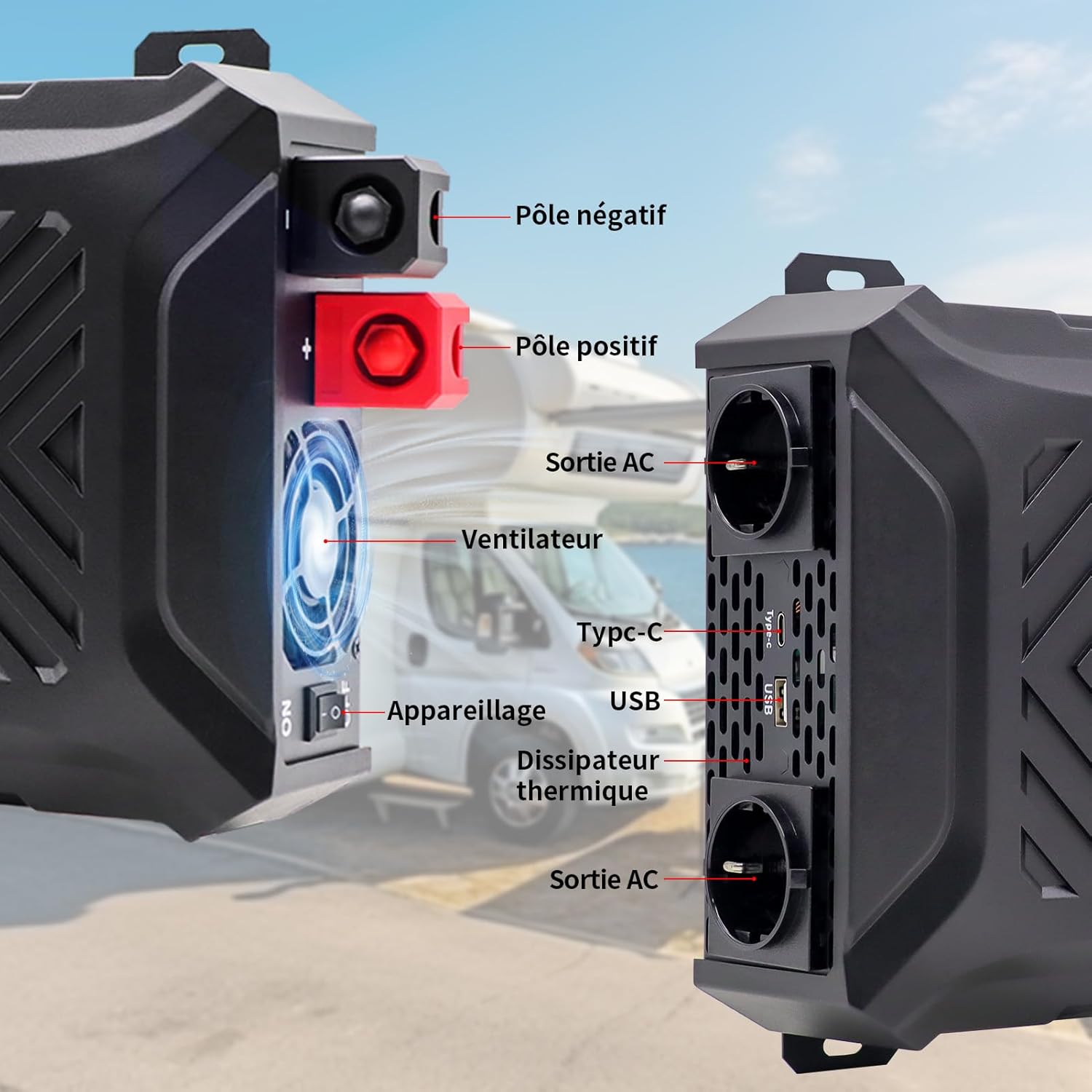
Image: Front and side view of the inverter with labels for the negative pole, positive pole, AC output sockets, fan, Type-C port, USB port, and heat sink.

Image: Detailed view of the inverter's LCD screen, AC output sockets, USB port, and Type-C port, with labels for input voltage, output voltage, real-time power, output frequency, and battery level.

Image: The DATOUBOSS inverter connected to various devices, illustrating its multiple output options including two EU AC outlets, a USB port, and a Type-C port, along with its 12V DC input.
4. Setup Instructions
Follow these steps for proper installation and connection of your inverter.
4.1 Mounting the Inverter
- Choose a secure, flat, and well-ventilated location.
- Ensure there is sufficient space around the inverter for airflow, especially around the fan and heat sink.
- Mount the inverter using appropriate screws and brackets (not included unless specified).
4.2 Battery Connection
The inverter requires a 12V DC battery system. Ensure the battery type is compatible (GEL, SLA, LI, FLD, AGM, CLA, LifePO4).

Image: Icons representing various compatible battery types including GEL, SLA, LI, FLD, AGM, CLA, and LifePO4, indicating the inverter's versatility.
- Turn off the inverter: Ensure the inverter's power switch is in the 'OFF' position.
- Connect the negative cable: Connect the black battery cable to the negative (-) terminal of the battery and then to the negative (-) terminal of the inverter.
- Connect the positive cable: Connect the red battery cable to the positive (+) terminal of the battery and then to the positive (+) terminal of the inverter.
- Secure connections: Tighten all connections firmly to prevent sparks or overheating.
- Grounding: Connect the inverter's grounding terminal to a proper earth ground.
Important: Always connect the battery cables in the correct polarity. Reverse polarity can damage the inverter and void the warranty. Use the provided battery cables or cables of appropriate gauge for the power rating.
4.3 Optional Solar Panel Connection
The inverter can be integrated into a solar power system. A solar charge controller is required for this setup.

Image: A diagram illustrating the connection of solar panels to a solar charge controller, which then connects to a battery bank, and finally to the DATOUBOSS inverter to power various household appliances.
5. Operating Instructions
Once the inverter is properly installed and connected, follow these steps to operate it.
5.1 Powering On/Off
- To Power On: After ensuring all connections are secure, switch the inverter's power button to the 'ON' position. The LCD screen will illuminate, displaying current status.
- To Power Off: Disconnect all AC loads from the inverter, then switch the inverter's power button to the 'OFF' position.
5.2 Using the LCD Display
The LCD screen provides real-time information about the inverter's operation and status.
- Input Voltage (DC): Displays the current voltage from the battery.
- Output Voltage (AC): Shows the inverter's AC output voltage.
- Output Power (W): Indicates the real-time power consumption of connected devices.
- Output Frequency (Hz): Displays the AC output frequency (50Hz).
- Battery Level Indicator: Shows the approximate charge level of the connected battery.
- Fault Indicators: Displays error codes or symbols if a protection mechanism is triggered.

Image: The inverter's LCD screen displaying operational data, alongside icons representing various safety protections such as overvoltage, overheating, overload, and undervoltage.
5.3 Connecting Devices
- Plug your AC appliances into the EU sockets.
- Connect USB-powered devices to the USB 2.1A port.
- Connect Type-C powered devices to the Type-C port.
Note: The total power consumption of all connected devices must not exceed the inverter's rated continuous power (2000W). For inductive loads (e.g., motors, refrigerators), the starting surge power can be significantly higher than the running power. Ensure the inverter's peak power (4000W) can handle these surges.
6. Maintenance
Regular maintenance ensures the longevity and optimal performance of your inverter.
6.1 Cleaning
- Ensure the inverter is turned off and disconnected from all power sources before cleaning.
- Use a soft, dry cloth to wipe the exterior of the inverter.
- Periodically check and clean the ventilation openings to ensure proper airflow. Do not use liquid cleaners or solvents.
6.2 Storage
- If storing the inverter for an extended period, disconnect it from the battery and store it in a cool, dry place.
- Ensure the battery connected to the inverter is properly maintained according to its manufacturer's instructions, especially if it's a lead-acid battery requiring periodic charging.
7. Troubleshooting
This section addresses common issues you might encounter with your inverter.
| Problem | Possible Cause | Solution |
|---|---|---|
| No output voltage / Inverter not turning on | Loose battery connections, low battery voltage, inverter switch off, internal fuse blown. | Check battery connections. Charge or replace battery. Ensure inverter switch is ON. Contact support if fuse is suspected. |
| Inverter shuts down / Overload alarm | Connected load exceeds inverter's rated power. | Reduce the total load by disconnecting some appliances. Check appliance wattage. |
| Overheat alarm | Poor ventilation, excessive ambient temperature, prolonged high load. | Ensure proper ventilation. Move inverter to a cooler location. Reduce load. |
| Low voltage alarm | Battery voltage is too low. | Charge the battery immediately. Disconnect loads to prevent deep discharge. |
| High voltage alarm | Battery voltage is too high. | Check battery charging system. Disconnect inverter from battery if voltage remains high. |
| Abnormal noise from inverter | Fan operating, or inductive load causing slight hum. | Normal operation for fan. If noise is excessive or unusual, contact support. |
If the problem persists after attempting these solutions, please contact customer support.
8. Specifications
Technical details for the DATOUBOSS PSW-E-12V 2000W Pure Sine Wave Inverter.

Image: The DATOUBOSS inverter with its dimensions labeled: 37 cm (14.57 in) length, 28.5 cm (11.22 in) width, and 18 cm (7.09 in) height, along with the included red and black battery cables.
| Feature | Detail |
|---|---|
| Brand | DATOUBOSS |
| Model Name | PSW-E |
| Model Number | PSW-E-12V 2000W |
| Input Voltage | 12 Volts DC |
| Output Voltage | 220V-230V AC |
| Output Frequency | 50Hz |
| Continuous Power | 2000 Watts |
| Peak Power | 4000 Watts |
| Conversion Efficiency | > 92% |
| Output Waveform | Pure Sine Wave |
| Output Ports | 2 x EU AC Sockets, 1 x USB 2.1A, 1 x Type-C |
| Power Source | Solar and Battery Powered |
| Product Dimensions | 37L x 28.5W x 18H centimeters |
| Recommended Uses | Home and Outdoor Use |
9. Warranty and Support
DATOUBOSS provides a comprehensive warranty and customer support for your product.
Warranty Information:
- This product comes with a 24-month manufacturer's warranty from the date of purchase.
- The warranty covers defects in materials and workmanship under normal use.
- Damage caused by improper installation, misuse, unauthorized modifications, or natural disasters is not covered.
Customer Support:
If you have any questions regarding the use, performance, or troubleshooting of your DATOUBOSS inverter, please do not hesitate to contact our customer service team. We offer friendly and patient customer support.
Please refer to the contact information provided with your purchase or visit the official DATOUBOSS website for support details.