
1. Introduction
Thank you for choosing T-SUNUS Solar Spot Lights. This manual provides essential information for the safe and efficient operation of your 6-in-1 outdoor landscape spotlights. Please read these instructions carefully before installation and use, and retain them for future reference.
These solar-powered spotlights are designed to provide warm white (3000K) illumination for various outdoor areas such as gardens, pathways, driveways, and trees. They feature a separated solar panel for optimal sun exposure and IP65 waterproofing for durability in diverse weather conditions.
2. Safety Information
- Ensure all components are securely connected before use.
- Do not attempt to modify or disassemble the product. This may void the warranty and pose safety risks.
- Keep the solar panel clean to ensure maximum charging efficiency.
- Avoid placing the solar panel in shaded areas, as this will reduce charging performance.
- The product is IP65 waterproof, but avoid submerging it in water.
- Keep out of reach of children.
3. Package Contents
Verify that all components are present:
- Solar Panel with Ground Stake
- Spotlight Units (6 units for 6-in-1 model)
- Ground Spikes for Spotlights
- Mounting Screws and Wall Plugs (for wall installation)
- User Manual
4. Product Features
- 6-in-1 Versatile Lighting: Multiple spotlight units connected to a single solar panel for comprehensive area illumination.
- High Solar Efficiency: Equipped with a larger solar panel (6.69x5.71 inches) achieving up to 17% solar-to-light efficiency for rapid charging.
- Long Illumination: 2200mAh rechargeable battery provides 8-9 hours of continuous light after 6-8 hours of direct sunlight charging.
- 2 Lighting Modes: Choose between High and Low light modes to suit your ambiance needs.
- Smart Automation: Integrated light sensor automatically turns lights on at dusk and off at dawn.
- IP65 Waterproof: Designed to withstand rain, snow, and dust for year-round outdoor use.
- Flexible Installation: Can be installed by sticking into the lawn with spikes or mounted on a wall. The separated solar panel allows for optimal positioning.
- Adjustable Angles: Solar panel is 90° adjustable, and light heads are 270° adjustable for precise illumination.

Image: Overview of solar panel charging and brightness modes.
5. Setup Instructions
5.1 Choosing an Installation Location
- Solar Panel: Select a location where the solar panel receives 6-8 hours of direct sunlight daily. Avoid shaded areas from trees, buildings, or other obstructions.
- Spotlights: Position the spotlights to illuminate your desired areas. The 9.8ft cables allow for flexible placement of the lights away from the solar panel.
- Ensure the light sensor on the solar panel is not obstructed or exposed to other light sources at night, as this may prevent the lights from turning on automatically.

Image: Guidelines for solar panel placement to ensure optimal charging.
5.2 Assembly and Installation
- Assemble Solar Panel: Attach the ground stake to the solar panel.
- Connect Spotlights: Connect each spotlight unit to the main cable extending from the solar panel. Ensure connections are secure and waterproof.
- Choose Installation Method for Spotlights:
- Ground Inserted: Attach the ground spike to each spotlight unit and firmly insert it into the soil in your desired location.
- Wall Mounted: Use the provided screws and wall plugs to mount the spotlight units to a wall or fence.
- Positioning: Adjust the angle of the solar panel (up to 90°) to face the sun directly. Adjust the light heads (up to 270°) to illuminate specific features.
- Initial Charge: Before first use, ensure the solar panel is exposed to direct sunlight for at least 6-8 hours with the power switch in the "ON" position to allow the battery to fully charge.
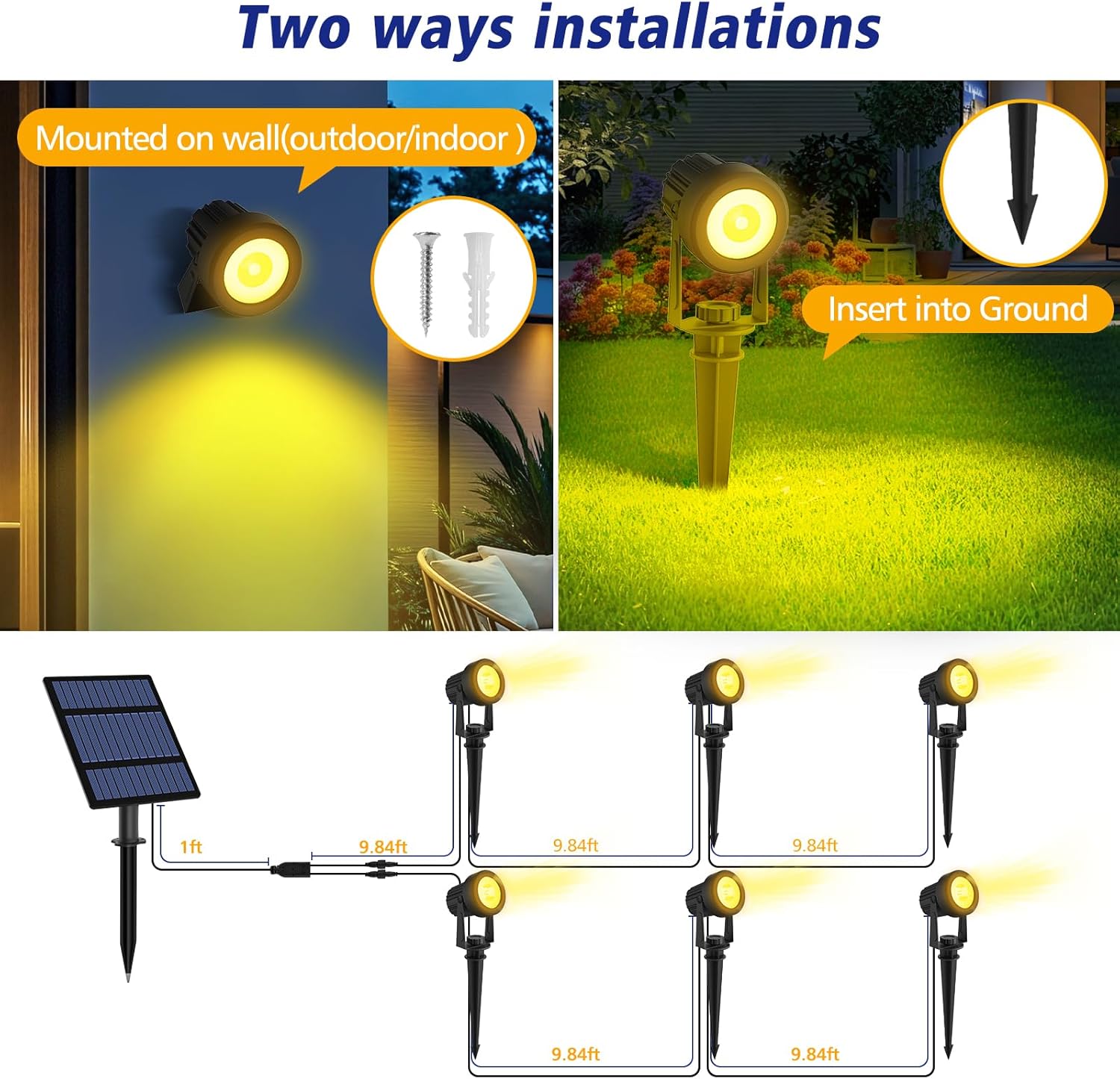
Image: Illustration of ground and wall installation options and wiring diagram.
6. Operating Instructions
6.1 Power Switch and Mode Selection
Locate the power switch on the back of the solar panel. This switch controls the unit's operation and brightness mode.
- First Press: Turns the lights ON in High Brightness mode (approx. 8 hours illumination after full charge).
- Second Press: Switches to Low Brightness mode (approx. 12 hours illumination after full charge).
- Third Press: Turns the lights OFF.
6.2 Automatic Operation
Once the desired mode is selected and the switch is in the "ON" position, the built-in light sensor will manage the lights automatically:
- The lights will automatically turn on at dusk.
- The lights will automatically turn off at dawn.

Image: Demonstrates the IP65 waterproof rating and weather resistance of the spotlights.
7. Maintenance
- Clean Solar Panel: Regularly wipe the solar panel with a soft, damp cloth to remove dust, dirt, and debris. A clean panel ensures optimal charging efficiency.
- Check Connections: Periodically inspect all cable connections to ensure they remain secure and free from damage.
- Battery Performance: The internal rechargeable battery is designed for long-term use. If you notice a significant decrease in illumination time, ensure the solar panel is receiving adequate direct sunlight.
- Winter Care: While IP65 rated, clearing snow or ice from the solar panel will help maintain charging capability during winter months.
8. Troubleshooting
| Problem | Possible Cause | Solution |
|---|---|---|
| Lights do not turn on at night. |
|
|
| Lights are dim or only stay on for a short time. |
|
|
9. Specifications
| Feature | Detail |
|---|---|
| Brand | T-SUNUS |
| Model | 6-IN-1 |
| Light Color | Warm White (3000K) |
| Brightness | Up to 400 Lumens |
| Power Source | Solar Powered |
| Battery Capacity | 2200mAh |
| Solar Panel Efficiency | 17% |
| Charging Time | 6-8 hours (direct sunlight) |
| Working Time | 8-9 hours (High mode), 12 hours (Low mode) |
| Water Resistance Level | IP65 Waterproof |
| Material | Acrylonitrile Butadiene Styrene |
| Cable Length | 9.8ft |
| Control Method | Push Button (for mode selection) |
| Light Source | LED |
| Number of Light Sources | 6 |
| Installation Type | Spike Mount, Wall Mount |

Image: Product dimensions and component details.
10. Warranty and Support
Warranty: The provided product data does not contain detailed warranty information. Please refer to the product packaging or contact T-SUNUS customer service for specific warranty terms and conditions.
Customer Support: For any questions, technical assistance, or support regarding your T-SUNUS Solar Spot Lights, please contact the manufacturer or your retailer. Contact information can typically be found on the product packaging or the official T-SUNUS website.