
1. Introduction
Thank you for choosing the DEWENWILS 2-Output Programmable Irrigation Computer. This device is designed to simplify your garden watering, offering precise control and flexibility for various outdoor applications. With its durable construction and user-friendly interface, you can ensure your plants receive optimal hydration while conserving water.

Image: Programmable Automatic Irrigation Timer banner, highlighting multi-mode, 2 independent control ports, water-saving, and rain delay features.
2. Product Features
- High-Quality Material: Features a durable, rust-resistant brass water inlet with a maximum water pressure of 8 bar. An integrated filter prevents clogging. With IP55 protection, the timer is weather-resistant and ideal for outdoor use.
- Two-Zone Irrigation Computer: Two independent ¾ inch outlets allow you to control watering for different garden areas. Four buttons and a dial enable precise setting of start time, watering duration, and frequency for each zone.
- Automatic and Manual Watering: In automatic mode, set duration from 1-300 minutes and interval from 1 minute to 7 days. A separate manual mode allows flexible adjustment of duration (1–300 min) by switching areas with L/R buttons.
- Rain Delay Function: Interrupts the watering schedule for up to 7 days during rain to prevent overwatering and save water. The preset watering program automatically resumes after the delay period.
- User-Friendly LED Display: A 2.8-inch LED display clearly shows important information such as watering time, schedule, and battery level. A warning appears for low battery (battery not included), and the valve automatically closes for reliability.

Image: DEWENWILS 2-Output Irrigation Computer with LED display and control dial, shown outdoors.

Image: Durable features of the irrigation computer, including a brass inlet and a sealed battery cover, highlighting leak-proof, waterproof, UV-resistant, and corrosion-resistant properties.
3. Package Contents
- DEWENWILS 2-Output Programmable Irrigation Computer
- User Manual
- Standard Hose Connectors (if applicable, check packaging)
4. Setup and Installation
Follow these steps to set up your irrigation computer:
- Insert Batteries: Open the battery compartment on the back of the unit. Insert 2 AA alkaline batteries (not included), ensuring correct polarity. Close the compartment securely.
- Connect to Faucet: Screw the brass inlet of the irrigation computer onto your outdoor faucet. Ensure a tight fit to prevent leaks.
- Attach Hoses: Connect your garden hoses to the two independent outlets (L and R) at the bottom of the unit.

Image: Step-by-step installation guide showing battery insertion, faucet connection, and hose attachment.
5. Operating Instructions
The DEWENWILS irrigation computer offers various modes for flexible watering. Use the central dial and buttons to navigate and set your preferences.

Image: Close-up of the LED display showing time and settings.
5.1. Setting the Clock
- Turn the dial to SET CLOCK.
- Use the HOUR+/- and MIN+/- buttons to set the current time.
- Press the L/R button to switch between setting hours and minutes.
- Turn the dial to another position (e.g., AUTO) to save the setting.
5.2. Automatic Watering Mode
This mode allows you to program a recurring watering schedule for each zone.

Image: Diagram illustrating the two independent watering zones (L and R) with separate programming options.
- Turn the dial to START TIME. Use HOUR+/- and MIN+/- to set the desired start time for watering.
- Turn the dial to HOW LONG. Use HOUR+/- and MIN+/- to set the watering duration (1-300 minutes).
- Turn the dial to HOW OFTEN. Use HOUR+/- and MIN+/- to set the watering frequency (e.g., every 12 hours, every 3 days). Intervals can range from 1 minute to 7 days.
- To apply settings to a specific zone (L or R), use the L/R button to select the zone before setting parameters.
- Once programmed, turn the dial to AUTO to activate the automatic schedule.
5.3. Manual Watering Mode
For immediate, on-demand watering without affecting your programmed schedule.
- Ensure the dial is in the AUTO or OFF position.
- Press the MANUAL button. The display will show the manual watering duration.
- Use HOUR+/- and MIN+/- to adjust the manual watering duration (1-300 minutes).
- Use the L/R button to select which zone (L or R) to water manually.
- Press MANUAL again to start watering. The timer will count down.
- To stop manual watering, press MANUAL again or turn the dial to OFF.

Image: Illustration of Eco-function, Rain Delay, and Manual Watering features.
5.4. Rain Delay Function
This feature allows you to pause your watering schedule during rainy periods to conserve water.
- Ensure the dial is in the AUTO position.
- Press the DELAY button. The display will show the default delay time.
- Use HOUR+/- and MIN+/- to adjust the delay duration (1-7 days).
- Press DELAY again to activate the rain delay. The timer will pause watering for the set duration and resume the programmed schedule afterward.
- To cancel the rain delay, press DELAY again.

Image: Irrigation computer in a rainy setting, demonstrating the rain delay function.
5.5. Turning Off the Timer
To completely stop all watering programs, turn the dial to OFF.
6. Maintenance
- Battery Replacement: When the low battery indicator appears on the display, replace the batteries promptly. The valve will automatically close when batteries are critically low.
- Cleaning: Periodically clean the filter inside the brass inlet to prevent debris buildup and ensure optimal water flow.
- Winter Storage: Before freezing temperatures, disconnect the timer from the faucet and store it indoors in a dry, frost-free location. Remove batteries before storage.

Image: Close-up of the brass inlet and filter components.
7. Troubleshooting
| Problem | Possible Cause | Solution |
|---|---|---|
| No water flow | Low battery; Faucet off; Filter clogged; Incorrect program | Replace batteries; Turn on faucet; Clean filter; Check program settings |
| Timer not watering at scheduled time | Incorrect clock setting; Program not set correctly; Rain delay active | Reset clock; Verify program settings (start time, duration, frequency); Cancel rain delay |
| Water leakage | Loose connections; Damaged O-ring/washer | Tighten all connections; Check and replace O-rings/washers if damaged |
| Display not working | Dead batteries; Unit malfunction | Replace batteries; Contact customer support if issue persists |
8. Specifications
- Brand: DEWENWILS
- Model: 2-Output Programmable Irrigation Computer
- Color: Black
- Product Dimensions: 13 x 13 x 8 cm
- Item Weight: 510 g
- Material: Brass (inlet)
- Water Pressure: Up to 8 bar
- Protection Rating: IP55
- Power Source: 2 x AA Batteries (not included)
- Watering Duration: 1-300 minutes
- Watering Frequency: 1 minute to 7 days
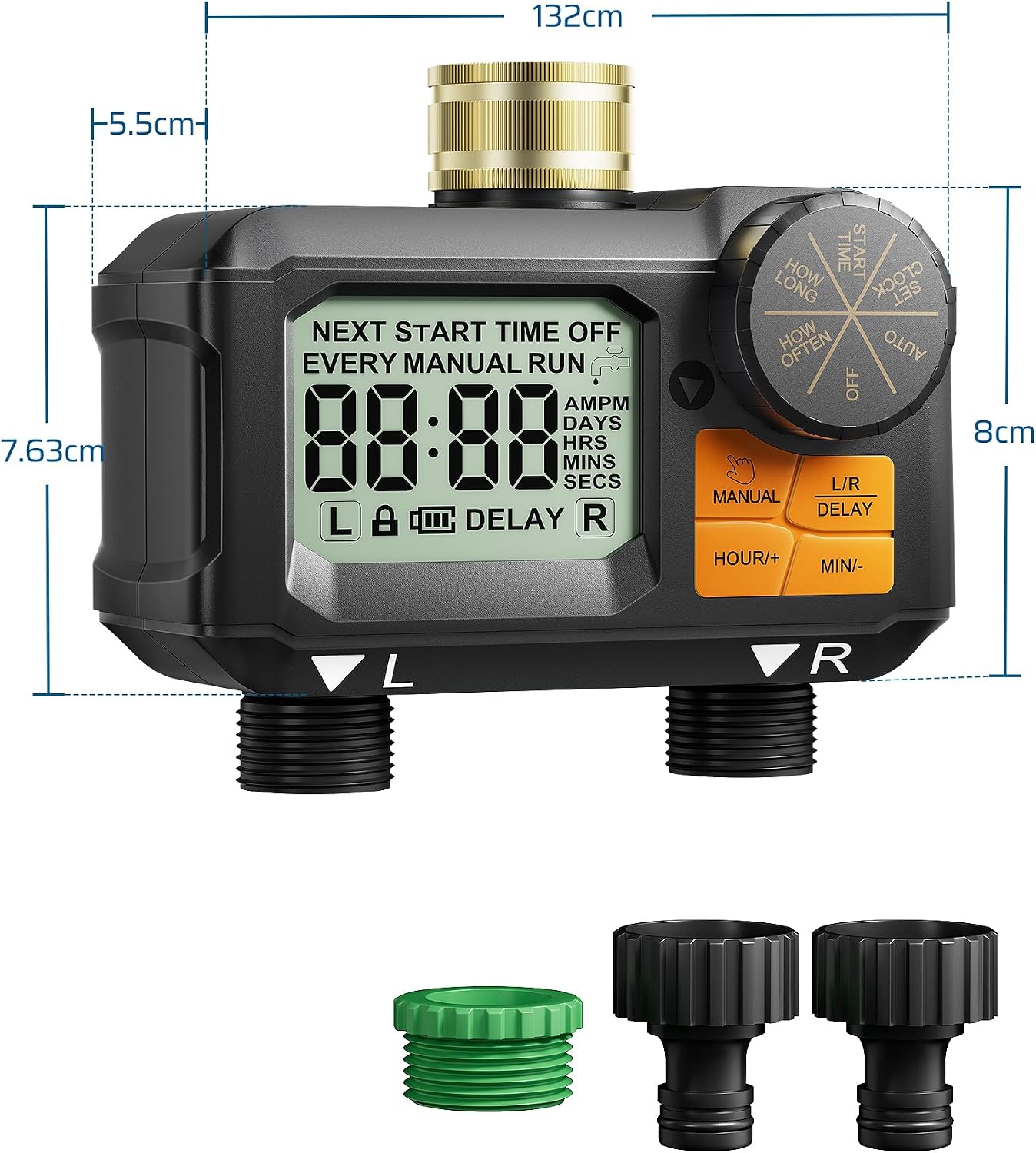
Image: Technical drawing showing product dimensions and included accessories.
9. Warranty and Support
DEWENWILS products are designed for reliability and performance. For warranty information or technical support, please refer to the contact details provided on the product packaging or visit the official DEWENWILS website. Please retain your proof of purchase for any warranty claims.