Introduction
Thank you for choosing the Pro Breeze OmniAir Bladeless Tower Fan with Air Purifier. This advanced appliance combines powerful air circulation with HEPA 13 air purification, offering a cleaner and more comfortable environment. Featuring Wi-Fi connectivity, a remote control, and multiple operating modes, this fan is designed for ease of use and optimal performance. Please read this manual thoroughly before operation to ensure proper use and maintenance.

The Pro Breeze OmniAir Bladeless Tower Fan, shown with its remote control and a smartphone displaying the control app interface.
Safety Instructions
Always follow basic safety precautions when using electrical appliances to reduce the risk of fire, electric shock, and injury.
- Ensure the power supply matches the voltage specified on the appliance rating label.
- Do not operate the fan with a damaged cord or plug.
- Keep the fan away from water or other liquids. Do not immerse the fan in water.
- Do not insert fingers or foreign objects into any openings of the fan.
- Unplug the fan from the power outlet when not in use, before cleaning, or before performing any maintenance.
- This appliance is not intended for use by persons (including children) with reduced physical, sensory or mental capabilities, or lack of experience and knowledge, unless they have been given supervision or instruction concerning use of the appliance by a person responsible for their safety.
- Children should be supervised to ensure that they do not play with the appliance.
Package Contents
- Pro Breeze OmniAir Bladeless Tower Fan
- Remote Control (with 2 AAA batteries included)
- HEPA 13 Filter (pre-installed)
- User Manual
Setup
- Unpack: Carefully remove all components from the packaging. Retain packaging for future storage or transport.
- Placement: Place the fan on a firm, level surface. Ensure there is adequate space around the fan for optimal airflow and oscillation.
- Power Connection: Plug the power cord into a standard electrical outlet.
- Remote Control Batteries: The remote control comes with 2 AAA batteries. Ensure they are correctly inserted.

The fan's sleek design allows it to fit seamlessly into various spaces. Dimensions are H 1056mm, W 255mm, D 255mm.
Operating Instructions
The Pro Breeze OmniAir fan can be controlled via the touch-sensitive LED panel, the included remote control, or the Pro Breeze smart app.
Control Panel & Remote Control

The fan's LED control panel and the intuitive remote control for easy operation.
- Power Button: Turns the fan On/Off.
- Speed Adjustment: Select from 10 fan speeds.
- Mode Selection: Cycle through 5 modes: Standard, Night, Natural, Auto, Max.
- Oscillation: Activates or deactivates 75° horizontal oscillation.
- Timer: Set a timer for up to 12 hours for automatic shut-off or turn-on.
Smart App & Voice Control (Wi-Fi Model)
For enhanced control, download the Pro Breeze smart app on your smartphone. The fan is compatible with Amazon Alexa and Google Home.

Control your fan remotely using the Pro Breeze smart app, compatible with Amazon Alexa and Google Home.
- App Pairing: Follow the instructions in the app to pair your fan with your smartphone.
- Remote Control: Adjust settings, modes, and schedules from anywhere.
- Voice Commands: Integrate with Amazon Alexa or Google Home for hands-free operation.
Operating Modes
- Standard Mode: Provides continuous airflow at your selected speed.
- Night Mode: Reduces fan speed and display brightness for quiet operation during sleep.
- Natural Mode: Simulates natural breeze by varying fan speeds.
- Auto Mode: Adjusts fan speed automatically based on ambient temperature.
- Max Mode: Operates at the highest fan speed for maximum cooling.

The fan offers 5 distinct operating modes to suit various preferences and environmental conditions.
Maintenance
Regular maintenance ensures optimal performance and longevity of your Pro Breeze OmniAir fan.
Cleaning the Fan
- Always unplug the fan before cleaning.
- Use a soft, damp cloth to wipe the exterior surfaces. Do not use abrasive cleaners or solvents.
- The bladeless design makes cleaning easy; simply wipe the air outlet slots.
HEPA Filter Replacement
The HEPA 13 filter captures 99.97% of airborne particles, including pet dander, dust, and allergens. The filter life depends on usage and air quality. Replace the filter when the air quality indicator consistently shows poor quality despite cleaning, or approximately every 6-12 months.
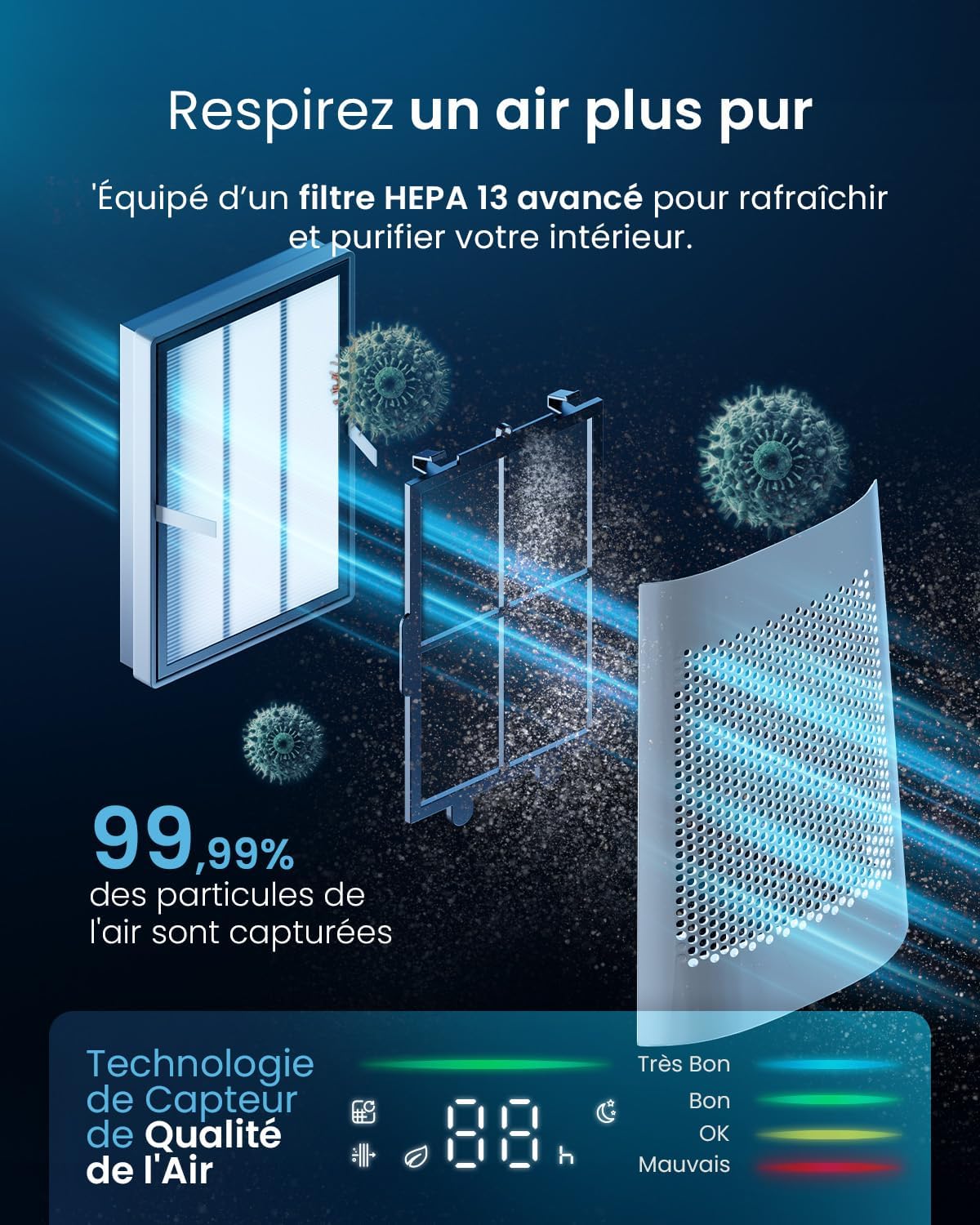
The advanced HEPA 13 filter system effectively purifies the air by capturing microparticles.
- Unplug the fan from the power outlet.
- Locate the filter compartment, usually at the base or side of the fan.
- Open the compartment cover and carefully remove the old filter.
- Insert the new HEPA 13 filter, ensuring it is correctly seated.
- Close the filter compartment cover securely.
Troubleshooting
| Problem | Possible Cause | Solution |
|---|---|---|
| Fan does not turn on. | No power supply. | Check if the power cord is securely plugged into a working outlet. |
| Weak airflow. | Filter is dirty or blocked. | Clean or replace the HEPA filter. |
| Remote control not working. | Batteries are dead or incorrectly inserted. | Replace batteries (2 AAA) and ensure correct polarity. |
| Wi-Fi connectivity issues. | Incorrect network settings or distance from router. | Ensure the fan is within Wi-Fi range. Re-pair the device through the app. Check router settings. |
| Unusual noise. | Obstruction or fan not on a level surface. | Check for any obstructions in the air intake/outlet. Ensure the fan is on a stable, flat surface. |
Specifications
| Feature | Detail |
|---|---|
| Model Number | PB-F-22W-W |
| Dimensions (L x W x H) | 25.5 x 25.5 x 105.6 cm (10.04 x 10.04 x 41.57 inches) |
| Weight | 9.9 kg (21.8 lbs) |
| Voltage | 220 Volts (DC) |
| Material | Plastic |
| Number of Speeds | 10 |
| Oscillation Angle | 75° |
| Filter Type | HEPA 13 |
| Timer | Up to 12 hours |
| Special Features | Air-Stream Technology, HEPA 13 Air Purifier, Wi-Fi Control, Remote Control |
Warranty and Support
This product is subject to a 30-day refund/replacement return policy. For specific warranty details, technical support, or any product-related inquiries, please contact the seller directly. Keep your purchase receipt as proof of purchase.
Seller: One Retail Group
For further assistance, please visit the Pro Breeze official website or contact their customer support.


