
3-Wheel Foldable Electric Mobility Scooter
Generic 3-Wheel Foldable Electric Mobility Scooter User Manual
Model: 3-Wheel Foldable Electric Mobility Scooter
1. Introduction
This manual provides essential information for the safe and efficient operation, assembly, and maintenance of your new 3-Wheel Foldable Electric Mobility Scooter. Please read this manual thoroughly before using the scooter to ensure proper understanding and to prevent injury or damage.
The scooter is designed to provide enhanced mobility for adults and seniors, offering comfort, portability, and ease of use for both indoor and outdoor environments.

Image 1.1: The 3-Wheel Foldable Electric Mobility Scooter, showcasing its compact design and integrated front basket.
2. Safety Information
WARNING: Failure to follow these safety instructions may result in serious injury or damage to the scooter.
- Always read the entire instruction manual before initial use.
- Ensure all components are securely assembled before operation.
- Do not exceed the maximum weight capacity of 265 lbs (120 kg).
- Operate the scooter at a safe speed, especially in crowded areas or on uneven terrain. The maximum speed is 3.7 mph.
- Avoid sudden stops or turns at high speeds.
- Be aware of your surroundings and potential obstacles.
- Use headlights and taillights during low-light conditions for visibility.
- The scooter is equipped with anti-rollover wheels for enhanced safety.
- Do not operate the scooter under the influence of alcohol or medication that may impair your judgment.
- Keep hands and feet clear of moving parts.
- Ensure the battery is fully charged before long trips.
3. Product Components and Overview
Familiarize yourself with the main parts of your mobility scooter:
- Tiller: Steering column with controls.
- Dashboard Control System: Includes battery level indicator, power switch, speed control, and directional levers.
- Seat: Padded, adjustable height, and 360° swivel function.
- Armrests: Foldable for easier access.
- Front Basket: Detachable for storage.
- Backrest with Pouch: Provides support and additional storage.
- Wheels: Three-wheel configuration with anti-rollover rear wheels.
- Headlights and Taillights: For illumination and visibility.
- Battery Pack: Provides power to the motor.

Image 3.1: Detachable front basket and backrest with integrated storage pouch.
4. Setup and Assembly
The scooter is designed for quick and efficient assembly and disassembly, making it convenient for transport and storage. Assembly typically takes around 10 minutes.
4.1 Unpacking
Carefully remove all components from the packaging. Ensure all parts are present:
- Main chassis (64 lbs)
- Seat (14 lbs)
- Battery pack (21 lbs)
- Front basket (5 lbs)
- Charger
- User Manual
4.2 Assembly Steps
- Place the main chassis on a flat, stable surface.
- Insert the battery pack into its designated compartment.
- Attach the seat post to the chassis and secure the seat. Ensure it clicks into place.
- Unfold the tiller and secure it in the upright position.
- Attach the front basket to the tiller.
- Connect any necessary electrical cables as indicated in the diagrams (refer to specific diagrams if provided in physical manual).

Image 4.1: Disassembled scooter components and their approximate weights, illustrating portability and ease of transport in a vehicle trunk.
4.3 Disassembly for Transport
To disassemble the scooter for transport:
- Remove the front basket.
- Remove the seat.
- Remove the battery pack.
- Fold down the tiller.
- The scooter can now be separated into five lightweight pieces for easier lifting and storage in a standard-size vehicle trunk. It is recommended that two people lift the main chassis (64 lbs) into a vehicle.
5. Operating Instructions
5.1 Dashboard Control System
The control panel is located on the tiller for easy access:

Image 5.1: Detailed view of the dashboard control system.
- 1. Battery Level Indicator: Displays the current battery charge.
- 2. Power Switch: Turns the scooter on or off.
- 3. Speed Control Dial: Adjusts the maximum speed of the scooter.
- 4. Left-hand Lever: Push to move backward.
- 5. Right-hand Lever: Push to move forward.
- Horn Button: Activates the horn.
- Headlight Switch: Turns headlights on/off.
Release Hands Stop: Releasing the directional levers will automatically engage the brakes, bringing the scooter to a stop.
Manual/Automatic Lock: The scooter has a mechanism to switch between automatic movement (D) and manual pushing (N). Ensure it is set to 'D' for powered operation.
5.2 Driving the Scooter
- Ensure the scooter is powered on using the Power Switch.
- Adjust the speed control dial to your desired maximum speed. Start with a lower speed until you are comfortable.
- To move forward, gently press the right-hand lever. To move backward, gently press the left-hand lever.
- Steer by turning the tiller handlebars.
- To stop, release the directional levers. The electromagnetic brakes will engage automatically.
5.3 Terrain Suitability
The scooter is designed for use on various surfaces, including:
- Bumpy Roads
- Brick Roads
- Grassy Areas
- Muddy Roads (light mud)
Always exercise caution when driving on uneven or slippery surfaces. Avoid excessively steep inclines or declines.

Image 5.2: The scooter's capability across different terrains.
6. Adjustments
The scooter offers several adjustable features for personalized comfort and accessibility:

Image 6.1: Overview of adjustable features.
- Seat Height: Adjust the seat height using the lever located beneath the seat to ensure comfortable leg positioning.
- Seat Swivel: The seat can rotate 360° to facilitate easier transfers on and off the scooter. Use the swivel release lever under the seat.
- Armrests: The armrests are foldable, allowing for easier access and exit from the seat.
- Tiller Angle: The angle of the tiller can be adjusted for optimal steering comfort. Use the joystick adjustment knob on the tiller column.
7. Maintenance
Regular maintenance ensures the longevity and safe operation of your mobility scooter.
7.1 Battery Care
- Charging: Charge the battery fully before first use. A full charge typically takes 6-8 hours.
- Frequency: Charge the battery after each use, or at least once a week if not used regularly, to maintain battery health.
- Storage: If storing the scooter for an extended period, ensure the battery is fully charged and disconnect it if possible. Store in a cool, dry place.
- Replacement: Replace batteries when their performance significantly diminishes.
7.2 Cleaning
- Wipe down the scooter with a damp cloth. Do not use abrasive cleaners or excessive water.
- Keep electrical components dry.
7.3 General Inspection
- Regularly check tire pressure (if applicable, for pneumatic tires).
- Inspect all fasteners and connections for tightness.
- Ensure brakes are functioning correctly.
- Check for any signs of wear or damage to cables, wiring, or structural components.
8. Troubleshooting
This section addresses common issues you might encounter with your mobility scooter.
| Problem | Possible Cause | Solution |
|---|---|---|
| Scooter does not power on. | Battery is not charged or not connected. Power switch is off. | Ensure battery is fully charged and properly connected. Turn the power switch to 'ON'. |
| Scooter moves slowly or lacks power. | Low battery charge. Speed control dial set too low. Overload. | Charge the battery. Adjust speed control dial. Ensure weight capacity is not exceeded. |
| Scooter stops unexpectedly. | Low battery. Loose connection. Safety feature activated. | Check battery level and charge if necessary. Inspect all connections. Consult the manual for specific safety feature triggers. |
| Brakes are not engaging properly. | Faulty brake system. | Contact customer support for assistance. Do not use the scooter if brakes are faulty. |
If you encounter a problem not listed here or if the suggested solutions do not resolve the issue, please contact customer support.
9. Specifications
Key technical specifications for the 3-Wheel Foldable Electric Mobility Scooter:
| Feature | Specification |
|---|---|
| Product Dimensions (L x W x H) | 33" x 19.7" x 33" (83.8 cm x 50 cm x 83.8 cm) |
| Item Weight | 77 lbs (Total) / Heaviest piece: 29 lbs |
| Maximum Weight Capacity | 265 lbs (120 kg) |
| Top Speed | 3.7 mph (6 km/h) |
| Maximum Drive Range Per Charge | Up to 12.4 miles (20 km) |
| Battery Type | 12V 12Ah * 2 (Lead-Acid) |
| Motor Power | 24V 180W |
| Charge Time | 6-8 hours |
| Climb Angle | Up to 8° |
| Brakes | Electronic, regenerative, and electromechanical |
| Certifications | ISO, CE certified, TSA-approved for travel |
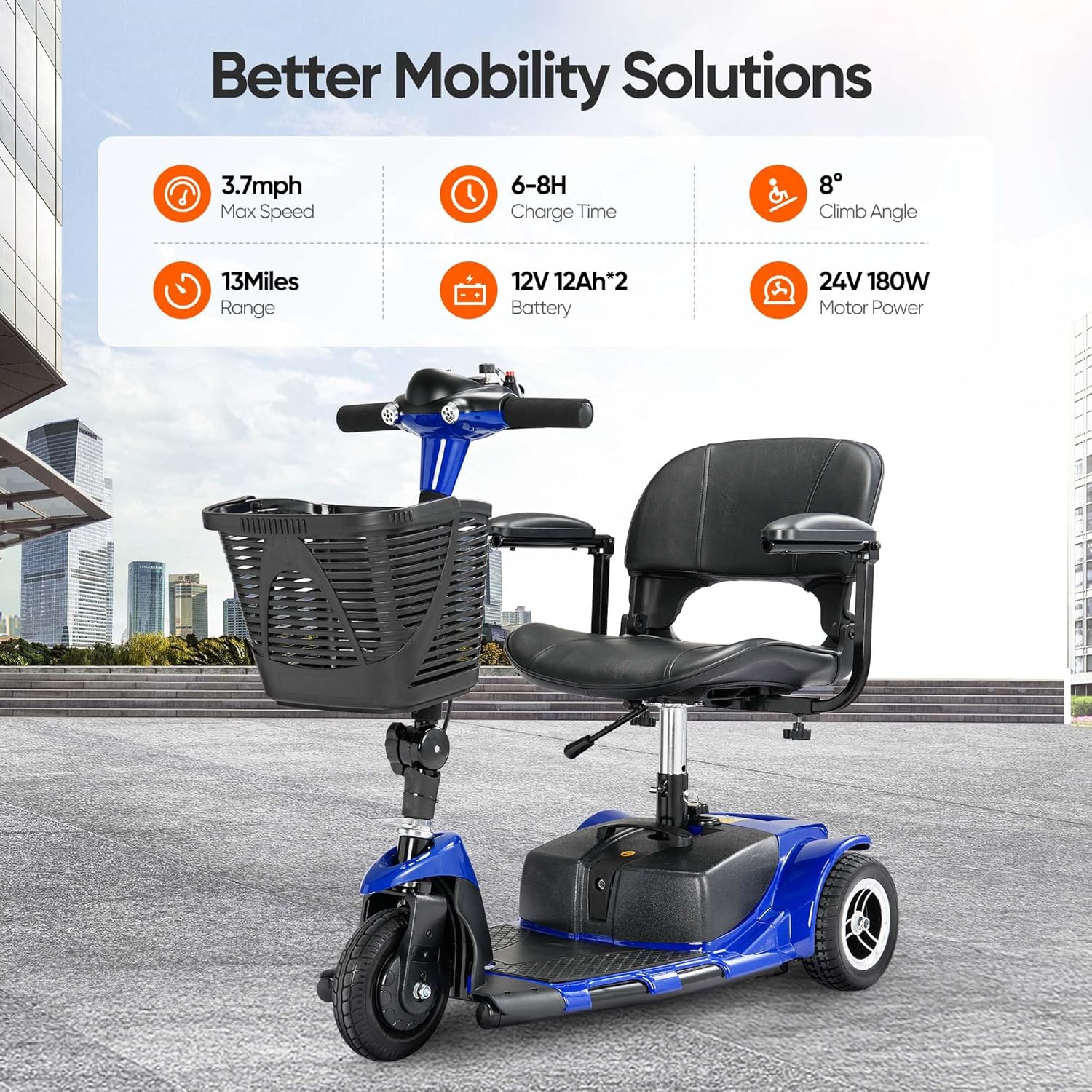
Image 9.1: Visual summary of key performance specifications.
10. Warranty and Support
The manufacturer provides lifetime support for this product. For any questions, technical assistance, or warranty claims, please contact your retailer or the manufacturer's customer service department.
Please retain your proof of purchase for warranty purposes. The scooter has passed ISO and CE certification, ensuring quality and safety standards.
Related Documents - 3-Wheel Foldable Electric Mobility Scooter
 |
Frequently Asked Questions for Mujocooker Folding Mobility Scooter Find answers to common questions about starting, charging, battery removal, and speed adjustment for the Mujocooker Folding Mobility Scooter. Includes video links for guidance. |
 |
Spitfire Scout Owner's Manual - Drive Medical Comprehensive owner's manual for the Drive Medical Spitfire Scout mobility scooter, detailing safety, operation, setup, maintenance, and specifications for enhanced personal mobility. |
 |
Drive Medical Scout Scooter Owner's Handbook Comprehensive guide for operating, maintaining, and troubleshooting the Drive Medical Scout mobility scooter. Includes safety instructions, specifications, and warranty information. |
 |
Drive Medical Scout Mobility Scooter Owner's Manual Comprehensive owner's manual for the Drive Medical Scout mobility scooter, covering safety guidelines, operation, maintenance, specifications, and warranty information. |
 |
Invacare Colibri Mobility Scooter: Easy, Customizable, and Safe Discover the Invacare Colibri mobility scooter, featuring the innovative LiteLock™ system for easy disassembly, customizable color panels, and a comfortable, maneuverable design. Explore accessories and technical specifications for enhanced personal mobility. |
 |
Drive Scout Mobility Scooter: Owner's Handbook and Operation Guide Comprehensive owner's handbook for the Drive Scout mobility scooter. Learn about safe operation, maintenance, troubleshooting, specifications, and warranty for your Scout scooter. |
Ask a question about this manual
Ask about setup, troubleshooting, compatibility, parts, safety, or missing instructions. Manuals+ will review the question and use this page’s manual context to help answer it.