
1. Introduction
Thank you for choosing the MERACH Under Desk Bike Pedal Exerciser. This compact and versatile fitness machine is designed to provide a convenient way to exercise your arms and legs, promote physical therapy, and enhance overall well-being. Its quiet magnetic resistance system and smart app integration make it suitable for various environments, including offices and homes.
Please read this manual thoroughly before assembly and operation to ensure safe and optimal use of your new exerciser.
2. Safety Information
- Consult a physician before starting any exercise program, especially if you have pre-existing medical conditions.
- Use the exerciser on a stable, flat surface. The included non-slip mat should be used to prevent movement during use.
- Ensure all parts are securely assembled before each use.
- Keep children and pets away from the exerciser during operation.
- Do not stand on the exerciser. It is designed for seated use only.
- Wear appropriate footwear (barefoot, slippers, or trainers) when using the pedal exerciser. Avoid casual shoes that may interfere with pedal straps.
- Maximum user weight capacity: 280 pounds.
3. Package Contents
Verify that all components are present in the package:
- MERACH Under Desk Bike Pedal Exerciser Main Unit
- Front Stabilizer Bar
- Rear Stabilizer Bar
- Pedals (Left and Right)
- Pedal Straps
- Resistance Bands (2)
- Non-Slip Mat
- Assembly Tools (Wrench, Screws)
- User Manual (this document)
- AAA Battery (1, for LCD monitor)
4. Assembly Instructions
The MERACH Under Desk Bike is designed for quick and easy assembly, typically taking around 10 minutes.
- Attach Stabilizer Bars: Securely attach the front and rear stabilizer bars to the main unit using the provided screws and wrench. Ensure they are firmly tightened for stability.
- Install Pedals: Identify the left (L) and right (R) pedals. Screw each pedal into its corresponding crank arm on the main unit. Note that the left pedal typically screws counter-clockwise and the right pedal clockwise. Tighten them securely.
- Attach Pedal Straps: Fasten the pedal straps to the pedals. Adjust the tightness of the straps to comfortably secure your feet during use.
- Insert Battery: Locate the battery compartment for the LCD monitor, usually on the top or side of the main unit. Insert the provided AAA battery, ensuring correct polarity.
- Place Non-Slip Mat: Position the non-slip mat on the floor where you intend to use the exerciser. Place the assembled exerciser on top of the mat.
- Connect Resistance Bands: If desired, attach the resistance bands to the designated connection points on the front stabilizer bar for arm exercises.

Image: Quick 10-minute assembly overview, showing all parts and the portable/compact design.
Video: MERACH S04 Under Desk Bike Assembly. This video demonstrates the step-by-step process of assembling the exerciser, including attaching the stabilizer bars, pedals, and resistance bands.
5. Operating Instructions
5.1. Basic Operation (Leg Exercise)
- Place the exerciser on the non-slip mat on a flat surface.
- Sit comfortably on a chair, ensuring your knees have enough clearance under your desk if using it in an office setting.
- Place your feet onto the pedals and adjust the straps for a secure fit.
- Begin pedaling in a smooth, controlled motion. You can pedal forward or backward.
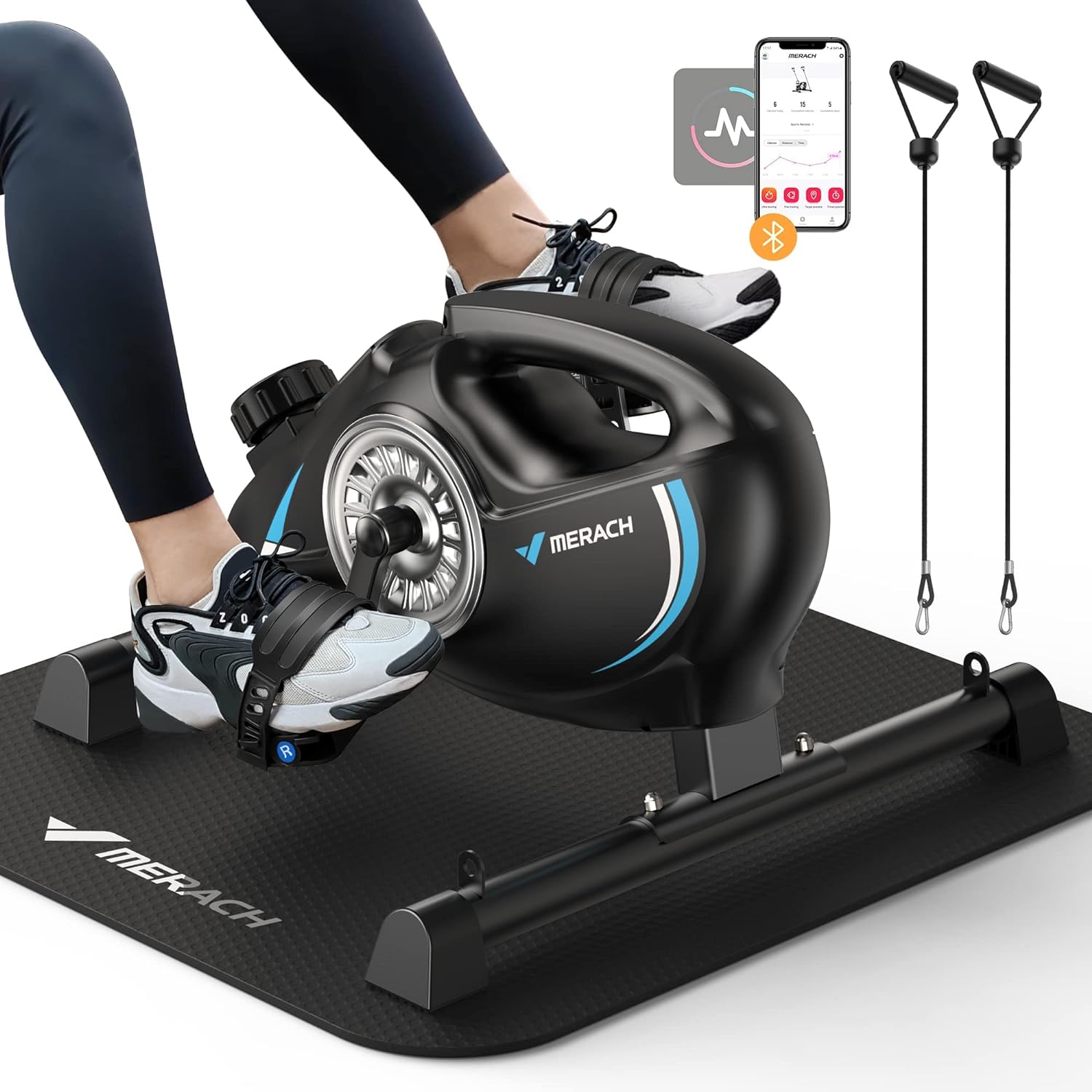
Image: A user engaging in leg exercise with the MERACH Under Desk Bike, highlighting its compact design and app connectivity.

Image: The anti-slip features of the MERACH Under Desk Bike, including the non-slip mat and non-slip covers on the exerciser's feet, ensuring stability during use.
5.2. Arm Exercise
- Place the exerciser on a sturdy table or elevated surface.
- Sit in front of the exerciser.
- Place your hands onto the pedals and begin rotating them.
- Alternatively, attach the resistance bands to the front stabilizer bar and use them for various arm and upper body exercises.

Image: Dual-use functionality for both leg and arm exercises, demonstrating the versatility of the MERACH Under Desk Bike.
Video: MERACH 3 in 1 Arm/Leg Exerciser. This video showcases the different ways to use the exerciser for both arm and leg workouts, including the use of resistance bands.
5.3. Adjusting Resistance
The MERACH Under Desk Bike features 16 levels of smooth magnetic resistance. To adjust the resistance, turn the resistance knob located on the top of the main unit. Turn clockwise to increase resistance for a more challenging workout, and counter-clockwise to decrease resistance.

Image: Demonstrates the silent magnetic resistance system and the resistance adjustment knob, showing an elderly user benefiting from the quiet operation.
5.4. LCD Monitor Functions
The integrated LCD monitor displays key workout metrics:
- SCAN: Cycles through all metrics automatically.
- SPEED: Current pedaling speed.
- TIME: Duration of your workout.
- DISTANCE: Distance covered during the workout.
- CALORIES: Estimated calories burned.
Press the button on the monitor to cycle through the display modes or reset the values (refer to the monitor's specific instructions for detailed operation).
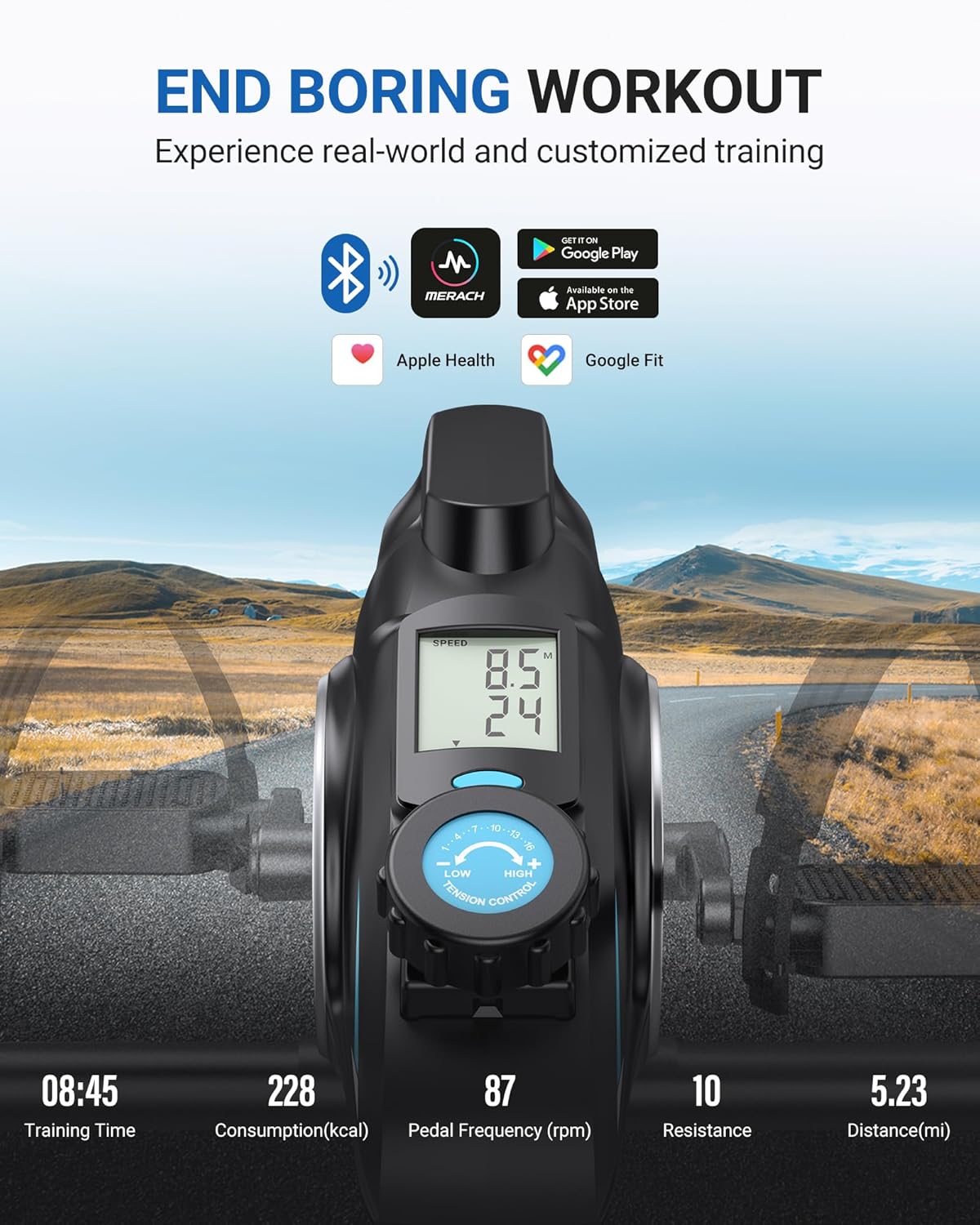
Image: The LCD monitor displaying various workout metrics and highlighting the MERACH App connectivity for enhanced training experience.
5.5. MERACH App Integration
Enhance your workout experience by connecting your exerciser to the free MERACH App. The app offers:
- Variety of training modes (free training, target, timed practice).
- Live metrics tracking your progress.
- Compatibility with Apple Health and Google Fit.
Download the MERACH App from the App Store or Google Play and follow the in-app instructions to connect your device via Bluetooth.
6. Maintenance
- Cleaning: Wipe down the exerciser with a damp cloth after each use to remove sweat and dust. Do not use abrasive cleaners or solvents.
- Storage: Store the exerciser in a cool, dry place away from direct sunlight and extreme temperatures. Its portable design allows for easy storage.
- Inspection: Periodically check all bolts and connections to ensure they remain tight. Tighten if necessary.
7. Troubleshooting
| Problem | Possible Cause | Solution |
|---|---|---|
| Exerciser slides during use. | Not on non-slip mat; mat not properly placed; surface too smooth. | Ensure the exerciser is placed on the provided non-slip mat. Verify the mat is flat and clean. Use on a carpeted surface if possible, or consider additional anti-slip measures. |
| Pedals are stiff or noisy. | Loose connections; debris in mechanism; resistance set too high. | Check that pedals are securely tightened. Inspect for any foreign objects. Reduce resistance level. If noise persists, contact customer support. |
| LCD monitor not displaying. | Battery drained or incorrectly inserted. | Replace the AAA battery, ensuring correct polarity. Press the monitor button to activate. |
| Cannot connect to MERACH App. | Bluetooth off; app not updated; device not discoverable. | Ensure Bluetooth is enabled on your mobile device. Update the MERACH App to the latest version. Restart both the exerciser (by removing/reinserting battery) and your mobile device. |
For further assistance, please refer to the Troubleshooting Guide (PDF) or contact MERACH customer support.
8. Specifications
| Brand: | MERACH |
| Model Number: | MR-S04 |
| Product Dimensions (LxWxH): | 23.62"D x 21.8"W x 12.59"H |
| Item Weight: | 17.8 pounds (approx. 8.07 kg) |
| Maximum Weight Recommendation: | 280 pounds |
| Resistance Type: | Magnetic |
| Number of Resistance Levels: | 16 |
| Display Type: | LCD |
| Power Source: | Battery Powered (1 AAA battery included) |
| Material: | Aluminum |
9. Warranty and Support
MERACH provides a one-year manufacturer's warranty for this product. In the event of any quality issues or if you require technical assistance, please contact MERACH customer support directly. Our team is dedicated to providing reliable products and user-friendly support.
For customer support, please visit the official MERACH website or refer to the contact information provided with your purchase documentation.