
1. Introduction
This manual provides essential instructions for the proper setup, operation, and maintenance of your COCOMM DT100 4G VoLTE Wireless Phone. Please read this manual thoroughly before using the device to ensure optimal performance and longevity.
2. Package Contents
Verify that all items are present in the package:
- COCOMM DT100 Wireless Phone
- Charging Base
- Battery (1 P76 type)
- Charger/Charging Cable (Micro USB)
- Quick Start Guide and Warranty Information

Image: The COCOMM DT100 wireless phone displayed next to its charging base, showing both main components.
3. Setup
3.1. Battery Installation
- Locate the battery compartment cover on the back of the phone.
- Gently slide or lift the cover to open it.
- Insert the provided P76 battery, ensuring the contacts align correctly with the phone's terminals.
- Replace the battery compartment cover until it clicks into place.
3.2. SIM Card Installation
The DT100 supports a SIM card for 4G VoLTE connectivity.
- With the battery removed, locate the SIM card slot.
- Insert your activated SIM card into the slot, ensuring the gold contacts face downwards and the cut corner aligns with the slot's orientation.
- Reinstall the battery and battery cover.
3.3. Initial Charging
Before first use, fully charge the phone battery.
- Connect the Micro USB charging cable to the charging base.
- Plug the charger into a standard power outlet.
- Place the COCOMM DT100 phone into the charging base. Ensure it is seated correctly and the charging indicator light (if present) illuminates.
- Allow the phone to charge until the battery indicator shows a full charge. This typically takes approximately 2.5 hours.

Image: The COCOMM DT100 wireless phone securely placed in its charging base, ready for charging or standby.
3.4. Powering On/Off
- To Power On: Press and hold the Power/End Call button (red button) until the screen illuminates.
- To Power Off: Press and hold the Power/End Call button until a power-off option appears on the screen, then confirm.
4. Operating Instructions
4.1. Making and Receiving Calls
- Making a Call:
- Enter the phone number using the alphanumeric keypad. The keypad is illuminated for visibility.
- Press the Call button (green button) to initiate the call.
- Receiving a Call:
- When the phone rings, press the Call button (green button) to answer.
- To end a call, press the End Call button (red button).
4.2. VoLTE Functionality
The COCOMM DT100 supports Voice over LTE (VoLTE), which provides high-definition voice calls over the 4G network. Ensure your SIM card and network provider support VoLTE for this feature to function.
4.3. Contacts Management
- Adding a Contact: Navigate to the "Contacts" menu, select "Add New Contact," and enter the name and phone number.
- Searching Contacts: Access the "Contacts" menu and use the navigation keys to scroll through your saved contacts or use the keypad to search by name.
4.4. Bluetooth Pairing
The phone features Bluetooth 2.1 for connecting to compatible accessories.
- Go to the phone's "Settings" menu and select "Bluetooth."
- Turn Bluetooth on.
- The phone will search for available devices. Select your desired device from the list and follow the on-screen prompts to pair.

Image: A hand holding the COCOMM DT100 phone, illustrating its connectivity features including 3G, 4G, and Bluetooth.
5. Maintenance
5.1. Cleaning
- Use a soft, dry, lint-free cloth to clean the phone and charging base.
- Do not use harsh chemicals, cleaning solvents, or strong detergents.
- Avoid getting moisture into any openings.
5.2. Battery Care
- To maximize battery life, avoid exposing the phone to extreme temperatures.
- Charge the battery regularly, even if the phone is not in frequent use.
- If the battery performance significantly degrades, consider replacing it with an authorized COCOMM battery.
5.3. Storage
When storing the device for extended periods, ensure it is powered off and stored in a cool, dry place. It is recommended to charge the battery to about 50% before long-term storage.
6. Troubleshooting
If you encounter issues with your COCOMM DT100, refer to the following common problems and solutions:
| Problem | Possible Cause | Solution |
|---|---|---|
| Phone does not power on. | Battery is depleted or not installed correctly. | Ensure the battery is correctly installed and fully charged. Connect to the charger and try powering on again. |
| Phone does not charge. | Charging cable or base is faulty; phone not seated correctly in base; battery issue. | Verify the charging cable and adapter are working. Ensure the phone is properly seated in the charging base. Check battery installation. If issues persist, contact support. |
| Cannot make or receive calls. | No network signal; SIM card not installed or activated; VoLTE not enabled (if applicable). | Check for network signal strength. Ensure SIM card is correctly installed and activated with your service provider. Confirm VoLTE is enabled in settings if desired. |
| Bluetooth device not pairing. | Bluetooth is off; device is out of range; device is not in pairing mode. | Ensure Bluetooth is enabled on both devices. Place devices close to each other. Put the accessory device into pairing mode. |
If the problem persists after attempting these solutions, please contact COCOMM customer support for further assistance.
7. Specifications
| Feature | Detail |
|---|---|
| Brand | COCOMM |
| Model | DT100 |
| Dimensions (Phone in Base) | 10.2 x 8.1 x 16.2 cm |
| Weight | 180 g |
| Display | 1.8-inch LCD, 128 x 64 pixels |
| Operating System | Android Nucleus Version |
| Processor | UNISOC T117 (1 GHz) |
| RAM | 32 MB |
| Internal Flash Memory | 32 MB |
| Digital Storage Capacity | 64 GB (potentially for expandable storage) |
| Battery Type | Li-Ion (P76 type) |
| Battery Capacity | 800 mAh |
| Talk Time | Up to 2.5 hours |
| Standby Time | Up to 3 days |
| Connectivity | 4G VoLTE, Bluetooth 2.1, Micro USB |
| Form Factor | Wireless DECT style |
| Certifications | CE, RoHS |
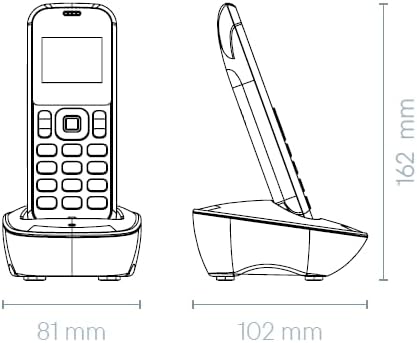
Image: Technical drawing illustrating the dimensions of the COCOMM DT100 phone and its charging base.
8. Warranty and Support
8.1. Warranty Information
The COCOMM DT100 comes with a manufacturer's warranty. Please refer to the included "Quick Start Guide and Warranty Information" document in your package for specific terms, conditions, and duration of the warranty. Keep your proof of purchase for warranty claims.
8.2. Customer Support
For technical assistance, troubleshooting beyond this manual, or warranty inquiries, please contact COCOMM customer support. Contact details can typically be found on the COCOMM official website or in the warranty documentation provided with your product.
You can also visit the COCOMM brand store on Amazon for more information: COCOMM Amazon Store


