
1. Introduction
Thank you for choosing the MORECORE X98 10000mAh 11-inch Solar Camping Fan. This versatile device is designed to provide cooling, lighting, and portable power in various outdoor and emergency situations. Featuring dual charging options, multiple fan speeds, adjustable light levels, and a built-in timer, it is an essential companion for camping, hiking, RV trips, and power outages.
2. Package Contents
- MORECORE X98 Solar Camping Fan Unit
- USB-C Charging Cable
- User Manual
3. Product Overview
Familiarize yourself with the components of your MORECORE X98 fan:
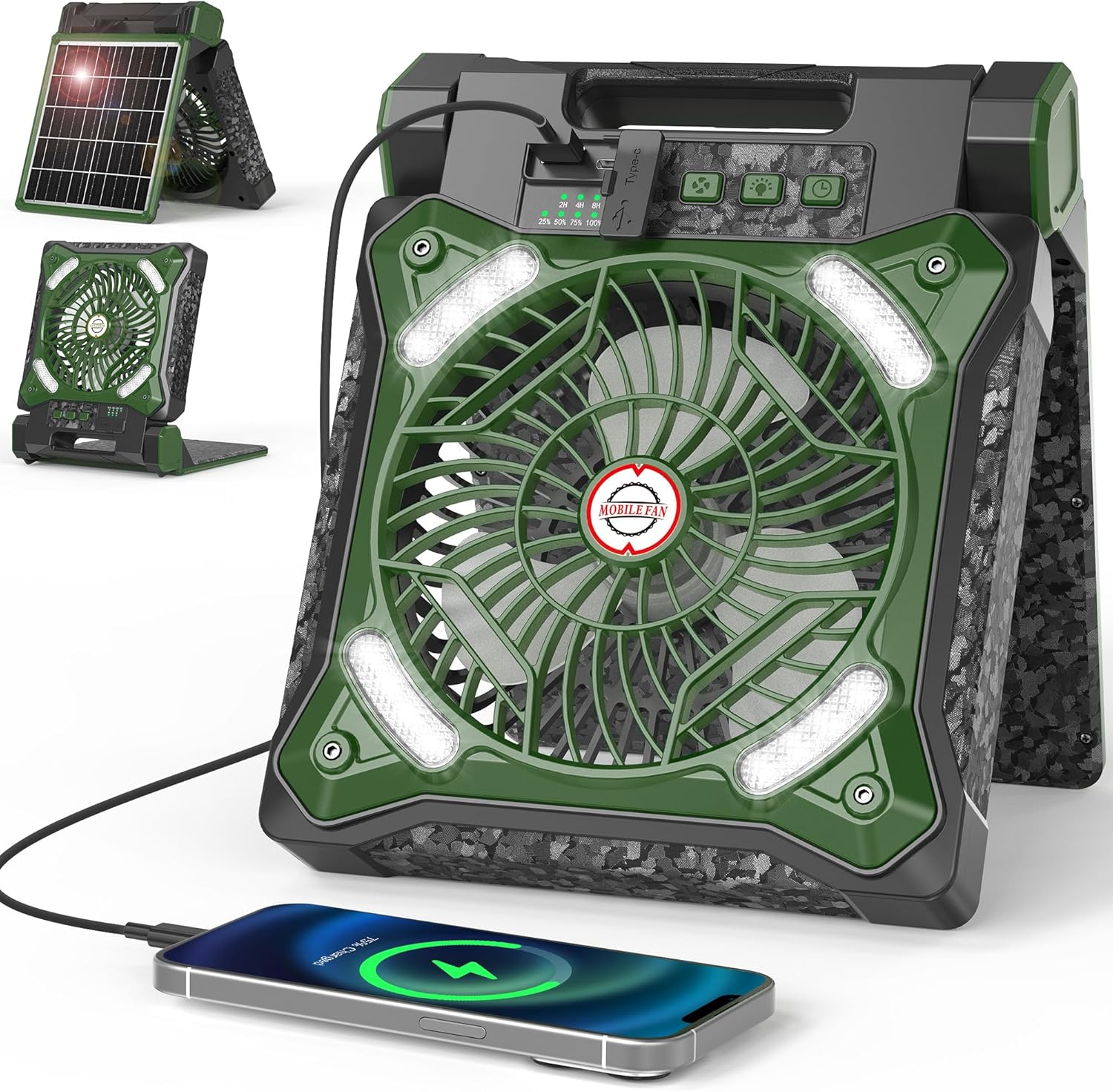
Figure 1: Front view of the MORECORE X98 Solar Camping Fan, showing the fan blades, LED lights, control panel, and a phone connected for charging. The integrated solar panel is visible on the back in a folded position.
- Fan Blades: Located at the center, protected by a grille.
- LED Lights: Integrated around the fan grille for illumination.
- Control Panel: Located on the top edge, featuring buttons for fan speed, light brightness, and timer, along with battery and timer indicators.
- Solar Panel: Foldable panel on the back for solar charging.
- USB-C Input Port: For fast charging the fan's internal battery.
- USB-A Output Port: For charging external devices like smartphones.
- Adjustable Stand/Handle: Allows for 90° adjustment for optimal positioning and serves as a carrying handle.

Figure 2: Detailed view of the control panel, highlighting the fan speed, light, and timer buttons, along with the battery percentage and timer duration indicator lights.
4. Setup
4.1 Initial Charging
Before first use, fully charge the fan using the provided USB-C cable. Connect the USB-C end to the fan's input port and the USB-A end to a compatible power adapter (not included) or a USB power source. The battery indicator lights on the control panel will show the charging progress.

Figure 3: Illustrates the two primary charging methods: fast charging via the Type-C port connected to a wall adapter, and solar charging using the integrated 8W solar panel.
4.2 Solar Charging
For off-grid charging, unfold the solar panel located on the back of the fan. Position the fan so the solar panel faces direct sunlight. The fan can be adjusted up to 90 degrees to optimize sun exposure. Solar charging is slower than USB-C charging and is ideal for maintaining battery levels during extended outdoor use.
5. Operating Instructions
5.1 Fan Operation
- Power On/Off: Press the power button (usually indicated by a power symbol) once to turn the fan on. Press and hold to turn it off.
- Adjust Fan Speed: While the fan is on, press the fan speed button (often indicated by fan blades) repeatedly to cycle through the 4 available speed settings.
- Set Timer: Press the timer button (indicated by a clock symbol) to set the fan to automatically shut off after 2, 4, or 8 hours. Corresponding indicator lights will illuminate.
Video 1: An official product video from MORECORE demonstrating the fan's portability, solar charging, adjustable stand, and fan speed settings. It highlights the convenience for outdoor activities.
5.2 LED Light Operation
- Turn Light On/Off: Press the light button (indicated by a light bulb symbol) once to turn the LED lights on. Press and hold to turn them off.
- Adjust Brightness: While the lights are on, press the light button repeatedly to cycle through the 3 available brightness levels.

Figure 4: Illustrates the three distinct LED light levels, providing varying degrees of illumination suitable for different nighttime scenarios.
Video 2: A video demonstrating the 4 fan speeds and 3 light levels of the MORECORE X98 fan, showcasing its versatility for different environmental conditions.
5.3 Power Bank Function
The fan's internal 10000mAh battery can also serve as a power bank. Connect your external device (e.g., smartphone) to the USB-A output port (5V-2A) using its charging cable. The fan will automatically begin charging your device.
Video 3: A short preview video from MORECORE highlighting the fan's utility during hurricane outages, demonstrating its light and phone charging capabilities in a dark environment.
6. Maintenance
- Cleaning: Use a soft, dry cloth to wipe the fan and solar panel. Do not use abrasive cleaners or immerse the unit in water.
- Storage: Store the fan in a cool, dry place away from direct sunlight when not in use for extended periods. Ensure the battery is partially charged (around 50%) before long-term storage.
7. Troubleshooting
- Fan not turning on: Ensure the battery is charged. Connect to a power source via USB-C or place in direct sunlight.
- Fan not charging via solar panel: Ensure the solar panel is clean and exposed to direct, strong sunlight. Cloudy conditions or indirect light will significantly reduce charging efficiency.
- External device not charging: Check if the fan's battery has sufficient charge. Ensure the USB cable is securely connected to both the fan's USB-A output port and your device.
- Lights not working: Check battery level. If the battery is low, the lights may not function or may operate at reduced brightness.
8. Specifications
| Brand | MORECORE |
| Model Name | X98 Solar Camping Fan |
| Power Source | Solar Powered, USB-C |
| Battery Capacity | 10000mAh |
| Fan Speeds | 4 |
| Light Levels | 3 (LED) |
| Max Run Time (Fan) | Up to 36 hours |
| Timer Settings | 2H, 4H, 8H |
| USB Output | 5V-2A (USB-A) |
| Solar Panel Wattage | 8 watts |
| Adjustability | 90° (folding stand) |
| Product Dimensions | 2.8"D x 8.66"W x 10.63"H |
| Item Weight | 3.45 pounds |
9. Safety Information
- Do not expose the fan to extreme temperatures or direct flame.
- Keep out of reach of children.
- Do not attempt to disassemble or repair the unit yourself. Contact customer support if issues arise.
- Avoid blocking the fan blades or air vents during operation.
- Ensure proper ventilation when charging.
10. Warranty and Support
This product comes with a standard manufacturer's warranty. For warranty claims, technical support, or any questions regarding your MORECORE X98 Solar Camping Fan, please refer to the contact information provided on the product packaging or visit the official MORECORE website. Extended protection plans may also be available for purchase.