1. Introduction
This document serves as an instruction manual for the replacement infrared (IR) remote control. This remote is designed to be compatible with the following portable speaker systems:
- Vortex VO2608
- Vieta Pro Party 10 VM-HW300
- Somogyi PAR 2200BT
- Som Pulse 2300W
Please ensure that your original remote control matches the appearance of this replacement remote for optimal compatibility and functionality. This remote operates via infrared signals and requires a direct line of sight to the speaker system's IR receiver.
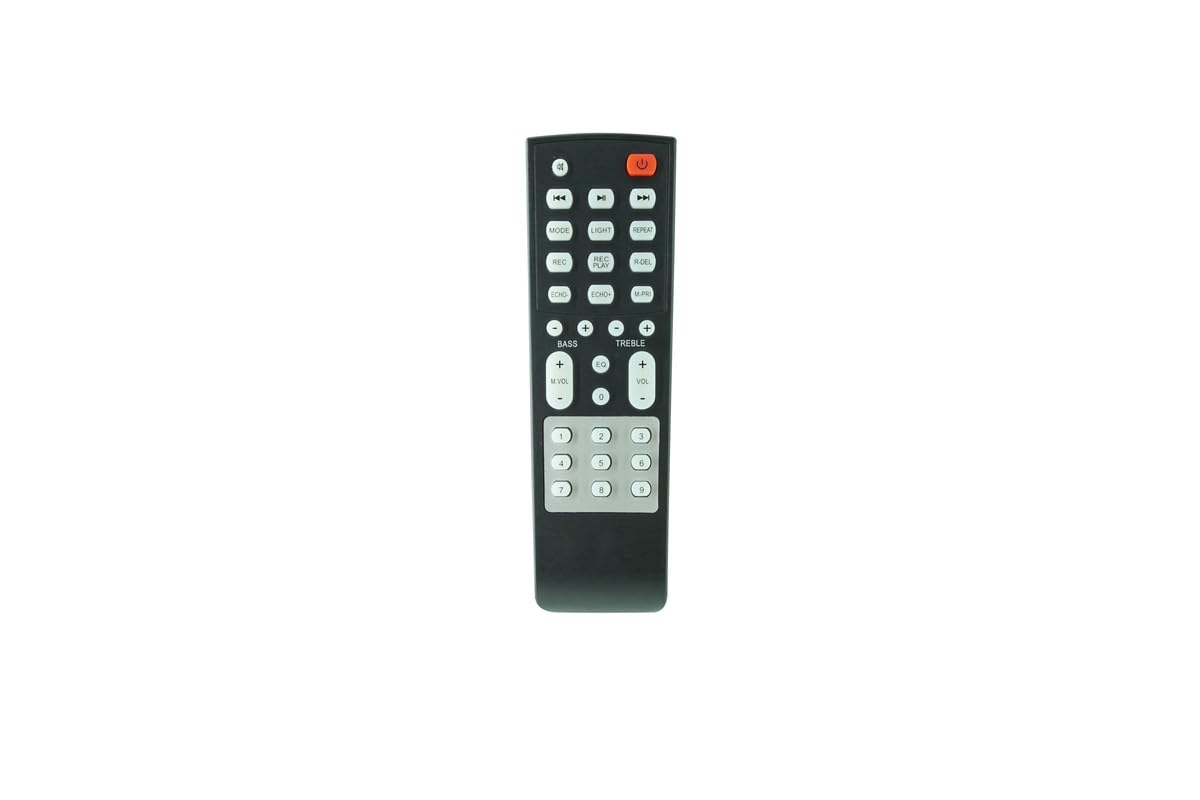
Figure 1: The replacement remote control. This image displays the front view of the remote, showing its buttons and general layout. Verify this matches your original remote.
2. Safety Information
Please read and understand the following safety precautions before using the remote control:
- Battery Handling: Use only the specified battery type (2 x AAA batteries). Do not mix old and new batteries, or different types of batteries.
- Battery Installation: Ensure batteries are inserted with correct polarity (+/-) as indicated inside the battery compartment.
- Disposal: Dispose of used batteries according to local regulations. Do not dispose of batteries in fire.
- Liquid Exposure: Do not expose the remote control to water or other liquids.
- Temperature: Avoid exposing the remote control to extreme temperatures or direct sunlight.
- Children: Keep batteries and the remote control out of reach of small children.
3. Setup
3.1. Battery Installation
The remote control requires two (2) AAA batteries (not included) for operation.
- Locate the battery compartment cover on the back of the remote control.
- Slide the cover downwards or press the latch (if present) and lift to open the compartment.
- Insert two new AAA batteries, ensuring the positive (+) and negative (-) terminals align correctly with the markings inside the compartment.
- Replace the battery compartment cover by sliding it back into place until it clicks securely.
The remote control does not require any programming or setup. Once batteries are installed, it is ready for use with compatible speaker systems.
4. Operating Instructions
To operate your speaker system using this remote control, point the remote directly at the infrared (IR) receiver on your speaker system. Ensure there are no obstructions between the remote and the speaker.
4.1. Basic Functions
- Power Button (ON/OFF): Press to turn the speaker system on or off.
- Volume Up (VOL+): Increases the speaker system's volume.
- Volume Down (VOL-): Decreases the speaker system's volume.
- Mute (MUTE): Silences the audio output. Press again to restore sound.
- Play/Pause (PLAY/PAUSE or ►/∎): Starts or pauses playback of media.
- Previous Track (PREV or ⏮): Skips to the beginning of the current track or the previous track.
- Next Track (NEXT or ⏭): Skips to the next track.
- Mode (MODE): Cycles through available input modes (e.g., Bluetooth, USB, AUX, FM Radio).
4.2. Advanced Functions (if applicable)
Depending on your specific speaker model, the remote may also include buttons for:
- EQ (EQ): Adjusts equalizer presets.
- Repeat (REPEAT): Repeats the current track or playlist.
- Number Pad (0-9): For direct track selection or FM radio frequency input.
- Light (LIGHT): Controls LED lighting effects on the speaker.
Note: Not all functions may be supported by every compatible speaker model. The functionality of specific buttons depends on the original remote's capabilities and the speaker system's design.
5. Troubleshooting
If the remote control is not functioning as expected, please refer to the following troubleshooting steps:
- Check Batteries:
- Ensure batteries are inserted with correct polarity (+/-).
- Replace old batteries with new AAA batteries.
- Line of Sight:
- Make sure there are no objects blocking the path between the remote control and the speaker system's IR receiver.
- Point the remote directly at the speaker's IR sensor.
- Distance:
- Ensure you are within the effective operating range of the remote control (typically up to 20 feet / 6 meters).
- Speaker Power:
- Confirm that the speaker system is powered on and not in standby mode.
- Compatibility:
- Verify that your speaker model is listed as compatible in the introduction section of this manual. This remote is a replacement and may not work with models not explicitly listed.
- Confirm that your original remote had the same appearance as this replacement.
If the issue persists after trying these steps, please contact customer support.
6. Specifications
| Product Type | Replacement Infrared Remote Control |
| Compatible Devices | Vortex VO2608, Vieta Pro Party 10 VM-HW300, Somogyi PAR 2200BT, Som Pulse 2300W Portable Speaker Systems |
| Power Source | 2 x AAA Batteries (not included) |
| Color | Black |
| Special Feature | No programming required; direct replacement. Ensure original remote matches appearance. |
7. Support and Warranty
7.1. Customer Support
For any questions, issues, or assistance with your replacement remote control, please contact the seller or retailer from whom you purchased the product. They can provide specific guidance and support.
7.2. Warranty Information
As a generic replacement product, warranty terms are typically provided by the seller. Please refer to your purchase documentation or contact the seller directly for details regarding their return policy and any applicable warranty coverage.


