
1. Introduction
Thank you for choosing the Inateck Ultralight Keyboard Case. This manual provides detailed instructions to help you set up, operate, and maintain your new keyboard case, ensuring optimal performance and longevity. This keyboard case is designed to enhance your iPad experience by providing a comfortable typing solution and robust protection.

The Inateck Keyboard Case provides a seamless integration with your iPad, transforming it into a versatile workstation.
2. Compatibility
The Inateck Keyboard Case is specifically designed for the following iPad models:
- iPad Air 13-inch (M3/M2) 2025/2024: Compatible with Model numbers A2898, A2899, A2900.
- 12.9-inch iPad Pro 6th/5th/4th/3rd Generation: Compatible with Model numbers A2436, A2764, A2437, A2766 (6th Gen); A2378, A2379, A2461, A2462 (5th Gen 2021); A2229, A2069, A2232, A2233 (4th Gen 2020); A1876, A2014, A1895, A1983 (3rd Gen 2018).
Note: Not compatible with iPad Pro 13" M4 (2024).

Ensure your iPad model matches the compatible list for proper fit and function.
3. Design and Key Features
3.1. Ultralight and Slim Profile
The Inateck Keyboard Case is engineered for portability. The keyboard itself is only 0.7 cm (0.27 inches) thick, and the total thickness when capped with the cover is approximately 1.5 cm. With an overall weight of just 574g (1.27 pounds), it is significantly lighter than many similar products, making it ideal for travel and on-the-go productivity without adding excessive bulk to your bag.

The ultralight design ensures maximum portability for your daily needs.
3.2. 1-Second Start-up and Smart On/Off
Experience instant productivity with the 1-second start-up feature. The keyboard automatically activates when attached to your iPad and powers off when detached, eliminating the need for a physical power switch. This intelligent design conserves power and provides a seamless user experience.

The keyboard activates instantly upon connection, ready for immediate use.

Smart screen on/off functionality helps conserve battery life.
3.3. Integrated Pen Holder
The keyboard case includes a convenient PU pen holder, providing a secure space for your Apple Pencil. Its borderless design allows for convenient magnetic charging of the second-generation Apple Pencil without needing to remove it from the holder. (Note: Apple Pencil not included).
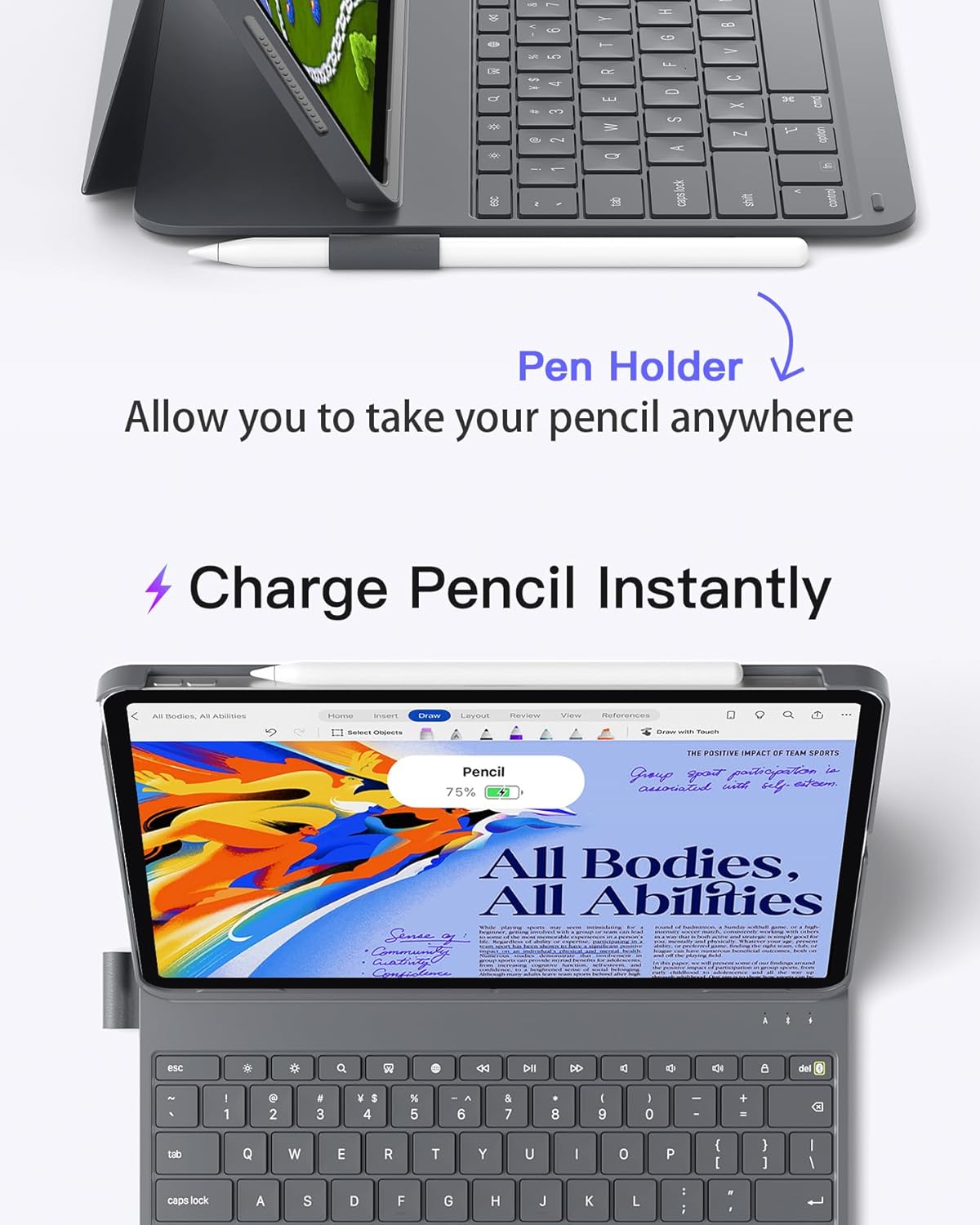
Keep your Apple Pencil secure and charged with the integrated holder.
3.4. Convenient Shortcut Keys and Typing Experience
The innovative six-row keyboard features an additional row of function keys, providing quick access to common iPad functions. Easily lock the screen, control volume, or perform other actions with a single press, avoiding complex key combinations. The 15mm x 15mm keycaps and 1mm stroke offer a comfortable and responsive typing experience, similar to a laptop keyboard.

Enjoy a comfortable and efficient typing experience with optimized key design.

Quickly access common iPad functions with dedicated shortcut keys.
4. Setup Instructions
- Attach your iPad: Align your iPad with the magnetic connection points on the keyboard case. The iPad will snap securely into place, and the keyboard will automatically power on.
- Initial Bluetooth Pairing:
- Ensure your iPad's Bluetooth is enabled.
- The keyboard should appear as a discoverable device. Select it to pair.
- If the iPad does not immediately recognize the keyboard, perform a factory reset on the keyboard by pressing the Esc and += keys simultaneously. Then attempt pairing again.
- Positioning: Adjust the iPad to your desired viewing angle. The strong magnets will hold it firmly in place for stable typing or viewing.
Watch this video for a visual guide on setting up and using your Inateck Keyboard Case for iPad Air 13 inch (M2) 2024.
5. Operating Instructions
5.1. Typing and Navigation
The keyboard provides a full QWERTY layout with responsive keys for efficient typing. Use the standard keyboard functions as you would on a laptop. The absence of a trackpad encourages direct interaction with the iPad's touchscreen, which can be beneficial for certain workflows.
5.2. Using Shortcut Keys
The dedicated row of function keys at the top of the keyboard allows for quick access to various iOS features:
- Esc (Undo Key): Functions as an undo command in many applications.
- Screen Brightness: Adjusts the screen brightness up or down.
- Search: Brings up the iOS search field.
- Screenshot: Captures the current screen information.
- Language Switch: Switches the language of the keyboard (requires multiple keyboard layouts set up in iPad settings).
- Media Controls: Play/Pause, Previous Track, Next Track.
- Volume Controls: Mute, Volume Up, Volume Down.
- Screen Off: Locks the iPad screen.
5.3. Detaching the Keyboard
To use your iPad in tablet mode or for reading, simply detach it from the magnetic keyboard base. The iPad will automatically switch to tablet mode, and the keyboard will power off to save battery.
6. Maintenance
To ensure the longevity and optimal performance of your Inateck Keyboard Case, follow these maintenance guidelines:
- Cleaning: Use a soft, dry, lint-free cloth to wipe down the keyboard and case. For stubborn spots, slightly dampen the cloth with water. Avoid harsh chemicals or abrasive cleaners.
- Storage: When not in use, keep the keyboard case closed to protect the keys and screen. Store it in a cool, dry place away from direct sunlight and extreme temperatures.
- Avoid Liquids: Keep the keyboard away from liquids to prevent damage to the electronic components.
- Charging: Charge the keyboard using the provided USB-C cable. Avoid overcharging or using incompatible chargers. The keyboard has a long standby time of up to 150 days.
7. Troubleshooting
- Keyboard Not Connecting/Pairing:
- Ensure Bluetooth is enabled on your iPad.
- Try performing a factory reset on the keyboard by pressing Esc + = simultaneously.
- Restart your iPad and try pairing again.
- Ensure the keyboard is sufficiently charged.
- Keys Not Responding:
- Check if the keyboard is properly connected and powered on.
- Ensure the keyboard is charged.
- If specific keys are not responding, gently clean around the keycap to remove any debris.
- iPad Not Snapping Securely:
- Verify that your iPad model is listed under the compatible devices in Section 2.
- Ensure there is no debris or obstruction on the magnetic connection points of either the iPad or the case.
8. Specifications
| Feature | Detail |
|---|---|
| Brand | Inateck |
| Model Number | BK2007-13-G-US2 |
| Item Weight | 1.27 pounds (574g) |
| Product Dimensions | 11.14 x 8.98 x 0.69 inches (28.29 x 22.81 x 1.75 cm) |
| Color | Gray |
| Power Source | Passive |
| Batteries | 1 Lithium Ion battery (included) |
| Connectivity Technology | Bluetooth |
| Number of Keys | 78 |
| Special Feature | Lightweight, 1s Start-up, Rechargeable |
9. What's in the Box
- 1 x Inateck Keyboard Case
- 1 x Pen Holder (integrated)
- 1 x USB-C Charging Cable (for keyboard)
- 1 x User Manual (this document)
10. Warranty and Support
Inateck products are designed and manufactured to the highest quality standards. For information regarding warranty coverage, technical support, or customer service, please refer to the official Inateck website or contact their customer support directly. Keep your purchase receipt for warranty claims.
For further assistance, you may visit the Inateck Store on Amazon.


