
1. Introduction
Thank you for choosing the K&F Concept 4-Pack ND Filter Set. This manual provides essential information for the proper installation, operation, and maintenance of your new neutral density filters. Designed specifically for DJI Osmo Action 3, Action 4, and Action 5 Pro cameras, these filters allow for precise control over light exposure, enabling you to capture stunning photos and videos in various lighting conditions.
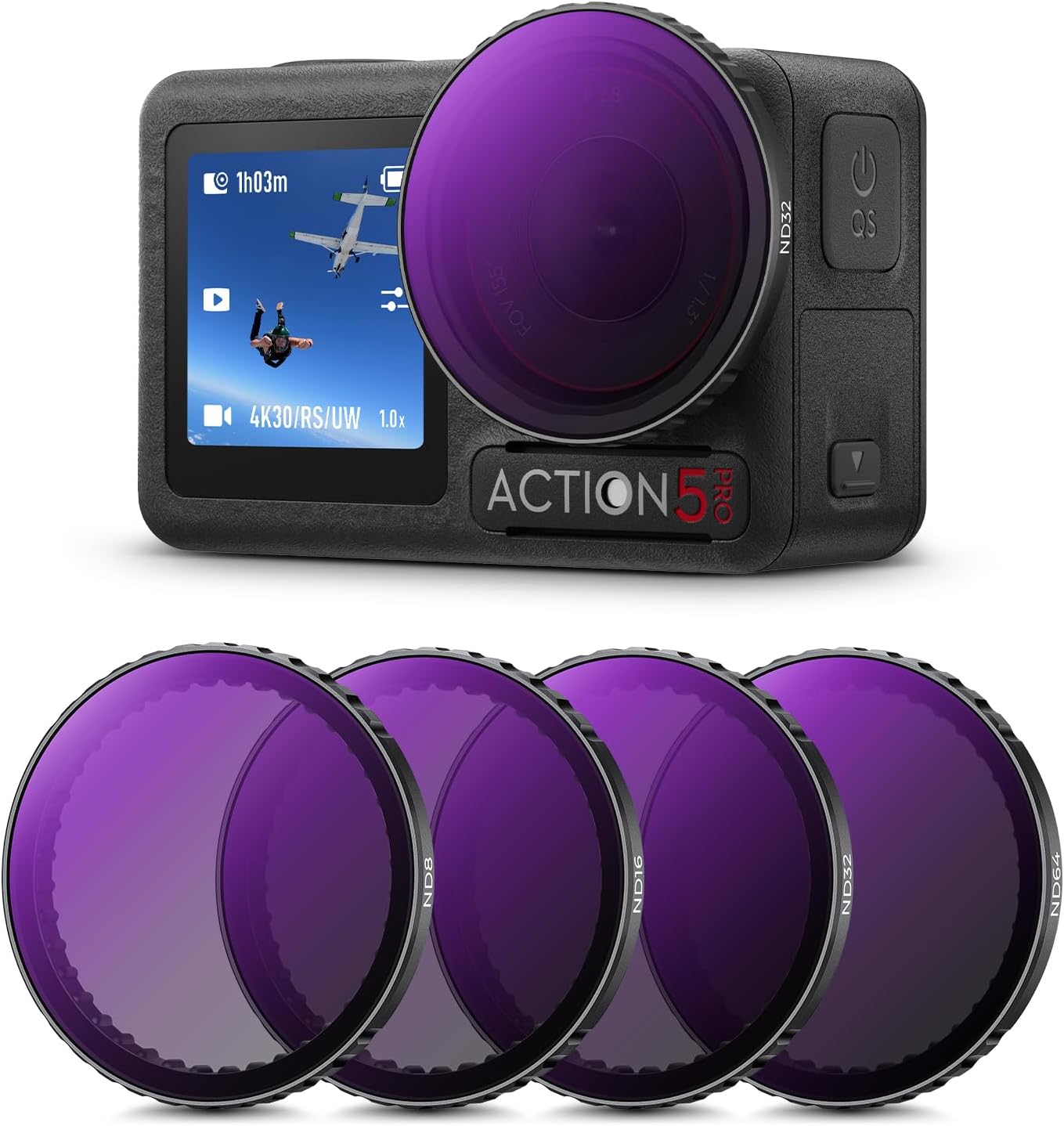
Image: The K&F Concept 4-Pack ND Filter set, featuring ND8, ND16, ND32, and ND64 filters, compatible with DJI Osmo Action 3, 4, and 5 Pro cameras.
2. Product Features
The K&F Concept ND Filter Set offers advanced features for superior photographic and videographic performance:
- 4-Piece ND Filter Kit: Includes ND8, ND16, ND32, and ND64 filters to enhance photographic and video captures.
- High-Quality AGC Optical Glass: Ensures crystal-clear shots and a secure fit, utilizing imported optical glass for superior performance.
- Advanced 28-Layer Nanometer Coating: Provides water-repellent and scratch-resistant protection for the glass. Features high light transmission (over 99.5%) for optimal image quality and an ultra-thin frame design to prevent vignetting.
- Versatile Light Reduction: Filters offer different levels of light reduction: ND8 (3 stops), ND16 (4 stops), ND32 (5 stops), and ND64 (6 stops). Ideal for various lighting conditions, from partially cloudy to very bright sunlight, improving exposure control and shutter speed.
- Snap-on Mounting: Designed for direct insertion and mounting onto the camera without removing the original protective filter. Filters are rigorously weight-tested to ensure no compromise on action camera performance.
3. Package Contents
Your K&F Concept ND Filter Set package includes:
- 1 x ND8 Neutral Density Filter
- 1 x ND16 Neutral Density Filter
- 1 x ND32 Neutral Density Filter
- 1 x ND64 Neutral Density Filter
Note: DJI Osmo Action camera is not included.
4. Setup and Installation
The K&F Concept ND filters feature a convenient snap-on design for easy installation. Follow these steps to attach the filter to your DJI Osmo Action camera:
- Align the filter with the lens: Gently position the ND filter over the camera lens, ensuring it is perfectly centered.
- Snap the filter to install: Apply gentle, even pressure until the filter snaps securely into place. There is no need to remove the camera's original protective filter.
Important: Ensure the filter is correctly aligned with the lens before snapping it down to prevent damage to the filter or camera lens.

Image: Step-by-step guide illustrating the simple snap-on installation process for the K&F Concept ND filters on a DJI Osmo Action camera.
The filters are lightweight and have been tested to ensure they do not negatively impact the performance or balance of your action camera.

Image: The ND filter seamlessly integrated with the DJI Osmo Action 5 Pro camera, demonstrating its minimal impact on the camera's load and balance.
5. Operating Instructions
Neutral Density (ND) filters reduce the amount of light entering the camera lens, allowing you to use slower shutter speeds or wider apertures in bright conditions. This helps to avoid overexposure and achieve creative effects like motion blur or shallow depth of field.
Understanding ND Filter Stops:
- ND8 (3-Stop): Reduces light by 3 stops. Ideal for partially cloudy days or when you need a slight reduction in light to achieve a cinematic look.
- ND16 (4-Stop): Reduces light by 4 stops. Suitable for normal daylight conditions, allowing for more control over exposure and motion blur.
- ND32 (5-Stop): Reduces light by 5 stops. Best for bright, sunny days, enabling slower shutter speeds for smooth motion in water or clouds.
- ND64 (6-Stop): Reduces light by 6 stops. Designed for very bright sunlight, allowing for significant light reduction and very slow shutter speeds for extreme motion blur effects.

Image: Visual representation of how each ND filter (ND8, ND16, ND32, ND64) reduces light and enables lower shutter speeds, illustrated with a surfing scene.
Tips for Use:
- Choose the appropriate ND filter based on the ambient light conditions and your desired creative effect.
- Experiment with different shutter speeds and apertures to achieve the desired exposure and motion blur.
- Always check your camera's display or histogram to ensure proper exposure after attaching a filter.
6. Maintenance and Care
To ensure the longevity and optimal performance of your K&F Concept ND filters, follow these maintenance guidelines:
Cleaning the Filters:
The filters feature a 28-layer nanometer coating that provides water-repellent, dirt-resistant, and scratch-resistant properties, making them easy to clean.

Image: Detailed diagram showcasing the advanced 28-layer nanometer coating technology applied to K&F Concept filters, enhancing durability and optical clarity.
- Use a clean, soft microfiber cloth specifically designed for optical lenses.
- For stubborn smudges or fingerprints, use a small amount of lens cleaning solution applied to the cloth, not directly to the filter.
- Gently wipe the filter surface in a circular motion from the center outwards.
- Avoid using abrasive materials, paper towels, or harsh chemicals, as these can damage the coating.

Image: Demonstration of the waterproof, dirt-resistant, and scratch-resistant properties of the K&F Concept ND filters, ensuring effective lens protection and easy cleaning.
Storage:
- Store the filters in their protective case when not in use to prevent dust accumulation and scratches.
- Keep filters in a cool, dry place away from direct sunlight and extreme temperatures.
7. Troubleshooting
If you encounter any issues with your K&F Concept ND filters, consider the following common points:
- Filter not snapping on securely: Ensure the filter is perfectly aligned with the camera lens. Apply even pressure. Do not force the filter if it resists. Check for any debris on the camera lens or filter rim.
- Vignetting (dark corners in images): While the ultra-thin frame design minimizes vignetting, ensure the filter is correctly seated. Vignetting can sometimes occur with very wide-angle lenses or specific camera settings; try adjusting your camera's field of view if applicable.
- Image quality issues (e.g., softness, color cast): Ensure the filter is clean and free of smudges or dust. Use the correct filter for the lighting conditions. High-quality optical glass and coatings are designed to maintain image integrity.
- Difficulty removing filter: Gently apply even pressure around the edges of the filter to unclip it. Avoid twisting or excessive force.
If problems persist, please refer to the support information provided in Section 9.
8. Specifications
| Specification | Detail |
|---|---|
| Brand | K&F Concept |
| Model Number | SKU.2076V1 |
| Filter Type | Neutral Density (ND) |
| Filter Set Includes | ND8, ND16, ND32, ND64 |
| Optical Material | AGC Optical Glass |
| Coating | 28-Layer Nanometer Coating |
| Coating Properties | Water-repellent, Dirt-resistant, Scratch-resistant |
| Light Transmission | >99.5% |
| Frame Design | Ultra-thin to prevent vignetting |
| Mounting Type | Snap-on |
| Compatibility | DJI Osmo Action 3, Action 4, Action 5 Pro |
| Product Dimensions (L x W x H) | 11 x 11 x 2 cm |
| Product Weight | 90 grams |
| Manufacturer | Shenzhen Zhuoer Photograph |
9. Warranty and Support
K&F Concept products are manufactured to high-quality standards. For warranty information, technical support, or any inquiries regarding your ND filter set, please refer to the official K&F Concept website or contact their customer service directly. Keep your purchase receipt as proof of purchase for any warranty claims.
For the most up-to-date support information, please visit: www.kentfaith.com