1. Introduction
The TELESIN Aluminum Camera Cage is designed to provide robust protection and enhanced functionality for your GoPro Hero 9, Hero 10, Hero 11, Hero 12, and Hero 13 action cameras. Constructed from durable aluminum alloy, this lightweight cage offers comprehensive protection against impacts and helps manage heat. Its versatile design supports various accessories and maintains access to essential camera features.

Image 1.1: TELESIN Aluminum Camera Cage with a GoPro Hero camera.
Key features include:
- Durable Aluminum Alloy Construction: Provides robust protection while remaining lightweight (48 grams).
- Magnetic Quick Attachment: Facilitates rapid camera setup and removal.
- Access to Ports: Open side design allows charging and SD card access without removing the camera from the cage.
- Accessory Compatibility: Features cold shoe mounts and 1/4-inch screw holes for attaching lights, microphones, tripods, and other accessories.
- Lens Filter Compatibility: Designed to accommodate ND/CPL lens filters and the Max Lens Mod.
2. Product Overview
Familiarize yourself with the components and design elements of your TELESIN Aluminum Camera Cage.

Image 2.1: Detailed view of the camera cage with dimensions and feature callouts.
- 1/4 Positioning Hole: Standard screw thread for mounting on tripods, monopods, etc.
- Mode Button Hole: Provides access to the camera's mode button.
- Switch Button Hole: Provides access to the camera's power/shutter button.
- Cold Shoe Mounts: Two integrated cold shoe mounts for attaching external accessories like microphones or LED lights.
- Soft Silicone Padding: Internal silicone lining protects the camera from scratches and provides a snug fit.
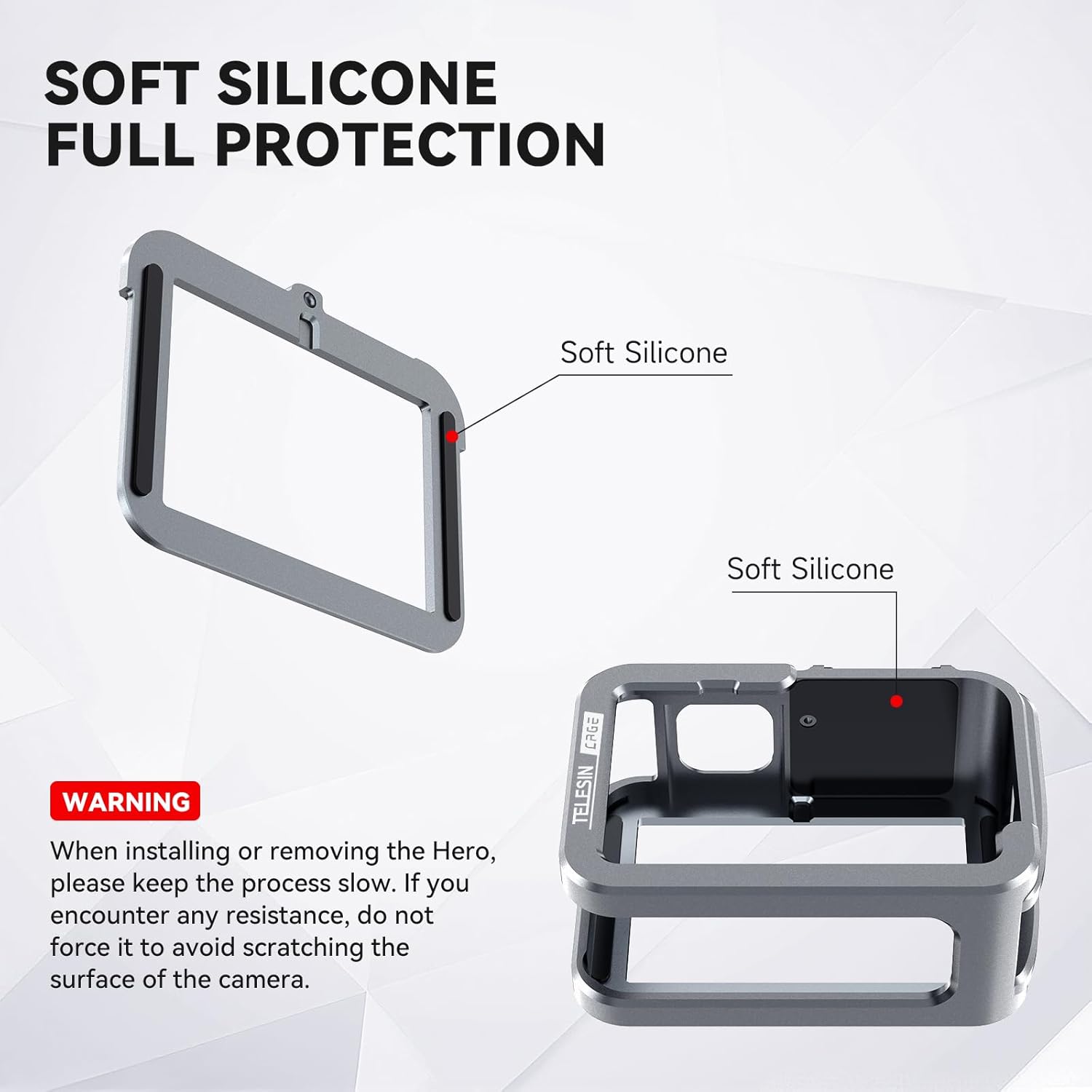
Image 2.2: Soft silicone padding for camera protection.
3. Installation Instructions
Follow these steps to correctly install your GoPro Hero camera into the TELESIN Aluminum Camera Cage:

Image 3.1: Step-by-step installation guide.
- Slide the Cover Upwards: Gently slide the top cover of the cage upwards to detach it from the main body.
- Mount the Action Camera: Carefully insert your GoPro Hero camera into the main body of the cage. Ensure proper alignment.
- Install the Cover: Slide the top cover back onto the main body until it clicks securely into place.
- Install the Vertical Adapter: Attach the included vertical adapter (mounting finger) to the bottom of the cage.
- Install the Fixing Screws: Use the provided screws to secure the vertical adapter firmly to the cage.
- Installation Complete: Your GoPro camera is now securely housed within the TELESIN Aluminum Camera Cage.
Warning: When installing or removing the camera, please proceed slowly. If you encounter any resistance, do not force it to avoid scratching the camera's surface. For some GoPro models, the camera's charging flap may need to be temporarily removed or adjusted for smooth insertion into the cage.
4. Operating Instructions
The TELESIN Aluminum Camera Cage enhances your GoPro experience with several functional features:
4.1 Quick Magnetic Attachment
The cage features a hollowed-out base with a magnetic connection, allowing for quick attachment and detachment from compatible mounts. This design enables you to set up and begin shooting within seconds.

Image 4.1: Quick magnetic attachment mechanism.
4.2 Charging and SD Card Access
The open side design of the cage ensures that the charging port and SD card slot remain easily accessible. This allows for continuous power supply and data transfer without needing to remove the camera from the protective cage.

Image 4.2: Charging port access while camera is in the cage.
4.3 Versatile Mounting Options
Equipped with two cold shoe mounts and a 1/4-inch screw hole, the cage provides multiple options for attaching accessories and mounting the camera. It can be used with tripods, monopods, bicycle mounts, helmet mounts, chest straps, and more.

Image 4.3: Examples of mounting the camera cage with accessories.
5. Maintenance
To ensure the longevity and optimal performance of your TELESIN Aluminum Camera Cage, follow these maintenance guidelines:
- Cleaning: Wipe the aluminum surface with a soft, dry cloth. For stubborn dirt, use a slightly damp cloth and mild soap, then dry thoroughly. Avoid abrasive cleaners or solvents.
- Silicone Care: Periodically check the internal silicone padding for wear or damage. Keep it free from dust and debris to prevent scratches on your camera.
- Storage: Store the cage in a clean, dry environment away from extreme temperatures and direct sunlight when not in use.
- Inspection: Regularly inspect all screws and mounting points to ensure they are secure. Tighten if necessary.
6. Troubleshooting
If you encounter any issues with your camera cage, refer to the following common solutions:
- Difficulty Inserting Camera: Ensure the top cover is fully removed before attempting to insert the camera. If the camera's charging flap interferes, it may need to be temporarily removed or adjusted. Always insert the camera slowly and without excessive force to prevent damage.
- Loose Fit: Verify that the top cover is securely reattached and the fixing screws for the vertical adapter are tightened. The internal silicone padding should provide a snug fit.
- Accessory Not Attaching: Ensure that accessories are compatible with cold shoe mounts or 1/4-inch screw threads. Check for any obstructions or debris in the mounting points.
7. Specifications
| Feature | Detail |
|---|---|
| Product Model | CXCY-S6-FMS-14-TGP-EU |
| Product Material | Aluminum Alloy |
| Product Process | CNC Process |
| Product Weight | 48 Grams (1.69 ounces) |
| Product Dimensions | 79.1 x 33.2 x 59.1 mm (3.11 x 1.31 x 2.33 inches) |
| Compatible Models | GoPro Hero 9, Hero 10, Hero 11, Hero 12, Hero 13 |
| Mounting Type | Tabletop Mount (via 1/4-inch screw hole) |
| Special Features | Lightweight, Cold Shoe Mounts, ND/CPL Lens Filter Compatibility |
8. Warranty and Support
For warranty information, product support, or any inquiries, please refer to the official TELESIN website or contact TELESIN customer service directly. Keep your purchase receipt for any warranty claims.


