
1. Introduction
This manual provides comprehensive instructions for the installation, operation, and maintenance of the Veinasa XS-WSDS01-0-5V Integrated Wind Speed and Direction Sensor. This device is designed for accurate measurement of wind speed and direction, providing a 0-5V analog output signal suitable for various weather monitoring and industrial control applications.
1.1 What's in the Box
- Veinasa XS-WSDS01 Integrated Wind Speed and Direction Sensor
2. Safety Information
Please read and understand all safety instructions before installing or operating the sensor. Failure to follow these instructions may result in equipment damage or personal injury.
- Ensure the power supply voltage matches the sensor's requirements (typically 12-24V DC).
- Do not attempt to disassemble or modify the sensor.
- Install the sensor in a location free from obstructions that could interfere with wind measurement.
- Securely mount the sensor to prevent damage from strong winds or environmental factors.
- Avoid installing the sensor near strong electromagnetic interference sources.
3. Product Overview
The Veinasa XS-WSDS01-0-5V is an integrated sensor designed for reliable and accurate wind speed and direction measurement. It features a robust polycarbonate construction suitable for outdoor use.
3.1 Key Features
- High measurement accuracy, fast response speed, and good interchangeability.
- Output signal supports 0-5V analog output.
- High data transmission efficiency and reliable performance.
- Wide range power supply adaptation, good data linearity, and long signal transmission distance.
- Integrated design for compact installation.
3.2 Product Views

Figure 1: Front view of the Veinasa XS-WSDS01-0-5V sensor.

Figure 2: The wind speed and direction sensor shown in an outdoor setting.
4. Installation and Setup
4.1 Mounting Options
The sensor can be mounted using various bracket styles, including a straight bracket or a universal factory bracket. Ensure the chosen mounting location provides an unobstructed path for wind flow from all directions.
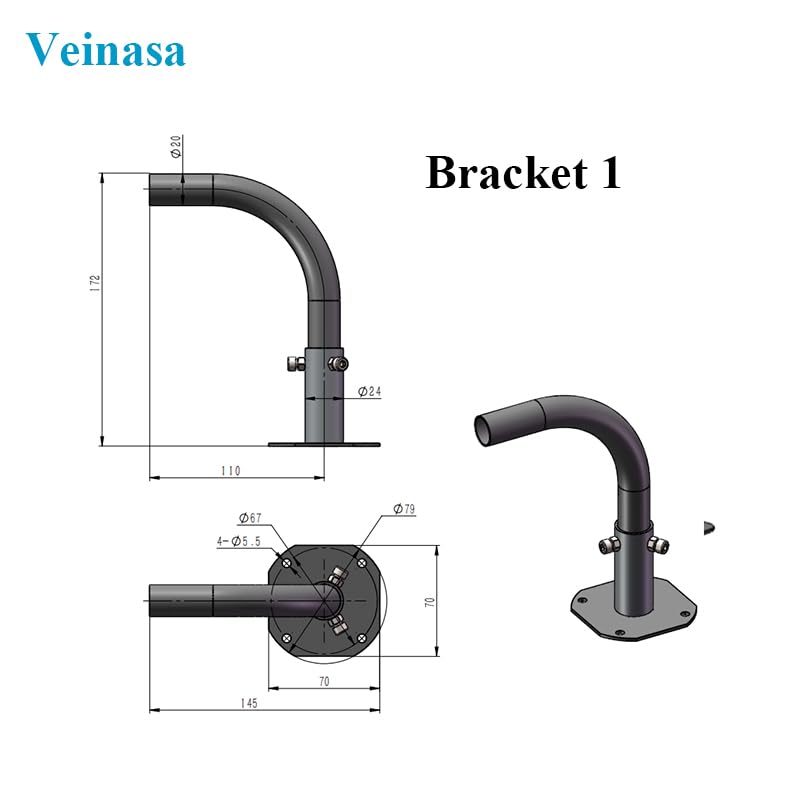
Figure 3: Dimensional drawing for a typical mounting bracket (Bracket 1).
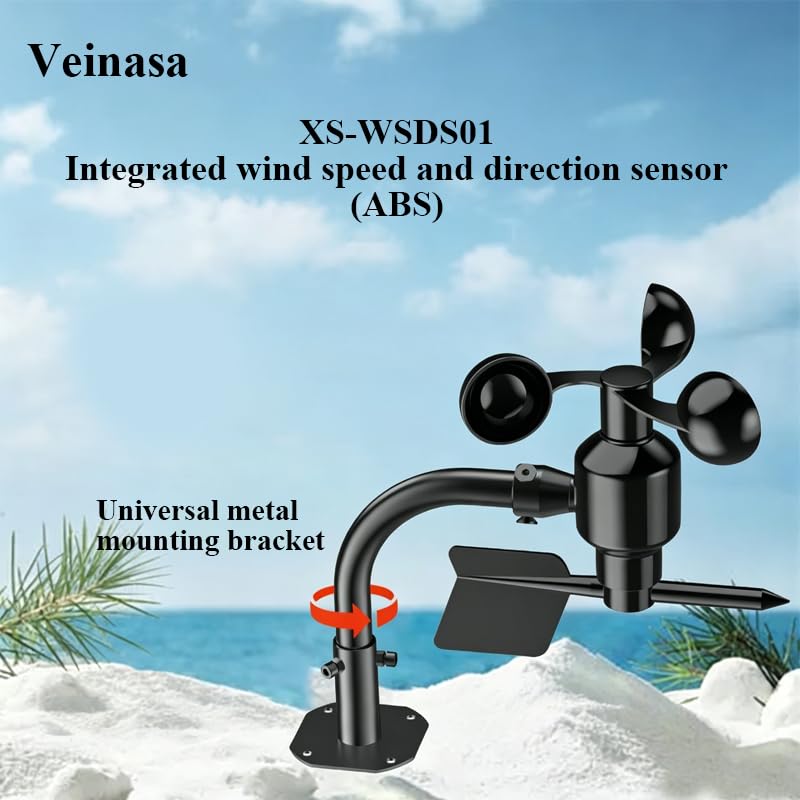
Figure 4: Sensor mounted on a curved bracket, illustrating a common installation method.

Figure 5: Example of a slotted bracket component for flexible mounting.
4.2 Wiring Instructions
The XS-WSDS01-0-5V sensor provides a 0-5V analog output. Connect the sensor to your data acquisition system or controller according to the following general guidelines. Always refer to your specific system's documentation for detailed wiring diagrams.
- Power Input (VCC): Connect to a stable DC power source (e.g., 12V or 24V).
- Ground (GND): Connect to the common ground of your power supply and data acquisition system.
- Analog Output (0-5V): Connect to an analog input channel on your data acquisition system or controller.
Note: Specific wire colors may vary. Always verify pin assignments with the product's included documentation or manufacturer's specifications.
5. Operation
Once properly installed and wired, the Veinasa XS-WSDS01-0-5V sensor will continuously measure wind speed and direction. The sensor outputs an analog voltage signal ranging from 0 to 5 volts. This voltage is proportional to the measured wind speed and direction values.
To interpret the sensor's output, you will need to apply a scaling factor or calibration curve provided by the manufacturer or determined during system setup. Consult the documentation for your data acquisition system or controller for instructions on how to read and convert analog voltage signals into meaningful wind speed (e.g., m/s) and direction (e.g., degrees) data.
6. Maintenance
The Veinasa XS-WSDS01-0-5V sensor is designed for low maintenance. Regular inspection and occasional cleaning will help ensure optimal performance and longevity.
- Visual Inspection: Periodically check the sensor for any physical damage, loose connections, or obstructions (e.g., leaves, debris) that might affect its operation.
- Cleaning: If dust or dirt accumulates on the sensor's cups or vane, gently clean them with a soft, damp cloth. Avoid using abrasive materials or harsh chemicals.
- Mounting Stability: Ensure the mounting bracket remains secure and stable, especially after periods of strong winds.
7. Troubleshooting
If you encounter issues with your sensor, refer to the following troubleshooting guide:
| Problem | Possible Cause | Solution |
|---|---|---|
| No output signal or incorrect readings | Incorrect wiring, insufficient power, sensor obstruction, damaged sensor. | Check all wiring connections. Verify power supply voltage. Remove any obstructions. Inspect sensor for physical damage. |
| Inconsistent or fluctuating readings | Loose connections, electromagnetic interference, sensor not level. | Secure all connections. Relocate sensor away from interference sources. Ensure sensor is mounted level. |
| Wind cups or vane not rotating freely | Debris, ice, bearing issue. | Carefully remove any debris or ice. If the issue persists, the bearing may be damaged and require professional service. |
8. Specifications
Technical specifications for the Veinasa XS-WSDS01-0-5V Integrated Wind Speed and Direction Sensor:
| Feature | Description |
|---|---|
| Brand | Veinasa |
| Model | XS-WSDS01-0-5V |
| Part Number | XS-WSDS01 |
| Special Feature | Wind speed and direction sensor |
| Material | Polycarbonate |
| Connectivity Technology | Analog (0-5V) |
| Style | Integrated Wind Speed and Direction Sensor |
| Color | XS-WSDS01-0-5V |
| Product Dimensions | 8"D x 8"W x 4"H |
| Included Components | Wind speed and direction sensor |
| Sensor Technology | Photoelectric |
| Item Weight | 1 kg |
| Display Type | No display |
| Usage Environment | Outdoor |
9. Warranty and Support
9.1 Warranty Information
This product comes with a 1-year warranty from the date of purchase. The warranty covers defects in materials and workmanship under normal use. It does not cover damage caused by improper installation, misuse, accidents, or unauthorized modifications.
9.2 Technical Support
For technical assistance, troubleshooting, or warranty claims, please contact your retailer or the manufacturer's customer support. Have your product model number and purchase date available when contacting support.