
1. Introduction
Thank you for choosing the NUASI TZ-SH330 4G LTE Outdoor Surveillance Camera. This advanced 2K 3MP camera is designed to provide reliable outdoor security without the need for Wi-Fi, utilizing 4G LTE connectivity. It features 2K color night vision, two-way audio, AI human detection, and an IP66 weatherproof rating, ensuring clear images and effective communication in various conditions. This manual will guide you through the installation, operation, and maintenance of your camera.

Image 1.1: NUASI 4G LTE Outdoor Surveillance Camera in an outdoor environment. This camera is designed for areas without Wi-Fi access, providing security through 4G LTE connectivity.
2. Package Contents
Please check the package for the following items:
- 1 x NUASI 4G LTE Surveillance Camera
- 1 x 5V/2A Power Adapter (2.7m cable)
- 1 x Mounting Bracket
- 1 x User Manual
- 1 x SIM Card (with 300MB test data)
3. Product Overview
The NUASI TZ-SH330 camera offers a comprehensive set of features for robust outdoor surveillance:
- 2K Ultra HD Video: Provides clear and detailed images, even in low light.
- 360° View & 4x Digital Zoom: Offers a wide field of view to capture every angle.
- AI Human Detection: Accurately identifies human movement, reducing false alarms.
- Color Night Vision: Ensures clear, full-color video footage at night.
- Two-Way Audio: Allows for real-time communication through the camera.
- 4G LTE Connectivity: Operates independently of Wi-Fi, ideal for remote locations.
- IP66 Weatherproof: Designed to withstand harsh weather conditions for reliable outdoor use.
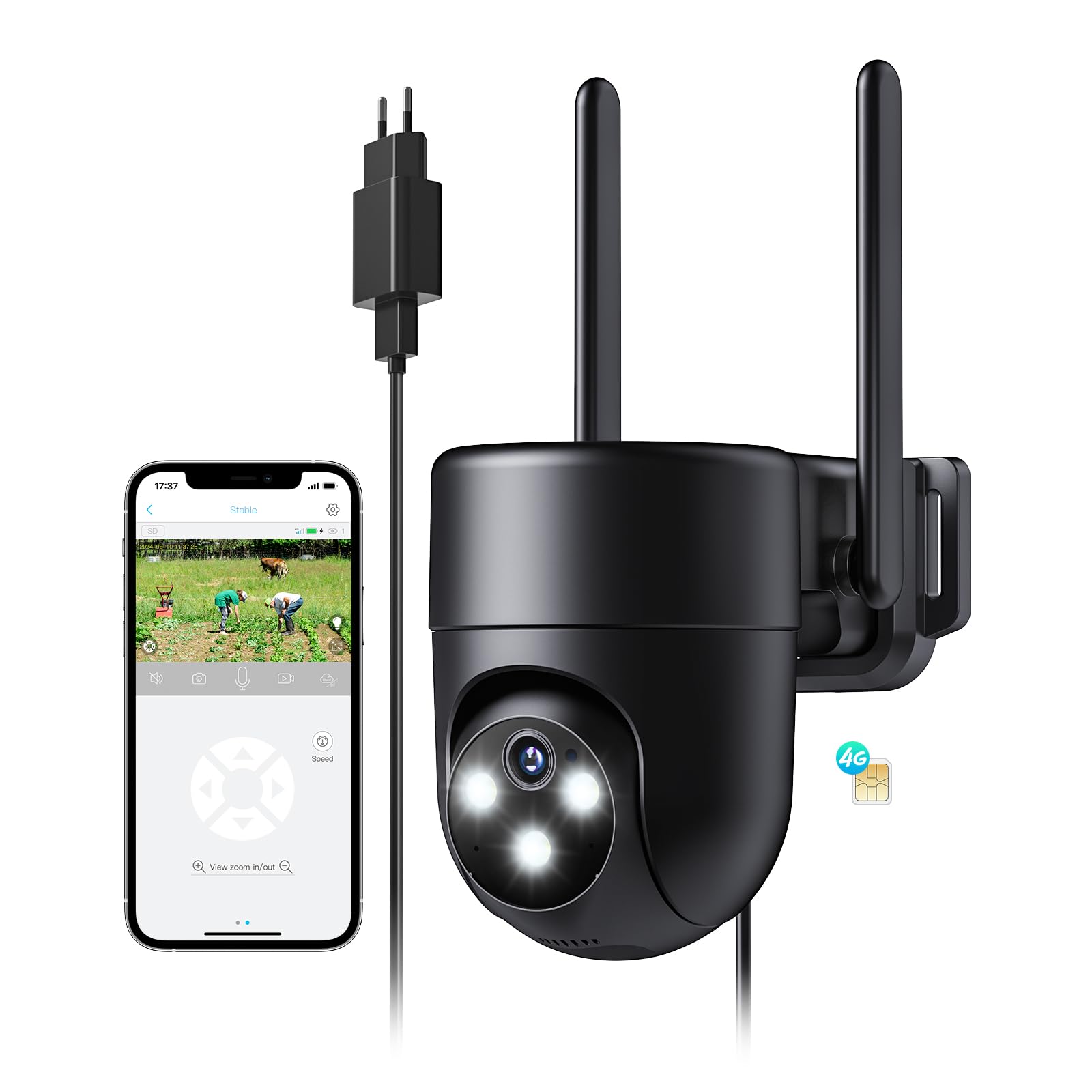
Image 3.1: Main view of the NUASI TZ-SH330 camera. Note the dual antennas for enhanced 4G signal reception and the integrated lens with surrounding sensors.
4. Setup Guide
4.1. SIM Card Installation
- Locate the SIM card slot on the camera. This is typically protected by a rubber seal.
- Carefully open the seal and insert the provided 4G SIM card into the slot. Ensure the SIM card is inserted correctly according to the diagram near the slot.
- Close the rubber seal firmly to maintain the IP66 weatherproof rating.
Note: The included SIM card contains 300MB of test data. For continuous use, you will need to purchase a data plan. The camera is compatible with most European SIM cards (e.g., Telekom, Vodafone, Orange).
4.2. Power Connection
Connect the provided 5V/2A power adapter to the camera's power input port and then plug it into a standard electrical outlet. The camera requires a wired power source and does not operate on battery.
4.3. App Installation and Pairing
- Download the Ubox app from the App Store (iOS) or Google Play Store (Android).
- Register for a new account or log in if you already have one.
- Follow the in-app instructions to add your camera. This typically involves scanning a QR code displayed on the camera or its packaging.
- Ensure your mobile device has an active internet connection during the pairing process.

Image 4.3: The Ubox mobile application interface. This app is essential for controlling and monitoring your NUASI camera.
4.4. Mounting
The camera supports wall mounting. Use the provided mounting bracket and hardware to securely attach the camera to a desired outdoor location. Ensure the camera has a clear line of sight to the area you wish to monitor and that the power cable can reach an outlet.
5. Operating Instructions
5.1. Live View
Open the Ubox app and select your camera from the device list to access the live video feed. You can view the area in real-time.
5.2. Recording and Playback
The camera supports continuous 24/7 recording when a memory card is inserted. You can also save recordings to the cloud (a 30-day free trial is included). To view recorded footage, navigate to the playback section within the Ubox app.
5.3. Two-Way Audio
Utilize the two-way audio feature in the Ubox app to communicate with visitors or deter intruders. Tap the microphone icon in the live view to speak, and the camera's speaker will broadcast your voice.
5.4. AI Human Detection and Alerts
The integrated AI algorithm automatically detects human movement. Upon detection, the camera's light alarm activates, and notifications are sent to your Ubox app. You can customize surveillance zones and alarm times in the app settings to minimize false alerts.
5.5. 360° View and Digital Zoom
In the live view, use the on-screen controls to pan and tilt the camera for a 360° view. You can also use pinch-to-zoom gestures for 4x digital zoom to focus on specific details.
5.6. Color Night Vision
The camera automatically switches to color night vision in low-light conditions, providing clear, full-color images even in darkness.
6. Maintenance
6.1. Cleaning
Periodically clean the camera lens and housing with a soft, damp cloth to ensure optimal image clarity and prevent dirt buildup. Do not use harsh chemicals or abrasive materials.
6.2. Firmware Updates
Regularly check the Ubox app for available firmware updates. Keeping your camera's firmware up-to-date ensures optimal performance, security, and access to new features.
6.3. Data Protection
Our cameras use AES algorithm for data encryption and ECDHE algorithm for high-strength key exchange. This ensures the secure transmission and storage of camera data.

Image 6.3: Data protection symbol. The camera employs advanced encryption to secure your surveillance data.
7. Troubleshooting
7.1. Power and Initial Setup
Q: Do I need to charge the device before use?
A: No, the camera does not have a battery. You must first plug in the power adapter, then power on the device to connect it with the Ubox mobile application.
7.2. Recording Issues
Q: Does the camera support 24/7 continuous recording?
A: Yes, you can use the included 32GB memory card for recording to ensure 24/7 continuous recording. Cloud storage is also available.
7.3. SIM Card Compatibility
Q: How do I choose a compatible SIM card?
A: We recommend using the SIM card we provide (which often comes with an affordable data plan). The camera is also compatible with most European SIM cards from major carriers such as Telekom, Vodafone, Wind Three, Orange, SFR, and O2-Telefónica.
8. Specifications
| Feature | Specification |
|---|---|
| Model Number | TZ-SH330 |
| Brand | NUASI |
| Connectivity Technology | 4G LTE (Cellular), Wired Power |
| Video Recording Resolution | 2K |
| Special Features | 4G LTE SIM Card, No Wi-Fi Needed, IP66 Weatherproof, App Notifications, AI Human Recognition, Color Night Vision, Two-Way Audio |
| Indoor/Outdoor Use | Outdoor |
| Power Source | Electric Cable |
| Mounting Type | Wall Mount |
| Night Vision Range | 20 Meters |
| Viewing Angle | 105 Degrees (PTZ for 360° coverage) |
| Dimensions (L x W x H) | 11.6 x 15.8 x 16.8 cm |
| Weight | 610 grams |
| Included Components | Camera, Power Adapter, Mounting Bracket, User Manual, SIM Card |
9. Warranty and Support
NUASI is committed to providing high-quality products. For any questions, technical assistance, or warranty inquiries, please refer to the contact information provided with your purchase or visit the official NUASI website. Please retain your proof of purchase for warranty claims.